


6 Best Timesheet Software for Small Business in 2026

Timesheet software helps small businesses record employee hours, track time spent on projects, prepare payroll data, and understand where work time is going. The right tool depends on your workflow: some businesses need simple employee timesheets, while others need project tracking, invoicing, attendance management, or automatic time tracking.
This guide compares six best timesheet software options for small businesses. For each tool, we’ll look at its main use case, key features, pricing approach, and the type of team it may be best suited for.
How to Choose Timesheet Software for a Small Business
The best timesheet software for your business depends on what you need to do with the time data after it has been recorded.
For payroll and attendance
Choose timesheet software that supports:
- Clock-in and clock-out
- Overtime and break tracking
- Timesheet approvals
- Payroll or accounting integrations
For project-based businesses
Look for:
- Time tracking by project and task
- Estimates versus actual time
- Project budgets
- Billable and non-billable hours
- Client or project reporting
For remote teams
Useful features for a timesheet app may include:
- Desktop and mobile time tracking
- Automatic or manual tracking options
- Timesheet reminders
- Activity monitoring, if appropriate for your workplace
For freelancers and very small teams
Prioritize:
- Simple setup
- Affordable pricing
- Easy timesheet entry
- Basic reporting
- Invoicing, if you bill clients by the hour
You don’t necessarily need every feature. A small retail business, a consulting agency, and a five-person remote software team may all use timesheets for different reasons and benefit from different types of software.
Comparison Table
| Tool | Best for | Time tracking | Timesheets and approvals | Project tracking | Monitoring | Starting price |
|---|---|---|---|---|---|---|
| Everhour | Project-based small teams | Manual and timer-based | Yes | Strong | No | Free plan; paid plans from $8.50/user/month |
| Time Doctor | Teams that need productivity monitoring | Automatic and manual | Yes | Yes | Yes | From $6.67/user/month |
| TimeCamp | Flexible time tracking and reporting | Automatic and manual | Yes | Yes | Yes | Free plan; paid plans from $3.99/user/month |
| Timely | Teams that prefer automatic time tracking | Automatic | Yes | Yes | No | From $9/user/month |
| Hubstaff | Remote and field teams | Automatic and manual | Yes | Yes | Yes | From $4.99/user/month |
| BeeBole | Customizable timesheets and reporting | Manual and clock-in/out | Yes | Yes | No | From €9/user/month |
Top 6 Timesheet Software for Small Businesses
Everhour
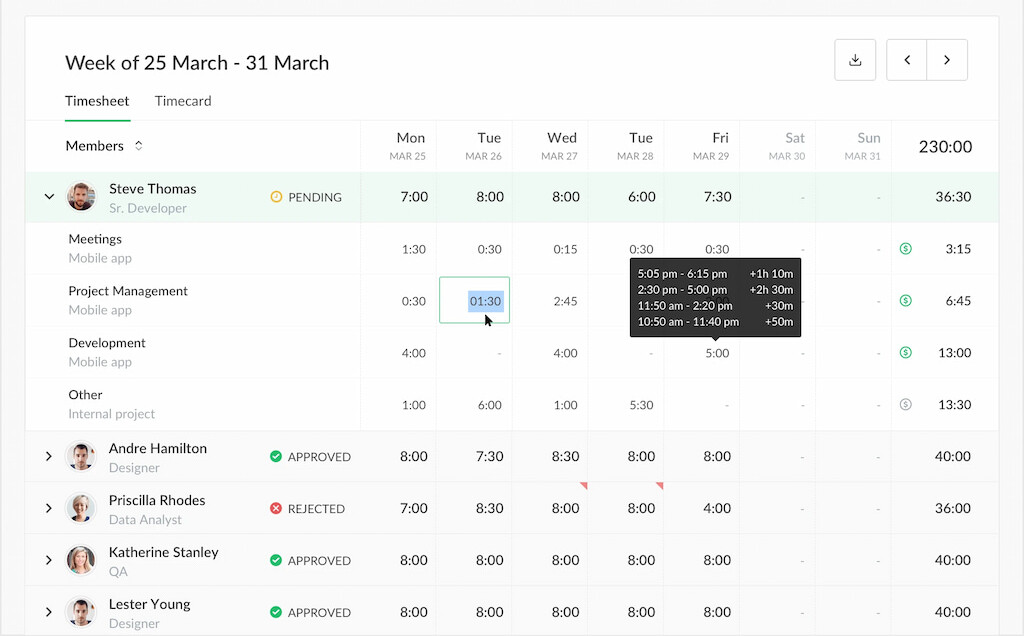
Everhour is a time tracker and timesheet tool best suited to time tracking for small teams that manage work through projects and tasks. It connects employee hours to projects, tasks, budgets, estimates, and clients, making it useful for businesses that need more than basic attendance tracking.
Key features
- Project and task time tracking: Track employee hours against specific projects and tasks using timers or manual time entries.
- Timesheets: Review, edit, and approve employee time entries in one place.
- Project budgets: Compare estimated and actual hours to monitor project progress and prevent overruns.
- Reporting: Create reports by employee, project, task, client, or billing status.
- Integrations: Track time directly within project management tools such as Notion, Monday.com, and Basecamp.
- Billing and invoicing: Use tracked hours to calculate billable time and support client invoicing.
Best for: Small agencies, consultancies, software teams, and other project-based businesses.
May not be the best fit for: Businesses that primarily need employee surveillance, screenshots, or GPS-based workforce monitoring.
Pricing
- Free Plan.
- Team Plan: $8.50 per user per month.
Time Doctor
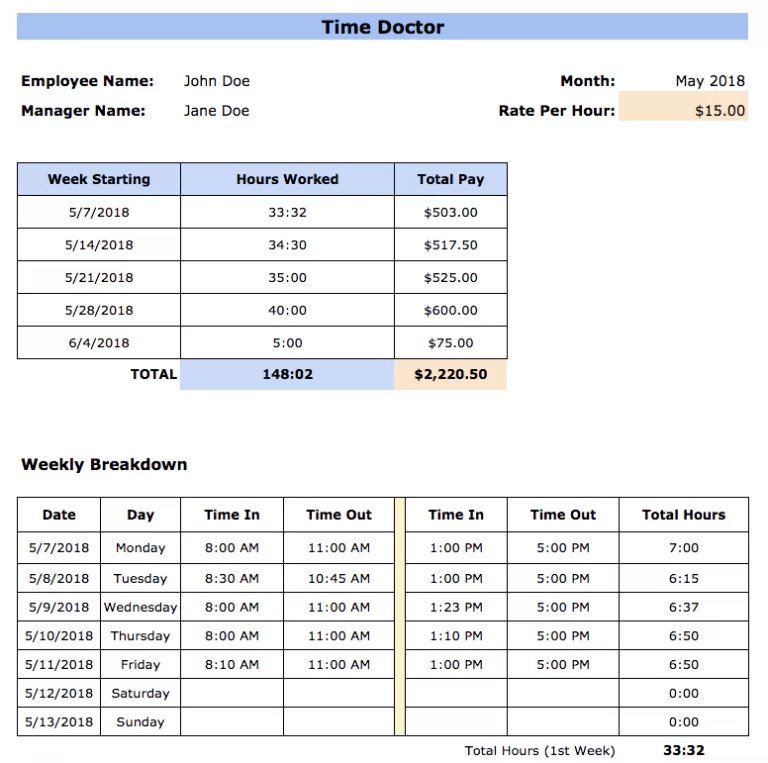
Time Doctor is a time tracking and employee productivity platform for small businesses that want to combine timesheets with activity monitoring. In addition to recording work hours, it provides visibility into application and website usage, idle time, and other work activity.
Key features
- Time tracking: Employees can record time using automatic and manual tracking options.
- Timesheets and reports: Review hours worked, time by project, and employee activity through detailed reports.
- Activity monitoring: Track application and website usage, idle time, and other productivity indicators.
- Screenshots: Capture screenshots at configurable intervals for teams that require additional visibility into work activity.
- Project tracking: Connect tracked time with projects, tasks, and clients.
- Integrations: Connect time data with project management, payroll, and other business tools.
Best for: Remote teams and businesses that need employee productivity and activity monitoring alongside time tracking.
May not be the best fit for: Small businesses that only need simple timesheets or prefer not to monitor employee activity.
Pricing
- Free trial
- Basic: $6.67 per user per month.
- Standard plan: $11.67 per user per month.
- Premium: $16.7 per user per month.
Learn more about Time Doctor in our Time Doctor vs Hubstaff article!
Timecamp
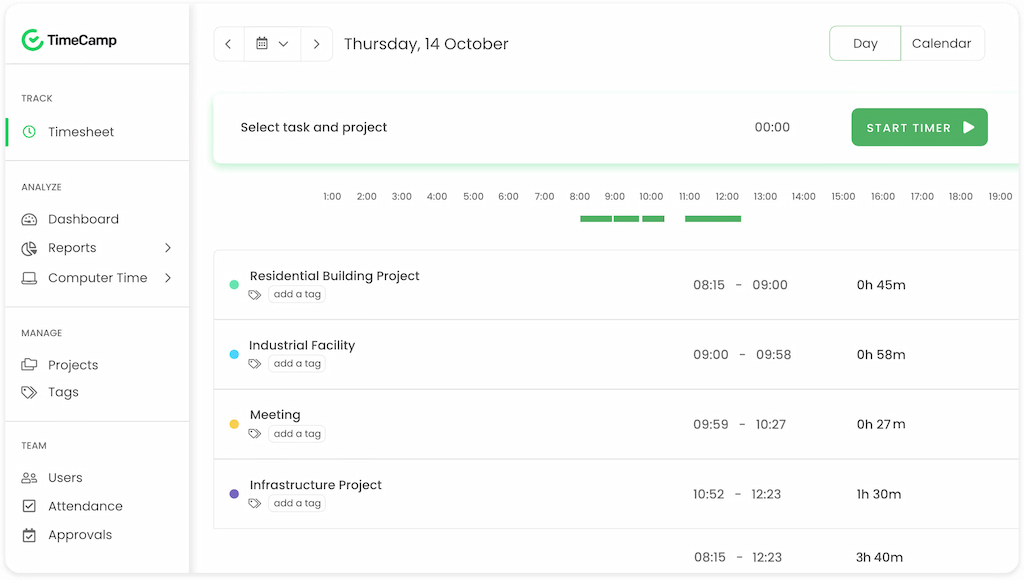
TimeCamp is a time tracking and timesheet platform that gives small businesses several ways to record and analyze employee hours. It supports manual and automatic tracking and connects time entries with projects, tasks, and reports.
Key features
- Flexible time tracking: Employees can record time manually or use automatic tracking.
- Timesheets: Review employee hours and organize time entries by project and task.
- Project tracking: Track time against projects, tasks, and clients to understand where work hours are going.
- Productivity monitoring: Use productivity and idle-time data to identify work patterns and potential bottlenecks.
- Reporting: Generate reports on employee hours, project time, budgets, and profitability.
- Integrations: Connect TimeCamp with project management, accounting, and other business tools.
Best for: Small businesses that want flexible time tracking with detailed reporting and productivity insights.
May not be the best fit for: Businesses looking primarily for a simple clock-in/clock-out system.
Pricing
- Free plan.
- Starter plan: $3.99 per user per month.
- Premium plan: $6.99 per user per month.
- Ultimate plan: $9.99 per user per month.
- Enterprise plan: Custom plan.
Timely
Timely is an automatic time tracking and timesheet platform designed for businesses that want to reduce manual time entry. It records work activity in the background and helps employees organize that information into time entries for projects and tasks.
![11+ timesheet apps for any need [updated for 2021]](https://everhour.com/blog/wp-content/uploads/2021/07/timely-app-1024x601.png)
Key features
- Automatic time tracking: Capture work activity automatically instead of requiring employees to start and stop timers.
- Timesheets: Turn tracked activity into time entries that can be reviewed and edited.
- Project tracking: Organize time by project, task, and client.
- Reporting: Analyze employee hours, project progress, and billable time.
- Project budgets: Monitor project hours and compare tracked time with budgets.
- Team management: Manage workloads, schedules, and team availability from the platform.
Best for: Knowledge workers and small teams that want to minimize manual timesheet entry.
May not be the best fit for: Shift-based businesses that primarily need attendance tracking, clock-in/clock-out, or workforce scheduling.
Pricing
- Free trial
- Starter plan: $9 per user per month (billed yearly).
- Premium plan: $16 per user per month (billed yearly).
- Unlimited plan: $22 per user per month (billed yearly).
Hubstaff
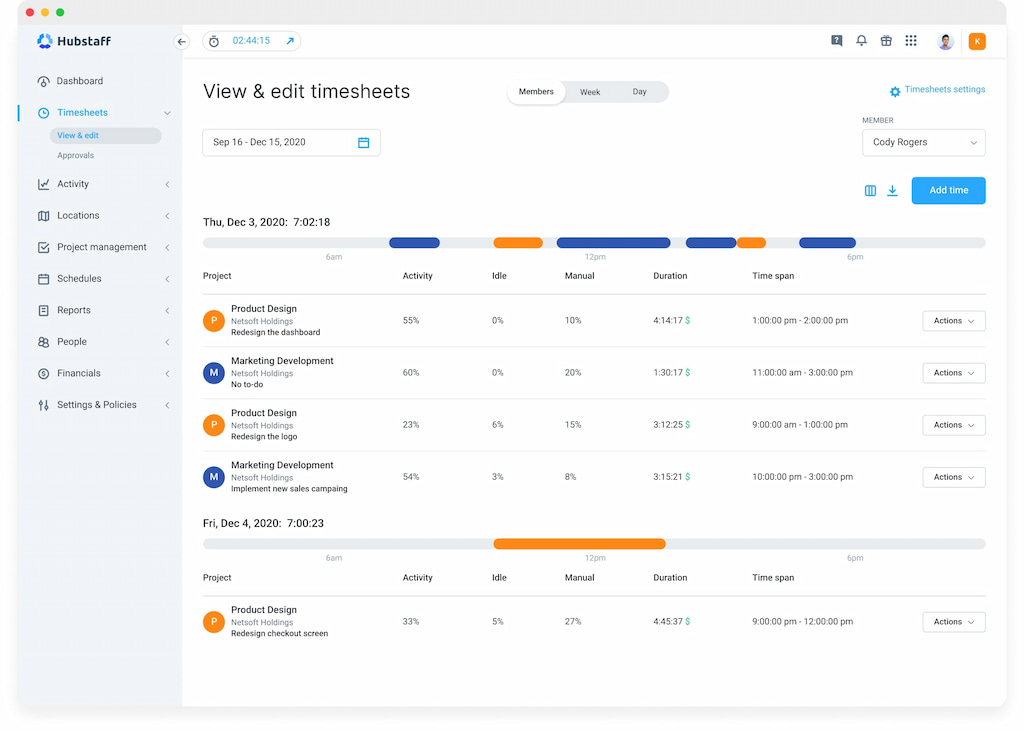
Hubstaff combines employee timesheets with productivity monitoring, project tracking, and location-based features. It is designed for businesses managing remote, mobile, and field teams that need visibility into both work hours and employee activity.
Key features
- Time tracking: Track hours through desktop, web, and mobile apps and connect them to projects and tasks.
- Timesheets: Review employee hours, attendance, and time entries for payroll and reporting.
- Activity monitoring: Track activity levels, application usage, and URLs to understand work patterns.
- Location tracking: Use GPS tracking and geofencing for mobile and field employees.
- Project tracking: Connect employee hours with projects, tasks, budgets, and client work.
- Payroll: Calculate payments based on tracked hours and employee pay rates.
Best for: Remote teams, field service businesses, and companies that need time tracking combined with employee activity or location monitoring.
May not be the best fit for: Small teams looking for lightweight timesheets without employee monitoring features.
Pricing
- Starter: $4.99 per user per month.
- Grow: $7.50 per user per month.
- Team: $10 per user per month.
- Enterprise: $25 per user per month.
BeeBole
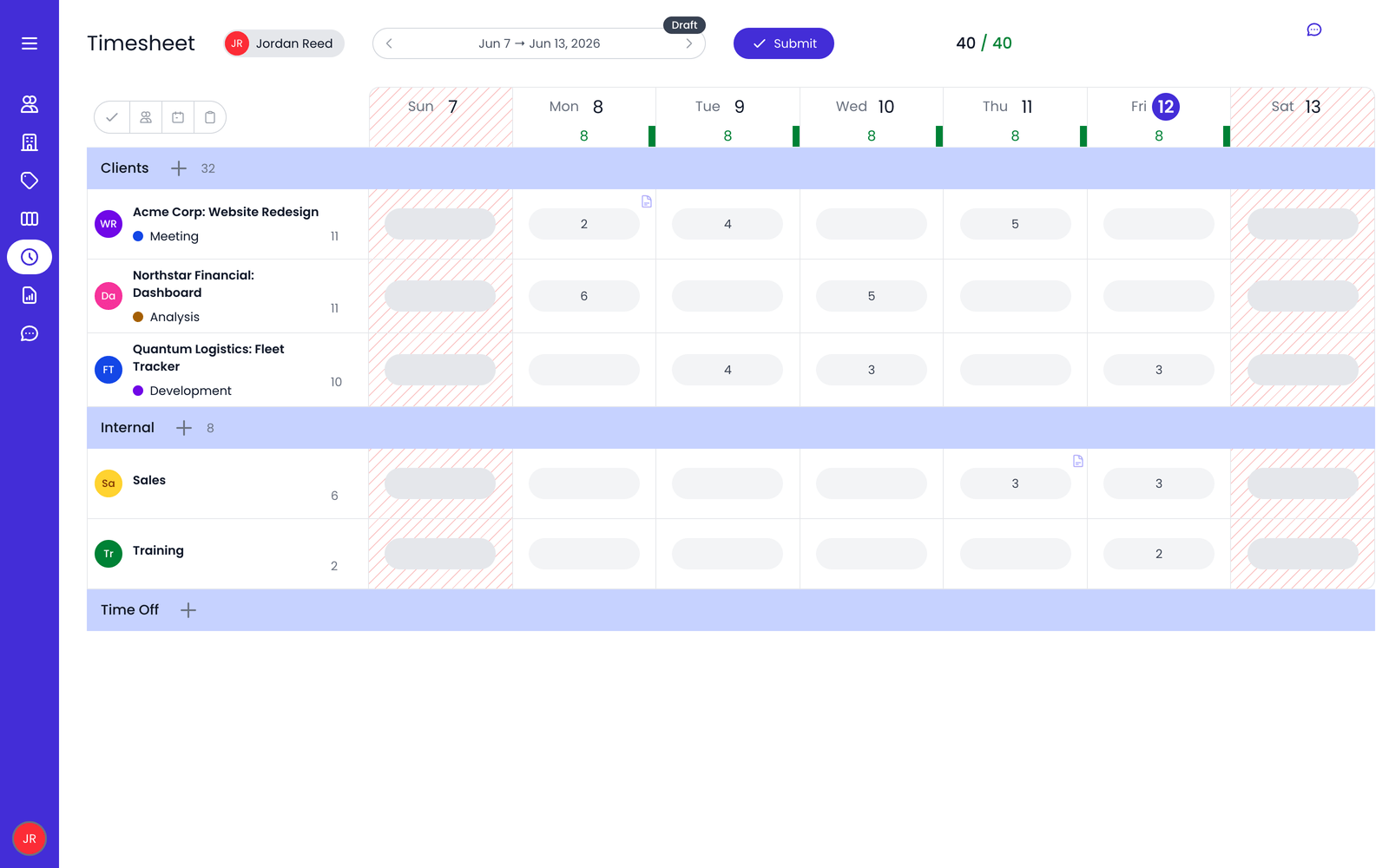
BeeBole is a timesheet and time tracking platform focused on customizable time entry, attendance, and reporting. It allows businesses to collect employee hours across projects, activities, and locations and adapt timesheets to their internal processes.
Key features
- Flexible time tracking: Employees can enter time manually or use clock-in and clock-out functionality.
- Customizable timesheets: Configure timesheets around different projects, activities, and business requirements.
- Reporting: Create customizable reports to analyze employee hours, project time, and other workforce data.
- Approvals: Review and approve employee timesheets before they are used for payroll or reporting.
- Multi-location support: Track time across different offices, teams, or work locations.
- Integrations: Connect time data with other business and payroll systems.
Best for: Small businesses that need customizable timesheets, approvals, and reporting.
May not be the best fit for: Teams looking for extensive project management or employee productivity monitoring features.
Pricing
- Flat-rate plan: €9 per user per month.
FAQ
Timesheet software records how long employees spend working and organizes those hours into timesheets for payroll, project tracking, billing, or reporting.
It depends on your workflow. Everhour is the strongest fit for project-based small businesses that need timesheets connected to tasks and budgets. TimeCamp is the best free option with unlimited users. Hubstaff works well for remote teams that need GPS and activity monitoring. Timely is best for teams that have given up on manual tracking entirely.
Yes. Everhour has a free plan for up to five users. TimeCamp has a generous free plan — unlimited users, projects, and tasks with no time limit.
Yes. Hubstaff has built-in payroll processing. Everhour exports approved timesheets for payroll. TimeCamp and Time Doctor both support payroll integrations. The depth varies by tool and payroll provider.
The terms are often used interchangeably. Timesheet apps typically focus on recording and approving hours in a structured weekly or daily format. Time tracking software often goes further into project-level tracking, billable hours, budgets, and client reporting. Many modern tools combine both.
It depends on your team. Manual tracking gives more control and accuracy for billing — employees record exactly what they worked on. Automatic tracking removes the burden of remembering but requires cleanup. TimeCamp and Hubstaff support both. Timely is fully automatic. Everhour is manual-first.
Yes. Everhour, TimeCamp, Time Doctor, and Timely all support billable hour tracking and invoicing to varying degrees. Everhour generates invoices natively from tracked time. TimeCamp includes billing rates and invoice creation. Time Doctor integrates with payroll and invoicing tools.
In Summary
There is no single best timesheet app for every small business. The right choice depends largely on how your employees work and what you need to do with the time data.
Choose BeeBole if customizable timesheets and reporting are more important than project management features.
Choose Everhour if your team works on projects and you want to connect employee hours with tasks, budgets, estimates, and clients.
Choose Time Doctor if you need timesheets combined with detailed employee activity and productivity monitoring.
Choose TimeCamp if you want flexible manual and automatic time tracking with reporting.
Choose Timely if you want to reduce manual time entry through automatic time capture.
Choose Hubstaff if you manage remote or field employees and need GPS or productivity monitoring.

Maria
A dedicated content enthusiast with extensive experience in international teams and projects of all sizes. Maria thrives on creativity and attention to detail, fueled by a love for fantasy novels, music, classic black-and-white films, and always finding ways to make things better.