


Time Tracking and Invoicing Software: 6 Best Tools for 2026

Time tracking and invoicing shouldn’t require spreadsheets, calendar memory games, and last-minute emails to figure out who did what. The tools in this list connect the hours your team records with the clients, projects, and invoices those hours need to be billed against — so billing becomes something that happens naturally at the end of a project rather than a separate administrative ordeal.
We focused specifically on how each tool handles the invoicing side of the workflow, not just whether invoicing exists as a checkbox feature. That means looking at invoice templates, payment collection, recurring billing, retainers, accounting sync, and how cleanly time logs actually translate into something you can send to a client.
How We Evaluated These Tools
We tested each tool by tracking time across sample projects, generating invoices from those logs, and evaluating the invoicing workflow end to end — templates, payment options, recurring billing, and accounting integrations. Pricing was verified directly on each vendor’s website as of July 2026. We also reviewed user feedback on G2 and Capterra to make sure our assessments reflect real-world experience.
Disclosure: Everhour is our product and appears first on this list. We’ve aimed to give every other tool here an honest writeup including real limitations. If Everhour isn’t the right fit, the alternatives below are strong options for different billing workflows, and we say so directly.
What Makes a Good Time Tracking and Invoicing Tool?
The time tracking side is fairly standard across most tools — timers, manual entry, billable vs non-billable categorization. The invoicing side is where they diverge significantly. Here’s what to look for:
- Native invoicing vs export — some tools generate invoices directly from time logs; others export data for use in a separate billing tool. Native is almost always faster and less error-prone.
- Payment collection — can clients pay directly from the invoice via Stripe, PayPal, or ACH? This matters more than most people realize until they’re chasing payments manually.
- Recurring billing — if you have retainer clients or subscription-based work, recurring invoices save significant admin time.
- Invoice customization — branded templates, custom line items, and the ability to add expenses alongside time entries determine how professional your invoices look to clients.
- Accounting sync — direct integration with QuickBooks or Xero eliminates double entry and reduces reconciliation errors.
- Approval workflows — for teams, the ability to review and approve time before it hits an invoice prevents billing disputes later.
Quick Overview
Best for project-based teams: Everhour
Best for freelancers with full billing workflows: FreshBooks
Best for QuickBooks-based businesses: QuickBooks Time
Best for freelancers needing contracts alongside invoicing: Bonsai
Best for simple hourly billing with payment collection: Harvest
Best for professional services with complex billing: BigTime
TL;DR Comparison Table
| Tool | Best for | Native invoicing | Payment collection | Recurring billing | Accounting sync | Free plan |
|---|---|---|---|---|---|---|
| Everhour | Project-based teams | ✅ | Via integrations | ✅ | QuickBooks, Xero | ✅ Up to 5 users |
| FreshBooks | Freelancers, small teams | ✅ | Stripe, PayPal, ACH | ✅ | QuickBooks, Xero | ❌ Trial only |
| QuickBooks Time | QuickBooks users | Via QuickBooks | Via QuickBooks | Via QuickBooks | QuickBooks native | ❌ |
| Bonsai | Freelancers | ✅ | Stripe, PayPal, ACH | ✅ | QuickBooks, Xero | ❌ Trial only |
| Harvest | Freelancers, small teams | ✅ | Stripe, PayPal | ✅ | QuickBooks, Xero | ✅ 1 user, 2 projects |
| BigTime | Professional services | ✅ | Stripe | ✅ | QuickBooks, Sage | ❌ Trial only |
Everhour
Everhour’s invoicing is built around one idea: the invoice should come directly from the time that was actually tracked, not from a separate spreadsheet or a manually assembled line list.
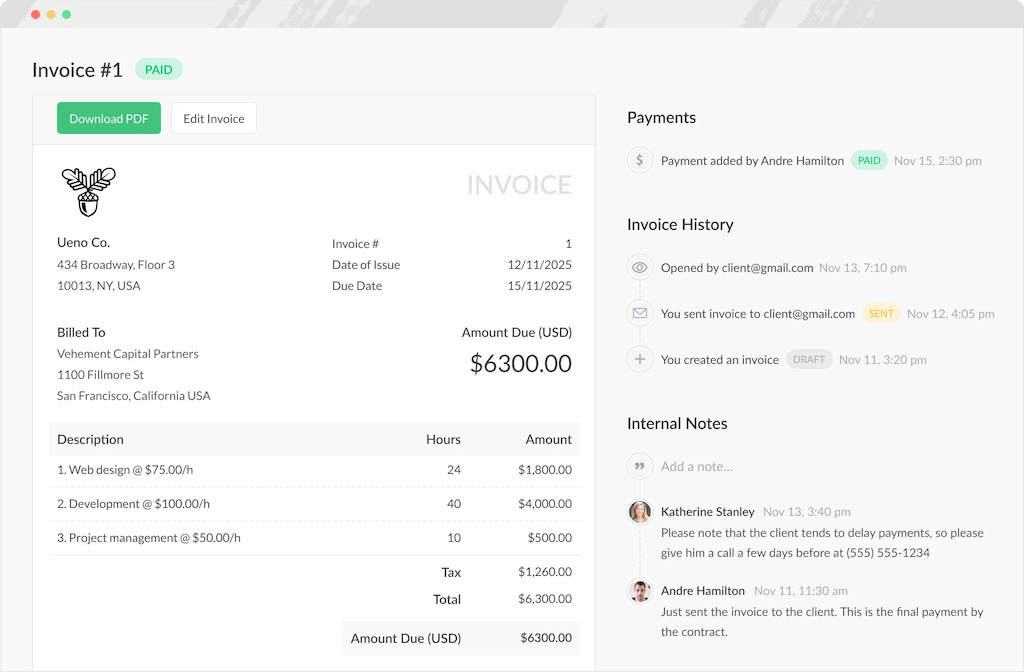
Time gets logged inside ClickUp, Asana, Trello, and Notion against actual tasks, approved by a manager, and then pulled directly into an invoice without any re-entry. For teams managing multiple clients simultaneously, that flow eliminates the biggest source of billing errors — the gap between what was tracked and what got billed.
On the invoicing side, you can break down line items by project, task, team member, or billing rate, add expenses alongside time entries, apply fixed fees for specific deliverables, and export branded PDFs. Payment collection isn’t built in natively but QuickBooks and Xero sync handles the accounting side cleanly.
Where it stands out is the combination of budget tracking alongside invoicing — you can see in real time whether a project is running over budget before you get to the invoice stage, which is more useful than discovering a problem when you’re writing the bill.
Pricing
Free plan for up to five users. Team plan $8.50/user/month (minimum five users) and includes invoicing, expenses, budget tracking, timesheet approvals, and API access.
FreshBooks
FreshBooks started as an invoicing tool and added time tracking later — which means the invoicing side is more mature than most tools on this list.
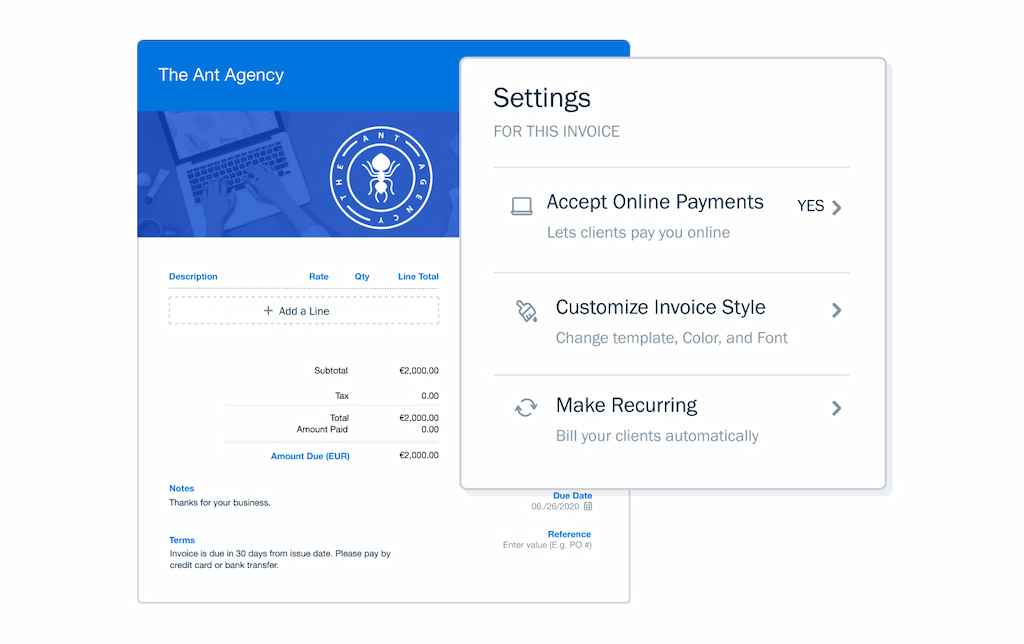
The invoice builder is genuinely polished: branded templates, custom fields, automated payment reminders, and direct payment via Stripe, PayPal, or ACH without the client needing to log into anything. For freelancers who send a lot of invoices and want payment collection to be frictionless for clients, it’s the strongest option here.
The time tracking side is functional but less sophisticated than dedicated trackers. No deep PM tool integrations, and reporting depth is more limited. Where FreshBooks earns its place is the full billing lifecycle in one tool — recurring invoices, retainer management, expense tracking, and proposals alongside time tracking, with no separate tool needed for any of it.
Recurring billing is particularly well handled. Automatic invoices for retainer clients on any schedule, with automatic payment collection if the client has a card on file.
Pricing
No free plan. Lite $23/month (up to 5 clients). Plus $43/month (up to 50 clients). Premium $70/month (unlimited clients). 30-day free trial available.
QuickBooks Time
QuickBooks Time doesn’t have its own invoicing — and that’s intentional. Tracked and approved hours sync directly into QuickBooks Online, where invoices are generated through QuickBooks’ own billing workflow. For businesses already running their accounting through QuickBooks, that removes a significant amount of manual data transfer.
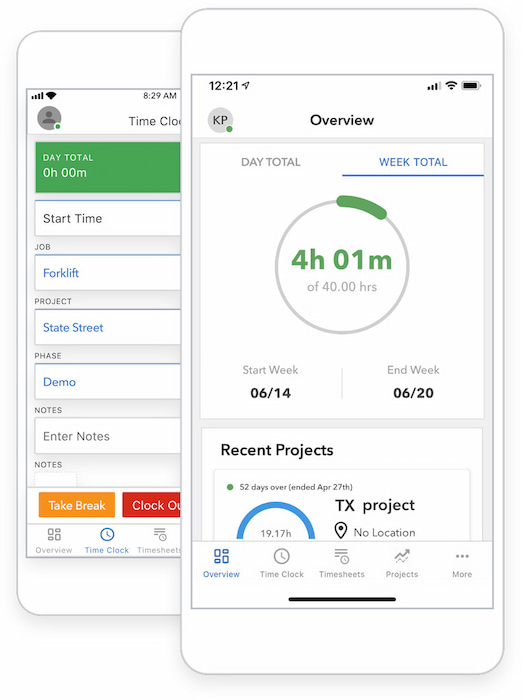
The practical implication is straightforward: QuickBooks Time is only worth considering if you’re already in the QuickBooks ecosystem. If you are, the combination is genuinely powerful — GPS tracking, shift scheduling, time approvals, job costing, and payroll all feeding into the same platform where your invoices and expenses already live.
The invoicing quality itself depends on which QuickBooks Online plan you’re on rather than which QuickBooks Time plan you have — branded templates, automatic payment reminders, Stripe and ACH payment collection, and recurring invoices are all available through QuickBooks, not through QuickBooks Time directly.
Pricing
No free plan. Premium plan $20/month base fee plus $10/user/month. Elite plan $40/month base fee plus $12/user/month.
Bonsai
Bonsai covers more of the client relationship workflow than any other tool on this list — proposals, contracts, time tracking, invoicing, and expense tracking all in one place.
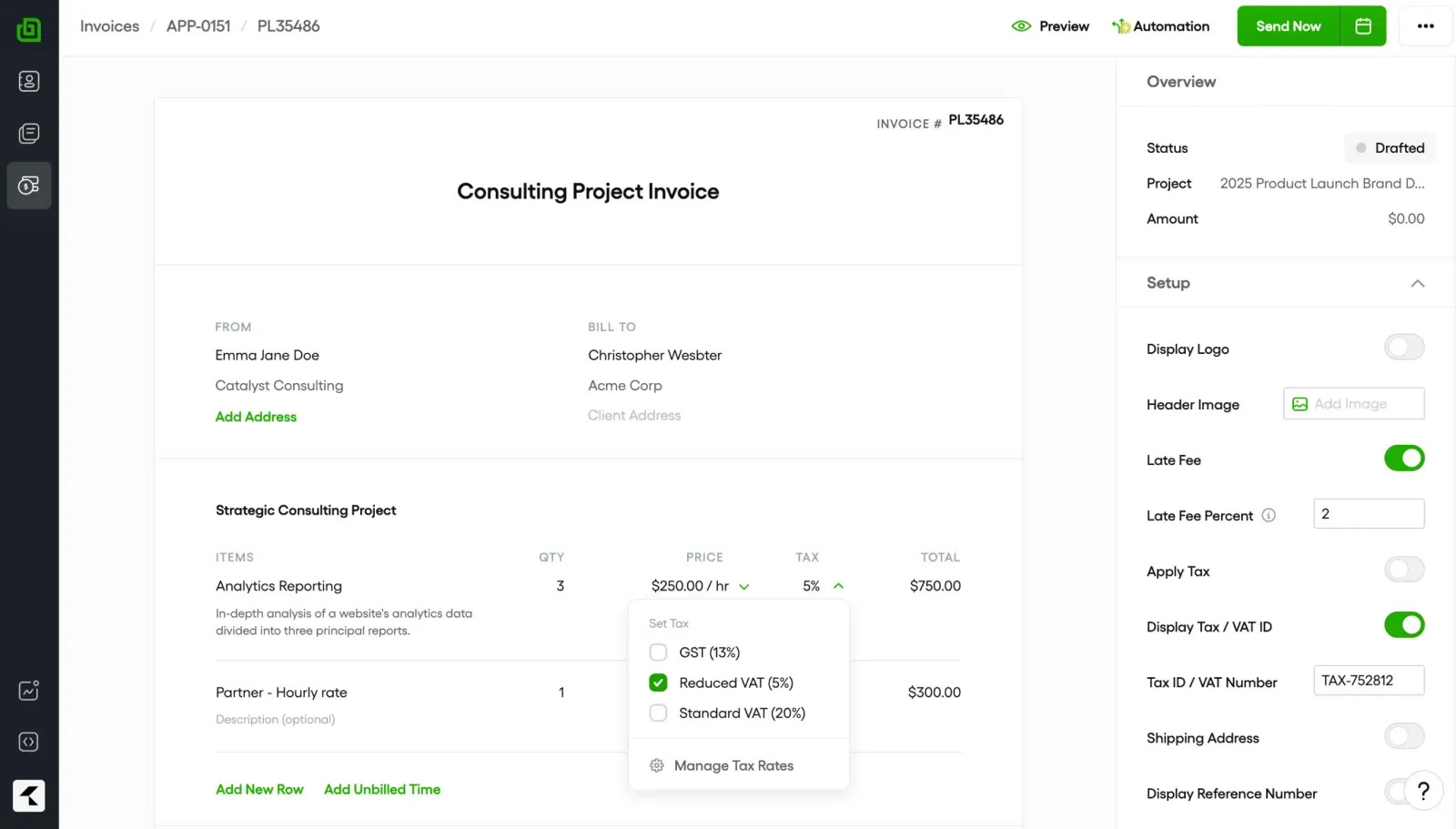
The contract and proposal side is what genuinely differentiates it. You can send a proposal, get it signed digitally, start tracking time against the approved project, and invoice from that tracked time without switching tools at any point. For freelancers who currently juggle separate tools for contracts, time tracking, and billing, that consolidation alone is worth the price.
The invoicing itself is clean — branded templates, automatic payment reminders, Stripe and PayPal payment collection, and recurring invoices for retainer work. Expenses can be added directly to invoices alongside time entries. Where it falls short relative to FreshBooks is reporting depth and accounting integration, which are more limited.
Pricing
No free plan — free trial available. Basic $9/user/month. Essentials $19/user/month (invoicing starts here). Premium $29/user/month. Elite $49/user/month. All billed annually.
Harvest
Harvest has been around since 2006 and its longevity reflects something real — it does the core time tracking and invoicing workflow cleanly and without unnecessary complexity.
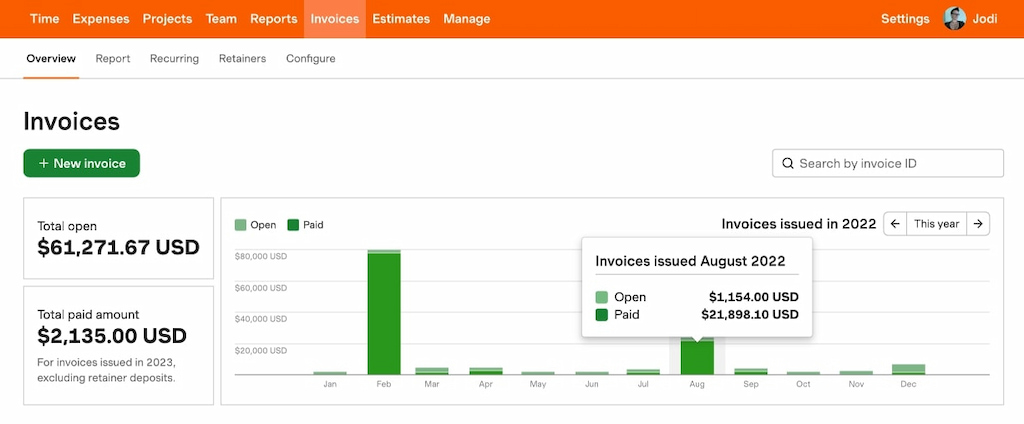
You track time, review it against project budgets, generate an invoice, and collect payment via Stripe or PayPal directly from the invoice. That’s the whole workflow, and Harvest executes it without friction. Line items pull directly from tracked time, expenses can be added, automatic payment reminders go out on a schedule you set, and clients can pay with one click without creating an account.
Where it falls short is depth. Budget tracking is basic compared to Everhour or BigTime. No contract or proposal functionality like Bonsai. PM tool integrations are limited — Harvest connects to Asana and Basecamp but time doesn’t log directly inside those tools the way Everhour does.
Pricing
Free plan: 1 seat, 2 projects. Teams $9/seat/month (billed annually). Enterprise $14/seat/month (billed annually). Enterprise Plus custom pricing.
BigTime
BigTime is the most billing-sophisticated tool on this list, built specifically for professional services firms where billing structures are complex and compliance matters.
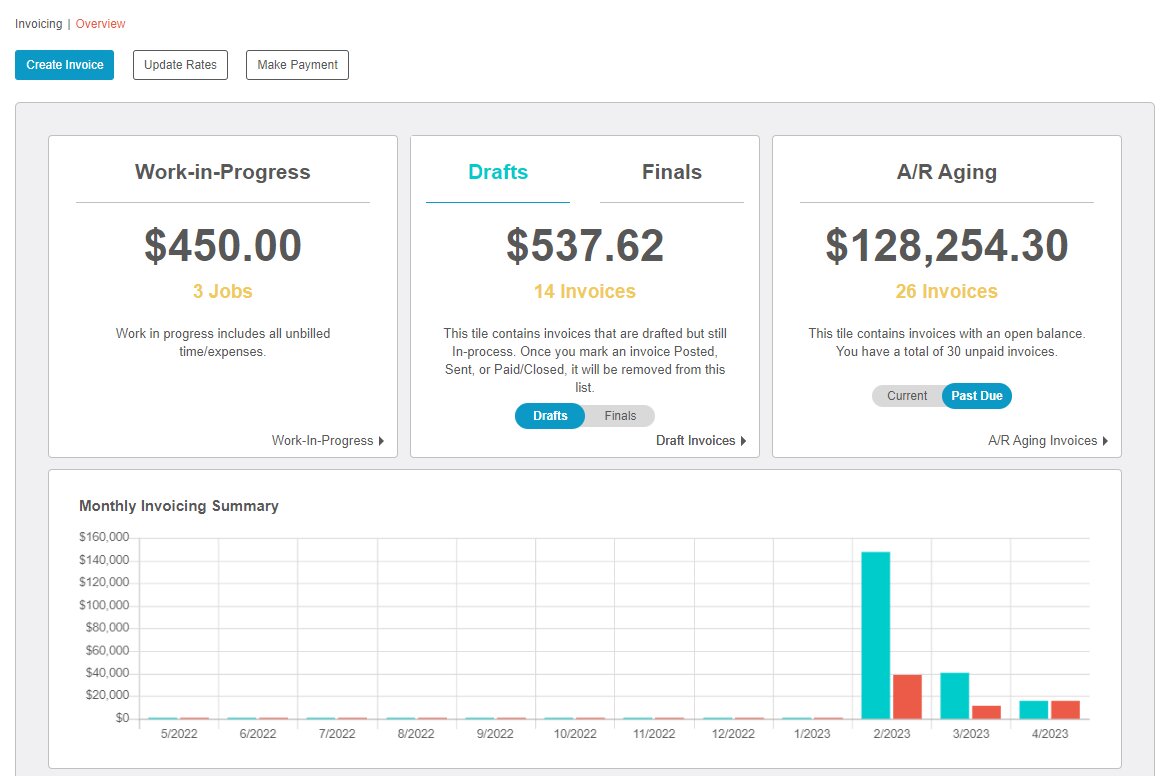
Fixed fee, hourly, milestone-based, not-to-exceed caps, retainers — BigTime handles all of these within the same platform and within the same project if needed. Invoice templates are highly customizable, partial billing against milestones is supported, and work-in-progress tracking gives finance teams visibility into unbilled time before it hits an invoice.
Where BigTime earns its price premium is the combination of billing complexity with resource planning — utilization reporting, capacity forecasting, and project profitability tracking are all built in. For a solo freelancer or small team it’s significantly more than needed. For a growing professional services firm that’s outgrown Harvest or FreshBooks, it’s the natural next step.
Pricing
No free plan. Essentials plan starts at $20/user/month. Higher tiers available for larger teams with advanced resource planning needs. 14-day free trial available.
FAQs
It depends on your workflow. Everhour is the strongest for project-based teams working inside tools like Asana or ClickUp. FreshBooks is the best all-in-one for freelancers who want polished invoicing with payment collection. QuickBooks Time makes the most sense if your accounting already runs through QuickBooks. For professional services firms with complex billing, BigTime is the most capable option.
Yes — all six tools on this list connect time tracking to invoicing in some way. Everhour, FreshBooks, Harvest, Bonsai, and BigTime generate invoices natively from tracked time. QuickBooks Time syncs tracked hours into QuickBooks Online where invoices are generated through QuickBooks’ own billing workflow.
FreshBooks and Bonsai both handle recurring invoices well, with automatic payment collection if the client has a card on file. Harvest supports recurring invoices but requires more manual setup. Everhour supports recurring invoices but doesn’t collect payment natively.
Yes, for most tools. FreshBooks, Harvest, and Bonsai all allow clients to pay via Stripe or PayPal directly from the invoice without logging into anything. BigTime supports Stripe payment collection. QuickBooks Time relies on QuickBooks Online’s payment collection, which also supports direct payment.
Time tracking software records how long work takes and against which projects or clients. Invoicing software generates bills from that data and handles payment collection. Most tools on this list combine both, but the depth of each side varies significantly — Everhour is stronger on the time tracking side, FreshBooks and Bonsai are stronger on the invoicing and billing workflow side.
Not necessarily. FreshBooks, Bonsai, and BigTime include enough financial reporting for most freelancers and small businesses. For businesses that need full accounting, integrating with QuickBooks or Xero alongside your time tracking tool is usually the right approach.
How to Choose
Choose Everhour for time tracking inside your PM tools with invoicing flowing from approved timesheets
Choose FreshBooks for the most polished freelance invoicing experience with payment collection and recurring billing
Choose QuickBooks Time if your accounting already runs through QuickBooks and you want direct sync
Choose Bonsai if you need contracts and proposals alongside time tracking and invoicing
Choose Harvest for a simple, reliable hourly billing workflow with direct payment collection
Choose BigTime for professional services firms with complex, multi-structure billing needs
➡️ Check out our industry-specific articles on time tracking:

Maria
A dedicated content enthusiast with extensive experience in international teams and projects of all sizes. Maria thrives on creativity and attention to detail, fueled by a love for fantasy novels, music, classic black-and-white films, and always finding ways to make things better.