


What Software Do Companies Use for Time Tracking?

Most companies use dedicated time tracking tools rather than spreadsheets or built-in timers in project management tools. The right platform depends on the business: agencies often prioritize billable hours and invoicing, software companies focus on project reporting and budgeting, while field teams need payroll, GPS tracking, and attendance features.
In this guide, we compare the tools businesses actually use, from Everhour and Harvest to Clockify, Toggl Track, and QuickBooks Time, and explain which type of company each one fits best.
How We Evaluated These Tools
We evaluated each platform based on ease of time tracking, reporting, project budgeting, payroll and invoicing capabilities, integrations, mobile experience, pricing, and overall value for businesses. Pricing and feature availability were verified on each vendor’s website in June 2026, and we also considered user feedback from G2 and Capterra alongside our own testing.
Disclosure: Everhour is our product and appears first on this list. We’ve aimed to review every tool fairly, including where another platform may be a better fit depending on your workflow.
What Companies Look for in Time Tracking Software
The best time tracking software should make it easy to record hours, manage projects, and simplify payroll or billing. Here are the features that matter most when comparing tools.
- Accurate time tracking: Support for timers, manual entries, and digital timesheets to ensure hours are logged correctly.
- Reporting: Clear reports on project progress, billable hours, team utilization, and productivity.
- Billable hours: The ability to separate billable and non-billable work, with invoicing support for client-facing businesses.
- Payroll: Timesheet approvals, overtime calculations, and payroll exports to reduce manual work.
- Integrations: Native connections with tools like Asana, ClickUp, Trello, Jira, QuickBooks, and Slack.
- Mobile apps: iOS and Android apps for tracking time from anywhere, with offline or GPS support where needed.
- Budgeting: Project budgets, estimated vs. actual hours, and profitability reports to keep work on track.
Quick Overview
| Tool | Best for | Free plan | Mobile apps | Standout feature |
|---|---|---|---|---|
| Everhour | Project-based teams | ✅ | iOS + Android | PM integrations, budgeting, invoicing |
| Harvest | Agencies & consultants | Limited | iOS + Android | Time tracking + invoicing |
| Toggl Track | Freelancers | ✅ | iOS + Android | Fast, lightweight tracking |
| Clockify | Budget-conscious teams | ✅ | iOS + Android | Unlimited users on free plan |
| QuickBooks Time | Payroll & field teams | ❌ | iOS + Android | GPS + payroll sync |
Best Time Tracking Software Companies Use
Everhour
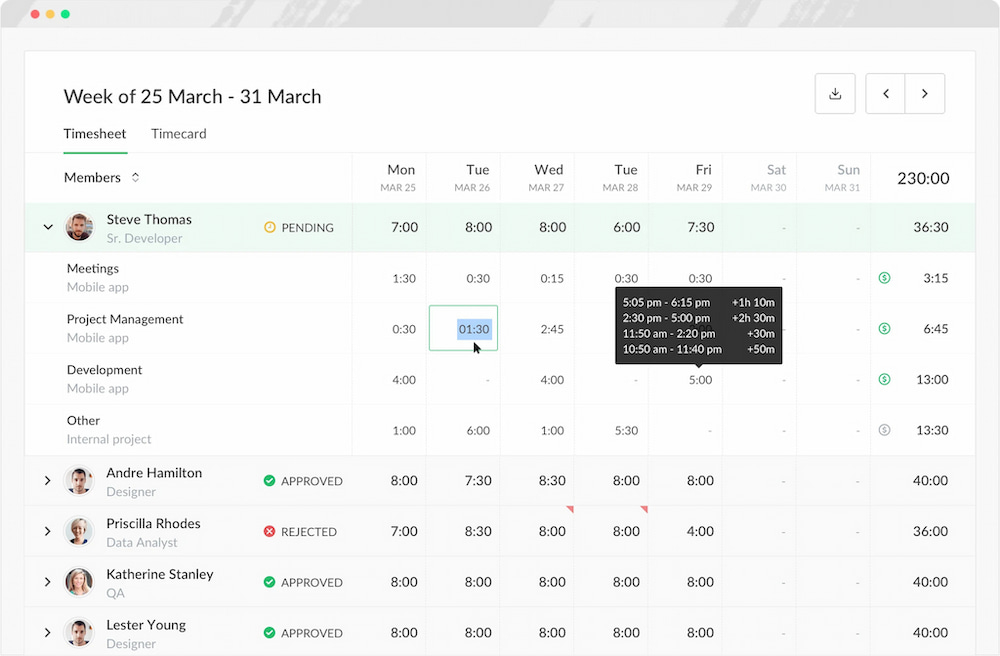
Everhour is a time tracker designed for companies that manage client projects and need more than simple time tracking. It combines digital timesheets with budgeting, invoicing, approvals, and reporting while integrating directly with project management platforms like Asana, ClickUp, Trello, Jira, and Notion. Teams can log time without leaving the tasks they already use, reducing manual work and improving reporting accuracy.
Key features
- Billable and non-billable time tracking
- Project budgets and profitability reporting
- Timesheet approvals
- Client invoicing
- Native integrations with PM tools
- Detailed reports
Pricing
Free plan available. Paid plan is $8.50/user/month.
Works best if
- Your company manages client projects
- Your team already works in Asana, ClickUp, Trello, Jira, or Notion
- You need budgeting and invoicing
Consider another option if
- You only need a personal timer
- You don’t need project management integrations
Bonus: With Everhour + Shifts by Everhour, companies can manage both hourly tracking and employee shift scheduling in one ecosystem.
Harvest
Harvest combines time tracking, expense management, and invoicing in a single platform, making it a popular choice for agencies, consultants, and freelancers. It focuses on helping businesses track billable hours, manage project budgets, and get paid faster without requiring separate billing software.
Key features
- Timer and manual time entry
- Billable and non-billable time tracking
- Client invoicing and online payment collection
- Expense tracking
- Project budgets and cost monitoring
- Reporting by client, project, and team
- Integrations with Asana, Trello, Slack, QuickBooks, Xero, and more
![11+ timesheet apps for any need [updated for 2021]](https://everhour.com/blog/wp-content/uploads/2021/06/harvest-timesheet-app.png)
Pricing
Free plan available for one user and two projects. Paid plans start at $11 per seat/month.
Works best if
- You bill clients by the hour
- You want time tracking and invoicing in one platform
- You run a small agency or consultancy
- You need expense tracking alongside timesheets
Consider another option if
- You need deeper project management integrations
- You want a generous free plan for a larger team
- You need advanced budgeting or profitability reporting
Find out other time tracking tools for consultants here!
Toggl Track
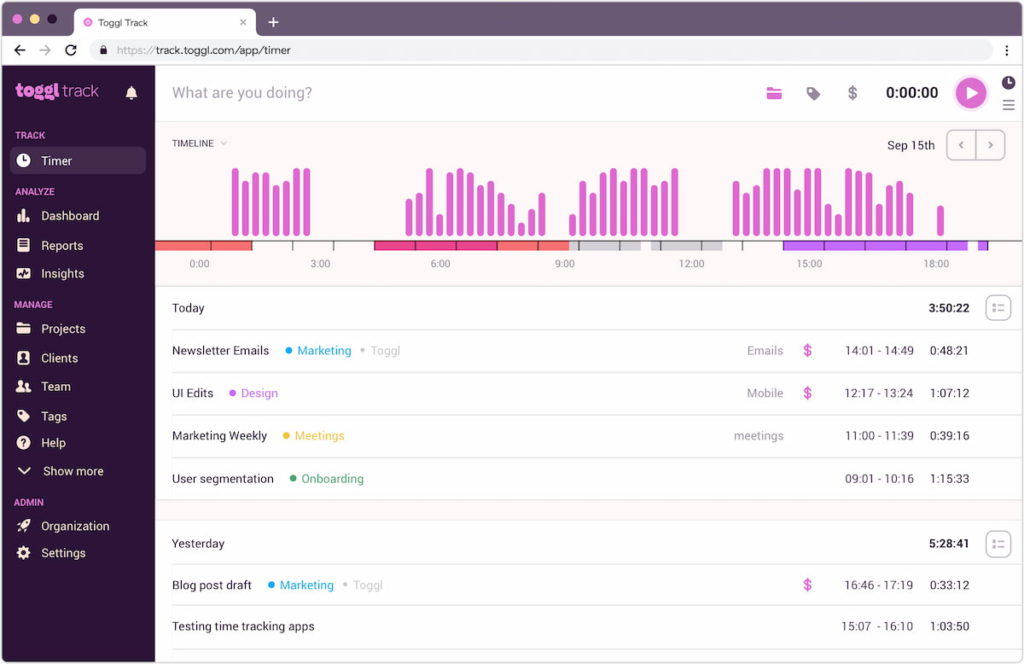
Toggl Track is built around simplicity. Its lightweight interface, one-click timers, and browser extensions make it easy for freelancers and small teams to start tracking time with minimal setup. It’s a strong choice if you want accurate timesheets without the complexity of a full project management platform.
Key features
- One-click timers across web, desktop, and mobile
- Manual and calendar-based time entry
- Billable and non-billable tracking
- Idle detection and tracking reminders
- Browser extensions
- Project and client tracking
- Exportable reports
Pricing
Free plan available for up to five users. Paid plans start at $10 per user/month.
Works best if
- You work independently or in a small team
- You want a fast, easy-to-use time tracker
- You primarily need timesheets and reporting
- You prefer a clean, distraction-free interface
Consider another option if
- You need built-in invoicing
- You require payroll or approval workflows
- You want advanced budgeting and profitability reporting
Clockify
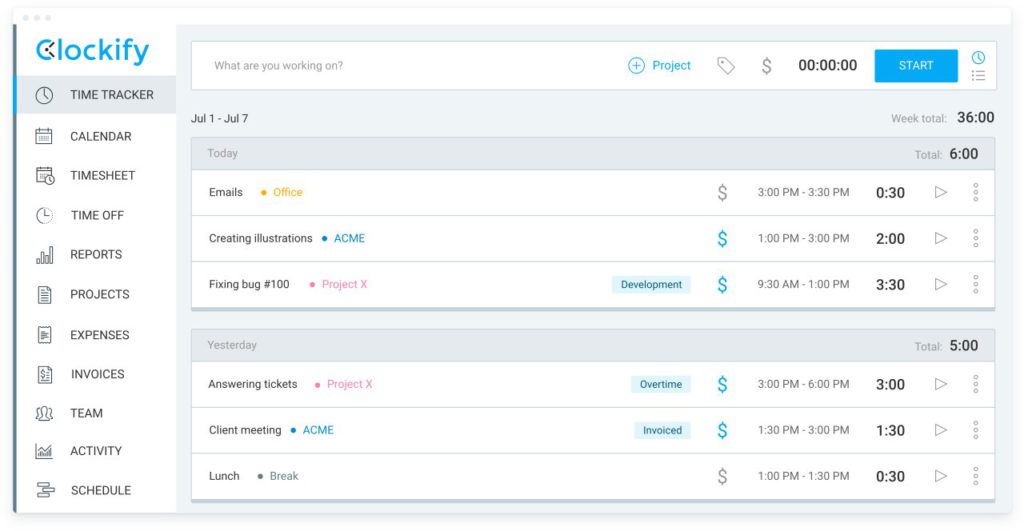
Clockify is one of the most generous free time tracking tools available, supporting unlimited users, projects, and time entries. It offers multiple ways to log time and provides a solid feature set for businesses replacing spreadsheets without a significant software investment.
Key features
- Unlimited users on the free plan
- Timers, manual entries, and weekly timesheets
- Billable and non-billable hour tracking
- Timesheet approvals
- GPS tracking and kiosk mode
- Offline mobile tracking
- Reporting and payroll exports
Pricing
Free plan available with unlimited users. Paid plans start at $3.99 per user/month.
Works best if
- You need a free solution for a growing team
- You’re replacing paper or spreadsheet timesheets
- You want basic payroll or client billing support
- You manage remote or field employees
Consider another option if
- You need advanced budgeting or profitability reports
- You want built-in invoicing on the free plan
- You rely heavily on project management integrations
QuickBooks Time
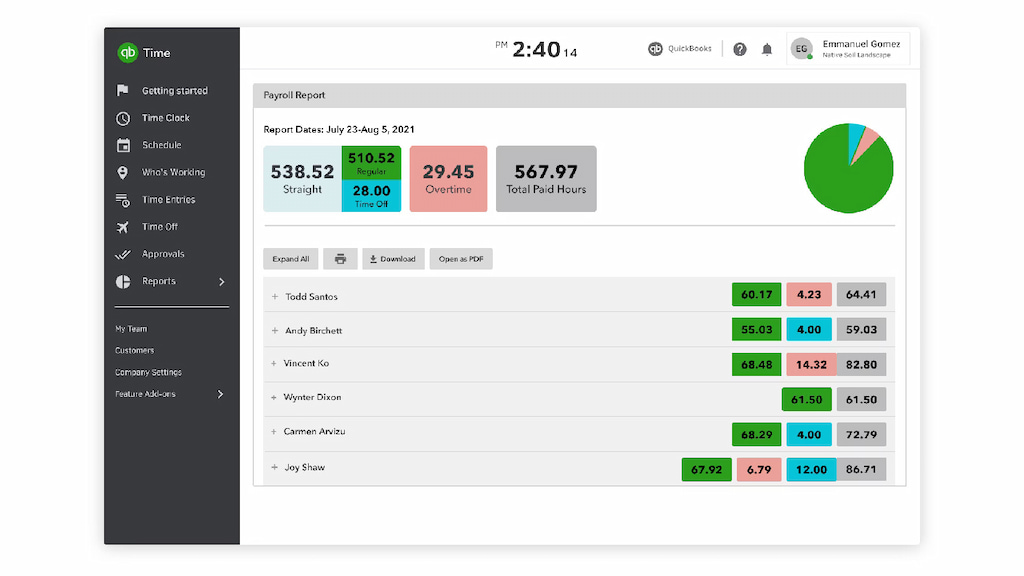
QuickBooks Time is designed for businesses that manage hourly employees and process payroll through QuickBooks. It combines digital timesheets with GPS tracking, scheduling, and payroll synchronization, making it especially useful for construction, field service, and other mobile workforces.
Key features
- Digital employee timesheets
- GPS tracking and geofencing
- Mobile clock-in and clock-out
- Payroll synchronization with QuickBooks
- Shift scheduling
- Overtime tracking
- Job costing and labor reports
Pricing
No free plan. Paid plans start at $20/month plus $8 per user/month.
Works best if
- You already use QuickBooks Payroll
- Your employees work on job sites or in the field
- You need GPS-based time tracking
- Payroll accuracy and compliance are priorities
Consider another option if
- You’re looking for a free or low-cost solution
- You don’t use QuickBooks
- You need project budgeting and client invoicing
Find out other great time tracking tools for contractors!
Should You Use Built-In Time Tracking?
Many project management platforms now include basic timers, but they often lack features businesses need for day-to-day operations.
Common limitations include:
- limited reporting
- no timesheet approvals
- no client invoicing
- no budgeting
- fewer payroll options
- limited export capabilities
For companies that bill clients, monitor project profitability, or process payroll, dedicated time tracking software usually provides a more complete solution while still integrating with existing project management tools.
FAQs
Most businesses use dedicated time tracking software rather than spreadsheets. Popular options include Everhour, Harvest, Toggl Track, Clockify, and QuickBooks Time. The best choice depends on your workflow—for example, agencies often prioritize budgeting and invoicing, while field teams may need GPS tracking and payroll integrations.
There isn’t a single best option for every business. Everhour is a strong choice for project-based teams that need budgeting, reporting, and project management integrations. Harvest is ideal for client billing, Clockify offers one of the best free plans, Toggl Track is popular with freelancers, and QuickBooks Time is well suited to payroll-focused businesses.
Some small businesses still use spreadsheets, but dedicated time tracking software is usually more accurate and efficient. It automates timesheets, reduces manual errors, simplifies payroll and billing, and provides reporting that spreadsheets can’t easily match.
Time tracking software records how employees spend their time using timers or manual entries. Timesheet software organizes those hours into daily or weekly timesheets for payroll, client billing, reporting, and approvals. Many modern platforms, including Everhour and Clockify, combine both functions.
Yes. Many tools integrate with platforms like Asana, ClickUp, Trello, Jira, and Monday.com, allowing employees to track time without leaving their tasks. This helps reduce context switching and keeps project data in one place.
Most businesses should look for accurate time tracking, reporting, billable and non-billable hour tracking, payroll support, project budgeting, mobile apps, timesheet approvals, and integrations with project management or accounting software.
Remote teams generally benefit from software with cloud access, mobile apps, detailed reporting, and integrations with collaboration tools. Everhour, Clockify, and Toggl Track are all strong options depending on whether your priority is project management, free time tracking, or simplicity.
What Software Do Companies Use for Time Tracking: Final Word
Most companies use dedicated time tracking software instead of spreadsheets or the basic timers built into project management tools. Which platform they choose depends on their workflow rather than company size alone.
- Everhour is well suited to project-based teams that need budgeting, reporting, approvals, and invoicing.
- Harvest is a strong choice for agencies and consultants that prioritize client billing.
- Toggl Track works well for freelancers and small teams looking for a simple, lightweight tracker.
- Clockify is one of the best options for businesses that need a generous free plan.
- QuickBooks Time is ideal for companies already using QuickBooks Payroll or managing field employees.
The best time tracking software is the one that fits the way your team already works. Before making a decision, consider how you track projects, process payroll, bill clients, and whether you need integrations with the tools your team uses every day.
Check out our industry-specific articles on time tracking:
- best apps for construction businesses
- construction employee scheduling
- best free apps for cleaning businesses
- best event staff management software
- manufacturing time tracking apps
- best time tracking tools for lawyers
- best time clocks for small businesses
- agency time tracking software
- time tracking for architects
- time tracking software for accounting firms
Discover the true cost of untracked time in project-based businesses — and learn how to stop revenue from slipping through the cracks.
Discover how high-performing agencies track time without killing culture — and boost productivity without burning out your team.

Maria
A dedicated content enthusiast with extensive experience in international teams and projects of all sizes. Maria thrives on creativity and attention to detail, fueled by a love for fantasy novels, music, classic black-and-white films, and always finding ways to make things better.