


Best Timesheet Apps: Best Free and Paid Options
Timesheet apps help businesses, freelancers, and teams record work hours accurately without relying on paper timesheets or spreadsheets. Depending on the tool, they can track project time, billable hours, attendance, overtime, payroll, or GPS-based clock-ins for field employees. The best timesheet app depends on how you work, so we’ve compared the leading options to help you choose the right one.
How We Evaluated These Timesheet Apps
We evaluated each timesheet app by testing its core time tracking workflow, mobile experience, reporting capabilities, payroll and invoicing features, integrations, and overall ease of use. We also verified pricing directly on each vendor’s website as of June 2026, since plans and features change regularly. To complement our testing, we reviewed user feedback on G2 and Capterra to understand how each tool performs in day-to-day use.
A disclosure: Everhour is our product and appears first on this list. We’ve aimed to provide balanced, accurate reviews of every tool, including where competitors may be a better fit depending on your workflow. If Everhour isn’t the right choice for your business, the alternatives below are all strong options for different use cases.
What Is a Timesheet App?
A timesheet app is software that records employee or freelancer work hours digitally, replacing manual timesheets and spreadsheets. Depending on the tool, users can start and stop timers, clock in and out, or enter hours manually.
Many timesheet apps also support billable hour tracking, overtime calculations, payroll exports, approvals, attendance tracking, and project reporting.
Timesheet apps are used by freelancers to invoice clients accurately, by agencies to monitor project budgets, and by businesses to simplify payroll and employee time tracking. Some tools focus on basic time entry, while others combine timesheets with scheduling, GPS tracking, project management, and invoicing.
Quick Overview: Best Timesheet Apps
- Best overall: Everhour
- Best free timesheet app: Clockify
- Best for freelancers: Toggl Track
- Best for payroll: QuickBooks Time
- Best for attendance tracking: Jibble
TL;DR: Best Timesheet Apps by Use Case
| App | Best for | Free plan | GPS support | Mobile apps | Notable features |
|---|---|---|---|---|---|
| Everhour | Freelancers, agencies, remote teams | ✅ | ✅ | iOS + Android | Built-in invoicing, Asana/Trello native |
| Clockify | Teams, contractors, construction | ✅ | ✅ | iOS + Android | Offline tracking, GPS, kiosk mode |
| Toggl Track | Freelancers, consultants | ✅ | ❌ | iOS + Android | Fast UI, tagging, Pomodoro |
| QuickBooks Time | Construction, payroll-heavy teams | ❌ | ✅ | iOS + Android | GPS + geofencing, QuickBooks sync |
| Jibble | SMBs needing attendance tracking | ✅ | ✅ | iOS + Android | Facial recognition, shift management |
Everhour – Best Overall Timesheet App
Everhour is a time tracker and a timesheet app built for businesses that need more than basic time tracking. In addition to digital timesheets, it helps teams track billable and non-billable hours, manage project budgets, approve timesheets, generate invoices, and analyze project profitability. Unlike standalone timers, Everhour integrates directly with project management tools, allowing employees to log time without leaving the tasks they’re already working on.
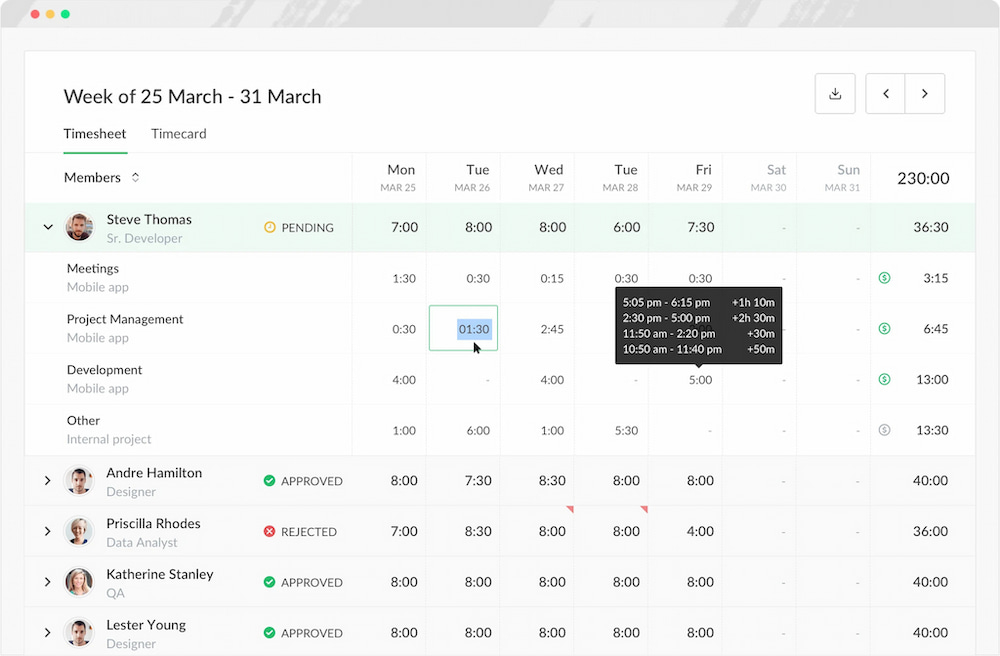
Key features
- Digital timesheets with manual and timer-based time entry
- Billable and non-billable time tracking
- Timesheet approvals for managers
- Budget tracking and project profitability reports
- Native invoicing from tracked hours
- Deep integrations with Asana, ClickUp, Trello, Jira, Notion, Basecamp, and more
- Detailed reporting by employee, client, project, or task
- Free tools including free project timesheet and free invoice generator
Pricing
Free plan available for up to five users. The Team plan starts at $8.50 per user/month and includes invoicing, budgeting, expenses, approvals, and API access.
✅ When it works best
- You manage projects inside Asana, ClickUp, Trello, Jira, or Notion
- You need accurate digital timesheets for payroll or client billing
- You want budgeting, approvals, and invoicing in one platform
- You manage multiple employees and need team-wide visibility
❌ When to avoid it
- You only need a simple personal timer
- You want automatic background tracking instead of manual time entry
- You don’t need project management integrations
Clockify – Best Free Timesheet App
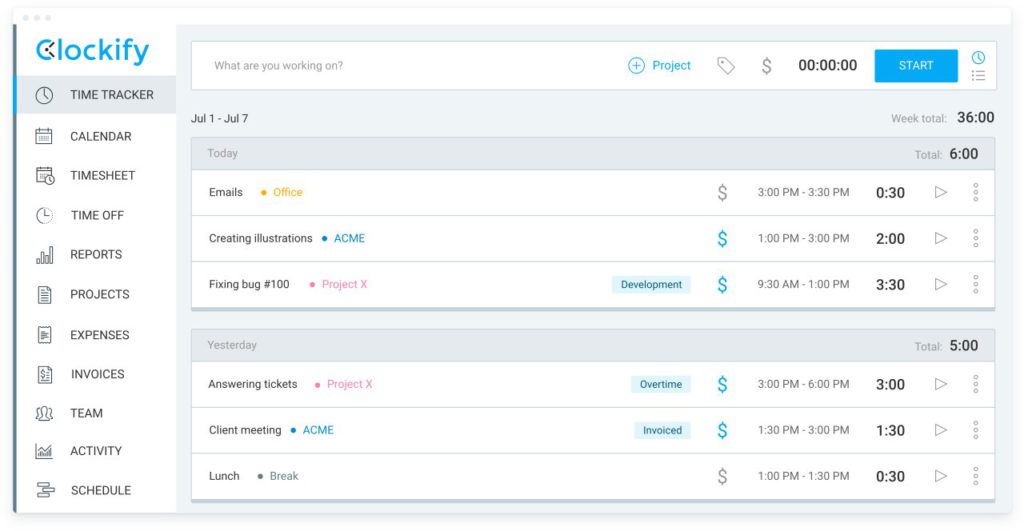
Clockify is one of the most popular free timesheet apps thanks to its generous free plan, which supports unlimited users, projects, and timesheets. It offers multiple ways to record time, including timers, manual entries, and weekly timesheets, making it a flexible choice for businesses moving away from spreadsheets.
Key features
- Unlimited users on the free plan
- Timer, manual entry, and weekly timesheets
- Billable and non-billable hour tracking
- Employee timesheet approvals
- GPS tracking and kiosk mode
- Offline time tracking on mobile
- Reports and payroll exports
Pricing
Free plan available with unlimited users. Paid plans start at $3.99 per user/month.
✅ When it works best
- You want a free digital timesheet solution
- Your team is replacing Excel or paper timesheets
- You need basic payroll or client billing support
- You manage remote or field employees
❌ When to avoid it
- You need advanced budgeting or profitability reporting
- You want deep project management integrations
- You need built-in invoicing on the free plan
Toggl Track – Best for Freelancers
Toggl Track focuses on making time tracking as fast and frictionless as possible. Its clean interface, browser extensions, and lightweight design make it a favorite among freelancers and consultants who primarily need accurate timesheets without the complexity of a full workforce management platform.
![11+ timesheet apps for any need [updated for 2021]](https://everhour.com/blog/wp-content/uploads/2021/06/toggl-timesheet-app.png)
Key features
- One-click timers across desktop, web, and mobile
- Manual and calendar-based timesheets
- Billable and non-billable tracking
- Idle detection and reminders
- Browser extensions for popular work tools
- Exportable reports
- Project and client tracking
Pricing
Free plan available for up to five users. Paid plans start at $10 per user/month.
✅ When it works best
- You work independently or in a small team
- You want quick, hassle-free timesheet entry
- You invoice clients manually
- You value a clean, intuitive interface
❌ When to avoid it
- You need native invoicing
- You want advanced payroll workflows
- You require detailed budgeting or profitability reporting
QuickBooks Time – Best for Payroll and Field Teams
QuickBooks Time is designed for businesses that manage hourly employees and process payroll through QuickBooks. Its timesheet functionality is closely tied to payroll, scheduling, GPS tracking, and job costing, making it particularly well suited to construction, field service, and other mobile workforces.
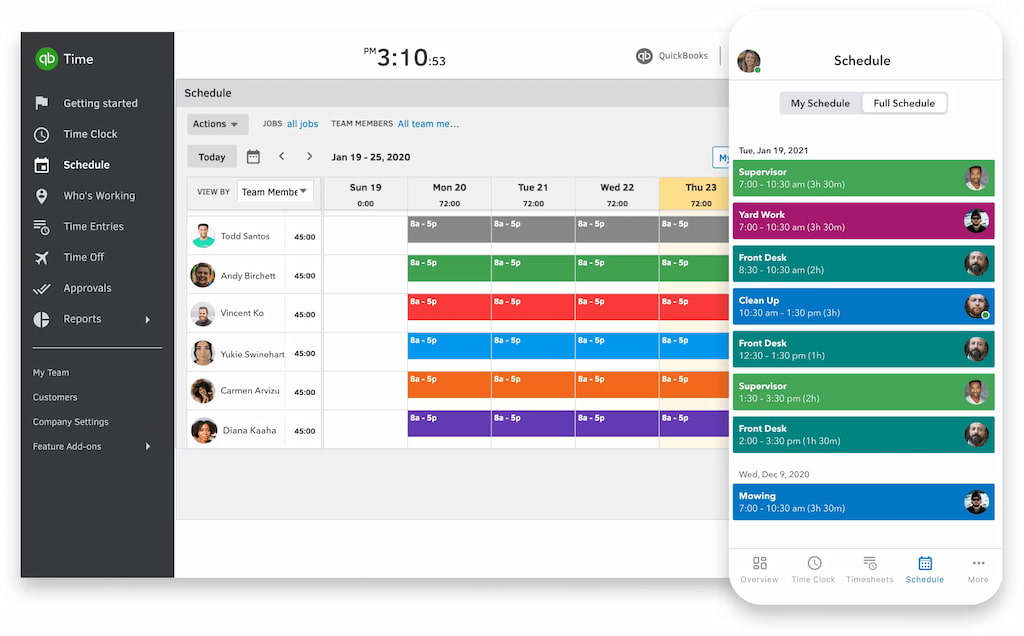
Key features
- Digital employee timesheets
- GPS tracking and geofencing
- Clock-in and clock-out from mobile devices
- Payroll synchronization with QuickBooks
- Shift scheduling
- Overtime calculations
- Job costing and labor reports
Pricing
No free plan. Paid plans start at $20/month plus $8 per user/month.
✅ When it works best
- You already use QuickBooks Payroll
- Your employees work in the field
- You need GPS-based timesheets
- Payroll accuracy is a top priority
❌ When to avoid it
- You don’t use QuickBooks
- You need project budgeting and invoicing
- You’re looking for a free timesheet app
Jibble – Best for Attendance and GPS Tracking
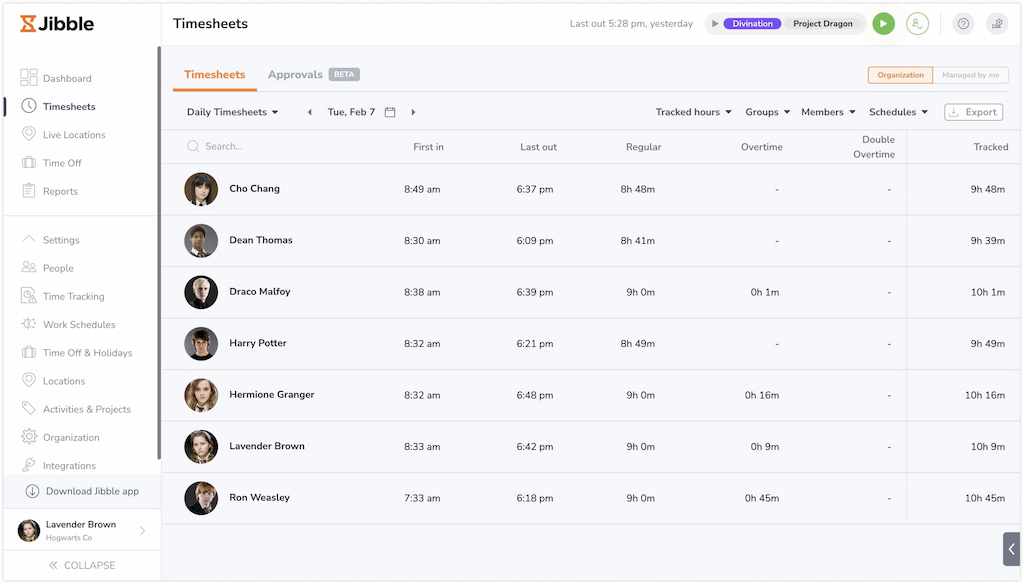
Jibble combines digital timesheets with attendance tracking, GPS verification, and facial recognition. It’s a strong option for businesses that need to verify employee attendance, especially for shift workers and mobile teams.
Key features
- Digital employee timesheets
- GPS location tracking
- Facial recognition for clock-ins
- Attendance monitoring
- Shift scheduling
- Overtime calculations
- Mobile apps for iOS and Android
Pricing
Free
✅ When it works best
- You manage shift-based employees
- Attendance verification is important
- You need GPS tracking for mobile workers
- You want affordable workforce management
❌ When to avoid it
- You primarily bill clients by the hour
- You need advanced project budgeting
- You want deep integrations with project management software
FAQ
A time tracking app records how long you spend on tasks or projects, often using timers or automatic tracking. A timesheet app focuses on organizing those tracked hours into daily or weekly timesheets for payroll, client billing, reporting, or compliance. Many modern tools, including Everhour and Clockify, combine both functions in a single platform.
The best choice depends on your workflow. Everhour is well suited to project-based businesses that need budgeting, invoicing, and project management integrations. Clockify is a strong option if you want a generous free plan, while QuickBooks Time works well for businesses that process payroll through QuickBooks.
Yes. Several timesheet apps offer free plans, including Clockify, Everhour, Toggl Track, and Jibble. Free plans typically include basic time tracking and timesheets, while advanced features such as approvals, payroll exports, invoicing, or budgeting are often available only on paid plans.
Yes. Most business-focused timesheet apps let you categorize time as billable or non-billable. This makes it easier to invoice clients accurately, monitor internal work, and understand project profitability. Features vary by platform, so it’s worth checking whether billing rates and invoicing are included.
Yes. Many timesheet apps include mobile apps for iOS and Android, allowing employees to clock in, track time, and submit timesheets from anywhere. Some tools also support GPS tracking, geofencing, offline time tracking, and shift scheduling, making them suitable for construction, field service, and distributed teams.
The most important features depend on your business, but most teams should look for:
– Accurate time tracking and digital timesheets
– Billable and non-billable hour tracking
– Payroll and invoicing support
– Mobile apps with offline access
– GPS tracking if employees work in the field
– Timesheet approvals and reporting
– Integrations with project management or accounting software
Final Word
Don’t settle for bloated timesheet tools or spreadsheet hacks. If you want visibility, billing accuracy, and team accountability, Everhour is the best timesheet app to get started with. It scales as you do — and it doesn’t make you hate time tracking.
➡️ Learn how startups might benefit from timesheet software!

Mike
An IT entrepreneur, executive, and former engineer with a passion for innovation and leadership. Mike focuses on driving company growth while keeping the team inspired. Outside of work, he enjoys tennis, snowboarding, traveling, reading, and, of course, putting his heart and soul into Everhour.