


Jira Best Practices: 15 Tips for Better Project Management

Jira works best when teams keep their setup simple, use consistent issue types and workflows, and make project information easy to find. The most useful Jira best practices include organizing your backlog, defining clear responsibilities, limiting unnecessary custom fields and statuses, automating repetitive work, and using reports to monitor project progress.
Good Jira practices should make work easier to manage, not add more administrative work. The right setup depends on how your team uses Jira, but a few principles apply to most software development, agile, and project management teams.
In this guide, we’ll cover 15 Jira best practices for organizing Jira projects, managing issues and workflows, improving team collaboration, and getting more useful information from Jira.
What Are Jira Best Practices?
Jira best practices are recommended ways to set up and use Jira so teams can manage projects, issues, workflows, and reporting more effectively. They cover both Jira configuration and day-to-day team practices, from choosing the right issue types to keeping the backlog and workflows organized.
The goal is not to use every Jira feature. A well-designed Jira setup gives people the information they need without making them maintain unnecessary fields, statuses, automations, or processes.
The most important Jira best practices are to:
- Keep projects and workflows simple: Use only the projects, statuses, fields, and issue types your team actually needs.
- Standardize how work is recorded: Define clear conventions for issue types, priorities, labels, and descriptions.
- Keep the backlog organized: Regularly review, prioritize, and remove outdated issues.
- Automate repetitive work: Use automation for routine updates, notifications, assignments, and transitions.
- Use reports for decisions: Choose dashboards and reports that help the team understand progress, workload, or project performance.
- Review your Jira setup regularly: Remove outdated configurations and adjust processes as the team’s needs change.
15 Jira Best Practices for Teams
1. Keep Jira projects simple
- A Jira project should represent a clear area of work with its own goals, issues, workflow, or team. Avoid creating separate projects for every small initiative if the work can be managed effectively within an existing project.
- Too many projects can make Jira harder to navigate and make reporting more complicated. Before creating a new project, consider whether the work needs a separate workflow, permissions, or reporting structure.
- Keep project configurations consistent where possible. If several teams follow the same process, using similar project structures makes it easier for people to move between projects and understand how work is organized.
2. Use clear and consistent issue types
- Use Jira issue types to distinguish between different kinds of work, not simply to give teams more ways to categorize issues. Common issue types include epics, stories, tasks, bugs, and subtasks.
- Define what each issue type means and when employees should use it. For example, a bug can represent a problem with existing functionality, while a story or task can represent planned work.
- Avoid creating large numbers of custom issue types unless they serve a specific purpose. Too many options make it harder for employees to choose the right one and can make reports and workflows more difficult to maintain.
3. Write clear issue descriptions
A Jira issue should contain enough information for someone to understand the work without having to ask the author for basic context. A useful issue description can include:
- Context: Explain why the work is needed and what problem it addresses.
- Requirements: Describe what needs to be done.
- Acceptance criteria: Define what needs to be true for the work to be considered complete.
- Relevant information: Add links, technical details, screenshots, or other resources when they are necessary.
- Dependencies: Mention other issues, teams, or tasks that could affect the work.
Use Jira templates for recurring types of work when they help teams provide consistent information. Avoid turning templates into long forms that people have to complete unnecessarily.
4. Keep the Jira backlog organized
- A Jira backlog should contain work that the team may realistically consider doing, with higher-priority items clearly separated from less important or uncertain work.
- Regular backlog grooming and refinement helps teams remove obsolete issues, clarify requirements, update priorities, and break large pieces of work into manageable items. Close or archive issues that are no longer relevant instead of allowing them to accumulate indefinitely.
- Avoid using the backlog as a storage system for every idea anyone might want to work on someday. If an issue has no clear owner, purpose, or likelihood of being addressed, keeping it indefinitely can make the backlog harder to use.
5. Design workflows around how your team works
- A Jira workflow should reflect the actual stages an issue passes through from creation to completion. For example, a simple development workflow might include statuses such as To Do, In Progress, In Review, and Done.
- Avoid adding a separate status for every small step in a team’s process. If a workflow becomes difficult to understand, maintaining it can take more time than it saves.
- When designing a workflow, make sure each status has a clear meaning and that everyone understands when an issue should move to the next stage. Review workflows periodically and remove statuses or transitions that the team no longer uses.
6. Define clear responsibilities
- Every Jira issue should make it reasonably clear who is responsible for moving the work forward. Use assignees consistently and establish who handles tasks such as backlog prioritization, issue triage, and Jira administration.
- Avoid assigning issues to an entire team when one person is actually responsible for the next action. At the same time, don’t use Jira assignments to imply individual accountability for work that genuinely belongs to several people.
- For larger projects, define ownership at both the issue and project level. This makes it easier to identify who should make decisions, resolve blockers, and keep the project moving.
7. Use labels, components, and custom fields consistently
- Jira provides several ways to categorize and describe issues, including labels, components, standard fields, and custom fields. Decide what each one is used for before adding more ways to organize information.
- For example, a team might use components to identify product areas and labels for temporary or cross-cutting categories. The exact structure matters less than applying it consistently.
- Before creating a custom field, check whether an existing Jira field can provide the information you need. Too many custom fields can make issue screens cluttered and make reporting and administration harder.
- Establish simple naming conventions for labels and other categories. Inconsistent variations such as
frontend,front-end, andFrontEndcan fragment reporting and make filters less useful.
8. Keep Jira boards focused
- A Jira board should give the team a useful view of the work it is responsible for. Configure board filters so that unrelated issues do not appear alongside the team’s actual work.
- Keep the board easy to scan. Show the statuses, fields, and information people need to make decisions rather than trying to display every available piece of issue data.
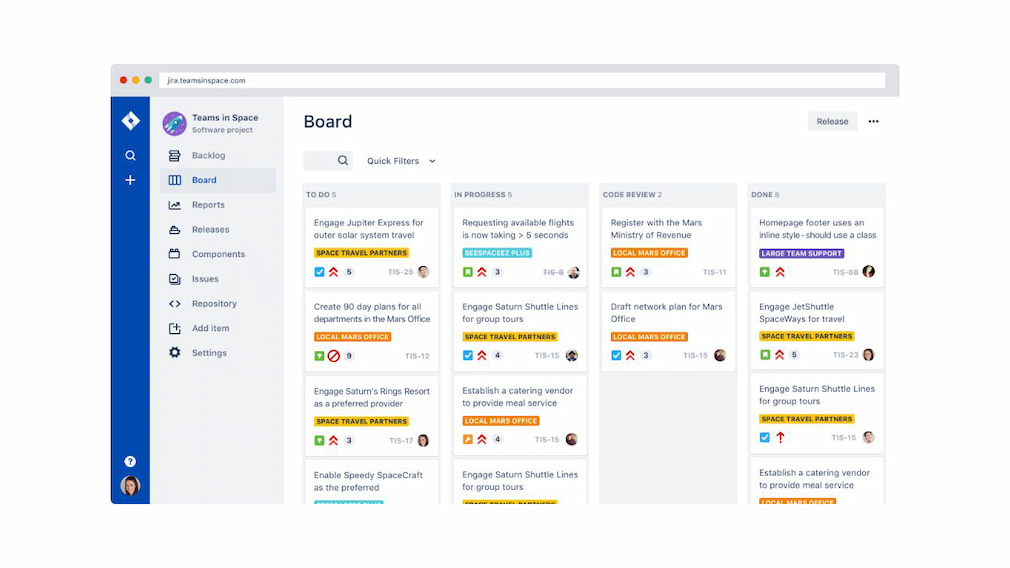
- If several teams use Jira differently, separate boards or carefully configured filters can be more useful than forcing everyone into the same board. The goal is to make the board a practical working view, not a complete representation of everything stored in Jira.
9. Set clear priorities
- Jira priorities are useful only when the team applies them consistently. Define what each priority level means and give employees clear guidance on when to use it.
- Avoid marking most issues as high priority. If everything is urgent, priority stops helping the team decide what should be handled first.
- For teams with more complex prioritization needs, combine Jira’s priority field with other criteria such as business impact, deadlines, customer impact, or dependencies. Keep the system understandable enough that team members can apply it without extensive training.
10. Automate repetitive Jira tasks
- Jira automation can handle routine actions such as assigning issues, updating fields, sending reminders, transitioning issues, and notifying people when specific conditions are met.
- Start with repetitive tasks that have clear rules and happen frequently. For example, an automation rule could notify an assignee when an issue has been waiting for review for a certain amount of time.
- Review automation rules regularly. Old or overlapping rules can create unexpected changes and unnecessary notifications. Every automation should have a clear purpose and be easy for Jira administrators to understand and maintain.
11. Reduce unnecessary notifications
- Jira notifications should help people act on important changes without creating a constant stream of alerts. Review your notification settings and make sure people are notified when their input or action is actually needed.
- Avoid notifying an entire team about every update to every issue. Use mentions, watchers, project roles, and targeted notifications when appropriate so that the people who need to know can find relevant updates without being overwhelmed.
- It’s also worth reviewing automated notifications alongside Jira’s standard notifications. Two different rules sending similar alerts can quickly turn useful updates into notification noise.
12. Use reports and dashboards intentionally
- Jira reports and dashboards can help teams understand project progress, workload, deadlines, and other important metrics. The most useful dashboards focus on questions the team actually needs to answer rather than displaying as many charts as possible.
- Choose reports based on your team’s workflow and goals. For example, a development team might use sprint reports and velocity trends, while a project manager may need a broader view of project status, unresolved issues, and upcoming deadlines.
- Review dashboards periodically and remove gadgets that no longer provide useful information. A small dashboard with relevant metrics is generally more useful than a crowded one that nobody checks.
13. Track time when it supports the workflow
- Jira’s time tracking can be useful when teams need to understand how long work takes, compare estimated and actual effort, manage project budgets, or record billable hours. It can also provide historical data that helps teams make better estimates.
- Time tracking works best when employees can easily record time against the relevant issues. If a team needs more detailed reporting, budgeting, or time tracking across multiple project management tools, a dedicated time tracking integration such as Everhour can extend Jira’s native capabilities.

- Time tracking should also be kept separate from employee monitoring. Recording how much time a task takes is different from monitoring what someone does on their computer.
14. Review and clean up your Jira setup regularly
Jira configurations can become more complicated over time as teams add custom fields, workflows, automations, projects, and dashboards. Regular maintenance helps prevent old configurations from making Jira harder to use.
Periodically review:
- Projects: Archive or remove projects that are no longer needed.
- Workflows: Remove outdated statuses and transitions.
- Custom fields: Identify fields that are no longer used.
- Automations: Disable obsolete or duplicate rules.
- Boards: Remove boards that no longer serve a team or workflow.
- Dashboards: Delete unused reports and gadgets.
- Permissions: Check that access still matches people’s roles.
Assign responsibility for Jira administration so that configuration changes have a clear owner.
Without regular maintenance, even a well-designed Jira setup can gradually become difficult to manage.
15. Document your Jira conventions
Document the rules your team follows for using Jira so that employees don’t have to guess how projects, issues, and workflows should be managed.
Your documentation can cover:
- Issue types: Explain when to create an epic, story, task, bug, or subtask.
- Statuses: Define what each workflow status means.
- Priorities: Explain how the team determines priority.
- Fields and labels: Document what they are used for and any naming conventions.
- Workflows: Explain how issues move through the development or project process.
- Backlog management: Describe how issues are reviewed and prioritized.
- Jira administration: Identify who can change project configurations and workflows.
Keep the documentation short enough that people will actually use it. A practical reference covering the team’s most important conventions is more useful than a detailed manual that quickly becomes outdated.
Jira Best Practices for Different Teams
Jira can support different types of teams, but the most effective setup depends on how the team plans, assigns, and completes work. The same configuration that works well for a software development team may be unnecessarily complex for a marketing or operations team.
Jira best practices for software development teams
Software development teams typically use Jira to manage bugs, features, technical work, and releases. A clear issue hierarchy can help teams connect individual tasks to larger pieces of work.
Use epics to group related work and stories or tasks for individual pieces of work. Keep bugs clearly identifiable and link them to the relevant product or development work when appropriate.
Development teams should also keep their workflow aligned with the actual development process. Include stages such as code review or testing only when they represent meaningful steps that the team needs to track.
For sprint-based teams, keep sprint scope realistic and review the backlog before each sprint. Use Jira reports to identify patterns in completed work and improve future planning rather than treating individual metrics as measures of employee performance.
Jira best practices for agile teams
Agile teams should use Jira to support their planning and delivery process rather than trying to reproduce every agile practice inside the tool.
Keep the backlog prioritized and refine upcoming work regularly. Before a sprint or iteration starts, make sure the team understands what the selected issues involve and what needs to be completed.
Use retrospectives to identify problems with the team’s process and make changes based on what you learn. Jira can provide useful information about completed work, cycle times, or unresolved issues, but metrics should support team improvement rather than become targets in themselves.
Jira best practices for project managers
Project managers can use Jira to maintain visibility into project progress, ownership, dependencies, and upcoming work.
Make sure important issues have clear owners and due dates where deadlines matter. Use links between related issues to make dependencies visible, and create dashboards that provide a concise overview of project status.
Avoid relying on Jira alone for every project management activity. Use it as the central source of information for work that belongs in Jira, while keeping meetings, communication, and decision-making appropriate to the situation.
Jira best practices for remote teams
Remote collaboration can be difficult and teams benefit from keeping important project context in Jira rather than relying on information shared only during meetings or private conversations.
Write issue descriptions clearly, record relevant decisions in the appropriate issues, and use comments and mentions when input from other team members is needed. This gives people a shared source of information they can access asynchronously.
Remote teams should also avoid using Jira activity as a proxy for productivity. The number of issues someone updates or comments they make does not necessarily indicate the amount or quality of work they contribute.
Common Jira Mistakes to Avoid
Even a well-configured Jira instance can become difficult to use when teams add too much complexity or stop maintaining it. These are some of the most common Jira mistakes to avoid.
- Creating too many custom fields: Only add custom fields when the information is genuinely needed for managing or reporting on work.
- Overcomplicating workflows: Don’t create a separate status for every step of a process. Use statuses that represent meaningful stages of work.
- Using Jira as a task dump: A backlog filled with outdated, duplicate, or low-value issues becomes harder to prioritize and maintain.
- Creating too many issue types: Give each issue type a clear purpose and avoid making employees choose between several nearly identical options.
- Using inconsistent naming: Establish conventions for labels, components, projects, and other categories so that information can be filtered and reported consistently.
- Sending too many notifications: Configure notifications around actions that require attention instead of notifying everyone about every change.
- Building dashboards nobody uses: A dashboard should answer specific questions about a project or team’s work. Remove reports and gadgets that don’t provide useful information.
- Automating without reviewing rules: Automation can save time, but outdated or overlapping rules can cause unexpected changes and unnecessary notifications.
- Treating Jira activity as productivity: Issue updates, comments, and other Jira activity don’t necessarily reflect the amount or quality of work someone has completed.
- Ignoring Jira maintenance: Review projects, workflows, fields, automations, permissions, and dashboards regularly to prevent outdated configurations from accumulating.
How to Improve Your Jira Setup
Improving a Jira setup doesn’t necessarily mean adding more features or changing everything at once. Start by identifying where your current configuration creates unnecessary work, confusion, or duplicate information, then make changes incrementally.
A practical Jira improvement process looks like this:
- Audit your current setup: Review projects, issue types, fields, workflows, automations, boards, dashboards, and permissions.
- Remove unnecessary complexity: Archive unused projects, remove obsolete fields, simplify workflows, and disable outdated automation rules.
- Standardize how teams use Jira: Define conventions for issue types, priorities, labels, descriptions, and other commonly used fields.
- Clean up the backlog: Remove duplicate or obsolete issues and make sure upcoming work is properly prioritized.
- Automate repetitive tasks: Identify routine actions that can be handled automatically without creating unnecessary notifications or process overhead.
- Improve reporting: Replace unused dashboards and reports with views that answer specific questions about project progress, workload, or performance.
- Document important conventions: Give employees a simple reference for how your team uses Jira and who is responsible for administering it.
- Review the setup regularly: Schedule periodic Jira audits so that outdated configurations don’t accumulate again.
Make changes based on how people actually use Jira.
How to Choose the Right Jira Time Tracking Approach
Jira’s built-in time tracking can be enough for teams that only need to record how much time employees spend on individual issues. If you need more detailed timesheets, project budgets, billable hours, or reporting across multiple tools, a dedicated time tracking solution can provide a more complete view.
Consider these factors when choosing how to track time in Jira:
- Use Jira’s native time tracking: This is a good option when employees only need to log hours against Jira issues and managers need basic time estimates and worklogs.
- Use a Jira time tracking integration: A dedicated tool can be useful when you need more detailed timesheets, project budgets, billable hours, or reporting. For example, Everhour lets teams track time directly against Jira issues while adding features for budgeting, reporting, and invoicing.
- Consider your team’s workflow: Time tracking should fit into the way employees already manage work. If they have to switch between several tools or manually copy information between systems, adoption can suffer.
- Decide what you need to measure: Tracking time for project estimates is different from tracking billable hours, monitoring project budgets, or analyzing team capacity. Define the purpose before choosing a tracking method.
- Keep time tracking separate from employee monitoring: Recording time spent on a Jira issue tells you about the work being done. It does not require monitoring applications, screenshots, keystrokes, or other employee activity.
Frequently Asked Questions
Keep Jira simple, use issue types and workflows consistently, maintain the backlog, automate repetitive tasks, and regularly review your configuration.
Organize Jira around your team’s actual workflow. Use clear projects, issue types, statuses, fields, and boards without adding unnecessary complexity.
Review the backlog regularly, prioritize upcoming work, remove obsolete issues, and keep requirements clear for high-priority items.
Simplify workflows, standardize how teams use Jira, automate repetitive tasks, reduce unnecessary notifications, and remove unused configurations.
Automate repetitive actions such as issue assignments, notifications, field updates, reminders, and workflow transitions.
You can use Jira’s built-in time tracking to log work against issues or connect Jira to a dedicated time tracking tool for more advanced timesheets, reporting, budgeting, or billing.
Conclusion
Good Jira practices make project information easier to manage, find, and act on. Keep your projects, issue types, and workflows simple, maintain an organized backlog, automate repetitive work, and use reports that support actual project decisions.
Review your Jira setup regularly and adjust it as your team’s needs change. The goal isn’t to use every Jira feature, but to create a setup that supports your team’s workflow without adding unnecessary complexity.

Maria
A dedicated content enthusiast with extensive experience in international teams and projects of all sizes. Maria thrives on creativity and attention to detail, fueled by a love for fantasy novels, music, classic black-and-white films, and always finding ways to make things better.