


What Is Everhour? How It Works, Pricing, and Alternatives Explained
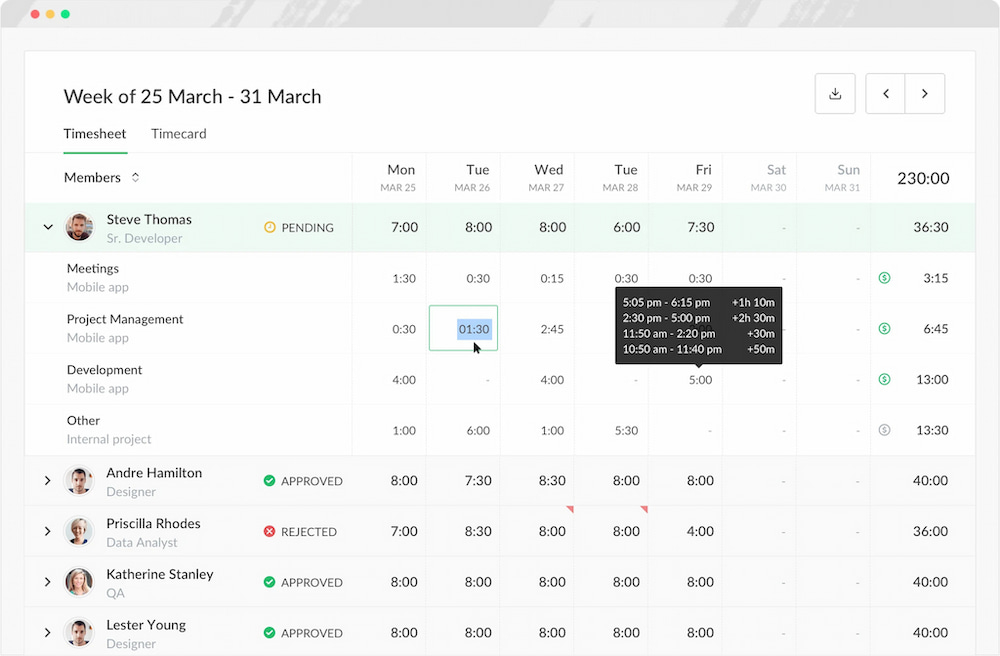
Choosing a time tracker isn’t just about features — it’s about where time actually lives in your workflow. Everhour takes a different approach from most tools. Instead of tracking time as a separate layer, it embeds tracking directly into project management systems like Asana, ClickUp, and Jira.
Time is not recorded around the work — it is recorded inside the work itself. That design changes what time tracking becomes: not a passive log, but part of task execution, budgeting, and reporting.
This review breaks down how that works in practice, where it performs well, and where it creates friction.
What Is Everhour?
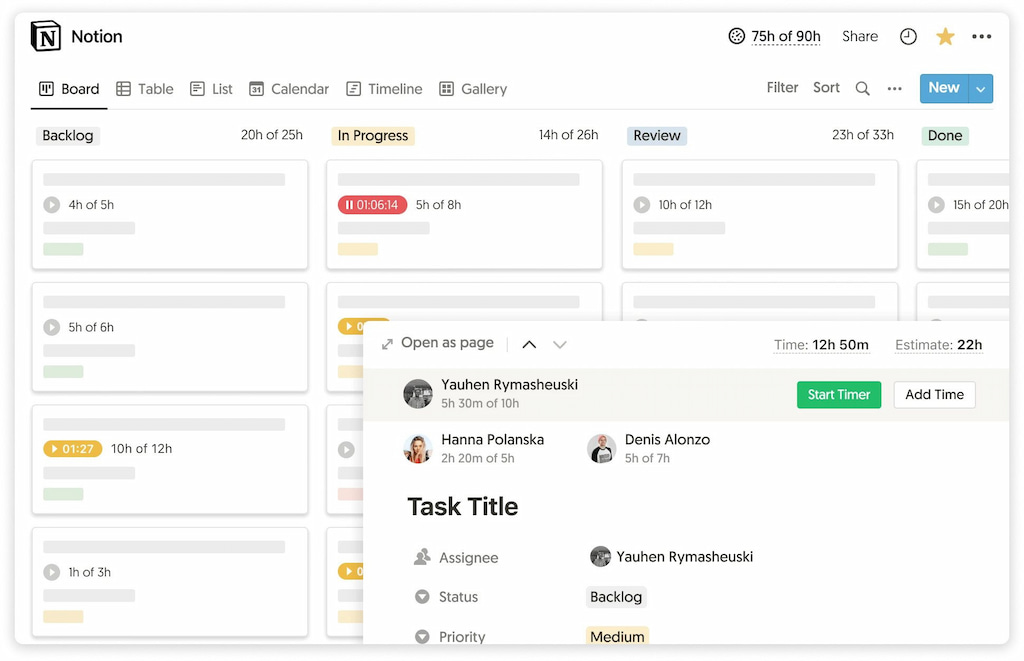
Everhour is a workflow-based time tracking tool built for teams that manage work inside different project management, payroll and CRM apps like Asana, Hubspot, Basecamp, Deel, and many more.
It is best suited for teams that want time tracking directly embedded into tasks and projects, rather than collected passively in the background.
Best for
- Agencies and consulting teams tracking billable client work
- Product and IT teams managing structured project delivery
- Teams that need accurate reporting tied to tasks, budgets, and timelines
Not ideal for
- Teams that want fully automatic, background time tracking
- Companies looking for employee monitoring or activity tracking tools
- Users who prefer minimal manual input or “set and forget” systems
Bottom line
Everhour gives you accuracy and structure in exchange for manual discipline. Unlike automatic trackers, it does not guess what people are doing. It records what they explicitly log inside workflows.
👉 This makes it highly reliable for project tracking, billing, and reporting — but less suitable for teams that want passive or automatic time capture.
Choose Everhour if…
- you want time tracking embedded inside project management tools
- you need structured, task-based reporting for clients or budgets
- you rely on time data for decisions, billing, or planning
Choose another tool if…
- you want fully automatic time tracking without manual input
- you prefer passive productivity tracking
- you want a standalone tracker outside your workflow apps
Core Features of Everhour
Everhour is built around a set of core capabilities that focus less on isolated tracking features and more on how time fits into everyday project work.
Time tracking inside tasks
Everhour allows teams to track time directly within tasks and projects, rather than in a separate system.
This means:
- time entries are tied to specific work items
- tracking happens where work is already managed
- teams don’t need to switch between tools
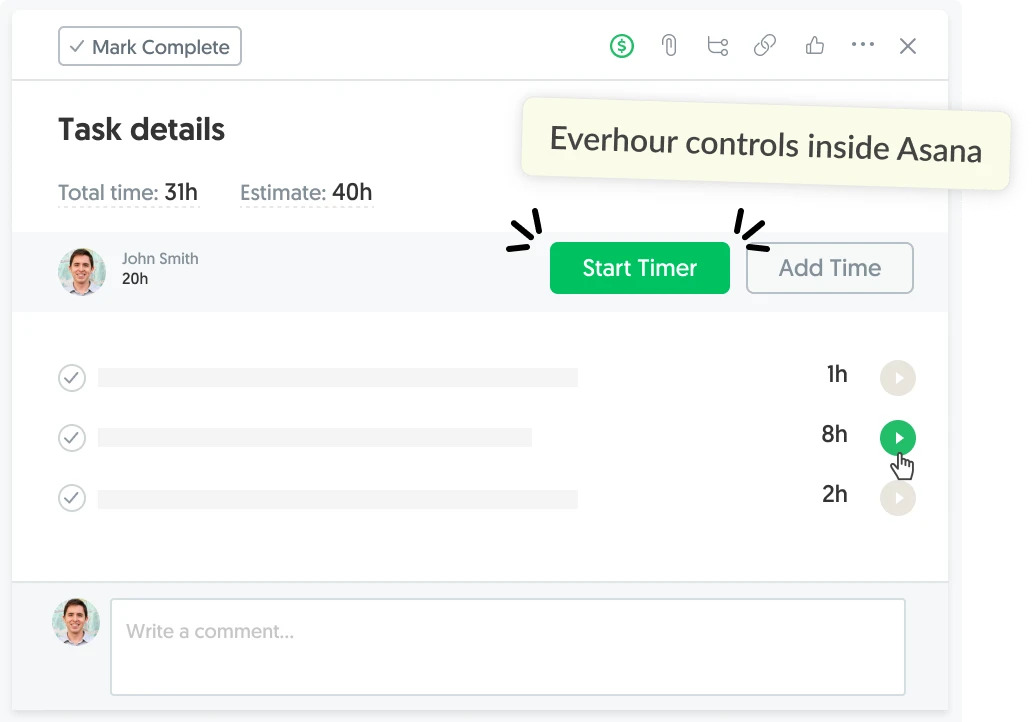
The result is a more structured way of logging time that stays connected to actual project activity.
Having said that, Everhour can also be a standalone time and task management system, thanks to its internal projects.
Reporting and project visibility
Reporting in Everhour is designed to show how time is distributed across projects, tasks, and teams.
It helps teams:
- understand where time is being spent
- compare planned vs actual effort
- track billable and non-billable work
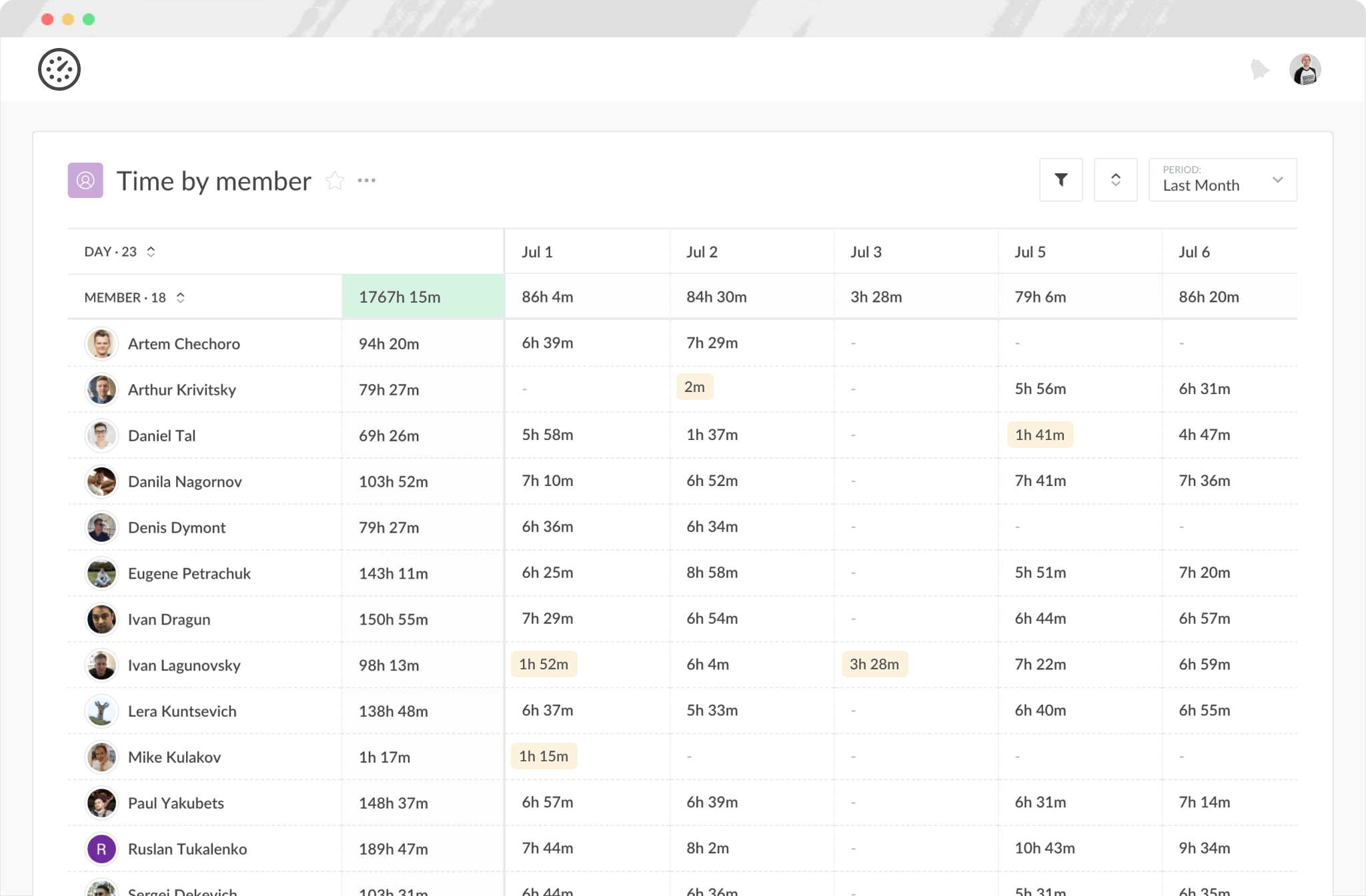
Instead of focusing on complex analytics, the emphasis is on clear project-level visibility.
Budgeting and cost tracking
Everhour includes budgeting tools that connect time tracking to financial outcomes.
Teams can:
- monitor project budgets in real time
- track billable hours against estimates
- understand project cost performance
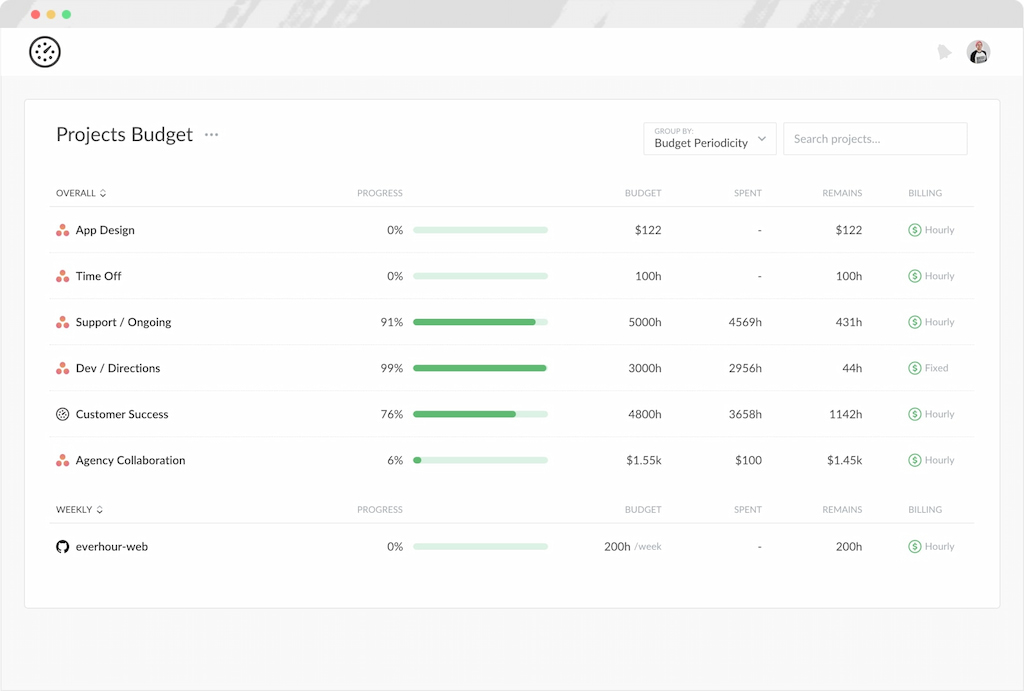
This is especially useful for teams that work on fixed-scope or client-billed projects.
Integrations with existing tools
One of Everhour’s key strengths is its integration with popular platforms. This allows teams to:
- track time without changing their workflow
- log time directly inside task management tools
- keep project management and time tracking aligned
Everhour’s features are not designed as standalone tools. Instead, they work together to support structured, workflow-based time tracking that stays embedded in how teams already manage work.
Integrations and Apps
Everhour is built around the idea that time tracking should not live in a separate tool. Instead, it should be embedded directly into the systems where work already happens. This is where integrations become central — not just as a feature, but as the core of how Everhour works.
Why integrations matter in Everhour
In most time tracking tools, integrations are a convenience feature. In Everhour, integrations are the product structure itself. Without integrations, Everhour is a standalone timer. With integrations, it becomes part of your project management system — where tasks, time, and reporting all exist in one flow.
This changes how teams operate daily:
- work is already structured in tasks
- time is captured inside those tasks
- reporting reflects real execution, not manual reconstruction
👉 The result is less switching between tools and fewer gaps between “what was done” and “what was recorded”.
How integrations change the workflow
When Everhour is connected to other platforms:
- tasks become directly trackable without duplication
- time entries are created inside existing task interfaces
- project managers see time data without leaving their workflow tools
This eliminates context switching and reduces friction between execution and tracking.
Workflow context embedding
Everhour structures data in a continuous flow:
- tasks define work
- time is logged inside tasks
- tasks roll up into projects
- projects feed reporting and budgeting
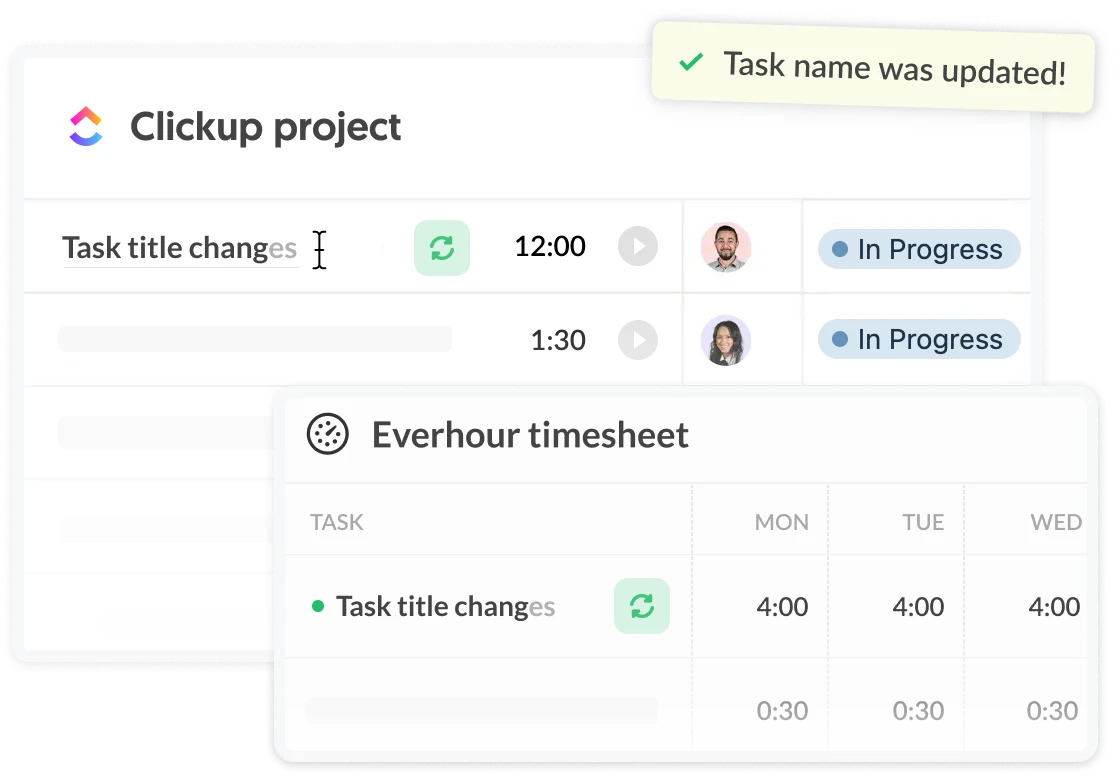
This creates a single connected system where execution and reporting stay aligned.
👉 The key idea: Everhour does not “add tracking to work” — it embeds tracking into work.
Browser extension
The browser extension is used to bring time tracking directly into task interfaces. This extension is available in Chrome, Safari, Opera, Firefox, and Edge, and enables teams to:
- start and stop timers inside project tools
- log time without leaving the current task view
- reduce friction in daily tracking
This helps keep tracking lightweight and embedded in real work rather than handled separately.
Mobile apps
Everhour’s mobile experience supports basic time tracking on the go. Its mobile app is mainly used for:
- logging time outside the desktop environment
- quick updates while away from the main workspace
- keeping project time records up to date in real time
Desktop app
The desktop app provides an additional layer for time tracking and optional functionality. It is typically used for:
- more stable tracking on desktop workflows
- supporting users who prefer a dedicated app environment
- complementing browser-based tracking
How Everhour Works in Practice
Everhour doesn’t sit next to your workflow. It becomes part of it. It becomes part of how teams already plan, execute, and review work — rather than a separate system they manage on the side.
How teams track time day-to-day
On a daily level, team members typically track time while working inside project management tools.
This usually looks like:
- opening a task in tools
- starting a timer or logging time directly within the task
- adding notes or adjusting entries if needed
- moving on to the next task without switching systems
The key idea is that time tracking happens inside the workflow, not outside it.
How managers use reports
Managers don’t usually interact with time tracking on a task-by-task level. Instead, they rely on reports to understand what’s happening across projects.
They typically use Everhour data to:
- compare planned vs actual time spent
- monitor project budgets and progress
- identify overloaded team members or tasks
- review billable vs non-billable time
This turns time tracking data into a project management and decision-making tool, not just a log of hours.
How data flows from tasks to decisions
The value of Everhour comes from how information moves through the system.
It generally follows this flow:
- tasks: time is logged directly where work happens
- projects: time data is grouped into structured workstreams
- reports: data is aggregated into clear project and team views
- decisions: managers use this information to adjust workload, budgets, and timelines
This structure is what makes Everhour more than just a tracker — it becomes a layer between execution and planning.
Real Use Cases
Everhour is used across different types of teams, but the common pattern is the same: structured project work where time needs to be tracked, analyzed, and often billed or reported.
Agencies
Agencies use Everhour mainly for client-facing work where time directly impacts billing and profitability.
➡️ Typical use cases:
- tracking time per client and project
- managing budgets across multiple campaigns
- monitoring profitability per account
- preparing invoices based on tracked hours
IT and product teams
In software and product teams, Everhour is used to understand how effort is distributed across development work.
➡️ Typical use cases:
- tracking time on features, bugs, and tasks
- monitoring sprint or milestone effort
- identifying workload imbalance across engineers or teams
- linking time data to project planning and estimates
Consulting
Consulting teams rely on structured time tracking for accurate client reporting and billing transparency.
➡️ Typical use cases:
- logging hours per client and engagement
- creating detailed activity reports for stakeholders
- tracking utilization across consultants
- ensuring accurate billing for time-based work
Marketing teams
Marketing teams use Everhour to manage campaign execution and coordinate work across multiple contributors.
➡️ Typical marketing time tracking use cases:
- tracking time on content production and campaigns
- measuring effort across design, copy, and strategy
- understanding resource allocation across channels
- improving planning accuracy for future campaigns
Finance and operations teams
Operations-heavy teams use Everhour to connect time data with internal efficiency and cost tracking.
➡️ Typical use cases:
- monitoring internal project costs
- tracking time spent on operational processes
- improving forecasting for recurring work
- analyzing team capacity and workload distribution
Productized service businesses
Teams offering fixed-scope services use Everhour to protect margins and standardize delivery.
➡️ Typical use cases:
- tracking time against fixed-price packages
- understanding cost per delivery unit
- optimizing workflows for repeatable services
- identifying scope creep early
Across all use cases, the pattern is consistent: Everhour is most valuable when time needs to be connected directly to structured work — whether that’s projects, clients, or internal operations.
What Everhour Is NOT
Everhour is built around structured, workflow-based time tracking, which means it fits some use cases better than others. To understand where it works best, it’s useful to clarify what it is not designed to do.
Not designed for employee monitoring
Everhour is not focused on tracking employee behavior or monitoring activity throughout the workday. It does not analyze productivity through passive observation or background tracking.
Instead, it relies on intentional time entries linked to tasks and projects.
Not built for passive tracking
Everhour does not automatically capture all activity in the background. Time tracking is user-driven, which means it reflects how teams choose to log their work rather than collecting continuous activity data.
Not intended as a fully automated tracking system
Everhour is not designed as a “set and forget” solution where time is recorded without user involvement.
It works best in environments where teams operate with structured workflows and actively manage their time entries.
Not a replacement for HR or payroll systems
While Everhour can support billing and budgeting workflows, it is not designed to replace HR or payroll platforms.
It does not handle payroll processing, employee records, or broader HR management functions.
Pros and Cons
✅ Pros
- Strong workflow embedding. Time lives inside tools like Asana, ClickUp, and Jira instead of a separate tracker
- High reporting clarity. Project time, budgets, and billing stay aligned with actual work structure
- Low ambiguity. Time is manually logged, which reduces guesswork and hidden tracking logic
- Strong fit for client work. Especially where billing accuracy matters more than automation
❌ Cons
- Requires discipline. If users don’t log time consistently, reporting quality drops fast
- No passive tracking. Teams expecting automatic data collection will find it limiting
- Less useful outside structured workflows. Works best only when work is already organized in projects
- Not frictionless by design. Intentional tracking adds control, but also overhead
Everhour works best for teams that prefer structured, workflow-based tracking where clarity and control matter more than full automation.
Pricing (What You’re Paying For)
Everhour pricing is less about feature tiers and more about unlocking workflow integration. Without paid plans, Everhour functions as a basic tracker. With paid plans, it becomes embedded inside project management tools — which is where its real value comes from.
Pricing overview
| Plan | Price | Best for | Bottom line |
|---|---|---|---|
| Free | $0 (up to 5 seats) | Individuals, small teams | Limited because integrations are missing |
| Team | $8.50/user/month (annual) | Growing teams, agencies | Where full workflow value unlocks |
| Custom | Custom pricing (50+ seats) | Larger organizations | Support + scaling rather than new features |
Free plan
The free plan is designed for individuals and small teams getting started with time tracking. It includes:
- Basic time tracking
- Projects and tasks
- Reporting
- Data export
💡 Good for basic tracking and simple reporting. But it does not include integrations, which means it does not represent the core Everhour workflow model.
Team plan
The Team plan is the main offering and where Everhour becomes fully functional for most teams. It includes:
- All features
- Native integrations with project management tools
- Billing, budgeting, and invoicing
- SSO and advanced permissions
💡 This plan is typically used by agencies, consulting teams, and product teams that need time tracking embedded into their workflows. This is the real entry point for most teams.
Custom plan
The Custom plan is designed for larger organizations with higher usage needs.
It includes:
- All features
- Volume-based discounts
- Priority support
- Dedicated account management
💡 Designed for scale, not functionality expansion.
Free trial and billing details
- A 14-day free trial with full access to all features
- No credit card required to start
- Annual billing includes a discount compared to monthly pricing
- Minimum seat requirements apply on paid plans (5 seats for Team, 50+ for Custom)
Everhour is not priced by features — it is priced by how deeply it embeds into your workflow.
Everhour vs Alternatives
Everhour is often compared to a wide range of time tracking tools, but the real difference usually comes down to how time is captured and how deeply it connects to workflows. Some tools focus on automation, others on simplicity or monitoring, while Everhour focuses on structured, task-level time capture inside existing project tools.
| Tool | Core approach | Best for | Key difference vs Everhour |
|---|---|---|---|
| Everhour | Project-focused tracking inside PM tools | Agencies, IT, consulting teams | Deep integrations, structured tracking |
| Toggl Track | Simple, timer-first tracking | Freelancers, small teams | More standalone, less workflow embedded |
| Clockify | Free, broad time tracking | Budget-conscious teams | More features at free tier, less integrated feel |
| Harvest | Time tracking + invoicing | Service-based businesses | Stronger invoicing focus, less PM integration |
| TimeCamp | Automatic tracking + monitoring | Automation-focused teams | More passive tracking, less manual structure |
| ClickUp (time tracking) | All-in-one workspace | Teams wanting one system | PM + tracking combined, less specialized |
Where Everhour stands out
Everhour is strongest when time tracking needs to stay tightly connected to work itself. It performs well when teams need:
- time logged directly inside tasks and projects
- accurate billing based on real project structure
- visibility across client work and internal delivery
- reporting that reflects actual workflow execution
This makes it particularly strong for agencies, consulting teams, and product teams working in structured environments.
Where other tools differ
Some alternatives take a different direction:
- Tools like Toggl Track prioritize simplicity and fast manual tracking without requiring a project management layer
- Tools like Clockify focus on accessibility and free usage at scale
- Tools like TimeCamp lean more toward automation and passive tracking, including productivity insights and background data capture
- All-in-one platforms like ClickUp combine task management and time tracking in a single system
These differences usually matter more than raw feature lists when teams choose a tool.
The main distinction is not feature count, but tracking philosophy. Everhour is best suited for teams that want time tracking to live inside structured workflows, while many alternatives lean either toward automation, simplicity, or full workspace consolidation.
FAQs
Yes. Everhour is well suited for teams that need structured time tracking inside project workflows. It works especially well for agencies, consulting teams, and product teams that manage multiple projects and need visibility over time, budgets, and client work.
No. Everhour does not offer fully automatic or passive time tracking. Time is logged manually or started through timers, which means users actively track time as they work rather than having it recorded in the background.
This makes it better suited for structured workflows rather than monitoring-style tracking systems.
Yes, it is commonly used for billing because time is tied directly to tasks and projects. This makes it easier to track billable hours and build invoices based on structured data.
However, accuracy depends on consistency. Since tracking is manual, teams need to log time regularly to ensure reports and billing data remain complete.
Everhour works best for teams that operate with clear projects and client-based work. Typical users include:
– Agencies managing multiple clients and budgets
– Consulting teams tracking billable hours per engagement
– Product and IT teams tracking work across tasks and sprints
– Service-based businesses that need structured reporting
It is less suitable for teams that require fully passive tracking or heavy HR-style workforce management.
The best alternative depends on what a team needs:
Toggl Track — simple, lightweight time tracking for freelancers and small teams
Clockify — free, flexible tracking with broad usage options
Harvest — strong focus on invoicing and client billing
TimeCamp — automatic tracking and productivity insights
ClickUp — all-in-one workspace with built-in time tracking
Each tool differs mainly in whether it prioritizes simplicity, automation, billing, or workflow integration.
Conclusion
Everhour is best understood as a system for structuring time inside work — not tracking work after it happens. It is designed to fit directly into how teams already manage projects, allowing time to be tracked inside tasks, connected to budgets, and reflected in reporting.
This makes it a strong fit for agencies, consulting teams, and product or IT teams that rely on structured project work and need clear visibility over time spent. It is especially useful when time tracking is tied to billing, budgeting, or project performance.
At the same time, it is less suitable for teams looking for fully automatic or background tracking. Everhour relies on intentional time entry, which means its effectiveness depends on how consistently teams log their work.
Overall, Everhour works best when time tracking is treated as part of the workflow itself — not something separate from it.

Maria
A dedicated content enthusiast with extensive experience in international teams and projects of all sizes. Maria thrives on creativity and attention to detail, fueled by a love for fantasy novels, music, classic black-and-white films, and always finding ways to make things better.