


Time Tracking Benchmarks: Accuracy, Compliance, Reporting

Tracking time is easy. Tracking time well is where most teams struggle. Many teams log hours, but few know how accurate, consistent, or usable that data actually is. Without clear time tracking benchmarks, it’s hard to tell whether your time tracking system works — or just collects numbers that don’t hold up in reporting, payroll, or planning.
Time tracking benchmarks solve that problem. They give you a way to measure the quality of your time data, not just the quantity. Instead of asking “are we tracking time?”, the better question becomes “how reliable is the data we’re getting?”
This article breaks down the key time tracking benchmarks teams should care about, what good looks like in practice, and how to improve your tracking setup so the data you collect is actually useful.
What Time Tracking Benchmarks Measure
Time tracking benchmarks focus on the quality of your data, not just whether time gets logged.
At a practical level, they measure four core things:
- Accuracy of recorded time: How closely logged hours reflect actual work, rather than estimates or guesswork
- Consistency of time logging: Whether team members track time regularly and follow the same structure
- Completeness of time data: Whether entries cover all work without gaps, missing days, or partial logs
- Usability of the data: Whether time data can be used directly for reporting, payroll, billing, or planning without heavy cleanup
Together, these benchmarks determine whether your time tracking system produces data you can actually rely on — not just data that exists.
Core Benchmarks for Time Tracking Performance
To understand whether a time tracking system works well, you need to evaluate the quality of the data it produces. These benchmarks focus on how accurate, consistent, and usable that data is in real workflows.
Data accuracy rate
This measures how closely logged time reflects actual work. High accuracy means time entries match what people actually did during the day, not what they estimate later. Accuracy is influenced heavily by how time is captured:
- manual logging tends to introduce estimation errors
- delayed entry increases reliance on memory
- structured or automated capture improves precision by recording work closer to when it happens
Low accuracy doesn’t always mean no data — it usually means the data cannot be fully trusted for planning or billing decisions.
Time entry compliance
This measures how consistently employees actually log their time.
It’s not just about whether time tracking exists, but whether it is used properly across the team. Key indicators include:
- how often time is logged on the same day as the work
- how frequently entries are missing or incomplete
- how often users need to reconstruct time after the fact
Even small compliance issues compound quickly, leading to gaps that distort weekly and monthly reporting.
Reporting completeness
This measures how usable time data is for analysis.
Good reporting completeness means time can be broken down without extra work into meaningful categories such as:
- projects
- clients
- tasks
- teams or departments
When completeness is low, data often exists only at a surface level, forcing teams to export and restructure it before they can answer basic questions like where time actually went.
Payroll and billing readiness
This measures how easily time data can be used for financial processes.
Strong systems allow time data to flow directly into payroll or invoicing with minimal adjustments. Weak systems require manual work, such as:
- correcting missing or inconsistent entries
- reclassifying time into billable categories
- reconciling rates or cost structures after the fact
The more manual intervention required, the further the system is from being operationally reliable.
Benchmarks by Team Type
Time tracking benchmarks vary depending on how teams actually use time data. Different workflows create different expectations for accuracy, structure, and reporting depth.
Agencies and client services
For agencies, time tracking is directly tied to revenue, which makes benchmarks highly financial in nature.
Key metrics include:
- Billable time capture rate
how much of actual client work is successfully tracked and billed - Revenue leakage from missing hours
how much billable time is lost due to incomplete or inaccurate logging
In this context, even small tracking gaps can translate into direct financial loss, so consistency and completeness matter as much as accuracy.
Product and engineering teams
In product and engineering environments, time tracking is less about billing and more about estimation and delivery predictability.
Key metrics include:
- Sprint-level tracking accuracy
how closely logged time aligns with planned sprint work - Estimate vs actual variance
how far actual effort deviates from initial estimates over time
These benchmarks help teams understand planning quality and identify whether estimates are becoming more or less reliable across cycles.
Operations and internal teams
For internal and operations-focused teams, time tracking is mainly used for visibility and resource planning.
Key metrics include:
- Workload distribution visibility
how clearly time data shows who is doing what across the team - Administrative overhead of tracking
how much effort is required to maintain accurate time logs and reporting
Here, the benchmark is less about financial precision and more about whether the system adds clarity or creates extra work.
Benchmarks for Tools and Systems
Different time tracking systems produce very different levels of data quality. Benchmarks here help compare how reliable, complete, and usable the output is depending on the type of tool used.
Manual tracking systems
Manual systems (paper timesheets, spreadsheets, or after-the-fact logging) tend to produce the least reliable data.

Typical benchmarks:
- Higher error rates
Time is reconstructed from memory, which increases estimation mistakes and inconsistencies - Low compliance consistency
Entries are often delayed, incomplete, or missing entirely - Weak reporting structure
Data usually needs manual cleanup before it can be used for analysis or reporting
These systems can work for very small teams, but they rarely scale without significant data quality issues.
Basic digital trackers
Basic tools (simple timers or standalone time tracking apps like Everhour) improve structure, but still rely heavily on user discipline.
Typical benchmarks:
- Improved consistency
real-time timers reduce some delays and missing entries - Still dependent on user discipline
accuracy drops when users forget to start/stop timers or log time manually - Moderate reporting quality
data is more structured than manual systems but often limited in breakdown depth
These tools improve visibility but don’t fully solve data reliability problems.
Integrated workflow-based tools
Integrated systems embed time tracking directly into work tools and processes.
Typical benchmarks:
- Higher data completeness
time is captured closer to actual work and tied directly to tasks or projects - Better alignment with tasks and projects
time data automatically follows existing workflow structure - Reduced reporting overhead
less manual exporting or reformatting needed to analyze data
These systems generally produce the most usable benchmarks because time tracking becomes part of the workflow rather than a separate activity.
Common Problems That Distort Benchmarks
Time tracking benchmarks depend entirely on the quality of the data behind them. In practice, a few recurring issues can quickly distort results and make benchmarks unreliable.
Forgetting to log time
This is one of the most common problems across teams. When employees don’t log time as they work, they tend to fill it in later from memory. That leads to missing entries, rough estimates, and uneven distribution of hours across tasks.

Even if total hours look correct, the detail behind them becomes unreliable, which weakens any analysis built on top of it.
Inconsistent categorization of work
Time data needs structure to be useful. When team members log similar work under different projects, tasks, or categories, the data becomes fragmented.
As a result, reports no longer reflect reality clearly. Teams often need to manually regroup or clean data before they can answer simple questions about where time actually went.
Over-reliance on estimates
Estimates are useful for planning, but they often get treated as a substitute for actual tracked time. When this happens, reports reflect assumptions rather than real activity. Over time, this makes it harder to understand true effort, identify inefficiencies, or improve planning accuracy.
Lack of standardized workflows
Without clear rules, time tracking becomes inconsistent across the team. Different people log time in different ways, at different times, and with different levels of detail.
This creates data that may look complete on the surface but lacks internal consistency, making benchmarks harder to trust.
How to Improve Time Tracking Benchmarks
Improving time tracking benchmarks is less about adding more features and more about tightening how time is captured, structured, and reviewed. Small changes in process usually have the biggest impact on data quality.
Standardize logging rules across teams
Start by defining clear expectations for how time should be tracked. Teams should know:
- when to log time (in real time vs end of day)
- what level of detail is required
- how to categorize work consistently
Without shared rules, even good tools produce inconsistent data.
Reduce manual input where possible
The more your system depends on memory, the lower your accuracy will be. Reducing manual effort can include:
- using work timers instead of after-the-fact entry
- pre-filling tasks or categories
- minimizing repetitive input
The goal is to capture time as close to the actual work as possible.
Align time tracking with actual workflows
Time tracking works best when it follows how people already work.
Instead of forcing users to switch contexts:
- connect time tracking to tasks and projects
- keep logging inside the tools teams already use
- avoid separate systems that require duplicate input
This reduces friction and improves both compliance and accuracy.
Introduce review and approval cycles
Even with good and positive tracking habits, time data still needs validation. Regular review cycles help:
- catch missing or incorrect entries early
- ensure consistency across the team
- prepare time data for payroll or reporting
Weekly timesheet reviews are usually enough to maintain data quality.
Use integrated systems instead of isolated trackers
Standalone tools often create disconnected data that requires extra work to use.
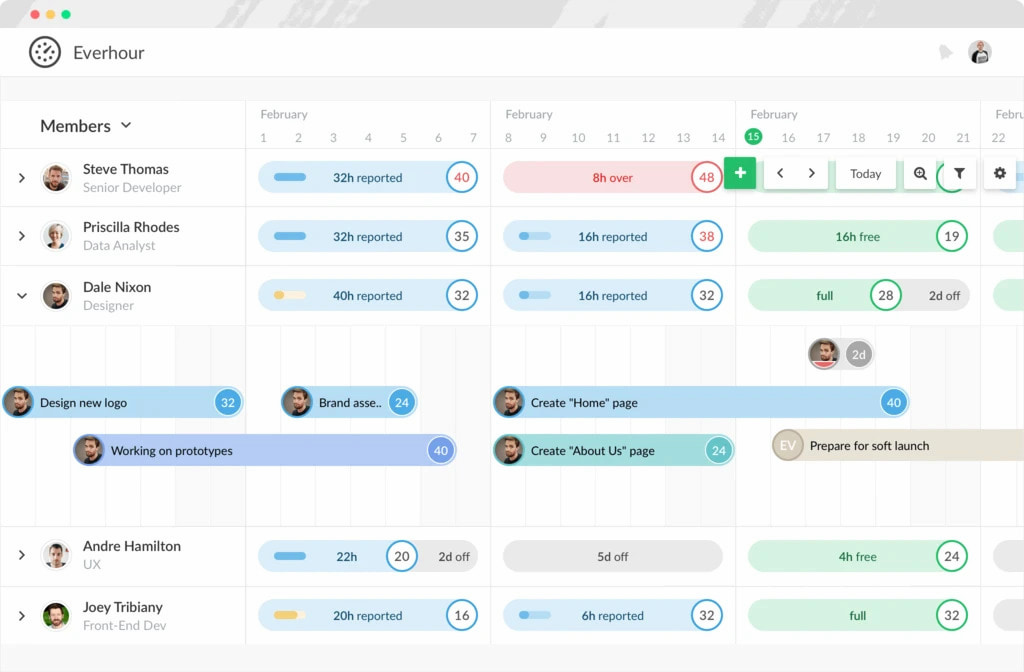
Integrated tools like Everhour‘s time tracker connect professional services time tracking directly to projects, tasks, and reporting workflows. This reduces manual steps, improves data completeness, and makes time data immediately usable without heavy cleanup.
Conclusion
Time tracking benchmarks define how reliable your time data actually is. If accuracy, consistency, and structure are weak, the data becomes hard to use for reporting, payroll, or planning. Improving benchmarks comes down to clear rules, less manual input, and better alignment with real workflows.
Tools like Everhour help by turning time tracking into a structured, consistent process — not just a set of entries.

Maria
A dedicated content enthusiast with extensive experience in international teams and projects of all sizes. Maria thrives on creativity and attention to detail, fueled by a love for fantasy novels, music, classic black-and-white films, and always finding ways to make things better.