


Task Batching: What It Is, Benefits, and How to Do It

Some workdays feel busy without being particularly productive. You answer a few emails, switch to a project task, respond to a message, review a document, and then return to the original task—often having to figure out where you left off.
Task batching offers a way to reduce this constant switching. Instead of handling similar activities whenever they appear, you group them together and complete them in dedicated sessions. This can make routine work easier to organize, protect time for focused tasks, and reduce the mental effort involved in moving between different types of work.
In this guide, we’ll explain how task batching works, explore practical examples, and show how to build a batching routine that fits your workload.
TL;DR: Key Takeaways
- Task batching means grouping similar tasks and completing them in a dedicated period rather than scattering them throughout the day.
- The main benefit is reduced context switching, which can help you maintain focus and spend less time getting back into tasks.
- Common examples include processing emails, creating content, reviewing documents, and handling administrative work in batches.
- Effective batching starts with identifying compatible tasks, estimating their duration, and scheduling realistic work sessions.
- Not every task belongs in a batch. Urgent requests, time-sensitive work, and activities requiring immediate responses may need a different approach.
What Is Task Batching?
Task batching is a productivity technique that groups similar activities into dedicated work sessions. Instead of switching between unrelated tasks throughout the day, you complete activities that require similar skills, tools, or attention together.
For example, rather than checking email every few minutes, you might schedule three sessions to read and respond to messages. You can use the same approach for reviewing documents, processing invoices, or updating project records.
By reducing context switching, task batching helps you work more efficiently, especially when handling recurring administrative tasks and smaller activities that interrupt focused work. The goal isn’t to group everything indiscriminately, but to create useful clusters without compromising priorities or deadlines.
How task batching works
A typical task batching routine involves four steps:
- Identify similar tasks. Look for activities that share a workflow, purpose, or set of tools.
- Group compatible activities. Create batches based on the type of work or context they require.
- Schedule dedicated sessions. Set realistic time slots that account for deadlines and workload.
- Work through each batch. Complete the grouped tasks before switching to another activity, unless something urgent comes up.
For example, a content manager might schedule separate sessions for keyword research, content brief reviews, and article updates rather than switching between research, editing, communication, and planning throughout the day.
Batch sizes depend on the work involved: some activities take 20 minutes, while others need an hour or more. Keep the schedule structured but flexible.
Task batching vs. multitasking
Multitasking involves handling several activities at once or frequently switching between them. Task batching groups similar activities so you can complete them consecutively with fewer interruptions.
For example, responding to emails between writing paragraphs repeatedly interrupts the writing process. Handling email in a separate session lets you focus on each activity without constantly shifting attention.
Task batching vs. time blocking
These techniques complement each other but serve different purposes:
- Task batching determines which activities to group based on their similarities.
- Time blocking assigns specific periods on your calendar to particular activities.
You can combine them by grouping administrative tasks and scheduling a 30-minute block each afternoon to complete them. Time blocking provides the schedule; task batching determines which tasks belong together.
Benefits of Task Batching
Task batching makes everyday work more manageable by reducing unnecessary transitions and giving recurring activities a clearer place in the workday.
Reduce context switching
Switching between unrelated tasks requires employees to redirect their attention and adjust to different workflows. Batching similar activities reduces these transitions. For example, handling several project updates in one session is less disruptive than interrupting focused work every time a new update arrives.
Improve focus and concentration
Dedicated sessions make it easier to concentrate on one type of work without anticipating unrelated tasks. Employees can protect uninterrupted time for activities such as writing, analysis, planning, and problem-solving.
Save time on repetitive tasks
Routine activities often involve the same steps and tools. Processing invoices, reviewing submissions, or updating records in one session reduces the time spent repeatedly opening documents, switching applications, and preparing to resume the same workflow.
Make workloads easier to organize
Grouping tasks by type helps employees estimate how much time different activities require and plan their responsibilities accordingly. Managers can also identify workload patterns. If administrative tasks consume a significant share of several employees’ time, they may need to redistribute that work or simplify the process.
Create more predictable work routines
Recurring batches give activities that would otherwise interrupt the day a designated place in the schedule. Employees might reserve mornings for focused work, check messages at set intervals, and handle administrative tasks later in the day. These routines make it easier to protect time for priorities while setting clearer expectations about availability.
Examples of Task Batching at Work
Task batching works across different roles and industries. It’s particularly useful for recurring activities that require similar tools, information, or skills.
Processing emails and messages
Instead of responding to every notification, employees can schedule dedicated inbox sessions throughout the day.
For example, a team member might check and process emails three times a day: in the morning, after lunch, and before finishing work. This reduces interruptions while keeping communication manageable. Teams should also agree on response-time expectations and use a separate channel for urgent issues.
Scheduling meetings and handling follow-ups
Meeting administration involves several related activities, including checking availability, sending invitations, preparing agendas, sharing notes, and following up on action items.
A project coordinator can group these tasks into one session rather than handling each request separately throughout the day.
Creating and editing content
Content teams can batch work by production stage instead of completing every step for one article before starting another. For example, a content manager might:
- Research keywords and topics for several articles.
- Prepare multiple content briefs.
- Edit several drafts in one session.
- Update existing articles and check internal links together.
Working on similar activities consecutively can also help maintain consistent editorial standards.
Reviewing documents and approving requests
Managers, editors, and HR teams often review similar documents or requests. Grouping these activities can make reviews more consistent and reduce unnecessary context switching.
For example, an HR manager might review leave requests, verify employee documents, and approve routine administrative changes in designated sessions. Time-sensitive requests should still be handled promptly.
Processing invoices and administrative tasks
Finance and operations teams can batch recurring activities such as invoice processing, expense reviews, record updates, and routine reporting.
For example, an employee might process all incoming invoices before moving on to expense reports. Keeping the relevant documents and systems at hand reduces repetitive preparation and makes inconsistencies easier to spot.
Completing similar project tasks
Task batching also applies to project work when activities share tools or require similar skills. A designer might resize images or export assets for several deliverables together, while a developer might group code reviews or routine maintenance tasks.
However, batching shouldn’t delay dependent tasks or prevent other team members from moving forward. The schedule should support the project workflow, not dictate it.
How to Batch Tasks Effectively
Effective task batching starts with understanding your workload. The goal is to group compatible activities without creating delays, unrealistic schedules, or unnecessary work.
Identify and group similar tasks
Review your regular responsibilities and look for activities that share the same tools, context, or skills. Common candidates include:
- Responding to emails and routine messages.
- Reviewing documents and reports.
- Updating project records and task statuses.
- Processing invoices and expense reports.
- Preparing content and presentations.
You can group tasks by type (writing, reviewing, scheduling), context (the same project or client), or tools (activities requiring the same software or equipment). Avoid batching tasks that depend on immediate feedback or have conflicting deadlines.
Estimate the time required
Estimate how long each batch will take based on its size and complexity. For example, processing routine emails might take 30 minutes, while reviewing several lengthy documents could require an hour or more.
Use previous experience to set realistic limits and leave room for unexpected delays. If a batch regularly runs over, split it into smaller sessions.
Schedule dedicated sessions
Assign time slots based on task urgency, importance, and the attention required. For example, you might handle messages at the beginning and end of the day, reserve mornings for focused project work, and schedule administrative tasks after lunch.
Account for meetings, deadlines, and dependencies so batching doesn’t delay other people’s work.
Set priorities and stopping points
Decide which tasks must be completed during each session and which can wait. Define what a finished batch looks like: an email session, for example, might end when all priority messages have been answered and remaining requests have been assigned or scheduled.
Clear stopping points prevent routine activities from taking over the workday.
Minimize interruptions
During each session, mute nonessential notifications, close unrelated tabs, and let colleagues know when you’ll be available again if necessary. Keep an appropriate channel open for urgent requests, but avoid switching tasks unless there’s a good reason.
Review and adjust your routine
Try your batching schedule for a week or two, then assess which sessions work and which consistently overrun or create bottlenecks. You might find that grouping emails is effective but batching client calls makes scheduling harder.
Adjust the routine to fit your actual workload rather than forcing every activity into a batch.
Task Batching Techniques and Methods
Task batching can take different forms depending on the type of work, employee schedules, and available flexibility.
Themed days
Themed days dedicate particular days or larger parts of the week to specific activities. For example, a marketing team might reserve Mondays for planning, Tuesdays and Wednesdays for content production, Thursdays for campaign coordination, and Fridays for reporting.
This approach reduces changes in focus across the week but requires flexibility for urgent requests and dependent tasks.
Time-based task batching
Time-based batching groups similar activities into recurring sessions throughout the day or week. Employees might check messages three times a day, process administrative requests each afternoon, or review reports every Friday. It’s easy to introduce because it doesn’t require restructuring the entire workweek.
Energy-based batching
Energy-based batching schedules tasks according to the concentration and mental effort they require. Employees can reserve their most productive hours for writing, analysis, or problem-solving, while grouping routine administrative work into periods when their energy is lower.
This is particularly useful for roles that combine demanding creative work with repetitive responsibilities.
Batching recurring administrative work
Employees can group routine activities such as updating records, filing documents, processing expenses, and preparing reports into regular sessions.
This keeps small obligations from interrupting more demanding work and makes recurring responsibilities easier to manage.
Combining task batching with time blocking
Task batching determines which activities belong together; a time blocking template assigns them calendar slots. For example, a content manager might schedule research from 9:00–10:00, writing from 10:30–12:00, and email and administrative tasks from 15:00–15:30.
Together, the techniques provide structure while leaving room for breaks, meetings, and unexpected work.
Task Batching Tools
Task batching doesn’t require a specialized productivity app. A calendar and task list are often enough to get started, while additional tools can help organize work, coordinate responsibilities, and track how time is spent.
Task and project management tools
Task management platforms help employees organize activities, assign responsibilities, set deadlines, and group related work. Labels, categories, filters, and recurring tasks make it easier to identify activities that belong in the same batch.
For teams, project management tools also provide visibility into task status and dependencies, helping employees avoid delaying work that others depend on.
Calendars and scheduling apps
Calendar apps let employees reserve dedicated periods for specific batches, such as email, administrative work, reporting, or focused project activities.
Shared calendars help teams coordinate availability and avoid scheduling conflicts with meetings or collaborative work.
Time tracking tools
Time tracking tools show how long different activities actually take. By tracking time against projects and tasks, teams can compare estimates with actual hours and identify work that regularly takes longer than expected.
For example, Everhour‘s time tracker lets teams track time on tasks and projects, compare tracked hours with estimates, and review time reports. Integrations with tools such as Asana, ClickUp, and Jira make it possible to track work within existing project workflows.
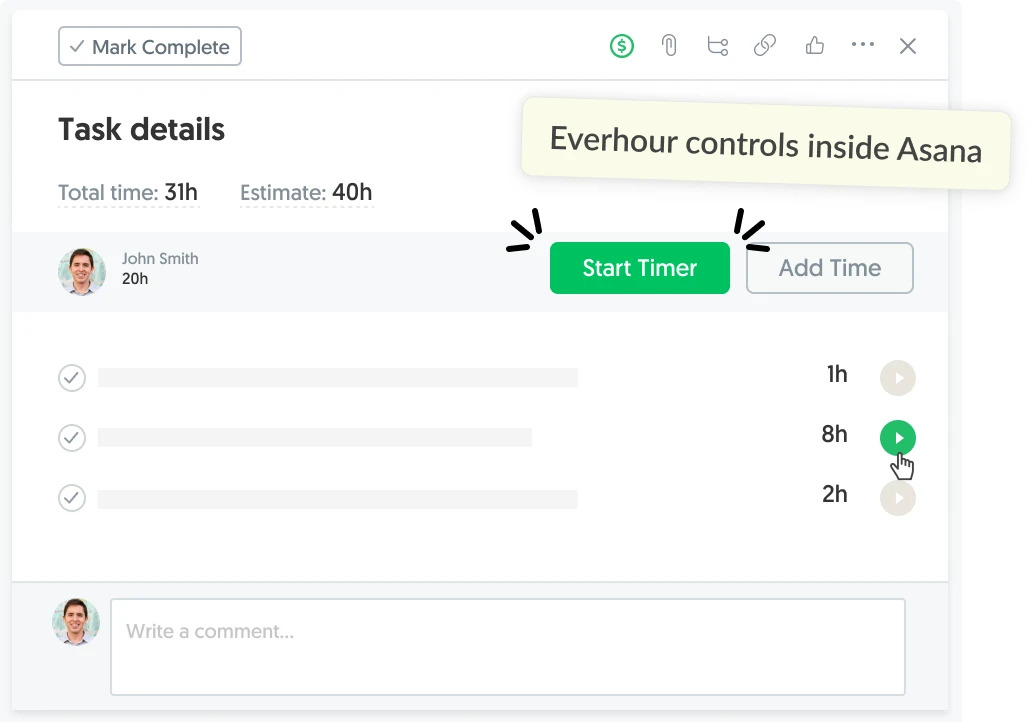
These insights help employees create more realistic batching schedules and identify time-consuming activities that may need to be simplified.
Automation tools
Automation tools can reduce repetitive work before it needs to be batched. Employees can use them to sort incoming messages, generate recurring reports, send reminders, or transfer information between applications.
They’re particularly useful for predictable administrative processes, but shouldn’t replace human review when tasks require judgment or decision-making.
Frequently Asked Questions
An example of task batching is setting aside two or three periods during the workday to process emails instead of responding to every message as it arrives. Other examples include reviewing several documents in one session, preparing multiple content briefs together, or processing invoices during a dedicated administrative block.
Task batching is often more effective than frequent multitasking because it reduces the need to switch between unrelated activities. Instead of repeatedly redirecting attention, employees complete similar tasks consecutively. However, batching isn’t suitable for every responsibility, particularly work that requires immediate responses.
There is no fixed number. The right batch size depends on task complexity, available time, and how similar the activities are. A session might involve several small administrative tasks or just two or three larger activities. Focus on creating manageable groups that can be completed without rushing.
A batching session can last anywhere from 15 minutes to a couple of hours, depending on the work involved. Short sessions may be sufficient for email or routine updates, while content production or document reviews may require more time. Experiment with different durations and adjust based on concentration and workload.
No. Task batching is particularly useful for recurring activities and work that involves similar processes, but it may be less suitable for roles with frequent urgent requests or unpredictable responsibilities. Customer support, incident response, and other reactive work often require more flexibility.
Task batching groups similar activities together, while time blocking assigns specific periods to tasks or activities on a calendar. The two techniques can be combined: employees first decide which tasks belong together, then schedule a dedicated session to complete them.
Yes. Task batching determines which activities to group, while the Pomodoro technique structures focused work into short intervals, traditionally 25 minutes followed by a five-minute break. Employees can use Pomodoro intervals to work through a batch of similar tasks, taking longer breaks between sets of intervals.

Maria
A dedicated content enthusiast with extensive experience in international teams and projects of all sizes. Maria thrives on creativity and attention to detail, fueled by a love for fantasy novels, music, classic black-and-white films, and always finding ways to make things better.