


Notion vs Obsidian: Key Differences, Pros, and Best Use Cases

Choosing the right note-taking and knowledge management tool can make a big difference in how you organize your thoughts, projects, and research. Notion vs Obsidian are two of the most popular options, but they take very different approaches. Notion focuses on a flexible all-in-one workspace, combining notes, databases, and collaboration in a single interface. Obsidian, on the other hand, is a markdown-based, local-first tool built around linking ideas and creating a personal knowledge graph.
In this article, we’ll compare Notion and Obsidian across features, usability, collaboration, integrations (for example, Notion’s time tracking integration) and workflow flexibility. By the end, you’ll have a clearer idea of which tool fits your needs best—whether you’re managing personal notes, creative projects, or a full-scale knowledge system.
❓ What Is Notion
Notion is an all-in-one workspace designed to help people organize information in one place. It combines notes, documents, databases, and lightweight project management tools into a single, flexible system.
At its core, Notion works with blocks. Every piece of content—text, headings, checklists, tables, images—lives as a block that you can move, nest, or reuse anywhere. This makes it easy to structure information visually and adapt pages as your needs change.
![how to use notion: guide to setup, productivity, and time tracking [2025]](https://everhour.com/blog/wp-content/uploads/2025/09/notion-block-1-1024x640.jpg)
🚀 Notion is especially popular with teams and individuals who want:
- shared notes and documentation
- simple project and task tracking
- databases for content, research, or planning
- a clean, customizable workspace without technical setup
Because Notion is cloud-based, collaboration comes naturally. Multiple people can edit the same page, leave comments, assign tasks, and see updates in real time. This makes it a common choice for startups, content teams, product managers, and anyone working across roles.
That flexibility is also Notion’s defining trade-off. While it can do many things, it relies heavily on manual structure. Users often need to design their own systems—pages, databases, and workflows—from scratch, rather than following a predefined method.
❓ What Is Obsidian
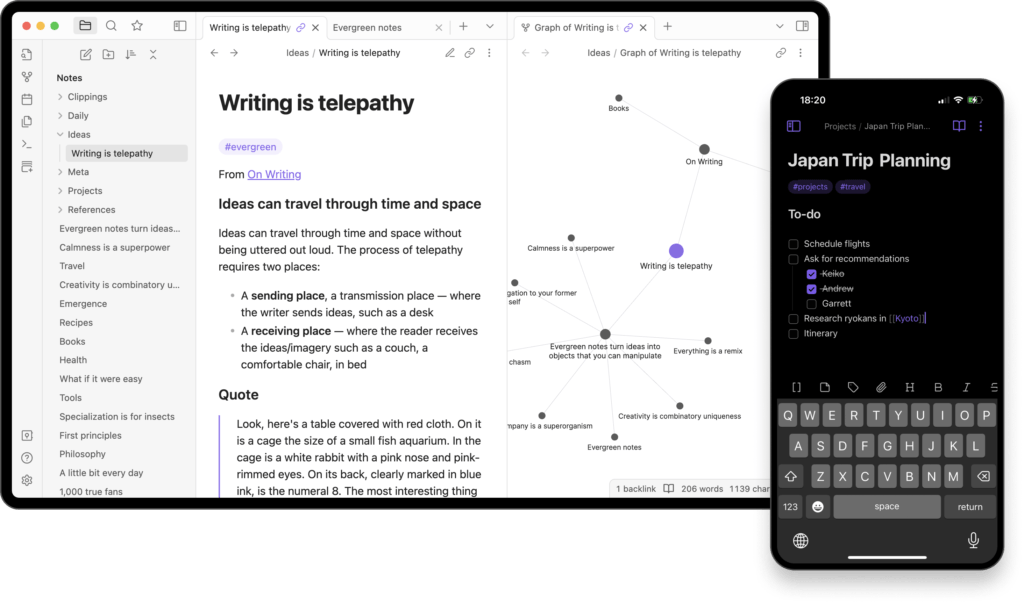
Obsidian is a note-taking app built around local files and linked thinking. Instead of storing your content in the cloud by default, Obsidian works with plain text Markdown files saved on your device.
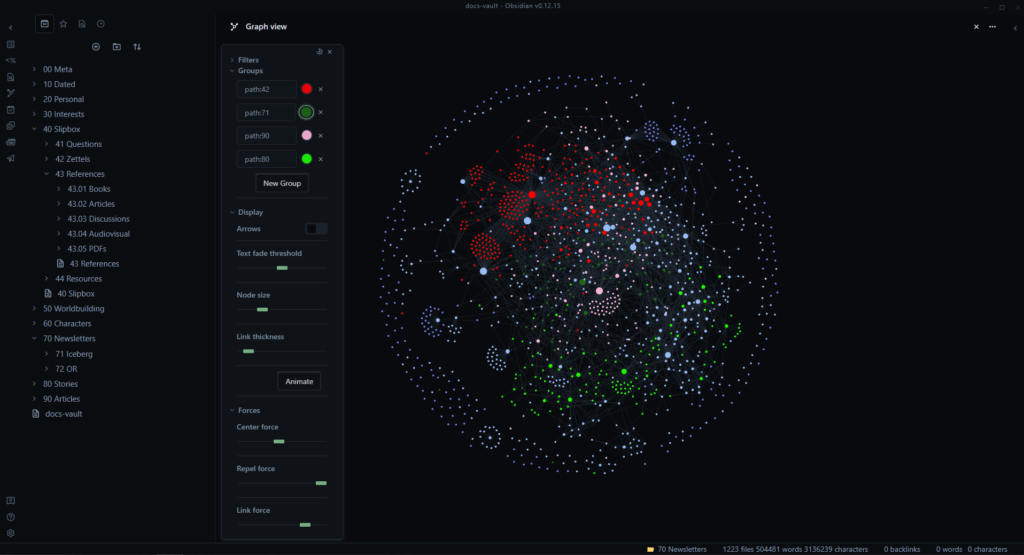
The core idea behind Obsidian is connections. Notes aren’t meant to sit in isolation. You link ideas together using internal links, and over time those links form a network of thoughts. Obsidian visualizes this through a graph view, which shows how notes relate to each other and helps surface patterns you might not notice otherwise.
🚀 Obsidian works best for people who:
- write and think a lot (researchers, writers, students)
- want long-term knowledge storage, not just quick notes
- prefer bottom-up organization instead of predefined structure
- care about data ownership and offline access
Unlike Notion, Obsidian doesn’t try to be an all-in-one workspace. There are no built-in databases, task boards, or team collaboration features out of the box. Instead, Obsidian stays lightweight and extensible. Users can add functionality through plugins, tailoring the app to their own way of thinking rather than adapting to a preset system.
This makes Obsidian feel more personal and powerful for deep work—but also less guided. There’s a learning curve, especially if you’re new to Markdown or knowledge-graph style note-taking.
🗂 Note-Taking and Content Organization
Notion: structured pages and databases
Notion uses pages, sub-pages, and databases to organize information. You can nest content and use Notion templates for:
- Meeting notes
- Project docs
- Research or personal writing
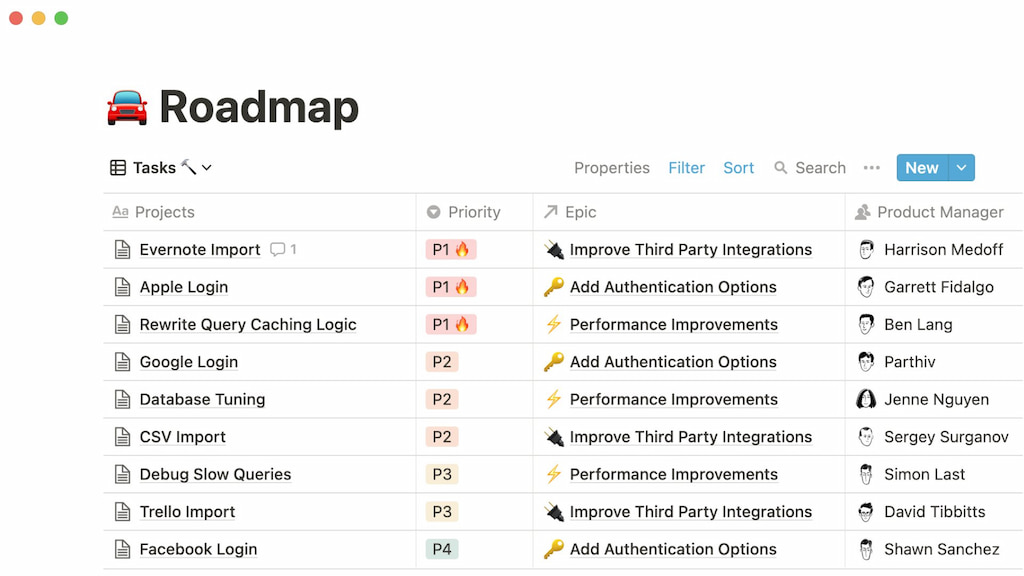
Databases let you filter, tag, and view notes in tables, boards, or calendars. It’s great for clear structure, but big setups can feel rigid.
Obsidian: linked notes and graph view
Obsidian uses Markdown files that connect with backlinks. The graph view shows relationships between notes, which is ideal for research or building a personal knowledge base.
You have more freedom, but you need to decide how to link and organize your notes yourself.
🤔 Summary
- Notion: best for structured, visual organization and templates.
- Obsidian: best for connecting ideas and flexible, non-linear note-taking.
🔗 Linking and Knowledge Management
Notion: relational databases and linked content
Notion uses linked databases and relational properties to connect projects, tasks, and notes. You can:
- Link a note to multiple projects or tasks
- Track dependencies across content
- Build dashboards showing related information
It works well for teams and structured workflows but is less suited for free-form knowledge exploration.
Obsidian: networked, bidirectional knowledge
Obsidian focuses on bidirectional links between notes, creating a web of ideas. Features like Zettelkasten-style organization make it ideal for:
- Long-term knowledge building
- Research projects
- Personal learning networks
You can see connections in the graph view, which helps spot patterns and relationships you might otherwise miss.
🤔 Summary
- Obsidian: best for non-linear knowledge growth, idea networks, and research-heavy workflows.
- Notion: best for structured knowledge, project documentation, and team collaboration.
👥 Collaboration and Sharing
Notion: team-friendly collaboration
Notion is built for teams to work together in real time. Features include:
- Shared pages and databases for projects and documentation
- Comments and mentions to give feedback directly in context
- Permissions and access controls to manage who sees or edits what
It’s ideal for project coordination and Notion project management, team knowledge bases, and structured workflows.

Obsidian: personal first, team optional
Obsidian is primarily designed for personal knowledge management. Collaboration is possible via:
- Syncing vaults using Obsidian Sync or cloud services
- Sharing notes as markdown files or PDFs
- Git-based workflows for tech-savvy teams
It’s better for individual research, personal Zettelkasten systems, and independent projects, though teams can use it with extra setup.
🤔 Summary
- Notion: best for team collaboration, shared documentation, and structured workflows.
- Obsidian: best for personal note-taking and knowledge management, with team collaboration as a secondary option.
🔍 Search, Tags, and Metadata
Notion: structured filters and properties
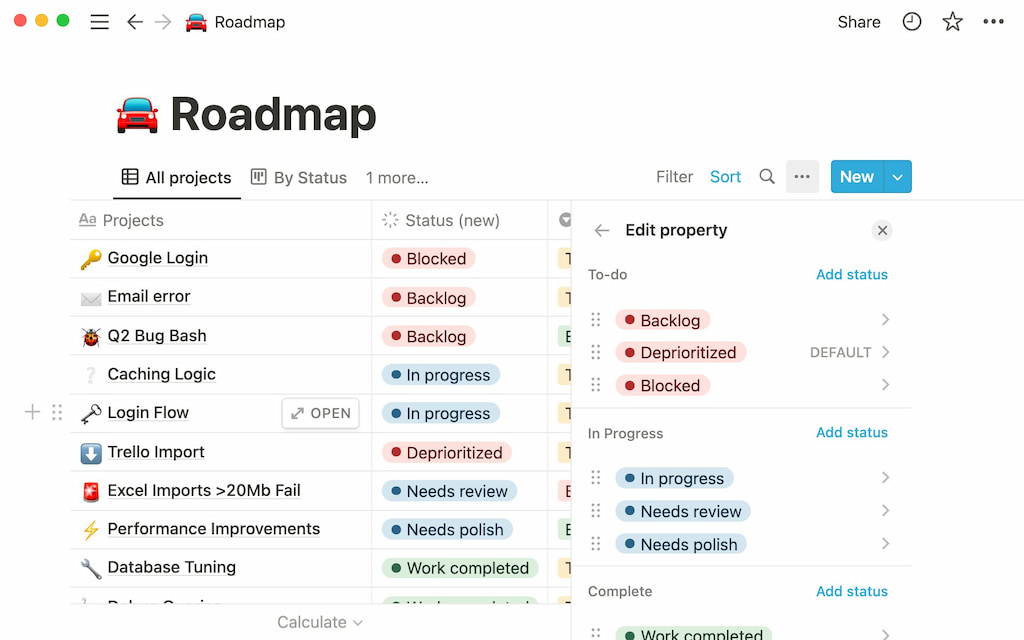
Notion uses databases, tags, and inline properties to organize and locate content:
- Filter and sort database entries to see exactly what you need
- Add tags or categories to pages and tasks for easier grouping
- Use inline properties to add extra context directly in a page
This works well for structured content where you know the fields you want to search or filter by.
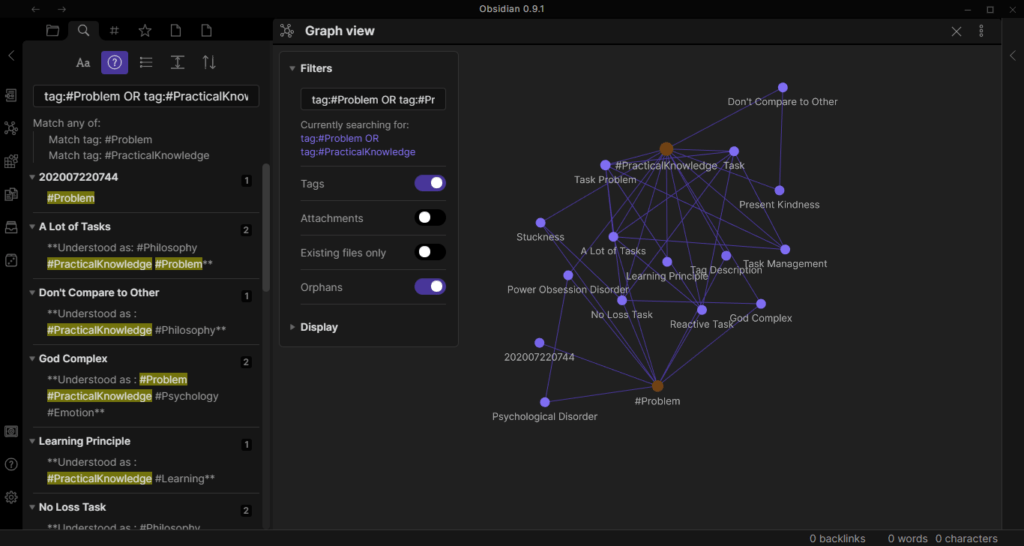
Obsidian: networked search and backlinks
Obsidian focuses on flexible, networked knowledge:
- Tag notes for quick grouping
- Search across all markdown files, including full text
- Backlinks automatically show which notes link to the current note
- Metadata in YAML frontmatter allows custom properties for advanced organization
This makes it perfect for exploring ideas, connecting thoughts, and seeing relationships in your notes.
🤔 Summary
- Notion: excels at structured, filterable content in databases.
- Obsidian: excels at discoverability and connected knowledge with tags, backlinks, and metadata.
⚙️ Extensibility and Integrations
Notion: API and third-party integrations
Notion allows you to connect with external tools and reuse templates:
- Use the Notion API to sync data with apps like Slack, Google Calendar, Zapier, or Everhour‘s time tracker for Notion time tracking
- Access a growing library of pre-built templates for project management, notes, and workflows
- Third-party Notion integrations can automate tasks or pull data into Notion databases
This is ideal for teams or individuals who rely on structured workflows and multi-app setups.
Obsidian: plugins and community-driven extensions
Obsidian focuses on local, flexible customization:
- Install community plugins for advanced note linking, task management, or visualization
- Customize the interface with themes and custom CSS
- Build personal workflows for Zettelkasten, journaling, or research tracking
This approach works best for power users who want full control over how their knowledge system behaves.
🤔 Summary
- Notion: strong for integrating structured workflows with other apps like Everhour.
- Obsidian: strong for personal customization and extending note-taking power through plugins and themes.
💰 Pricing Overview
| Plan | Notion | Obsidian |
|---|---|---|
| Free |
€0 / month per member Personal use Notion AI trial Basic forms & sites Calendar, Mail (Gmail sync) Databases with subtasks, dependencies, custom properties |
Free for individuals Local markdown notes Backlinks & graph view Community plugins |
| Plus / Sync |
€9.50 / month per member Everything in Free Unlimited collaborative blocks & file uploads Unlimited charts, custom forms & sites Basic integrations |
$4 USD / month per user (billed annually) Sync notes across devices End-to-end encryption Version history Collaborate on shared vaults Priority support |
| Business / Publish |
€19.50 / month per member Everything in Plus SAML SSO Granular database permissions Private teamspaces & conditional forms Premium integrations |
$8 USD / month per site (billed annually) Publish notes to web with customizable themes Graph & full text search Priority support |
| Enterprise / Catalyst | Custom pricing, scalable & secure, dedicated support |
$25 USD one-time payment Early access to beta versions Community badges & VIP channel |
| – / Commercial | – | $50 USD per user per year |
🚀 Use Cases and Examples
🧠 Personal productivity
Notion is great if you want everything in one place. Tasks, notes, goals, and habits can live in the same workspace using databases and templates. It’s ideal for planning weeks, tracking projects, or creating dashboards that show multiple areas of life.
Obsidian works best for thinking, reflecting, and writing. Daily notes, linked ideas, and lightweight to-do lists help clarify thoughts without needing strict structure.
👥 Team knowledge management
Notion shines for teams. Shared workspaces, permissions, comments, and databases make it easy to create wikis, onboarding hubs, and documentation everyone can maintain. Startups and remote teams often use it as a single source of truth.
Obsidian is better for small teams or individuals who value local files and control. While Sync allows shared vaults, it’s not built for large-scale collaboration.
📚 Research and writing
Obsidian excels at research-heavy work. Bidirectional links, backlinks, and the graph view make it easy to connect ideas and spot patterns over time—perfect for researchers, writers, and Zettelkasten users.
Notion works for structured research like reading lists, sources, and organized notes, but it’s less flexible for non-linear thinking or idea exploration.
🗂️ Project planning
Notion is strong for projects with clear steps, deadlines, and ownership. Combine tasks, timelines, documents, and resources in one place for personal or team projects.
Obsidian can support project planning, but it takes more manual setup. It suits knowledge-driven projects like long-term writing or research rather than execution-focused workflows.
🤔 Choosing between Notion and Obsidian
✅ When Notion is the better fit
Notion is the stronger choice if you want structure, collaboration, and visibility. It works best when you:
- need shared workspaces for teams or clients
- rely on databases, filters, and templates
- plan projects with tasks, deadlines, and owners
- want one system for docs, planning, and lightweight workflows
If your thinking is mostly linear and your work depends on coordination, Notion reduces friction and keeps everything in one place.
🧠 When Obsidian is the better fit
Obsidian is a better match if your work is driven by thinking, writing, and long-term knowledge building. It makes sense when you:
- prefer local files and full data ownership
- think in connections rather than hierarchies
- write a lot and revisit ideas over time
- want a tool that adapts to your thinking, not the other way around
If your notes are an evolving system rather than a set of documents, Obsidian supports deeper insight and continuity.
🔀 Tips for hybrid setups
Many people use both tools without forcing one to do everything. Common approaches include:
- Obsidian for personal notes, research, and writing
- Notion for projects, shared knowledge, and collaboration
- linking key outcomes manually between systems
- keeping Obsidian as the “thinking space” and Notion as the “execution space”
A hybrid setup works best when each tool has a clear role instead of overlapping responsibilities.
🔎 Notion vs Obsidian: Conclusion
Notion and Obsidian excel in different areas. Notion is great for teams, structured projects, and collaborative knowledge management—especially when paired with tools like Everhour for tracking time and project effort directly within Notion. Obsidian, on the other hand, is ideal for personal knowledge, deep note-taking, and building a connected system of ideas.
Choosing the right tool depends on your workflow: pick Notion if collaboration, project planning, and visibility into work are key; choose Obsidian if long-term personal knowledge, flexibility, and networked notes matter most. Many users find a hybrid setup gives the best of both worlds—Obsidian for research and thinking, Notion for execution, sharing, and time-tracked project management with Everhour.

Maria
A dedicated content enthusiast with extensive experience in international teams and projects of all sizes. Maria thrives on creativity and attention to detail, fueled by a love for fantasy novels, music, classic black-and-white films, and always finding ways to make things better.