


Employee Productivity Formula: How to Calculate It (+ Examples)

Employee productivity is a key metric for understanding how efficiently work gets done. It affects performance, costs, and overall business results. Measuring it helps you spot inefficiencies, use resources better, and improve output without increasing workload.
At its core, employee productivity compares output to the time or effort invested. However, there’s no single formula that works for every situation—the right approach depends on your business, the type of work, and the data you have.
In this article, you’ll learn the main employee productivity formulas, how to calculate them, and the best way to track and measure employee productivity in general.
What Is Employee Productivity?
Employee productivity measures how efficiently work is completed by comparing output to input.
In simple terms, it shows how much value employees generate based on the time, effort, or resources they use. This makes it an important business metric. Productivity directly affects performance, costs, and profitability, which is why it’s widely used to evaluate how work is done and where improvements can be made.
Tracking productivity helps you:
- identify inefficiencies
- improve workflows
- make better decisions about time and resources
Employee productivity can be measured at different levels, depending on your goal:
Individual level
Focuses on personal performance and workload. It helps evaluate how effectively a single employee completes tasks.
Team level
Looks at how well a group collaborates and delivers results. It highlights overall output and work efficiency.
Department level
Provides a broader view of productivity across functions. It helps assess how resources are allocated and how efficiently each department operates.
Basics of Calculating Employee Productivity
At its core, employee productivity is calculated using a simple formula:
This formula shows how much value is produced for a given amount of time, effort, or resources.
➡️ Output refers to what is produced. This can vary depending on the role or industry, for example:
- revenue generated
- tasks completed
- units produced
- projects delivered
➡️ Input refers to what is invested to produce that output, such as:
- hours worked
- labor cost
- time or effort
The key is to choose output and input measures that reflect the actual work being done. The more accurately these are defined, the more useful your productivity calculation will be.
Common Employee Productivity Formulas
Measuring employee productivity isn’t one-size-fits-all. Different roles, industries, and goals require different approaches to calculation. The formulas below are the most widely used because they offer clear, measurable ways to evaluate how efficiently work gets done.
1. Output per hour
This formula is one of the most practical ways to measure productivity when work can be tied to time. It shows how much output is produced for every hour worked, making it especially useful in environments where time tracking is already in place.
🤔 How to use it:
Start by defining what counts as output in your context—this could be units produced, tickets resolved, or tasks completed. Then divide that number by the total hours worked during the same period.
✍️ Example:
If an employee completes 120 tasks in 30 hours, their productivity would be:
This means the employee completes 4 tasks every hour, which can be used as a baseline for tracking performance or setting expectations.
2. Revenue per employee
This formula shifts the focus from operational output to financial contribution. It’s commonly used at the organizational level to understand how effectively a company is generating revenue relative to its workforce.
🤔 How to use it:
Take the total revenue generated over a specific period and divide it by the number of employees. This gives you a high-level view of how much revenue each employee contributes on average.
✍️ Example:
If a company earns $500,000 with 25 employees:
Each employee contributes $20,000 in revenue. While this is a broad metric, it’s useful for comparing performance over time or benchmarking against industry standards.
3. Task-based productivity
Not all work can be measured in hours or revenue, especially in roles where output is more qualitative or varied. In these cases, productivity can be measured based on task completion over time.
🤔 How to use it:
Define what qualifies as a completed task and track how many are finished within a given timeframe. Then divide the total tasks by the time spent working.
✍️ Example:
If an employee completes 15 tasks in 5 hours:
This metric is especially useful for teams working on deliverables where speed and consistency matter more than physical output.
4. Labor productivity
Labor productivity is a more traditional and widely used economic metric. It evaluates how efficiently labor contributes to overall output, often at the company or industry level.
🤔 How to use it:
Output can be measured in units, revenue, or value produced, while labor input is typically measured in hours or labor cost.
✍️ Example:
If a company produces goods worth $75,000 using 1,500 hours of labor:
This results in $50 of output per labor hour, which helps organizations evaluate efficiency and track changes over time.
Examples of Employee Productivity Calculation
Understanding the formulas is one thing, but seeing them applied in real scenarios makes them much easier to interpret. Let’s look at the practical examples from different industries that show how productivity is calculated and what the results actually mean.
Office work example
Office productivity is often measured by tasks completed over time.
A marketing specialist completes 25 tasks in a 10-hour workday. Using the task-based productivity formula:
This means the employee completes 2.5 tasks per hour. In an office setting, this metric can help teams understand workload distribution, identify bottlenecks, and set realistic expectations for task completion.
Retail example
In retail, productivity is often tied to revenue or sales generated.
A store generates $8,000 in sales during a 40-hour work week. Using the output per hour formula:
This means the store generates $200 in revenue for every hour worked. This type of calculation helps managers evaluate staff performance, optimize scheduling, and understand how staffing levels impact revenue.
Manufacturing example
In manufacturing, productivity is typically measured by physical output relative to labor input.
A production line manufactures 1,200 units over 300 hours. Using the output per hour formula:
This indicates that the team produces 4 units per hour. In this context, productivity metrics are essential for tracking efficiency, improving processes, and getting rid of time wasters.
How to Measure Employee Productivity
Measuring employee productivity requires a structured approach. The goal is to clearly define what you’re measuring, choose the right method, and ensure the data you collect reflects real work performance. Following a consistent process makes your results more accurate and easier to compare over time.
1. Define output
The first step is to clearly define what “output” means for the role or team you are measuring. Output represents the results of work, but it can vary significantly depending on the type of job.
For example:
- in manufacturing, output may be the number of units produced
- in customer support, it may be the number of tickets resolved
- in sales, it may be revenue generated
- in project-based roles, it may be tasks or deliverables completed
Defining output correctly is critical because it determines what you are actually measuring. Without a clear definition, productivity metrics can become inconsistent or misleading.
2. Define input
Next, define what counts as “input.” Input represents the resources used to produce the output, and it is most commonly measured in time, but can also include cost or effort.
Typical examples include:
- hours worked
- labor cost
- time spent on tasks
- effort or resources allocated to a project
The key is to choose an input that aligns with your output. For example, if you’re measuring output per hour, then time must be tracked accurately.
3. Choose the right formula
Once output and input are defined, the next step is selecting the formula that best reflects your goals. Different roles and industries require different approaches.
Common options include:
- output per hour for time-based work
- revenue per employee for financial performance
- task-based productivity for knowledge work
- labor productivity for broader analysis
Choosing the right formula ensures that your measurement reflects the actual nature of the work, rather than forcing a one-size-fits-all approach.
4. Collect data
With your formula in place, the next step is collecting accurate data for both output and input. This is where tools and tracking systems become important.
Data can come from:
- time tracking tools
- project management systems
- sales or financial reports
- task management platforms
The quality of your productivity measurement depends heavily on data accuracy. Inconsistent or incomplete data can lead to misleading results.
5. Calculate and analyze
Finally, apply the formula and analyze the results. This is where productivity metrics become useful for decision-making.
After calculating productivity:
- compare results across time periods
- identify trends or changes in performance
- compare teams or individuals
- spot inefficiencies or bottlenecks
The goal is not just to calculate a number, but to understand what it means. Consistent tracking allows you to make informed decisions, set realistic goals, and improve overall efficiency.
Factors That Affect Employee Productivity
Employee productivity is influenced by several key factors. Understanding these helps identify what drives performance and where improvements can be made.
- Workload and scheduling: Balanced workloads help employees stay focused and consistent, while overload leads to fatigue and errors. Poor scheduling or constant task switching can disrupt concentration and reduce output.
- Tools and technology: The right tools make work faster and more efficient. Time tracking, project management, and automation tools help streamline workflows and reduce manual effort. Outdated or complex systems create friction and slow teams down.
- Employee engagement: When people feel connected to their work, they take more initiative and stay focused. Low engagement often results in reduced effort and inconsistent output.
- Management and communication: Clear expectations and strong communication keep work aligned. Employees perform better when they understand priorities and receive regular feedback.
- Work environment: A structured, distraction-free environment supports focus and efficiency. Whether in-office or remote, the setup plays a key role in how easily employees can complete their work.
Tools for Tracking Employee Productivity
Tracking productivity is much easier when you use dedicated tools instead of relying on estimates. The right employee productivity software gives you accurate data on how you spend your time and how work progresses across teams.
Time tracking software
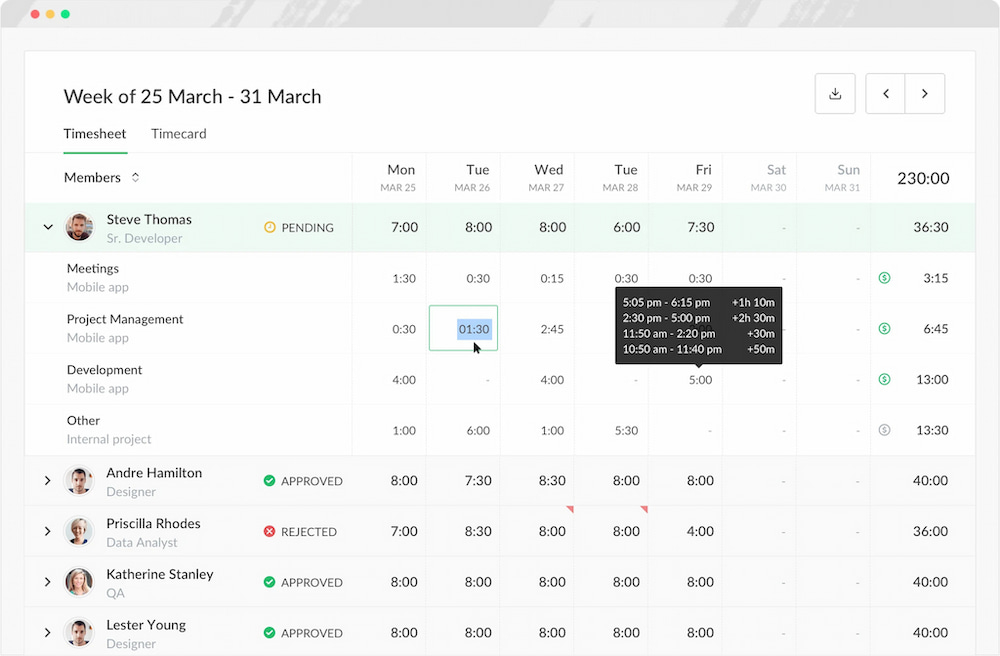
Productivity time tracking tools record how long employees spend on tasks and projects. This helps you calculate productivity more precisely and understand where time is going. For example, a time tracker like Everhour integrates directly with project management platforms, so you can track your time without interrupting workflows.
Project management tools
Project management tools organize tasks, assign responsibilities, and provide visibility into progress. They make it easier to see work distribution and whether teams are staying on track. This helps identify bottlenecks early and keeps productivity consistent.
Reporting and analytics tools
Reporting tools turn collected data into clear insights. Instead of just tracking activity, they help you analyze performance over time, compare results, and measure productivity using real metrics. This is what allows you to make informed decisions instead of guessing.
Overall, these productivity tools improve efficiency tracking by increasing accuracy and reducing manual effort. Automation saves time, while structured data makes it easier to understand performance and optimize workflows.
FAQ
What is the employee productivity formula?
The basic formula is: Productivity = Output ÷ Input. Output refers to what is produced (such as revenue, units, or completed tasks), while input refers to the resources used (such as time, labor, or cost). This formula helps measure how efficiently work is being done.
How do you calculate employee productivity?
You calculate productivity by dividing total output by total input over a specific period. For example, if an employee completes 50 tasks in 10 hours, productivity would be 5 tasks per hour. The exact metrics depend on the type of work and the data available.
What is a good employee productivity rate?
There is no single “good” rate, as productivity varies by industry, role, and business model. Instead of a universal benchmark, it’s better to track trends over time and compare performance within the same team or context.
What are the main factors that affect employee productivity?
Key factors include workload and scheduling, tools and technology, employee engagement, management and communication, and the work environment. Each of these can influence how efficiently employees complete their work.
How can you improve employee productivity?
You can improve productivity by setting clear goals, using the right tools, reducing unnecessary workload, using productivity improvement techniques, and tracking performance consistently. Small adjustments in these areas can lead to measurable improvements over time.
Why is employee productivity important?
Employee productivity directly impacts business efficiency, profitability, and growth. Higher productivity means more output with the same or fewer resources, which helps organizations scale and stay competitive.
Conclusion
Employee productivity is more than a number. It shows how work gets done and where you can make improvements. While the core formula is simple, its value comes from applying it consistently and understanding the factors that influence performance.
With the right tools, tracking and analyzing productivity becomes much easier. Platforms like Everhour help you monitor time, measure output, and keep data accurate without extra manual effort.
A clear approach to productivity helps you make better decisions, support your team, and maintain steady performance over time.

Maria
A dedicated content enthusiast with extensive experience in international teams and projects of all sizes. Maria thrives on creativity and attention to detail, fueled by a love for fantasy novels, music, classic black-and-white films, and always finding ways to make things better.