


What Is Float in Project Management? Definition, Types & Examples

In project management, schedules rarely go exactly as planned. Some tasks can be delayed without affecting the final delivery date, while others must stay on track to avoid pushing the whole project back. This built-in flexibility is known as float.
Float helps project managers understand how much time they can delay a task without impacting the overall project timeline or other dependent activities. It plays a key role in planning, scheduling, and risk management.
By identifying float, project managers can prioritize work more effectively, allocate resources more efficiently, and respond better to unexpected delays. In this article, we’ll explain what float is, how it works, and why it matters in managing successful projects.
What Is Float in Project Management?
Float (also called slack) is the amount of time a task can be delayed without affecting the overall project timeline or delaying dependent tasks. In simple terms, it shows how much flexibility you have in your schedule.
If a task has float, it means it is not on the critical path, so a short delay will not push the project’s final deadline. If a task has zero float, any delay will directly impact the project completion date.
Float exists because most projects include multiple tasks running in parallel, with different dependencies between them.
Some tasks must finish before others can start, while others can move more flexibly within the schedule. Float helps project managers see which activities have room for adjustment and which ones require strict control to keep the project on track.
Types of Float in Project Management
Total float
Total float is the amount of time a task can be delayed without delaying the overall project completion date. It affects the entire project schedule because it measures flexibility within the full timeline. If total float is reduced or used up, the project deadline may start to slip.
For example, if a task can be delayed by 3 days without impacting the final delivery date, it has 3 days of total float.
Free float
Free float is the amount of time a task can be delayed without delaying the start of the next dependent task.
The key difference from total float is impact: free float only considers the next task, not the whole project timeline. A task may have free float even when total float is limited or zero.
If a task finishes early enough that it still does not delay the next task’s start, that unused time is free float.
Negative float
Negative float occurs when a project schedule cannot meet its required deadline, meaning tasks already exceed the available time.
It indicates that the project is behind schedule or that the planned timeline is unrealistic.
Common causes include tight deadlines, delayed tasks, insufficient resources, or changes in project scope that increase workload without adjusting the schedule.
How Project Managers Use Float
Project managers use float to understand where they have flexibility in a project schedule and where they don’t. It helps them prioritize work, manage risks, and keep deadlines under control.
Task prioritization
Tasks with zero float sit on the critical path. Managers prioritize these first because any delay affects the project deadline and project roadmap. Tasks with available float get lower urgency since they can shift without immediate impact.
Resource allocation
Float helps managers move people between tasks more effectively. If a task has spare float, they can temporarily assign team members to higher-priority work without affecting the schedule.
Managing delays
When delays happen, float acts as a buffer. It gives managers time to adjust plans without immediately pushing the project end date. Once float is used up, the schedule becomes more sensitive to further delays.
Better planning decisions
Tracking float throughout the project helps managers spot bottlenecks early and make more predictable scheduling decisions across the entire project.
How to Calculate Float
Float is calculated by comparing the earliest and latest times a task can start or finish without affecting the project schedule.
Key schedule terms
- Early start (ES): The earliest time a task can begin
- Early finish (EF): The earliest time a task can be completed
- Late start (LS): The latest time a task can begin without delaying the project
- Late finish (LF): The latest time a task can finish without delaying the project
Float formula
The most common way to calculate total float is:
Total float = LS − ES
You can also calculate it using finish dates:
Total float = LF − EF
Both methods give the same result, depending on whether you work from start times or finish times.
Simple example
If a task can start on day 5 (ES) but can be delayed until day 8 (LS) without affecting the project, then:
Float = 8 − 5 = 3 days
This means the task has 3 days of scheduling flexibility before it impacts the overall project timeline.
Float vs Critical Path
What is the critical path?
The critical path is the longest sequence of dependent tasks in a project. It determines the shortest possible time needed to complete the project. Any delay in a critical path task directly delays the project deadline.
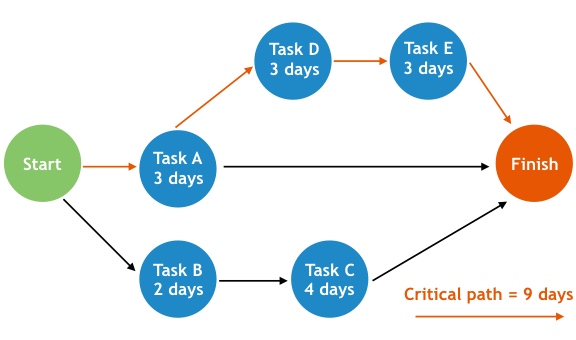
Why critical path tasks have zero float
Tasks on the critical path have zero float because they cannot be delayed without affecting the final delivery date. There is no flexibility in their timing, so even a small delay shifts the entire project schedule.
How float identifies non-critical tasks
Float helps separate flexible tasks from critical ones. Tasks with float are not on the critical path, which means they can be delayed within a certain range without impacting the project deadline.
By comparing float values, project managers can quickly see which tasks require strict attention and which ones offer scheduling flexibility. This helps balance workloads, reduce bottlenecks, and manage resources more effectively across the project.
Example of Float in a Project Schedule
A simple project schedule helps show how float works in practice. Consider a small project with three tasks that depend on each other.
Project example
| Task | Duration | Float |
|---|---|---|
| Gather requirements | 5 days | 0 days |
| Design mockups | 4 days | 2 days |
| Prepare training materials | 3 days | 4 days |
How it works
If design mockups slip by two days, the project deadline stays intact. If requirements gathering slips by one day, the entire project moves because it’s on the critical path.
What this shows
This type of schedule helps project managers quickly see which tasks are flexible and which are critical. It also makes it easier to adjust timelines, redistribute resources, and manage delays without impacting delivery dates.
Common Causes of Negative Float
Negative float appears when a project schedule cannot meet its required deadline. In practice, it means the planned work already exceeds the time available, indicating that the project is behind schedule.
Common causes include:
- Unrealistic deadlines: Stakeholders set delivery dates that don’t align with the actual amount of work required, leaving teams with insufficient time to complete tasks.
- Delayed activities: Early tasks take longer than expected, causing delays to ripple through dependent activities and affect the overall schedule.
- Resource constraints: Limited staff availability, equipment shortages, or budget restrictions slow progress and make it difficult to stay on track.
- Scope changes: Additional requirements are introduced without adjusting the timeline, increasing the workload while keeping the original deadline intact and creating scope creep.
- Dependency issues: Tasks that rely on delayed predecessors are forced to start later, creating scheduling conflicts and negative float further down the project timeline.
Negative float is often a warning sign that corrective action is needed, such as reallocating resources, revising the project scope, or renegotiating deadlines.
Tools That Help Track Float
Float is usually calculated and managed inside project scheduling tools rather than manually. These tools help project managers visualize timelines, dependencies, and scheduling flexibility across tasks.
Project scheduling software
Most project management platforms automatically calculate float when you build task dependencies and set durations. This helps teams quickly see which tasks are on the critical path and which have scheduling flexibility.
Gantt charts
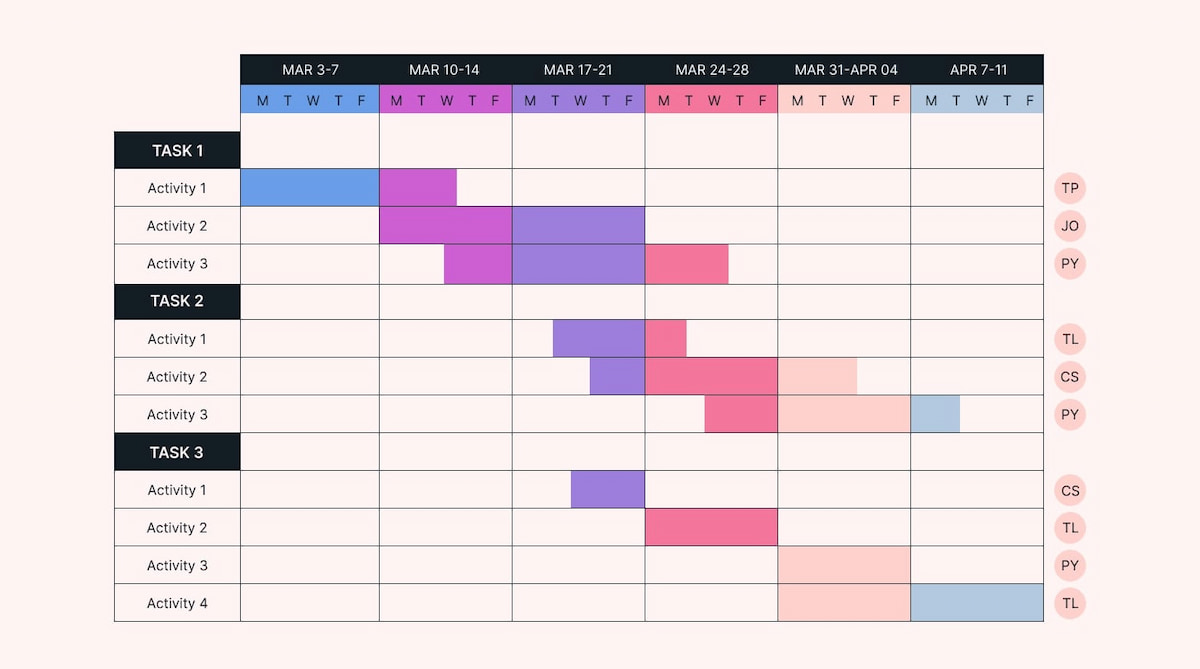
Gantt charts provide a visual timeline of the entire project. They make it easier to spot overlapping tasks, dependencies, and potential delays that affect float.
Critical path analysis tools
These tools identify the longest sequence of dependent tasks and highlight where float exists in the schedule. This helps managers focus on high-risk areas.
How Everhour supports planning
While float is typically calculated in scheduling tools, a time tracker like Everhour helps teams track actual effort, workloads, and project progress. This makes it easier to spot when tasks are starting to consume their available float and when a project may be at risk of delay.
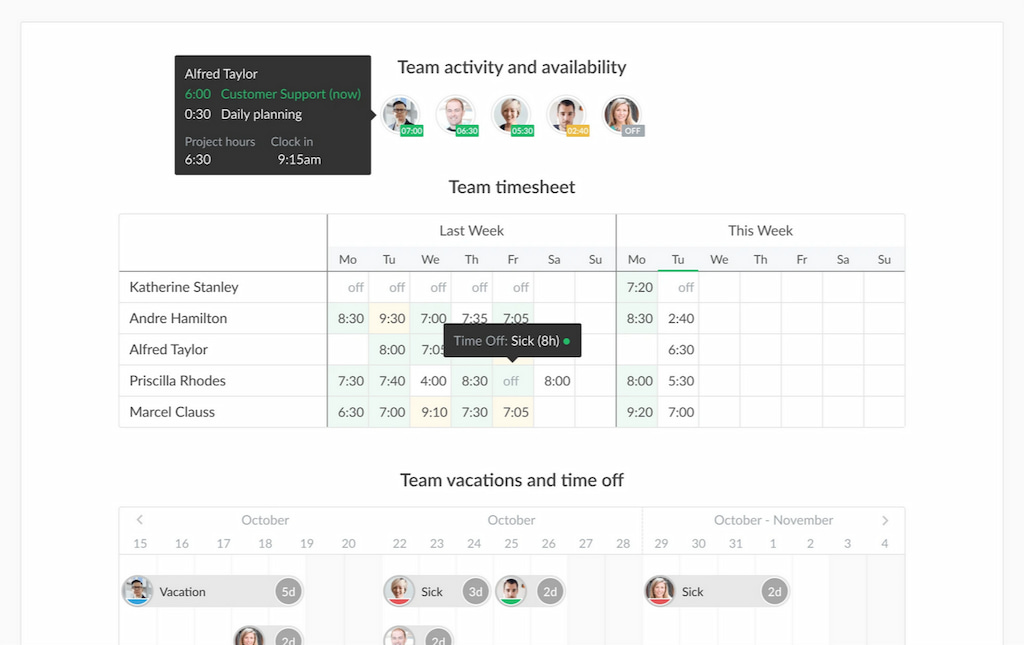
Together, these tools give project managers better visibility into timing, dependencies, and overall schedule health.
Best Practices for Managing Float
Managing float effectively helps project managers keep schedules realistic, reduce delays, and respond quickly when plans change. It also improves visibility into how flexible each part of a project really is.
Keep schedules updated regularly
Float values change as tasks progress. Updating project schedules ensures float reflects current reality, not outdated assumptions.
Monitor critical and near-critical tasks
Focus not only on tasks with zero float but also on those with very low float. These tasks can quickly become critical if delays occur.
Avoid using up float unnecessarily
Float should act as a buffer, not extra time to fill. Using it without planning can increase the risk of delays later in the project.
Communicate schedule changes early
When float starts shrinking, teams should know early. This helps avoid last-minute disruptions and keeps work aligned across teams.
Use project management tools
Project tools with dependency tracking and timeline views make it easier to see float across tasks and identify risks before they escalate.
FAQ
Float (or slack) is the amount of time a task can be delayed without affecting the project deadline or dependent tasks.
There is no difference. Float and slack mean the same thing and are often used interchangeably.
Total float measures how much a task can be delayed without affecting the overall project timeline. Free float measures how much it can be delayed without affecting the next task.
Tasks on the critical path have zero float because any delay directly impacts the project completion date.
Yes. Negative float means the project schedule is already behind and cannot meet the required deadline.
Float helps managers identify scheduling flexibility, manage delays, allocate and plan resources, and reduce project risk.
Conclusion
Float plays a key role in project management by showing how much flexibility exists within a schedule. It helps managers understand which tasks can shift without affecting the project deadline and which ones require strict control.
By using float effectively, project managers can prioritize work, manage delays, allocate resources more efficiently, and reduce scheduling risks. It also provides a clearer view of project health, especially when combined with critical path analysis.
Ultimately, understanding float leads to better planning, more realistic timelines, and smoother project delivery across teams and tasks.

Maria
A dedicated content enthusiast with extensive experience in international teams and projects of all sizes. Maria thrives on creativity and attention to detail, fueled by a love for fantasy novels, music, classic black-and-white films, and always finding ways to make things better.