


What Is Basecamp? How It Works & Pricing
Basecamp is a project management and team collaboration tool that brings tasks, project communication, schedules, files, and other project information into one place. Teams can use it to organize projects, assign work, discuss ideas, share files, manage deadlines, and keep clients involved.
Unlike tools built primarily around task lists or complex workflows, Basecamp organizes work around projects. Each project can have its own set of tools for managing tasks, communication, files, schedules, and progress.
Basecamp is designed for teams that want a relatively simple way to manage projects without relying on separate tools for every part of their workflow.
In this guide, we’ll explain what Basecamp is, how it works, what it’s used for, its main features, pricing, and how it compares with its alternatives.
What Is Basecamp?
Basecamp is project management software developed by 37signals. It combines project organization and team communication in a shared workspace, so teams can manage work and discuss it in the same place.
A Basecamp project can include tasks, discussions, files, schedules, chat, check-ins, and other tools depending on what the team needs. This makes the project itself the central place for both the work and the conversations around it.
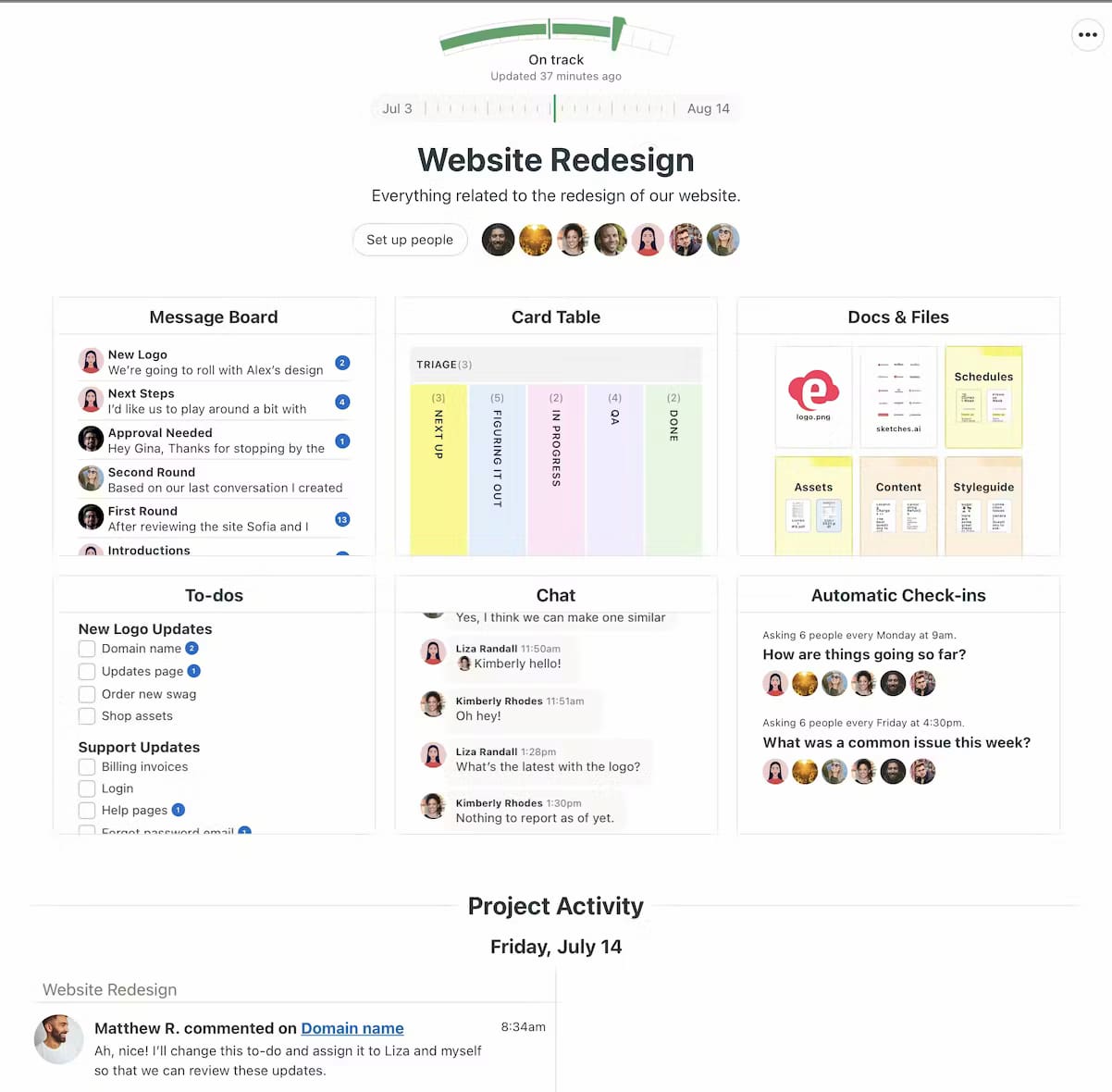
Basecamp’s approach is intentionally straightforward: instead of building highly complex workflows, it provides a set of tools that cover the main parts of running a project.
For example, a marketing team could create a Basecamp project for a campaign, use To-dos to assign work, Message Boards for important discussions, Docs & Files for campaign materials, and Schedule for deadlines and meetings.
Basecamp is not limited to one type of team or project. Agencies, software teams, marketing departments, consultants, and other organizations can use it to coordinate work and collaborate with clients or colleagues.
Basecamp 5 is the current version of the product, released in 2026 with more than 100 improvements to the previous version. It retains Basecamp’s project-centered approach while adding updates to navigation, search, activity views, the text editor, and other parts of the platform.
How Does Basecamp Work?
Basecamp organizes work around projects. Each project gets its own workspace where teams can manage tasks, communication, files, schedules, and other project information.
A typical Basecamp workflow looks like this:
Create a project
Start by creating a project for a client, campaign, product, internal initiative, or another body of work. Each project has its own workspace and can include the tools relevant to that project.
Add the people involved
Invite team members, clients, contractors, or other collaborators to the project. You can control what clients and other external collaborators can see and access.
Organize the work
Use Basecamp’s project tools to divide work into tasks, discussions, deadlines, files, and other activities. You can choose which tools to use instead of having every project follow the same structure.
Communicate in the project
Project discussions, announcements, chat, and recurring check-ins can happen inside Basecamp. Keeping these conversations with the project gives everyone a shared place to find information and decisions.
Track progress
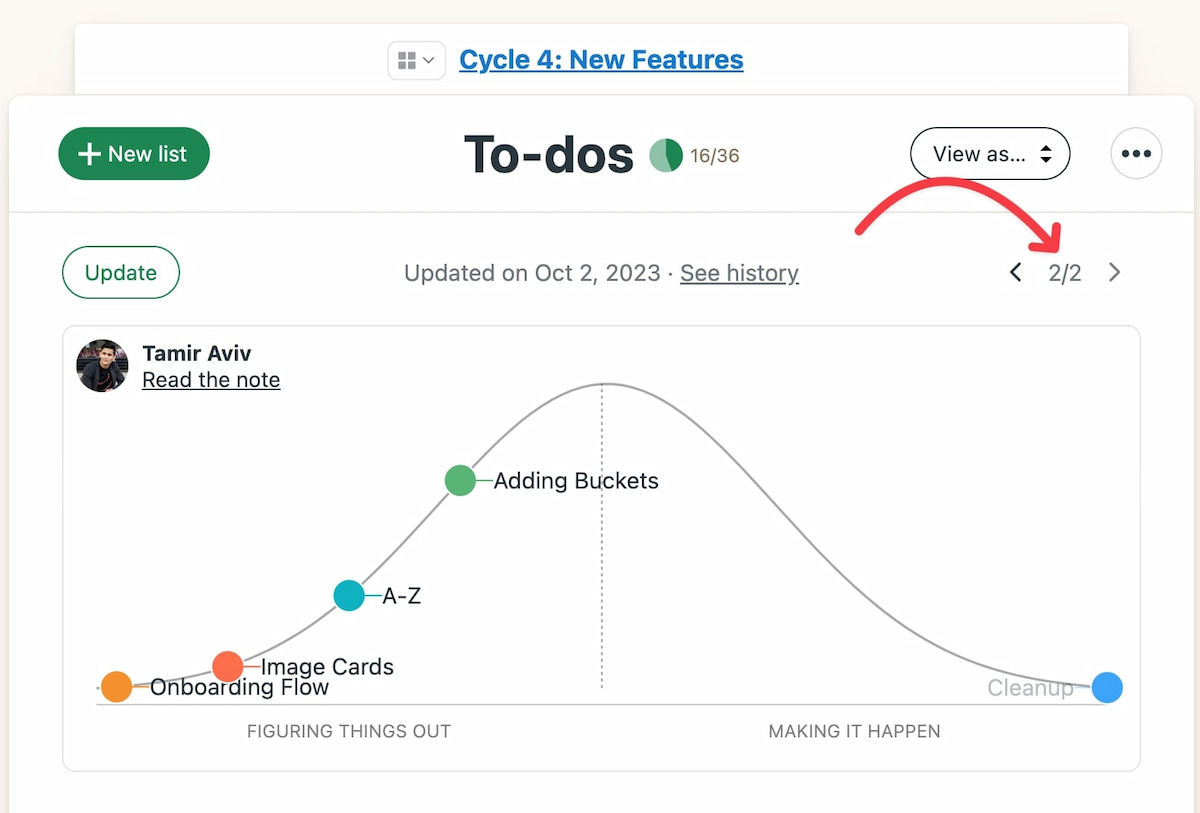
Basecamp provides several ways to see what’s happening across projects. Teams can use task lists, schedules, reports, Hill Charts, and other project views to understand what needs attention and how work is progressing.
The result is a project workspace where the work itself and the communication around it stay connected, rather than being spread across separate task, chat, file-sharing, and scheduling tools.
What Features Does Basecamp Have?
Basecamp combines several project management and collaboration tools in one project workspace. The exact tools you use can vary by project.
To-dos
To-dos are Basecamp’s task management tool. You can create task lists, assign work to specific people, add due dates, and attach files or discussions to tasks.
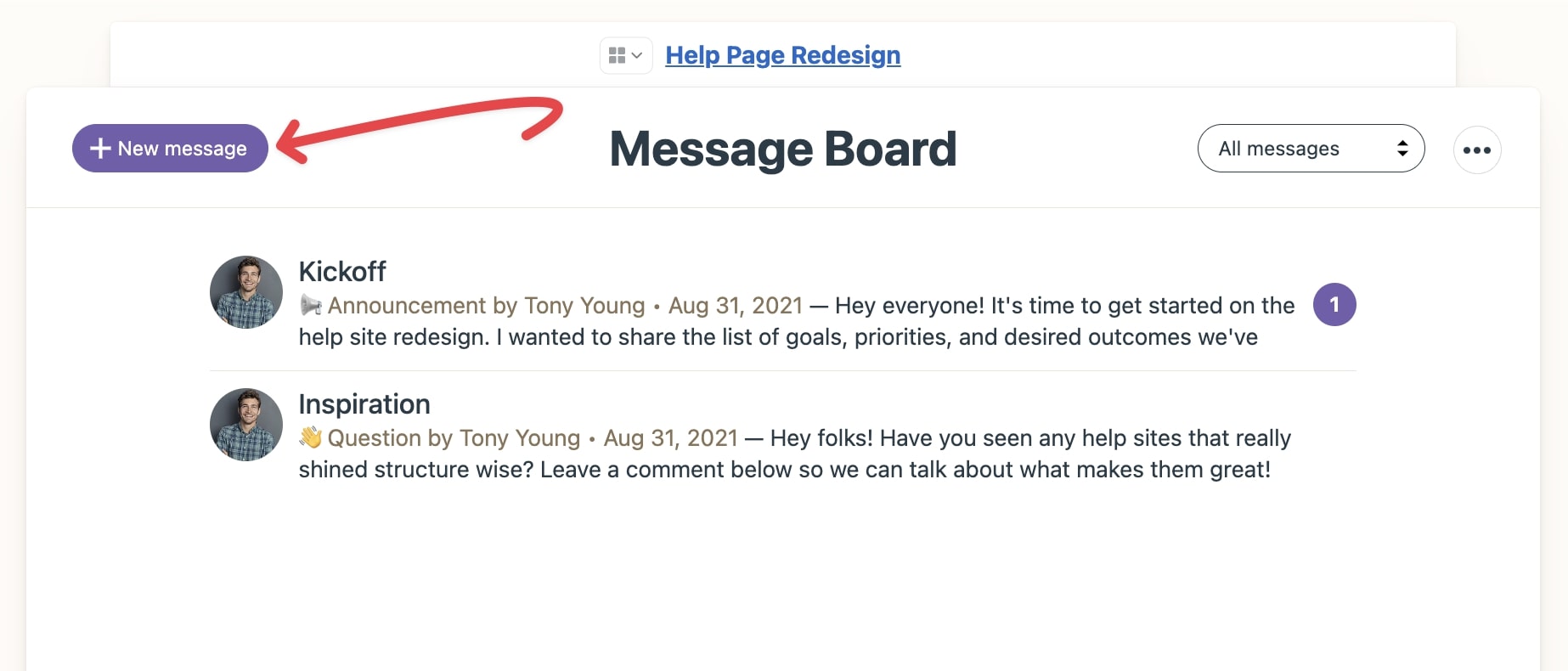
Message Boards
Message Boards are designed for longer-form project discussions and announcements. They can be useful for decisions, updates, feedback, and other information that shouldn’t disappear in a chat stream.
Card Tables
Card Tables provide a more visual way to organize work. Teams can use cards and columns to represent stages in a workflow, making them useful for processes such as content production, issue tracking, or approvals.
Campfire
Campfire is Basecamp’s chat tool for quick, informal conversations. It is intended for project-related communication that doesn’t need a formal message or task.
Schedule
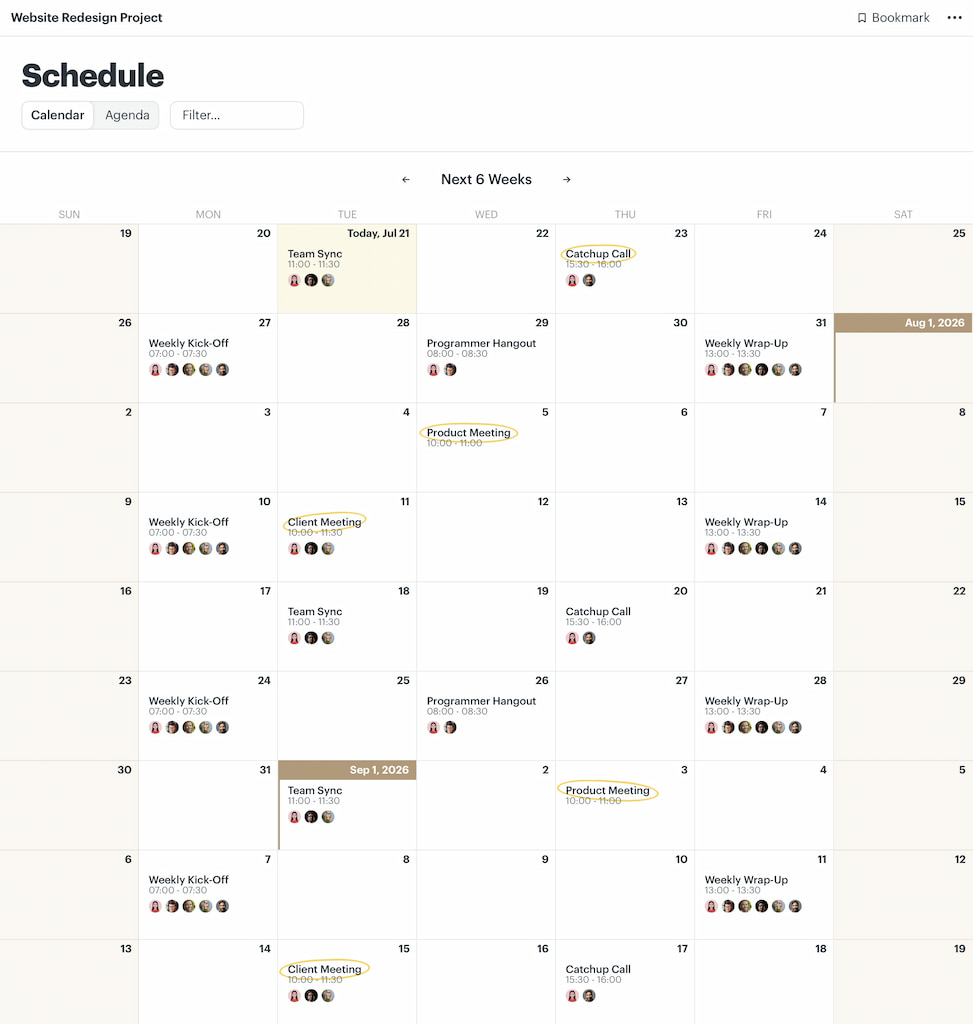
The Schedule tool helps teams keep track of deadlines, milestones, meetings, events, and other dates related to a project.
Docs & Files
Docs & Files gives each project a place to store documents, images, and other files. Keeping these materials with the project makes them easier for team members and clients to find.
Automatic Check-ins
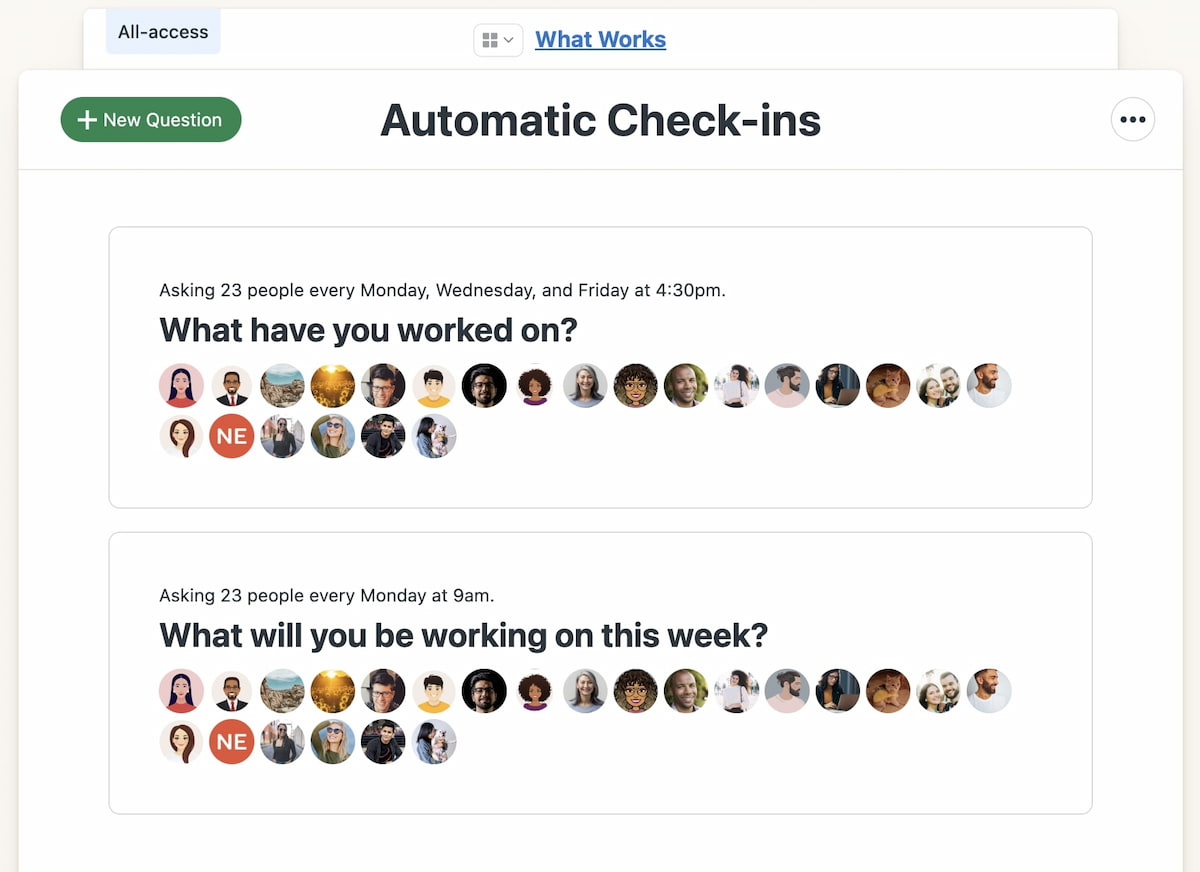
Automatic Check-ins lets teams collect recurring updates without scheduling another meeting. For example, a team could ask members what they worked on that day or what they plan to work on next.
Hill Charts
Hill Charts give teams a visual way to show the status of work. They distinguish between work that is still being figured out and work that is moving toward completion, rather than reducing progress to a percentage.
Basecamp 5 also adds several newer capabilities, including subtasks, an updated text editor with Markdown and tables, voice notes, improved search and navigation, a redesigned activity view, and a new My Bar for quickly accessing tasks, events, and other personal items.
The core project tools remain centered around to-dos, Message Boards, Card Tables, Campfires and Pings, Scheduling, Docs & Files, Reports, and Automatic Check-ins.
What Is Basecamp Used For?
Basecamp can be used for many types of projects where teams need to coordinate tasks and keep project communication in one place.
Common use cases include:
- Client projects: Manage tasks, feedback, files, deadlines, and communication with clients.
- Marketing projects: Coordinate campaigns, content production, approvals, and launch dates.
- Software projects: Organize development work, discussions, documentation, and project updates.
- Website projects: Keep design, development, content, client feedback, and deadlines together.
- Internal projects: Coordinate initiatives that involve people from different teams or departments.
For example, an agency could create a separate Basecamp project for each client. The project could contain the client’s tasks, feedback, files, deadlines, and conversations, giving both the agency and client a shared place to follow the work.
What Makes Basecamp Different From Other Project Management Tools?
Basecamp takes a project-centered approach to work management. Instead of focusing primarily on task lists, it combines tasks with the communication and information surrounding them.
A few characteristics define this approach:
- Projects as the main workspace: Tasks, conversations, files, schedules, and other information are organized around individual projects.
- Communication alongside work: Teams can discuss projects, share updates, and make decisions without moving those conversations into a separate system.
- A relatively simple structure: Basecamp deliberately avoids trying to accommodate every possible project management methodology or workflow.
- Client collaboration: Projects can include clients and external collaborators without requiring them to have the same role as internal team members.
- Different views of progress: Tools such as Hill Charts and reports provide ways to understand project status beyond simply looking at completed tasks.
This makes Basecamp particularly oriented toward teams that want project management and communication to live together without building a highly customized workflow.
What Are Basecamp’s Strengths and Limitations?
Basecamp’s strengths and limitations largely come from the same design choice: it keeps project management relatively straightforward.
Strengths
- Projects and communication in one place: Teams can manage tasks, discussions, files, schedules, and other project information in the same workspace.
- Simple project structure: Teams can start managing a project without building a complex workflow first.
- Client collaboration: Basecamp supports projects that include clients and other external collaborators.
- Built-in communication: Message Boards, Campfires, Pings, and Automatic Check-ins provide several ways to communicate within a project.
- Flat-rate pricing: Paid plans don’t charge separately for each user on plans that include unlimited users.
Limitations
- Less workflow customization: Teams that need highly specialized workflows may find Basecamp less flexible than highly configurable project management platforms.
- Fewer specialized project management features: Basecamp focuses on core project management and collaboration rather than trying to support every project management methodology.
- Additional tools may still be useful: Teams with advanced requirements for areas such as resource planning, reporting, or time tracking may want dedicated software alongside Basecamp.
These differences are mainly questions of fit. Basecamp prioritizes a relatively straightforward project-centered structure, while some teams need more specialized controls or customization.
How Much Does Basecamp Cost?
Basecamp uses a relatively simple pricing model compared with project management tools that charge for every user.
Current plans include:
| Plan | Price | Active projects | Users |
|---|---|---|---|
| Free | $0 | 1 | Up to 5 |
| Freelancer | $25/month | Up to 3 | Up to 20 |
| Studio | $59/month | Up to 10 | Unlimited |
| Pro | $99/month | Up to 25 | Unlimited |
| Unlimited | $299/month, billed annually | Unlimited | Unlimited |
The main difference from per-user pricing is that Basecamp’s paid plans let you add users without increasing the subscription price for each additional person.
Who Is Basecamp Best For?
Basecamp can be a good fit for teams that want to manage projects and communication in the same workspace without building a highly customized system.
It may be particularly useful for:
- Agencies and consultants: Keep client work, communication, files, and tasks together.
- Small and midsize teams: Manage projects without a large collection of specialized project management features.
- Client-facing teams: Give clients a dedicated place to follow projects and provide feedback.
- Teams managing multiple projects: Keep each project’s work and communication in its own workspace.
- Teams that value simplicity: Use a predefined set of project management and collaboration tools rather than configuring every part of the workflow.
Who Might Not Need Basecamp?
Basecamp may be less suitable for teams that need highly specialized or heavily customizable project management workflows.
For example, you may want to consider another tool if you need:
- Highly detailed resource and capacity planning
- Complex task dependencies
- Extensive portfolio management
- Specialized Agile or Scrum features
- Highly customized workflows and automations
- Advanced time tracking, project budgeting, or billing
These aren’t necessarily weaknesses for every team. They are mainly questions of fit: Basecamp prioritizes a simpler project-centered approach, while some teams need more specialized controls.
Does Basecamp Have Time Tracking?
Yes. Basecamp includes built-in time tracking across its current plans. Teams can record the time they spend working on projects and use that information to understand how long work takes.
Built-in time tracking can cover basic needs, but some teams need more detailed reporting around project time. For example, agencies and consultants may want to analyze billable hours, compare tracked time with estimates, monitor project budgets, or create more flexible reports.
Tracking Basecamp time with Everhour
Everhour adds more detailed time tracking and reporting to Basecamp. With its Basecamp time tracking integration, teams can track time against Basecamp projects and tasks, monitor project budgets, and generate reports for analyzing how time is spent.
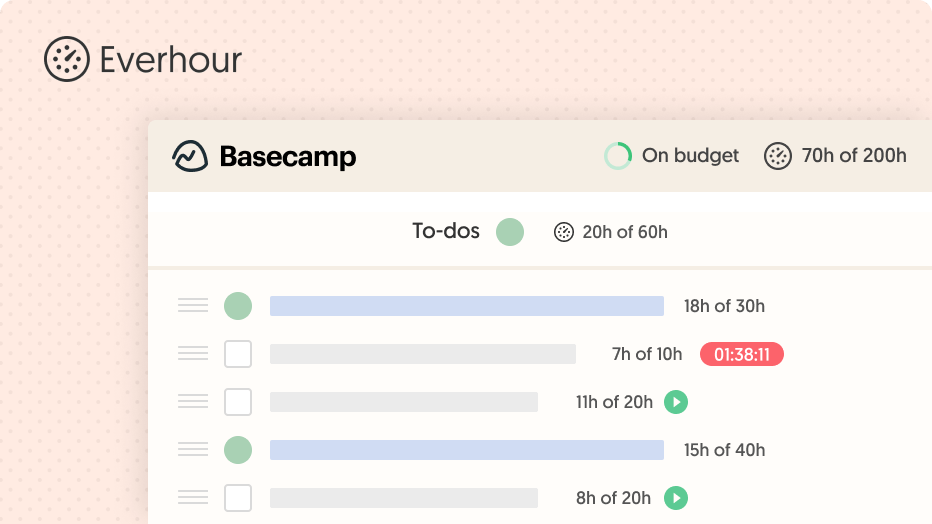
This can be particularly useful for agencies, consultants, and other teams that need to connect tracked time with project costs, estimates, or client billing.
The distinction is simple: Basecamp provides project management and collaboration tools, while Everhour focuses on time tracking, budgeting, reporting, and billing around that work.
Basecamp vs. Other Project Management Tools
Basecamp takes a project-centered approach, but other project management tools organize work differently. The right choice depends on how your team needs to structure and manage projects.
| Tool | Main approach | How it differs from Basecamp |
|---|---|---|
| Asana | Task and workflow management | Provides more detailed task organization and workflow management |
| Trello | Boards and cards | Centers work around visual Kanban-style boards |
| ClickUp | Highly customizable work management | Offers a broader range of configuration and project management features |
| monday.com | Customizable work management | Provides highly configurable workflows and views |
| Notion | Flexible workspace and databases | Combines project management with documents, databases, and knowledge management |
Basecamp tends to make more sense when you want projects, communication, and collaboration to live together in a relatively simple structure. Tools with more extensive customization may be a better fit when you need to build highly specific workflows.
Frequently Asked Questions
Basecamp is used to manage projects, organize tasks, coordinate teams, share files, communicate with clients, and keep project information in one place.
Yes. Basecamp is project management and team collaboration software. It combines task management with project communication, scheduling, file sharing, and other collaboration tools.
Basecamp offers a free plan with limited projects and users. It also has paid plans with more projects, users, and features.
Basecamp offers several paid plans with flat monthly pricing rather than charging separately for each user. Prices and plan limits can change, so check Basecamp’s current pricing before subscribing.
Yes. Basecamp includes time tracking for recording time spent on project work. Teams that need more advanced time reports, budgets, or billing workflows can also connect Basecamp with a dedicated time-tracking tool such as Everhour.
Yes. Basecamp supports client collaboration, allowing teams to give clients access to relevant project information without giving them the same access as internal team members.
Basecamp can work well for small businesses that want a straightforward way to organize projects and communication. Teams with complex workflows, detailed resource planning, or extensive customization requirements may need a more specialized project management tool.
Basecamp centers projects around communication and collaboration, while Asana focuses more heavily on tasks, workflows, and work management. The better fit depends on how your team prefers to organize projects.
Conclusion
Basecamp is project management and collaboration software that brings tasks, communication, files, schedules, and other project information together in one place.
Its project-centered approach makes it useful for teams that want a straightforward way to coordinate work and keep project communication connected to the work itself. At the same time, teams with more specialized requirements may need additional tools or a more customizable project management platform.
If you use Basecamp and need more detailed time tracking, budgeting, reporting, or billing, Everhour can extend the time-management side of your workflow without replacing Basecamp’s project management and collaboration features.

Maria
A dedicated content enthusiast with extensive experience in international teams and projects of all sizes. Maria thrives on creativity and attention to detail, fueled by a love for fantasy novels, music, classic black-and-white films, and always finding ways to make things better.