


Wrike Vs Jira: Key Differences, Use Cases, And Which Tool Fits
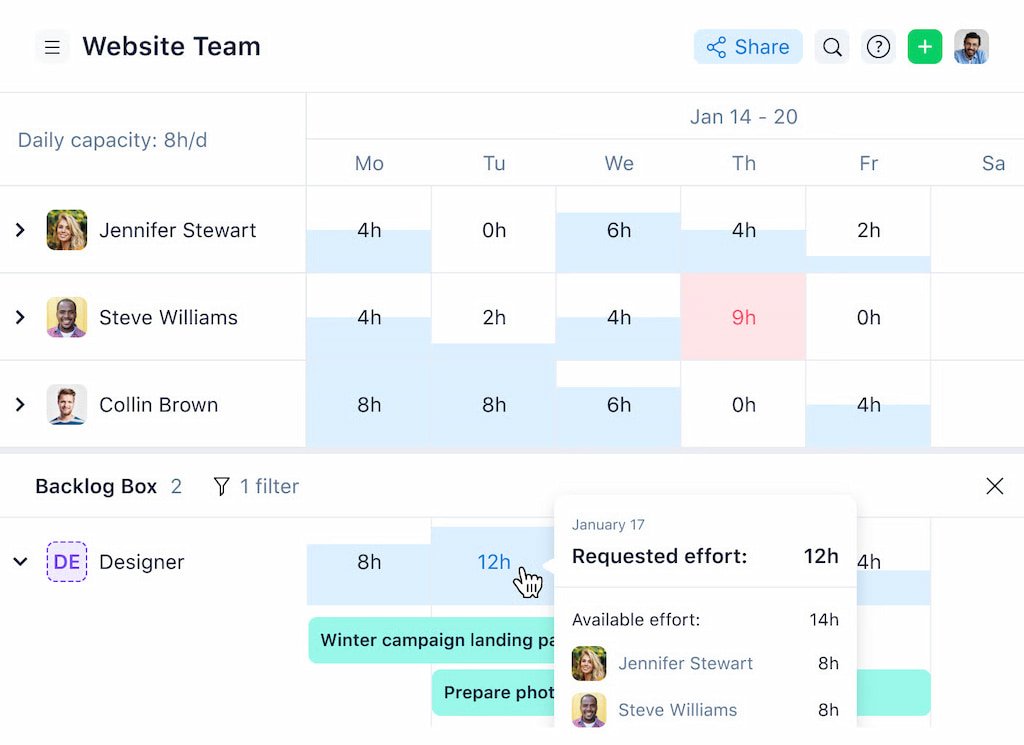
Wrike and Jira are two of the most popular work management tools on the market, but they’re built for very different types of teams. Both can manage tasks and workflows, but they approach planning, collaboration, and reporting in very different ways—especially when it comes to execution details like effort, time, and delivery tracking. This is also where tools like a Wrike time tracking integration often come into the picture. In this article, we’ll break down Wrike vs Jira in practical terms. You’ll see how each tool handles planning, workflows, collaboration, reporting, and scaling, and when one makes more sense than the other.
🧠 What Wrike And Jira Are Built For
Wrike
Wrike is a project management platform designed for teams that need structure, coordination, and visibility across many types of work. It helps teams plan projects, organize tasks, and collaborate without forcing everyone into the same rigid process.
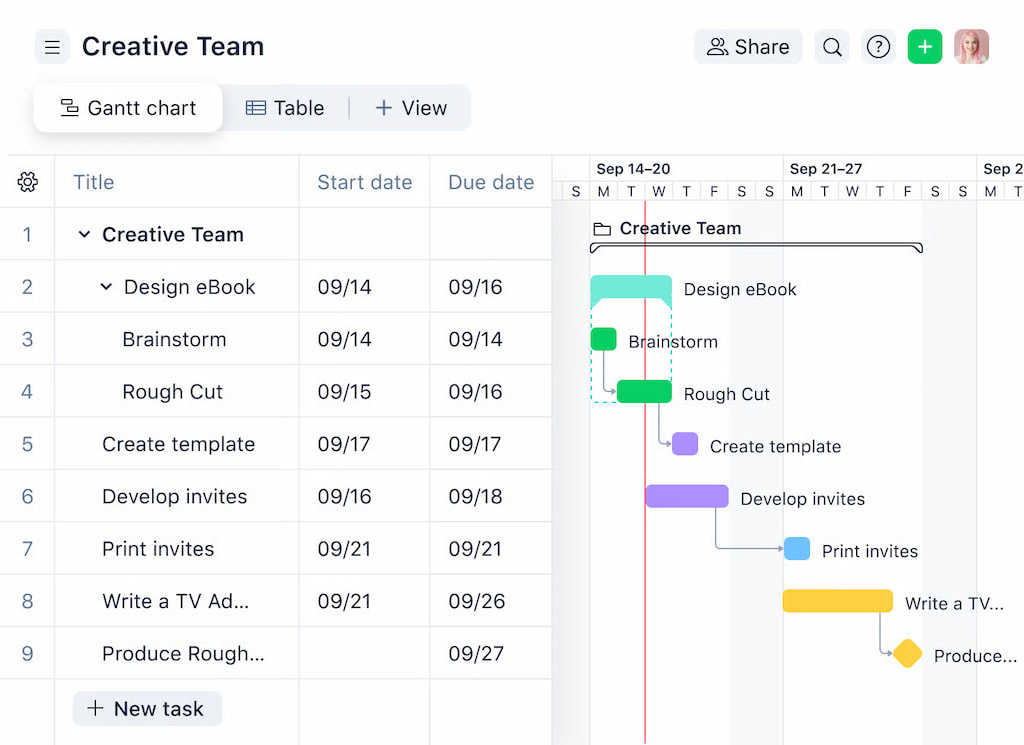
Wrike works especially well for cross-functional teams where marketing, operations, product, and client-facing roles all work together. Teams use it to plan campaigns, manage product initiatives, coordinate client deliverables, and track operational work. Its main strength is visibility—stakeholders can see progress across projects, teams, and timelines without needing deep technical setup.
Jira
Jira is an agile project and issue tracking platform built primarily for software development teams. Its core focus is supporting agile delivery through backlogs, sprints, issues, and releases.
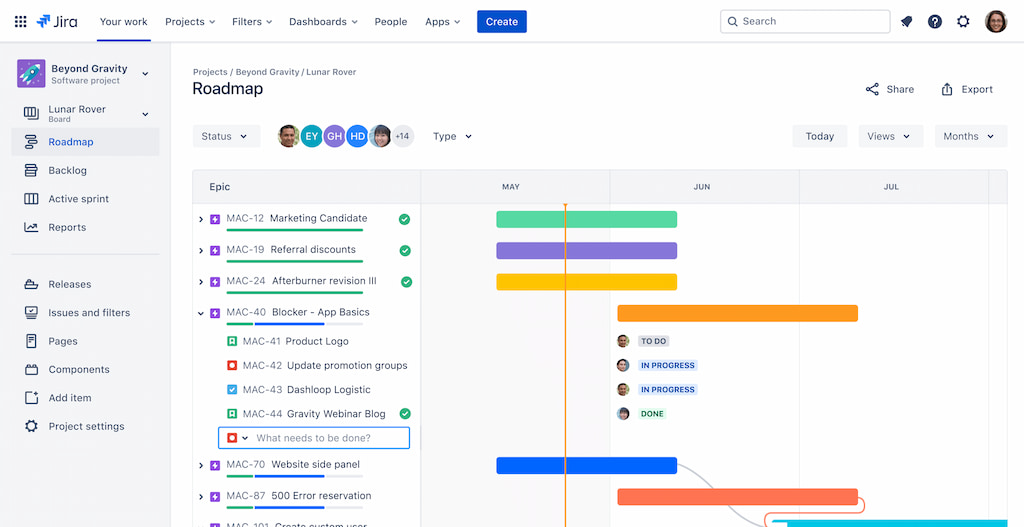
Jira excels when teams follow frameworks like Scrum or Kanban. It supports sprint planning, backlog grooming, issue tracking, and release management in detail. Because of this focus, Jira is developer-centric by design. It assumes technical workflows, technical language, and teams that are comfortable working with epics, stories, tickets, and velocity.
▶ Wrike is built to help many teams work together across departments, while Jira is built to help development teams ship software efficiently. Although their features may overlap in some areas, the intent behind each tool shapes how teams use them day to day—and which teams feel most at home in each platform.
⚙️ Planning And Task Management
This is where the differences between Wrike and Jira become very clear.
Wrike
Wrike focuses on structured planning that works across teams, not just engineering. Teams use Wrike to:
- break work into projects, folders, and tasks
- assign owners, deadlines, and dependencies
- plan work visually using lists, boards, timelines, and Gantt charts
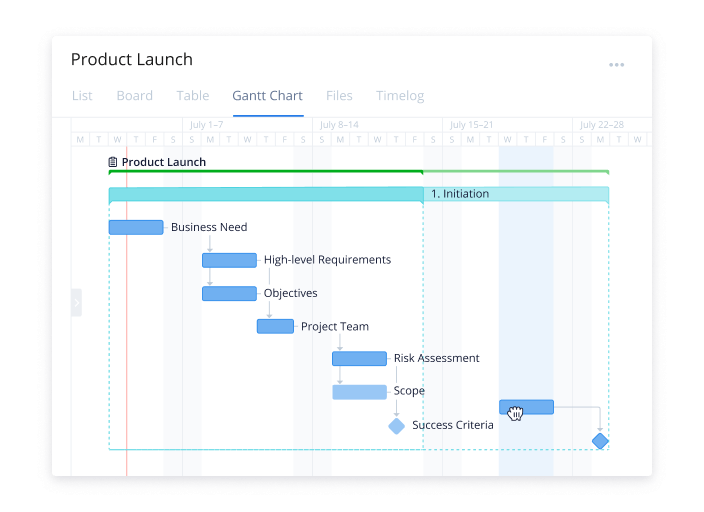
Tasks in Wrike are flexible. The same task can live in multiple folders or projects, which helps when work touches several teams at once (for example, product + marketing + operations).
Wrike works well when planning needs to stay readable for non-technical stakeholders while still giving managers clear oversight.
Jira
Jira is built around issues, not general tasks. Everything — bugs, features, stories, and tickets — follows an issue-based model. Jira planning typically includes:
- backlogs with epics, stories, and subtasks
- sprint planning and sprint boards
- strict workflows tied to agile processes
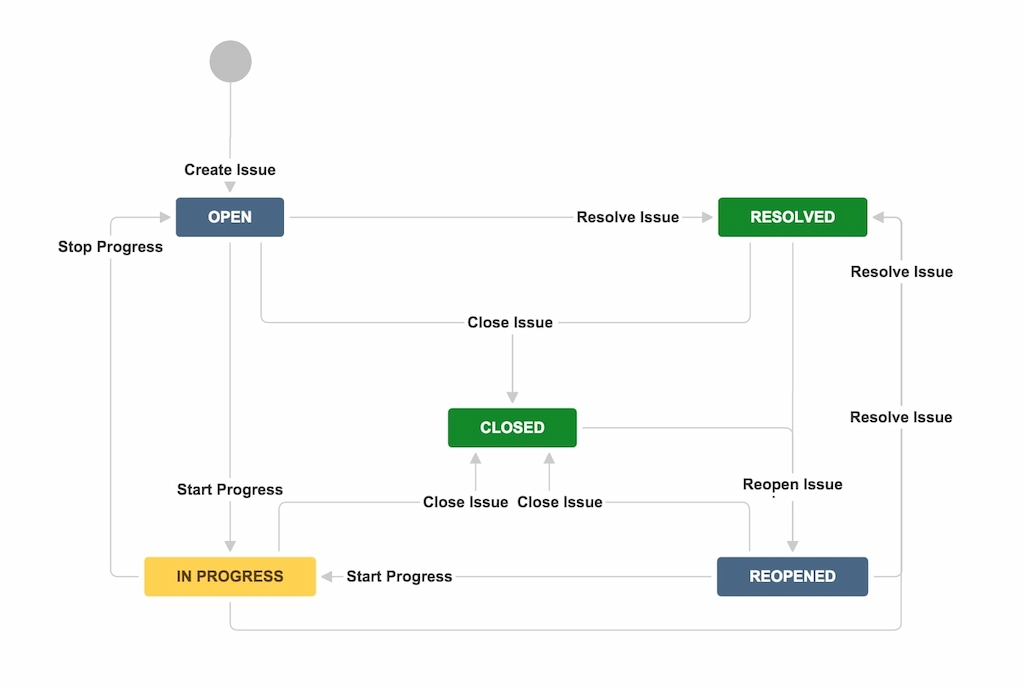
This structure is powerful for software teams running Scrum or Kanban. However, it can feel rigid or overly technical for teams outside engineering.
Key differences
- If your work involves many roles, changing priorities, or stakeholder visibility, Wrike usually feels easier to plan in.
- If your work revolves around sprint cycles, issue tracking, and development workflows, Jira fits more naturally.
🔄 Workflows And Approvals
Wrike
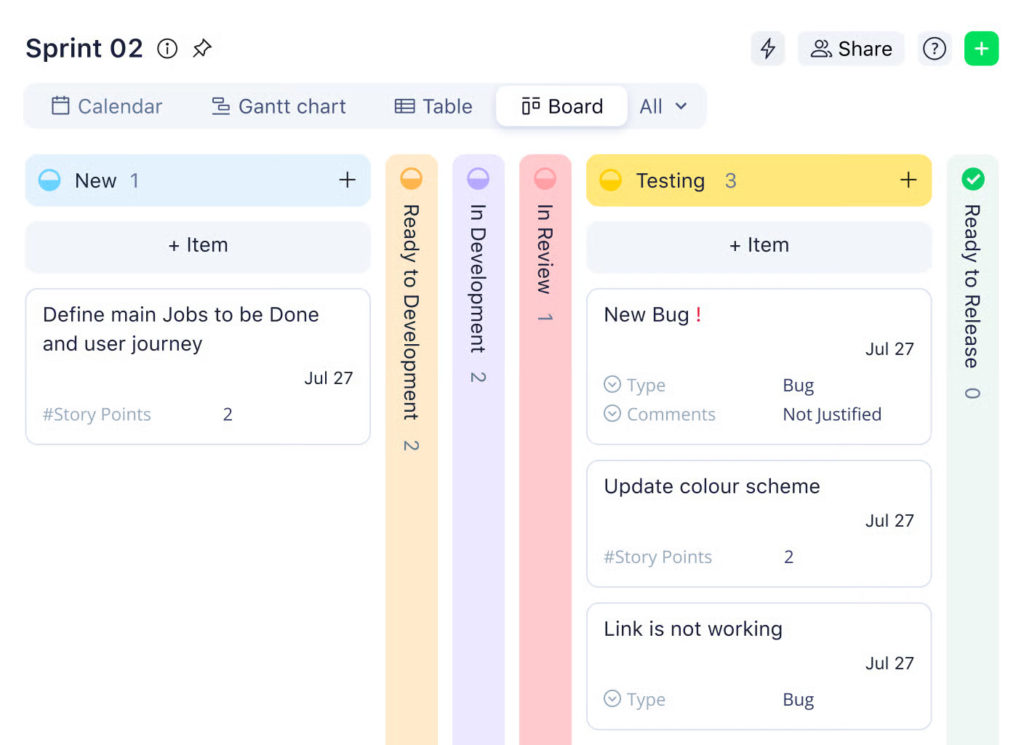
Wrike lets teams create custom Wrike workflows for each type of project or task. You can define statuses like “in progress,” “review,” or “approved”, and automate actions such as assigning tasks, sending reminders, or updating statuses.
- Ideal for cross-functional teams that need to manage approvals across departments (e.g., marketing campaigns or client projects).
- Workflows are visual and flexible, so non-technical team members can easily understand where work stands.
- Approvals can be built directly into workflows, ensuring nothing moves forward without the right sign-off.
Jira
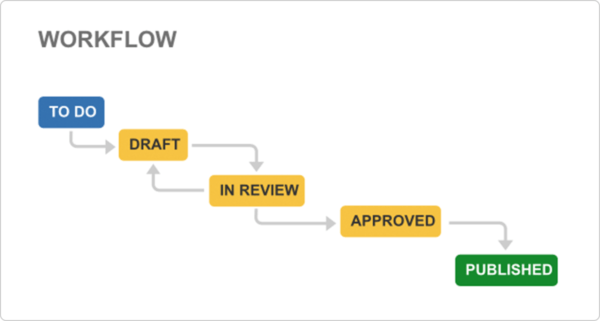
Jira focuses on developer-centric workflows, where issues move through predefined stages like “to do,” “in progress,” and “done.”
- Workflows are highly configurable, but setup can be complex.
- Approvals are often handled through custom fields, add-ons, or additional plugins.
- Best suited for software development teams who need strict control over issue progress and version releases.
Key differences
- Wrike: flexible, visual, easy for multiple teams to follow, ideal for approvals across business functions.
- Jira: precise, technical, ideal for engineering teams, requires more setup for non-development approvals.
📊 Reporting, Dashboards, and Visibility
Wrike
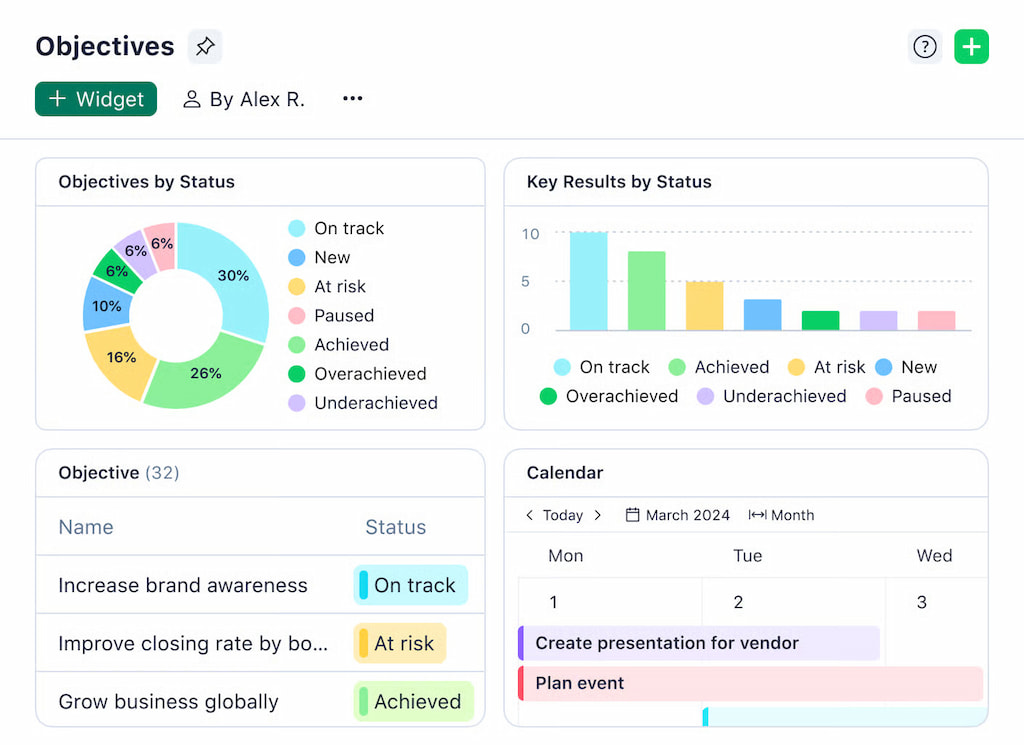
Wrike gives teams a visual view of project progress and workload. Dashboards show overdue tasks, bottlenecks, and team performance. Built-in reports let you summarize status, track time, and monitor project health.
- Multiple view options: lists, boards, timelines, Gantt charts.
- Managers can customize dashboards to track the most relevant metrics.
- Real-time updates ensure teams see the latest information without extra steps.
Jira
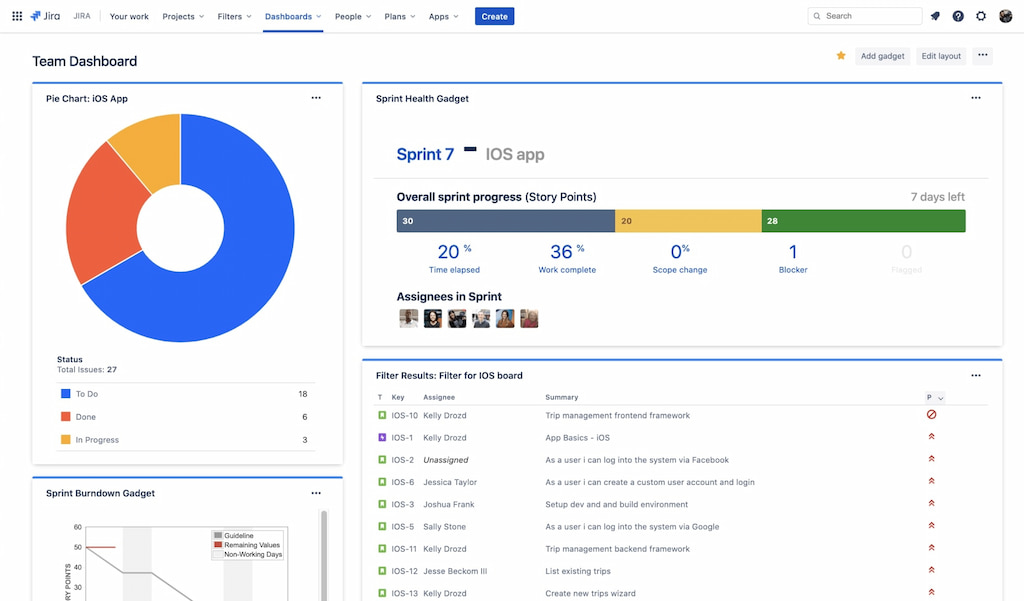
Jira focuses on issue tracking and agile metrics. Dashboards show sprint progress, backlog health, and completed tasks. Reports track velocity, burndown, and cycle time.
- Great for engineering teams running sprints.
- Dashboards can be complex to set up and often require plugins.
- Reports are developers-centric, less intuitive for marketing or operations teams.
Key differences
- Wrike: broader team visibility, easier for non-technical teams, dashboards are flexible.
- Jira: detailed agile insights, best for software delivery, less intuitive for cross-functional use.
⏱ Time, Effort, and Cost Tracking
Wrike
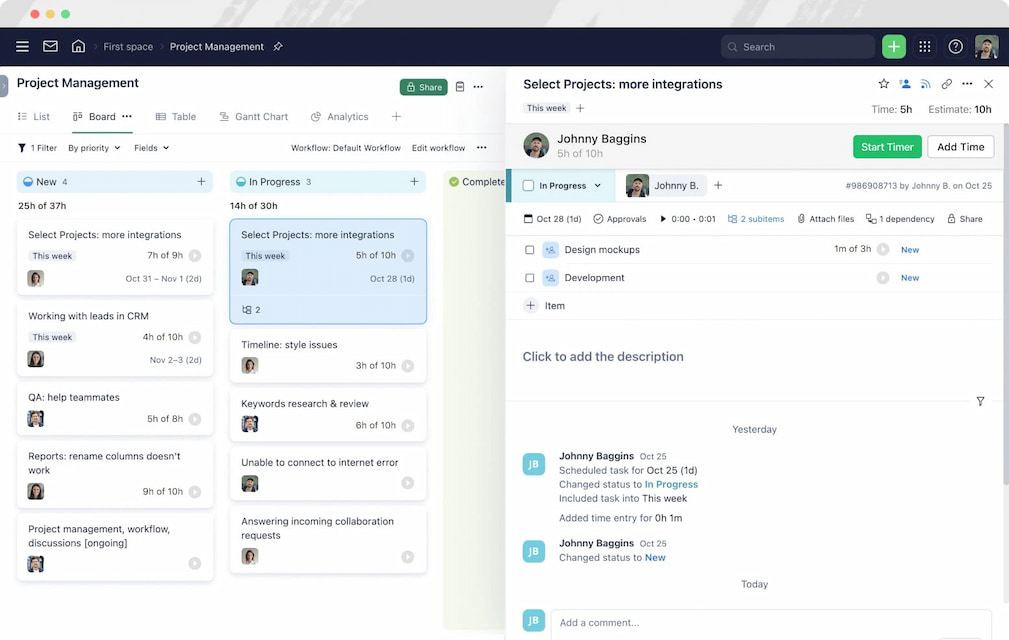
Wrike lets teams track time inside Wrike directly. You can monitor workloads, set deadlines, and see progress across multiple teams. Native time tracking works for basic needs, but as projects grow, gaps appear in detailed reporting and cost visibility.
- Tasks can have time estimates vs actuals.
- Workload views help managers balance team capacity.
- Budget tracking is limited without integrations.
Integrations: A time tracker like Everhour extends Wrike, letting teams track time inside tasks, generate detailed reports, and monitor costs without leaving the platform. This makes it easy to gain full visibility into time, effort, and budgets.
Learn more in our Wrike vs Everhour comparison!
Jira
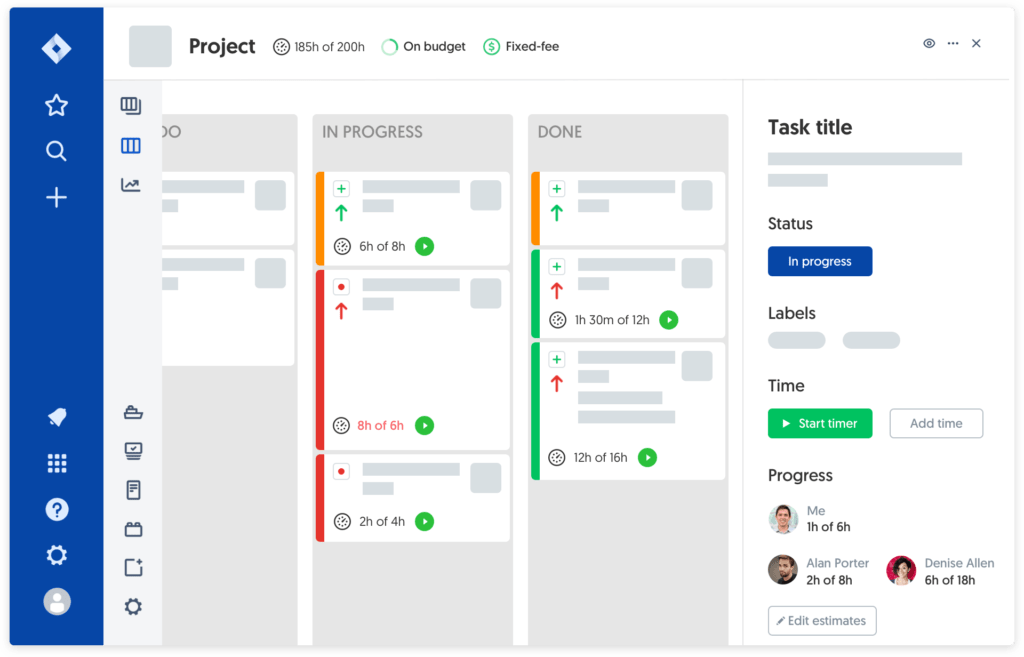
Jira focuses on issues and sprints, so Jira time tracking is optional and often added via apps. Teams can see time spent per ticket and track progress during sprints.
- Built-in time tracking exists but is basic.
- Cost and budget tracking requires additional tools.
- Works best for developer-focused teams, less so for cross-functional reporting.
Jira integrations: Jira integrates with Everhour as well, allowing teams to track time per issue, monitor individual and team progress, and produce detailed cost and effort reports—bridging the gap between development work and broader business visibility.
Key differences
- Wrike: better for cross-team visibility, tracking both progress and effort, easier for non-dev teams.
- Jira: strong for agile software tracking, but needs plugins like Everhour for full time and cost management.
🔌 Integrations And Extending Functionality
Both Wrike and Jira work best when paired with the right integrations, especially for tracking time, costs, and overall project performance. While each platform has strong core features, teams often need additional tools to get full visibility and streamline workflows.
Wrike integrations
- Everhour – track time directly inside tasks, compare estimates vs actuals, monitor budgets, and generate detailed reports without leaving Wrike.
- Slack – get notifications, create tasks from messages, and keep teams aligned.
- Google Drive / SharePoint – attach files, collaborate on documents, and centralize resources.
- Business intelligence tools – export data for deeper reporting and insights.
Wrike’s integration ecosystem allows teams to extend the platform without changing core workflows, which is ideal for cross-functional teams managing multiple projects.
Jira integrations
- Everhour – track time on issues, monitor developer workloads, and integrate cost and effort reporting into Jira dashboards.
- Confluence – link documentation and collaborate on product specs.
- Slack / Microsoft Teams – stay updated on sprint progress and issue updates.
- Test management tools – like TestLodge, for QA tracking and bug reporting.
These integrations help bridge Jira’s developer-centric focus to give product managers and stakeholders better visibility into timelines, resources, and costs. There are also powerful Jira templates that you can use for automation.
Why integrations matter
- Fill gaps in native time, effort, and cost tracking.
- Reduce context switching by keeping everything connected.
- Give teams actionable insights to improve project delivery.
🆚 Wrike Vs Jira: Key Differences
| Feature / Aspect | Wrike | Jira |
|---|---|---|
| Primary focus | Work and project management for cross-functional teams | Agile project management and issue tracking for software teams |
| Task structure | Projects, folders, tasks, subtasks, dependencies | Issues, epics, stories, subtasks, sprints, backlogs |
| Workflow flexibility | Custom workflows, statuses, and approvals | Agile workflows with sprint boards, backlogs, and issue statuses |
| Views & dashboards | List, board, timeline, Gantt, dashboards | Kanban and Scrum boards, dashboards, reports |
| Time tracking & cost visibility | Basic native tracking; enhanced with Everhour Wrike integration | Limited native; enhanced with Everhour Jira integration |
| Integrations | Slack, Google Drive, SharePoint, BI tools, Everhour | Confluence, Slack, Teams, test management tools, Everhour |
| Best for | Cross-team collaboration, structured workflows, marketing, operations, product management | Software development teams, agile delivery, developer-focused projects |
| Ease of use | Moderate; easier for non-developers | Moderate to complex; steep learning curve for non-devs |
🟢 When Wrike Makes More Sense
- Cross-functional collaboration – Wrike works well when marketing, operations, design, or product teams need to work together.
- Structured workflows – Great for teams that rely on approvals, clear statuses, and project hierarchies.
- Visibility across projects – Managers and stakeholders can track progress across multiple teams without relying on dev-specific tools.
- Non-software projects – Works well for initiatives outside software development, like campaigns, client work, or operations.
🔵 When Jira Makes More Sense
- Software development focus – Jira is built for engineering teams managing sprints, backlogs, and issues.
- Agile methodology – Perfect for Scrum or Kanban processes with sprint planning and velocity tracking.
- Developer-centric workflows – Integrates tightly with code repositories, CI/CD tools, and developer reporting.
- Issue tracking – Ideal for bug tracking, feature requests, and detailed development workflows.
🔄 Can Wrike and Jira Work Together?
Many teams use both Wrike and Jira to balance cross-team visibility with agile development needs. Instead of switching entirely, integrations can help connect the strengths of both platforms.
Common integration scenarios:
- Development tracking in Jira, project visibility in Wrike – Jira handles sprints, backlogs, and issue tracking, while Wrike provides high-level dashboards for stakeholders.
- Automatic updates between systems – changes in Jira tasks, status, or priorities can sync to Wrike projects to avoid duplicated work.
- Cross-team reporting – combining Jira’s technical progress with Wrike’s project-wide reporting helps managers track delivery and resource allocation.
Benefits of using both:
- Reduce data silos between development and other teams.
- Keep stakeholders informed without needing access to Jira.
- Maintain structured planning across multiple departments.
Tip: Use integrations like Everhour to track time across both platforms, so teams can see effort, budgets, and progress without switching tools constantly.
✅ Wrike vs Jira: Conclusion
Both Wrike and Jira have their strengths. Wrike excels at cross-team visibility, structured workflows, and project planning, while Jira shines for software development, agile delivery, and issue tracking.
You don’t always have to choose one over the other. Many teams use both tools together to balance project management and development needs. Integrations, especially Everhour, can help track time, monitor budgets, and get clear reports across Wrike and Jira—giving teams full visibility into effort and costs without switching platforms.
With the right setup, teams can stay aligned, reduce duplicated work, and scale their workflows efficiently, making the combination of Wrike, Jira, and smart integrations a powerful solution for complex projects.

Maria
A dedicated content enthusiast with extensive experience in international teams and projects of all sizes. Maria thrives on creativity and attention to detail, fueled by a love for fantasy novels, music, classic black-and-white films, and always finding ways to make things better.