


Skills Matrix: Map Skills and Identify Team Gaps
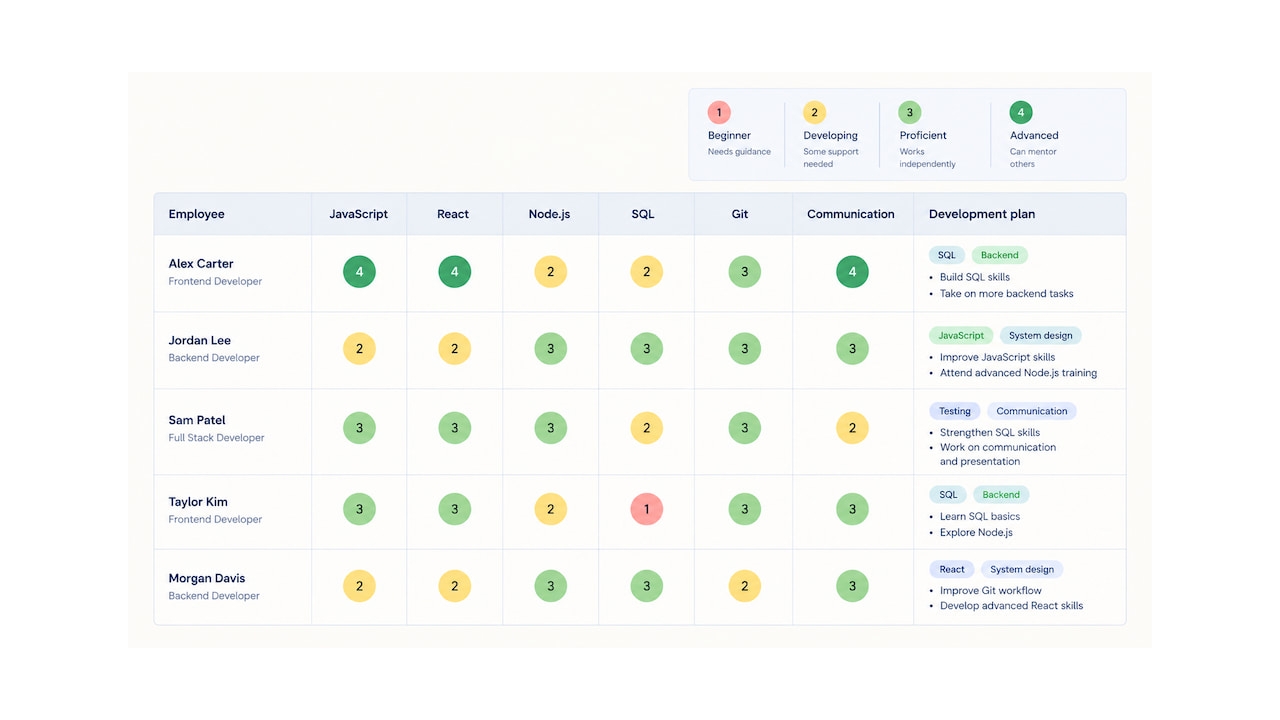
A team can have talented employees and still struggle to assign work effectively. Managers may not know who has experience with a particular tool, which skills are missing, or where the team depends too heavily on one person. Without a clear picture of existing capabilities, staffing decisions and employee development often rely on assumptions rather than evidence.
A skills matrix helps solve this problem by mapping employees strengths and proficiency levels in one place. Managers can use it to identify skill gaps, allocate work based on expertise, plan training, and prepare their teams for upcoming projects.
TL;DR — Key Takeaways
- A skills matrix is a visual tool for mapping employee skills and proficiency levels across a team or organization.
- A typical matrix lists employees or roles in rows and relevant skills in columns, using ratings to show current capabilities.
- To create one, define its purpose, select relevant skills, establish a rating scale, assess employees, and use the results to plan development.
- Skills matrices help managers identify skill gaps, distribute work more effectively, reduce reliance on individual specialists, and plan training.
- A skills matrix is most useful when its ratings are clear, evidence-based, and updated as team capabilities and business needs change.
What Is a Skills Matrix?
A skills matrix is a structured overview of the skills available within a team, department, or organization. It shows which employees possess specific skills and how proficient they are, helping managers compare current capabilities with the requirements of their work.
A skills matrix typically includes four components:
- Employees or roles: The people or positions being assessed.
- Skills: The technical, functional, or transferable abilities relevant to the team’s work.
- Proficiency levels: Ratings that indicate how developed each skill is.
- Development notes: Optional information about training needs, certifications, or areas for improvement.
For example, a software development team might track skills such as JavaScript, automated testing, database management, and code review. The matrix can reveal that several developers are proficient in JavaScript, but only one has experience with a particular testing framework. That knowledge gap could become a problem if the specialist is unavailable or multiple projects need the same expertise.
Skills matrices aren’t limited to technical skills. A customer support team might map product knowledge, conflict resolution, written communication, and troubleshooting. A marketing team could track analytics, copywriting, campaign management, and SEO.
The skills included should reflect the team’s actual responsibilities and goals. A matrix that lists every conceivable ability quickly becomes difficult to maintain, while one focused on the skills needed for current and upcoming work can directly support staffing and development decisions.
Skills matrix vs. competency matrix
The terms skills matrix and competency matrix are sometimes used interchangeably, and their definitions vary between organizations. A skills matrix typically focuses on specific abilities, such as using a software tool or conducting data analysis. A competency matrix may take a broader view, covering the knowledge, behaviors, and capabilities required to perform a role effectively.
For example, a skills matrix might rate an employee’s proficiency in Excel, while a competency matrix might assess their broader ability to analyze data, interpret results, and communicate recommendations.
Both tools help organizations understand existing capabilities and identify development needs. The right choice depends on whether the goal is to map specific skills, evaluate broader role requirements, or combine both.
Skills Matrix Example
A skills matrix becomes easier to understand when you see how the ratings work. The example below shows a fictional software development team assessed across four technical skills.
| Employee | JavaScript | Automated testing | SQL | Code review |
|---|---|---|---|---|
| Alex | 4 | 3 | 2 | 4 |
| Jordan | 3 | 4 | 3 | 3 |
| Sam | 2 | 1 | 4 | 2 |
| Taylor | 3 | 2 | 3 | 4 |
In this example, skills are rated on a scale from 1 to 4:
| Rating | Proficiency level | Description |
|---|---|---|
| 1 | Beginner | Understands the basics but needs guidance |
| 2 | Developing | Can handle straightforward tasks with some support |
| 3 | Proficient | Works independently on typical tasks |
| 4 | Advanced | Handles complex work and can guide or mentor others |
The matrix highlights several patterns. Alex and Taylor have advanced code review skills, while Jordan has the strongest automated testing skills. Sam has advanced SQL skills but would need support with automated testing.
These differences can inform project assignments, mentoring, and training plans. If an upcoming project depends heavily on automated testing, Jordan may be well placed to lead that work, while helping Sam develop testing skills could increase the team’s flexibility over time.
A skills matrix can also reveal single points of failure. If only one employee has advanced knowledge of a critical tool, the team may be vulnerable when that person is unavailable. Cross-training another employee can reduce that risk.
The ratings alone don’t determine who should receive an assignment. Managers should also consider workload, availability, experience with the specific project, employee development goals, and interest in taking on new responsibilities. A skills matrix informs decisions; it doesn’t replace judgment or conversations with the team.
Benefits of Using a Skills Matrix
A skills matrix gives managers a clearer view of what their team can do and where additional capabilities may be needed. When maintained regularly, it can support several practical decisions.
- Identify skill gaps. Compare current capabilities with the skills required for upcoming projects or business goals. This helps managers prioritize training or recruitment instead of making assumptions about what the team lacks.
- Allocate work more effectively. Match assignments with employees who have the relevant expertise while considering their workload, availability, and development goals.
- Reduce knowledge bottlenecks. Identify critical skills that only one or two employees possess. Cross-training and knowledge sharing can help prevent work from stalling when a specialist is unavailable.
- Plan employee development. Use assessment results to set individual learning goals, arrange mentoring, and identify opportunities for employees to build new capabilities.
- Support hiring and workforce planning. Understand whether the team can meet future needs with its existing skills or whether external recruitment may be necessary.
- Improve team flexibility. Identify opportunities for employees to learn complementary skills, making it easier to redistribute work when priorities change.
For example, if a team is preparing to take on a new client project, a skills matrix can show whether it has the necessary expertise in-house. Managers can then decide whether to assign existing specialists, train other employees, or recruit additional support before the project begins.
How to Create a Skills Matrix
Creating a useful skills matrix involves more than listing employees and assigning ratings. The goal is to build a reliable picture of team capabilities that supports specific decisions.
1. Define the purpose
Start by deciding what you want the matrix to help you achieve. You might use it to staff projects, identify training needs, plan succession, support hiring, or understand whether the team has the capabilities required for a new initiative.
Your objective determines which employees, skills, and proficiency levels you need to include. A matrix designed for project staffing, for example, should focus on skills relevant to upcoming work rather than every ability employees might possess.
2. Identify the relevant skills
List the skills required to perform the team’s current responsibilities and meet its expected goals. Consider technical abilities, knowledge of specific tools or processes, and transferable skills where they’re relevant to the work.
You can identify these skills by reviewing job descriptions, discussing project requirements with team leads, examining recurring work challenges, and asking employees which capabilities they use most often.
Keep the list focused. Too many skills make the matrix cumbersome to complete and maintain, while overly broad categories make it difficult to distinguish between employees’ actual capabilities.
3. List employees or roles
Decide whether the matrix should map individual employees, job roles, or both. An employee-level matrix is useful for assigning project tasks, identifying development opportunities, and planning cross-training. A role-based matrix defines the skills expected for particular positions and can help with hiring, career progression, and succession planning.
For larger teams, you may want separate matrices for different departments or functions. This keeps the information manageable and ensures that each matrix reflects the needs of the people using it.
4. Define proficiency levels
Choose a rating scale that employees and managers can apply consistently. A four- or five-level scale is usually sufficient for distinguishing basic familiarity from independent proficiency and advanced expertise.
For example, a five-level scale could range from beginner to expert. Whatever scale you choose, describe what each level means in observable terms rather than relying on vague labels.
A rating of 3 might mean that an employee can complete typical tasks independently, while a rating of 4 could indicate that they can handle complex cases and support colleagues. Clear criteria make assessments more consistent and help managers identify meaningful development steps.
5. Assess current skills
Gather information about employees’ capabilities using a combination of self-assessments, manager evaluations, work samples, certifications, and demonstrated experience.
Self-assessments can reveal skills employees use confidently or want to develop, but they shouldn’t be the only source of information. Employees may underestimate or overestimate their proficiency, particularly when rating skills without clear criteria.
Discuss ratings with employees and use concrete examples to validate them. The goal is to build an accurate picture of current capabilities, not to rank employees or treat the matrix as a performance scorecard.
6. Build and review the matrix
Organize the information in a spreadsheet or another tool that makes it easy to compare employees and skills. Use consistent labels, a clear rating scale, and filters or visual indicators where they make gaps easier to spot.
Once the matrix is populated, look for patterns:
- Which required skills are missing or underdeveloped?
- Which skills depend on a single employee?
- Where could cross-training improve team flexibility?
- Which employees could take on more advanced work with additional support?
Review the findings with relevant team leads and employees before making staffing or development decisions. This helps catch inaccurate ratings and accounts for context that the matrix may not capture.
7. Turn findings into an action plan
A skills matrix only becomes useful when its findings lead to action. Prioritize the gaps that matter most to current projects and future business needs, then decide how to address them.
Possible actions include training, mentoring, pairing employees with experienced colleagues, redistributing responsibilities, or recruiting for skills that are difficult to develop internally.
Assign ownership and set a review date for each action. For example, if only one employee can maintain a critical system, a development goal might be to train a second employee over the next quarter. This turns a potential bottleneck into a concrete plan for improving team resilience.
Skills Matrix Templates and Tools
The best format depends on the size of your team, how frequently skills change, and what you want to do with the information.
A spreadsheet is often enough for a small team. You can create one using Google Sheets or Excel, with employees in rows, skills in columns, and proficiency ratings in each cell. Add a separate column for development goals or notes if you need to track follow-up actions.
A simple template might look like this:
| Employee | Skill 1 | Skill 2 | Skill 3 | Development priority |
|---|---|---|---|---|
| Employee A | 4 | 3 | 2 | Improve Skill 3 |
| Employee B | 3 | 4 | 3 | None currently identified |
| Employee C | 2 | 2 | 4 | Improve Skill 1 |
Replace the generic skill labels with abilities relevant to your team, and use a consistent proficiency scale. The table is a starting point rather than a complete assessment system; the ratings should be supported by clear criteria and evidence.
For larger organizations, dedicated skills management or workforce planning software may make it easier to maintain profiles, track development, and analyze capabilities across departments. A spreadsheet may become harder to manage when skills, roles, and employee responsibilities change frequently.
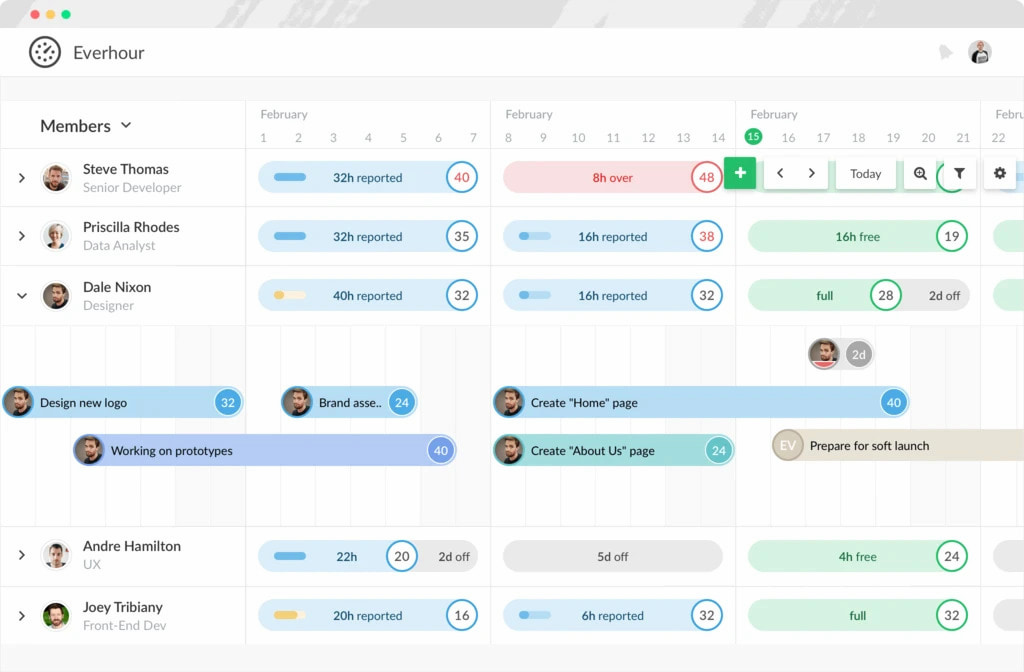
Skills matrices can also inform project planning. Once managers understand who has the relevant expertise, they can consider that information alongside deadlines, availability, and workload when assigning work. A time tracker such as Everhour helps teams track time spent on tasks and projects, providing additional context about workload and effort. This complements skills mapping, although time tracking itself doesn’t assess employee proficiency or replace a dedicated skills matrix.
Whichever format you choose, prioritize usability. A straightforward matrix that managers and employees update regularly is more valuable than a complicated system that quickly becomes outdated.
Frequently Asked Questions
A skills matrix typically includes employee names or roles, relevant skills, proficiency ratings, and clearly defined rating criteria. You can also add certifications, development goals, or notes about training needs, depending on the purpose of the matrix.
A skills matrix generally maps specific abilities, such as programming, data analysis, or using a particular tool. A competency matrix may cover broader combinations of knowledge, skills, and behaviors required for a role. Organizations sometimes use the terms interchangeably, so it’s best to define what your matrix measures.
Use a consistent scale with descriptions of observable proficiency levels. For example, a four-level scale might range from beginner to advanced, with each level specifying how independently an employee can perform relevant tasks. Combine self-assessments with evidence such as work samples, certifications, and manager feedback.
Review a skills matrix regularly and whenever significant changes occur, such as new project requirements, role changes, completed training, or the introduction of new tools. Some teams review their matrices quarterly, while others update them as changes happen. The right frequency depends on how quickly skills and responsibilities evolve.
Yes. A skills matrix helps managers identify employees with the expertise required for project tasks and spot capability gaps before work begins. For effective staffing, combine skills information with workload, availability, deadlines, and development goals rather than assigning work based on proficiency alone.
For small teams, a spreadsheet in Excel or Google Sheets is often sufficient. Larger organizations with frequently changing roles, skills, and development plans may benefit from dedicated skills management or workforce planning software. Choose a format that makes the information easy to update, interpret, and use in real decisions.

Maria
A dedicated content enthusiast with extensive experience in international teams and projects of all sizes. Maria thrives on creativity and attention to detail, fueled by a love for fantasy novels, music, classic black-and-white films, and always finding ways to make things better.