


Asana Workflow Automation: Rules, Examples, and Best Practices

Asana workflow automation helps teams reduce manual work and keep projects moving without constant check-ins or status updates. Instead of assigning tasks, changing due dates, or sending reminders by hand, teams can set rules that handle these actions automatically.
Automation in Asana is especially useful for recurring processes like task intake, approvals, handoffs, and ongoing project updates. When set up well, it saves time, reduces mistakes, and helps teams focus on actual work rather than project maintenance.
In this article, we’ll break down how Asana workflow automation works, what you can automate, real examples by team (such as Asana integrations), and where automation has limit so you can decide how to use it effectively in your own workflows.
❓ What Is Asana Workflow Automation?
Asana workflow automation is all about saving time and reducing the effort spent on repetitive tasks. By automating routine steps, your team can focus on high-value work while keeping projects organized and on track. At the heart of Asana automation are triggers and actions:
- A trigger is an event that starts a rule, like creating, moving, or completing a task.
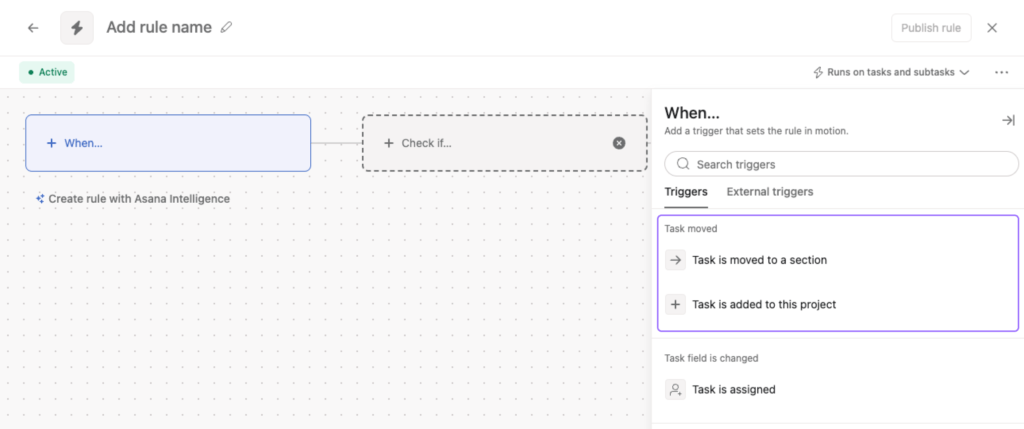
- An action is the task that happens automatically when the trigger occurs, such as assigning a task to a team member, updating a due date, or sending a notification.
Why use automation in Asana?
When set up thoughtfully, automation removes friction from everyday work and helps teams move faster with less manual effort.
- 🚀 Faster project completion: automated workflows keep tasks moving forward and reduce bottlenecks.
- ⚡ Increased productivity: teams spend less time on manual updates and more time on real work.
- 📐 Standardized processes: rules and Asana templates ensure consistency across projects and teams.
- 👥 Optimized task distribution: work is assigned based on availability, roles, or expertise.
- 🧠 Lower administrative overhead: fewer reminders, less manual tracking, and smoother coordination.
With Asana workflow automation, teams can simplify their Asana project management, improve efficiency, and maintain clear visibility over every task and project milestone.
🚀 Key Asana Automation Features
📝 Task assignment automation
Automatically assigning tasks ensures that every task reaches the right person without delays. In Asana, you can set rules so that when a task is created or moves to a specific section, it is automatically assigned to a designated team member. This reduces confusion, eliminates manual task delegation, and keeps your projects moving efficiently.
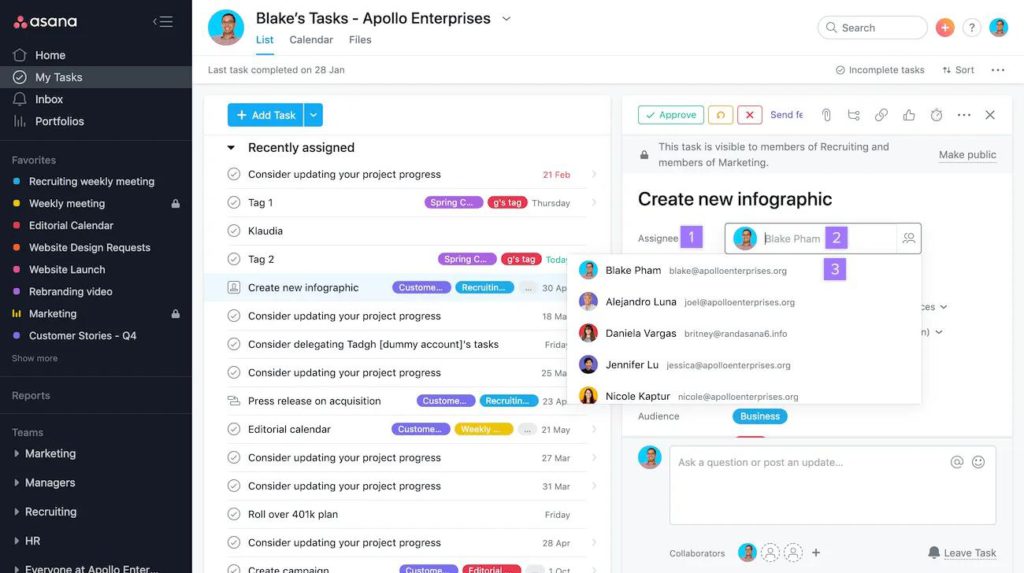
How it works:
- Select “Customize” in your project toolbar.
- Go to “Rules” and click “Add Rule.”
- Choose a trigger, like “Task created” or “Task moved to section.”
- Set the action to “Assign to” the relevant team member.
- Publish the rule, and the task is automatically assigned whenever the trigger occurs.
Benefits: Faster delegation, fewer missed assignments, and consistent workload distribution.
📅 Due date management
Keeping tasks on schedule is crucial for project success. Asana allows you to automate due dates so tasks are always aligned with your project timeline. You can also set recurring due dates for repeating tasks, eliminating the need to manually recreate tasks each week or month.

How it works:
- Open the task details and set a due date or start date.
- Use the “Set to repeat” option for recurring tasks.
- Optionally, create rules to automatically adjust due dates when tasks move sections or statuses change.
Benefits: Keeps projects on track, reduces missed deadlines, and ensures recurring tasks are never forgotten.
✅ Approval workflows
Approval workflows make sure that work is reviewed and validated before moving forward. You can automate this in Asana by creating approval tasks and assigning them to the appropriate approver, with clear instructions and due dates.
How it works:
- Create a new task or select an existing one that requires approval.
- Click the three-dot menu and select “Mark as Approval.”
- Assign the task to the approver and set a due date.
- The approver can mark the task as Approved, Changes Requested, or Rejected.
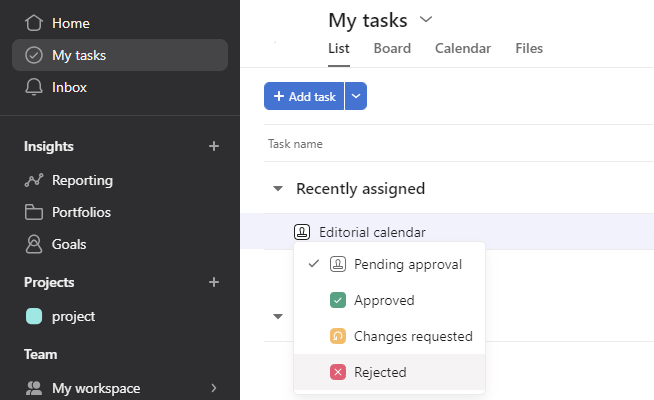
Benefits: Reduces errors, ensures accountability, and saves time by automating follow-ups for approvals.
📂 Project creation automation
Starting new projects can be time-consuming. Asana allows you to automate project creation using templates or by quickly setting up projects with pre-defined layouts, teams, and privacy settings.
How it works:
- Click the “+Create” button and select “Project.”
- Choose a template or start from a blank project.
- Enter project details, assign team members, and select the layout (List, Board, Timeline, or Calendar).
- Click “Create Project” to finalize.
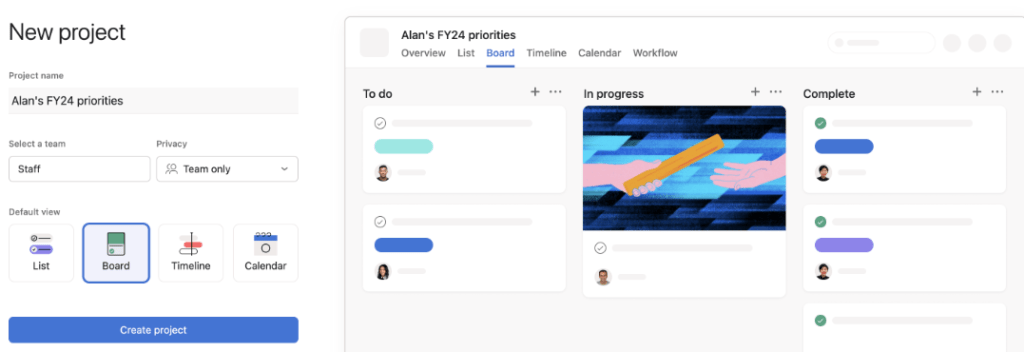
Benefits: Speeds up project setup, ensures consistency across projects, and reduces manual configuration.
📧 Email integration
Integrating Asana with Gmail or Outlook allows you to turn emails into actionable tasks and manage updates without leaving your inbox. This ensures important requests and follow-ups don’t get lost in email threads.

How it works:
- Install the Asana add-on for Gmail or Outlook.
- Log into Asana through the add-on.
- Select an email and create a task directly from it.
- Fill in details such as assignee, due date, and project.
Benefits: Saves time, keeps work centralized, and reduces the chance of missed tasks.
👥 Resource allocation
Proper resource allocation ensures your team’s workload is balanced and projects are completed on time. Asana lets you automate resource planning by visualizing team capacity and assigning tasks based on availability and expertise.
How it works:
- Create a capacity plan in the Reporting section.
- Add projects and team members to the plan.
- Assign tasks automatically based on percent allocation, estimated hours, or project count.

Benefits: Prevents overloading team members, optimizes productivity, and provides clear visibility of workload.
🎯 Goal setting
Asana’s Goals feature connects high-level objectives to day-to-day tasks and projects. Automating goal tracking allows teams to see progress in real time and ensures everyone’s work contributes to strategic outcomes.
How it works:
- Navigate to the Goals tab in Insights.
- Create company or team goals, assign owners, and set timeframes.
- Link tasks and projects to goals for automatic progress updates.
- Track progress through dashboards and status updates.

Benefits: Aligns team activities with company objectives, improves accountability, and simplifies reporting.
📊 Portfolio tracking
Portfolio automation allows managers to oversee multiple projects simultaneously. Progress, risks, and status updates are tracked automatically, eliminating the need for manual checks.
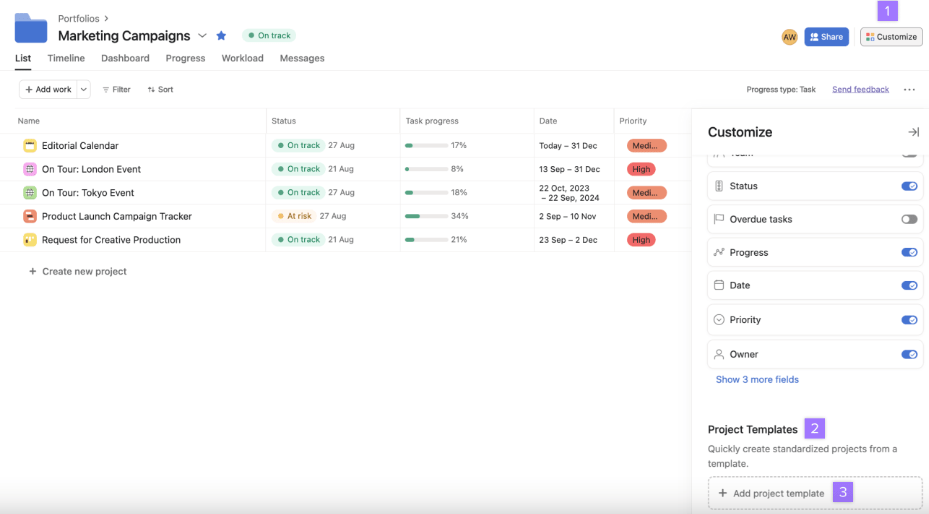
How it works:
- Create a portfolio and add projects you want to monitor.
- Set rules to automatically update project status as tasks are completed.
- Use dashboards to visualize milestones, risks, and progress.
Benefits: Provides transparency, supports decision-making, and streamlines oversight.
🧩 Task dependencies
Task dependencies ensure work happens in the correct order. Automation notifies or assigns dependent tasks automatically once prerequisites are complete.
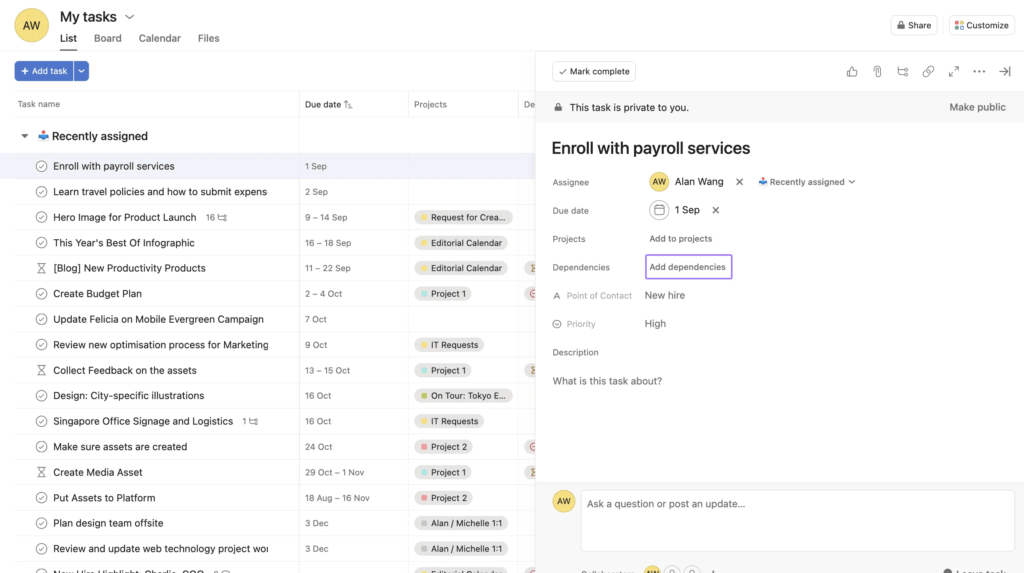
How it works:
- Set tasks as dependent on other tasks.
- Create rules to notify or assign tasks when the predecessors are completed.
Benefits: Prevents workflow bottlenecks, keeps tasks organized, and ensures smooth project progress.
⏳ Timeline adjustments
Timeline automation keeps schedules accurate. When task dates change, dependent tasks adjust automatically to match the new timeline.
How it works:
- Set rules to shift task dates when predecessor tasks are delayed or completed early.
- Track changes directly on the project timeline view.
Benefits: Maintains accurate schedules, reduces manual rescheduling, and improves project visibility.
🔗 Dependencies notifications
Automated dependency notifications alert team members when tasks they rely on are ready, preventing delays in project handoffs.
How it works:
- Set dependent tasks with notifications enabled.
- Team members receive automatic updates when prerequisite tasks are completed.
Benefits: Improves team communication, reduces waiting times, and keeps work progressing smoothly.
👀 Best Practices for Using Asana Automation
Automation can save time, but using it effectively requires strategy. Here’s how teams can get the most out of Asana’s automation features.
🧩 Start with clear workflows
Before automating, map out your existing processes. Identify repetitive tasks, bottlenecks, and points where delays occur. Automation works best when your workflows are already organized.
Tips:
- Document task flows and dependencies.
- Identify high-volume or repetitive tasks first.
- Decide which tasks truly benefit from automation.
⚙️ Use rules thoughtfully
Asana rules are powerful but can become confusing if overused. Focus on rules that reduce manual effort and improve visibility without creating unnecessary triggers.
Tips:
- Limit overlapping rules to prevent conflicts.
- Name rules clearly so team members understand their purpose.
- Test rules on small projects before rolling them out team-wide.
📊 Monitor results and adjust
Automation isn’t set-and-forget. Regularly review how automated workflows are performing and make adjustments as your team’s needs evolve.
Tips:
- Track time saved and tasks completed automatically.
- Ask team members for feedback on whether automations are helping.
- Remove or tweak rules that don’t add value.
💬 Communicate with your team
Even the best automation can fail if team members aren’t aware of it. Share guidelines on how automation affects task assignments, notifications, and workflow visibility.
Tips:
- Include a short guide in your project or team wiki.
- Highlight new automation features during team meetings.
- Encourage team members to suggest automations to improve workflows.
🔄 Combine automation with templates
Using templates alongside automation ensures consistency across projects. You can predefine tasks, subtasks, rules, and assignments, making project setup almost instant.
Tips:
- Maintain updated templates for recurring project types.
- Link rules directly to template tasks to standardize processes.
- Review templates periodically to remove outdated tasks or rules.
⏱ Integrate time tracking with Everhour
Tracking time on automated tasks can be tricky, but Everhour’s Asana time tracking integration makes it seamless. You can monitor how long tasks take, even when assignments, due dates, or subtasks are automated via a time tracker. This ensures accountability, accurate reporting, and data-driven workflow improvements.
Tips:
- Enable Everhour inside Asana to track task and subtask time automatically.
- Use reports to identify tasks that take longer than expected and adjust rules accordingly.
- Combine time tracking insights with automation to optimize workload and team productivity.
🚀 Asana Workflow Automation: Conclusion
Asana automation empowers teams to streamline workflows, reduce manual effort, and stay on top of projects with less stress. By using rules, templates, and integrations like Everhour for time tracking, you can ensure you assign tasks correctly, meet deadlines, and your overall productivity improves.
The key to successful automation is planning: understand your processes, implement rules thoughtfully, and continuously monitor their impact. When done right, automation doesn’t replace team collaboration—it enhances it, giving your team more time to focus on meaningful work rather than repetitive tasks.
Start small, experiment, and expand your automated workflows gradually. Over time, Asana automation can transform the way your team manages projects, helping you deliver results faster and with greater consistency.

Maria
A dedicated content enthusiast with extensive experience in international teams and projects of all sizes. Maria thrives on creativity and attention to detail, fueled by a love for fantasy novels, music, classic black-and-white films, and always finding ways to make things better.