


Candidate Screening: A Practical Process for Hiring Teams

Candidate screening helps hiring teams narrow a large applicant pool before investing time in interviews and assessments. A good screening process quickly identifies candidates who meet the essential requirements while giving qualified applicants a fair chance to move forward.
Screening can take several forms, from reviewing resumes and application answers to asking pre-screening questions, conducting short screening calls, or assessing job-specific skills. The right approach depends on the role, but the goal stays the same: spend more hiring time on candidates who meet the requirements and less on clear mismatches.
In this guide, we’ll explain what candidate screening involves, what to look for, how to structure the process, and how hiring teams can make screening more efficient.
What Is Candidate Screening?
Candidate screening is the process of evaluating applicants against the requirements of a role to decide who should move to the next stage of hiring.
Screening usually happens after candidates apply and before full interviews. Recruiters or hiring managers may review resumes, portfolios, application answers, qualifications, and work history, then use phone or video screens, skills tests, or work samples when they need more information.
A screening process should focus on job-related criteria that help determine whether a candidate meets the role’s essential requirements. It shouldn’t attempt to make a final hiring decision at this stage.
Why Is Candidate Screening Important?
Without a clear screening process, recruiters and hiring managers can spend substantial time reviewing applications or interviewing candidates who don’t meet the basic requirements of the role.
Effective screening can help teams:
- Save recruiter time: Eliminate clear mismatches before they reach longer interviews.
- Focus interviews: Give hiring managers a shortlist of candidates who already meet the essential criteria and have the needed core competencies.
- Create consistency: Apply the same core requirements and evaluation criteria across candidates.
- Improve hiring efficiency: Reduce unnecessary steps and keep qualified candidates moving through the process.
- Improve the candidate experience: A clear, focused process avoids asking candidates to complete unnecessary interviews or competency assessments.
The goal isn’t to screen out as many candidates as possible. It’s to identify the candidates worth investing more time in while keeping the process consistent and relevant to the role.
What Should You Screen Candidates For?
Start with the requirements that actually determine whether someone can succeed in the role. Separate must-have qualifications from preferred skills so recruiters don’t reject potentially strong candidates over requirements that aren’t essential.
Key screening criteria can include:
- Relevant experience: Look for experience that relates directly to the responsibilities of the role.
- Required qualifications: Check education, certifications, licenses, or other credentials the position requires.
- Job-specific skills: Identify the technical or functional skills candidates need to perform the work.
- Work samples or portfolios: For roles where output matters, review previous work or use a practical assessment to evaluate relevant skills.
- Practical requirements: Confirm factors such as availability, location, work authorization, or compensation expectations when they genuinely affect the role.
- Role motivation: A short screening conversation can help determine whether the candidate understands the position and has a relevant reason for pursuing it.
Define these criteria before you start screening. A clear framework makes it easier to compare candidates consistently and reduces the risk of changing your standards as you review applications.
How to Screen Candidates
A structured screening process helps recruiters move from a large applicant pool to a focused shortlist without spending unnecessary time on each candidate.
Define your screening criteria
Start with the job description and identify the requirements that candidates must meet. Separate essential qualifications from preferred ones, and create a simple checklist or scorecard that recruiters can use throughout the process.
Review resumes and applications
Use the must-have criteria to identify clear matches and mismatches. Look for relevant experience, qualifications, skills, and evidence that the candidate meets the basic requirements rather than trying to make a final hiring decision from the resume alone.
Use pre-screening questions
Ask short, role-specific questions to confirm information that isn’t clear from the application. Depending on the role, you might ask about relevant experience, availability, technical skills, or other essential requirements.
Conduct a screening interview
Use a short phone or video call to explore areas that an application can’t fully show, such as communication, motivation, relevant experience, and understanding of the role. Keep the core strategic questions consistent so you can compare candidates on the same criteria.
Assess skills when necessary
Use a work sample, portfolio review, skills test, or other practical assessment when you need evidence of a candidate’s ability to perform the work. Keep assessments relevant to the role and avoid adding unnecessary steps to the process.
Create the shortlist
Review the screening results against your predefined criteria and decide which candidates should move forward. Record the reasons for advancing or rejecting candidates so the process stays consistent and the hiring team has a clear basis for later decisions.
How to Make Candidate Screening More Efficient
A good screening process should reduce unnecessary work, not simply move more candidates through the same number of steps. Hiring teams can improve efficiency by standardizing evaluation, reducing repetitive work, and tracking how much time the process actually takes.
Standardize screening
Use the same core criteria, questions, and evaluation framework for candidates applying for the same role. This makes comparisons easier and reduces the risk of spending significantly more time evaluating some candidates than others.
Track time spent screening
Measure how much time recruiters and hiring managers spend reviewing applications, conducting screening calls, coordinating assessments, and completing other hiring tasks.
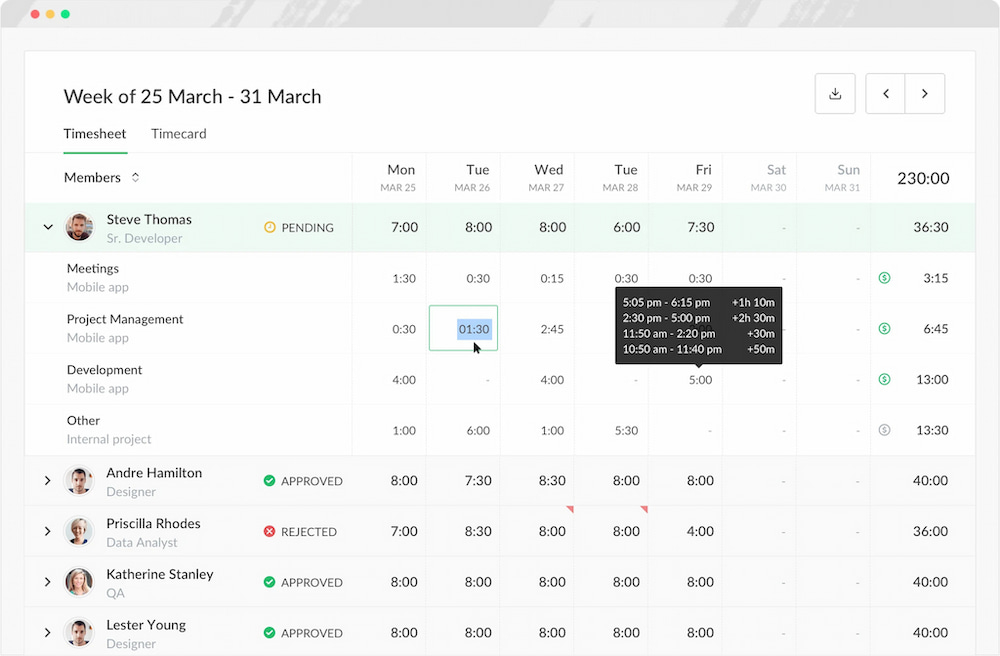
Everhour‘s time tracker can help teams track recruiting work against projects and tasks, making it easier to see how much time different hiring activities consume. This can reveal roles or stages that require more effort than expected and help teams decide where to improve the process.
Automate repetitive work
Use recruiting software to handle administrative tasks such as organizing applications, sending routine communications, and scheduling interviews. Automation can free recruiters to spend more time evaluating qualified candidates and communicating with applicants.
Screen candidates against requirements that genuinely matter for the role. Avoid adding unnecessary filters simply because they make the applicant pool smaller. A shorter shortlist isn’t useful if the process filters out qualified candidates.
Review screening data
Track metrics such as applications screened, screening time, candidates who advance to interviews, and time to hire. Looking at these numbers over time can help teams identify bottlenecks and determine whether changes to the screening process actually improve efficiency.
Candidate Screening Metrics to Track
Tracking a few practical metrics can show where a screening process consumes time and where candidates drop out:
| Metric | What it tells you |
|---|---|
| Time spent screening | How much recruiter and hiring-manager capacity screening consumes |
| Applications screened | The volume of applications moving through the process |
| Screening-to-interview rate | How many screened candidates advance to interviews |
| Time to screen | How quickly applications move from submission to a screening decision |
| Interview-to-offer rate | How well the screened pool aligns with later-stage requirements |
| Time to hire | How long the overall hiring process takes |
Don’t focus on a universal target for each metric. Compare your results across roles and over time to find unusual delays, bottlenecks, or changes in the efficiency of your own hiring process.
Common Candidate Screening Mistakes
Even a structured screening process can create problems when recruiters apply criteria inconsistently or spend too much time on the wrong parts of the process.
| Mistake | What goes wrong |
|---|---|
| Screening without clear criteria | Recruiters make subjective decisions because they haven’t agreed on what the role actually requires. |
| Using too many requirements | Qualified candidates get filtered out because teams treat every preferred qualification as essential. |
| Relying only on resumes | Resumes show background but may not provide enough evidence of job-specific skills. |
| Changing criteria mid-process | Candidates get evaluated against different standards, making comparisons less consistent. |
| Spending too much time on individual candidates | Recruiters lose capacity to review the rest of the applicant pool and move qualified candidates forward. |
| Ignoring screening time | Hiring teams don’t know how much recruiting capacity the process consumes or where bottlenecks occur. |
The goal isn’t to make screening as fast as possible. It’s to spend enough time to make a useful first assessment without turning the initial screening stage into a full interview process.
Frequently Asked Questions
Candidate screening is the process of evaluating applicants against a role’s requirements to decide who should move to the next stage of hiring. It can include resume reviews, application questions, screening calls, skills assessments, and work samples.
Focus on job-related requirements such as relevant experience, required qualifications, role-specific skills, and practical requirements. Separate essential qualifications from preferred ones so you don’t unnecessarily exclude qualified candidates.
Recruiters often handle initial screening, while hiring managers or subject-matter experts may assess technical skills and role-specific qualifications. The right approach depends on the role and your hiring process.
There is no standard screening time. It depends on the number of applications, role complexity, screening criteria, and information available for each candidate. Tracking actual screening time can help identify roles or hiring stages that consistently take longer than expected.
Screening checks whether a candidate meets the basic requirements to move forward. An interview provides a deeper assessment of the candidate’s experience, skills, motivation, and suitability for the role.
Define your screening criteria before reviewing applications, standardize core questions, automate repetitive administrative work, and track the time spent on screening. Reviewing this data can help identify bottlenecks and improve recruiting workflows.
Candidates applying for the same role should be evaluated against the same essential criteria and follow a consistent screening process. Teams can use additional assessments when a role requires specific skills or when an application leaves important information unclear.
Conclusion
A good candidate screening process answers one basic question: does this applicant meet the requirements for the next stage?
Define those requirements before screening, apply them consistently, and use interviews or assessments when the application doesn’t provide enough evidence. Then track how much time the process actually takes so you can spot bottlenecks and plan recruiting capacity more realistically.
Everhour can help teams track time spent on recruiting projects and hiring tasks, giving recruiters and managers a clearer view of where their time goes.

Maria
A dedicated content enthusiast with extensive experience in international teams and projects of all sizes. Maria thrives on creativity and attention to detail, fueled by a love for fantasy novels, music, classic black-and-white films, and always finding ways to make things better.