


Best Time Tracking and Billing Software Solutions for Efficient Invoicing

Let’s be honest: tracking time and billing clients shouldn’t require three tools, a spreadsheet, and a therapist. The best time tracking and billing software doesn’t just track hours. It integrates directly into your project management workflow, lets you invoice clients in a click, and keeps your budget (and brain) in check.
Here are the tools that actually do that.
How We Evaluated These Tools
We evaluated each tool across six areas:
- Pricing and scalability — How does the cost change as the team grows?
- Time tracking — How easy is it to record and edit time against projects, tasks, and clients?
- Billing workflow — Can tracked hours be converted into billable amounts without manual data entry?
- Invoicing — Can the tool generate invoices from approved time?
- Project management integration — Does time tracking happen inside the team’s existing PM tool?
- Reporting and profitability — Can teams compare tracked time, revenue, budgets, and costs?
Pricing was verified directly on each vendor’s website as of July 2026. We also reviewed user feedback on G2 and Capterra.
Disclosure: Everhour is our product and appears on this list. We’ve aimed to give every other tool an honest writeup including real limitations.
Best Time Tracking and Billing Software: Quick Overview
| Tool | Best for | Time tracking | Billing & invoicing | Project management | Accounting integrations | Free plan |
|---|---|---|---|---|---|---|
| Everhour | Project-based teams & agencies | Built in | Invoices from tracked time | Integrates with Asana, ClickUp, Trello, Jira, Notion & more | QuickBooks, Xero | Up to 5 users |
| Avaza | All-in-one teams | Built in | Invoices from tracked time & expenses | Built in | QuickBooks, Xero | Yes |
| Scoro | Professional services & complex projects | Built in | Hourly, fixed-fee, milestone & retainer billing | Built in | Accounting integrations | No |
| FreshBooks | Freelancers & small businesses | Built in | Invoices, recurring billing & payments | Basic | Accounting integrations | No |
| Paymo | Freelancers & small agencies | Built in | Invoices from tracked time & expenses | Built in | Accounting integrations | Yes |
| QuickBooks Time | QuickBooks users | Built in | Syncs tracked time to QuickBooks | Scheduling & job management | QuickBooks | No |
Best for All-in-One PM + Billing
Everhour
The thing that separates Everhour from most billing tools is where the work happens — inside ClickUp, Asana, Trello, and Notion rather than in a separate app. Time gets logged against actual tasks, budgets update in real time, and invoices are generated from approved timesheets without any re-entry. For agencies and project-based teams that need billing to follow naturally from the work rather than happen as a separate administrative exercise, that embedded workflow is the main reason to choose it over anything else on this list.
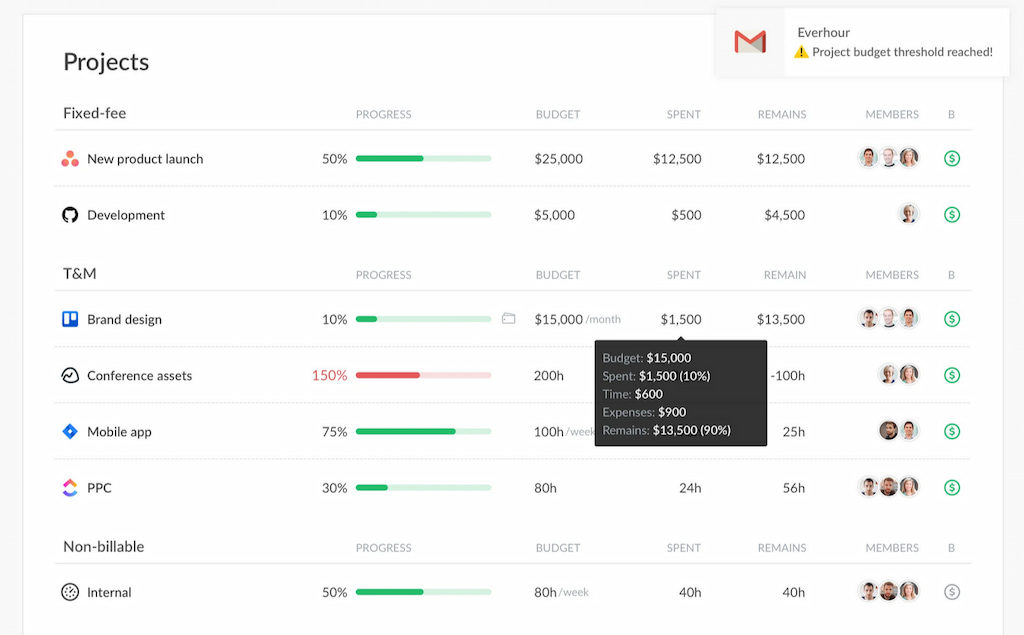
Beyond a time tracker, it covers project budgets, time off, billable rates, expense tracking, timesheets, resource planning, and profitability reporting. You can see whether a project is running over budget before you get to the invoice stage — which is significantly more useful than discovering a problem when you’re writing the bill.
Pricing
Free for up to five users. Team plan $8.50/user/month (minimum five users).
Avaza
Avaza covers the full project workflow in one platform — task management, time tracking, expense tracking, and invoicing — without requiring integrations with external PM tools because the PM functionality is built in. For small teams that want everything in one place without the overhead of connecting multiple tools, that’s a genuine advantage.
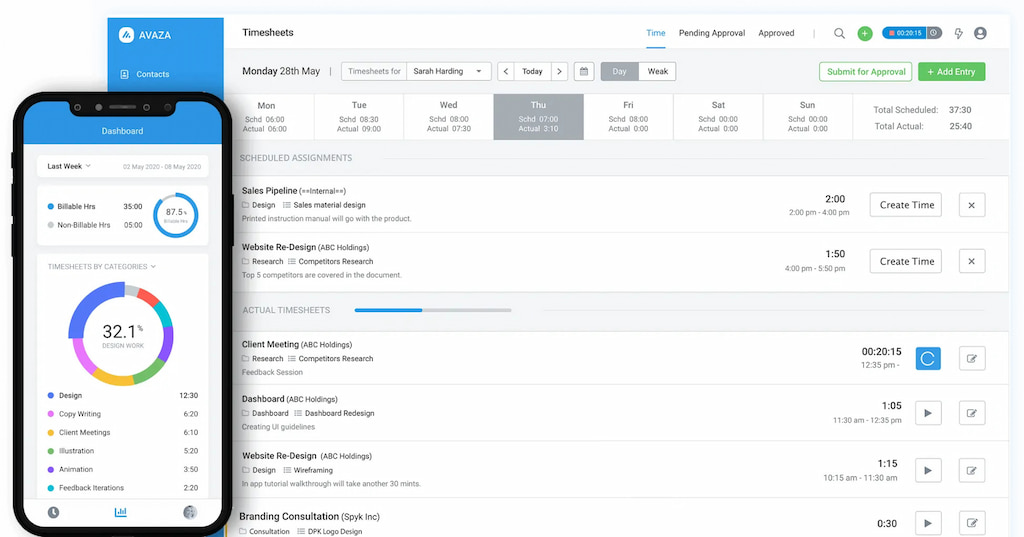
The time tracking side supports multiple simultaneous timers, which is useful for teams juggling several projects at once. Expenses can be added directly alongside time entries for a complete picture of project costs before invoicing. Real-time reporting covers time, expenses, and project progress without needing to export anything.
Where it falls short relative to Everhour is PM tool depth — Avaza’s built-in project management is functional but less sophisticated than dedicated tools like Asana or ClickUp, and it doesn’t embed into those tools the way Everhour does. For teams already invested in a PM tool, that’s a limitation worth considering.
Pricing
Free plan available for up to 1 user. Startup $11.95/month (2 users). Basic $23.95/month (5 users). Business $47.95/month (10 users). Additional users available on all paid plans.
Scoro
Scoro is the most complete business management platform on this list — it covers project management, time tracking, billing, financial reporting, and CRM in one place. For professional services firms that have outgrown simpler tools and need detailed visibility into project profitability, resource utilization, and financial performance, it goes deeper than anything else here.
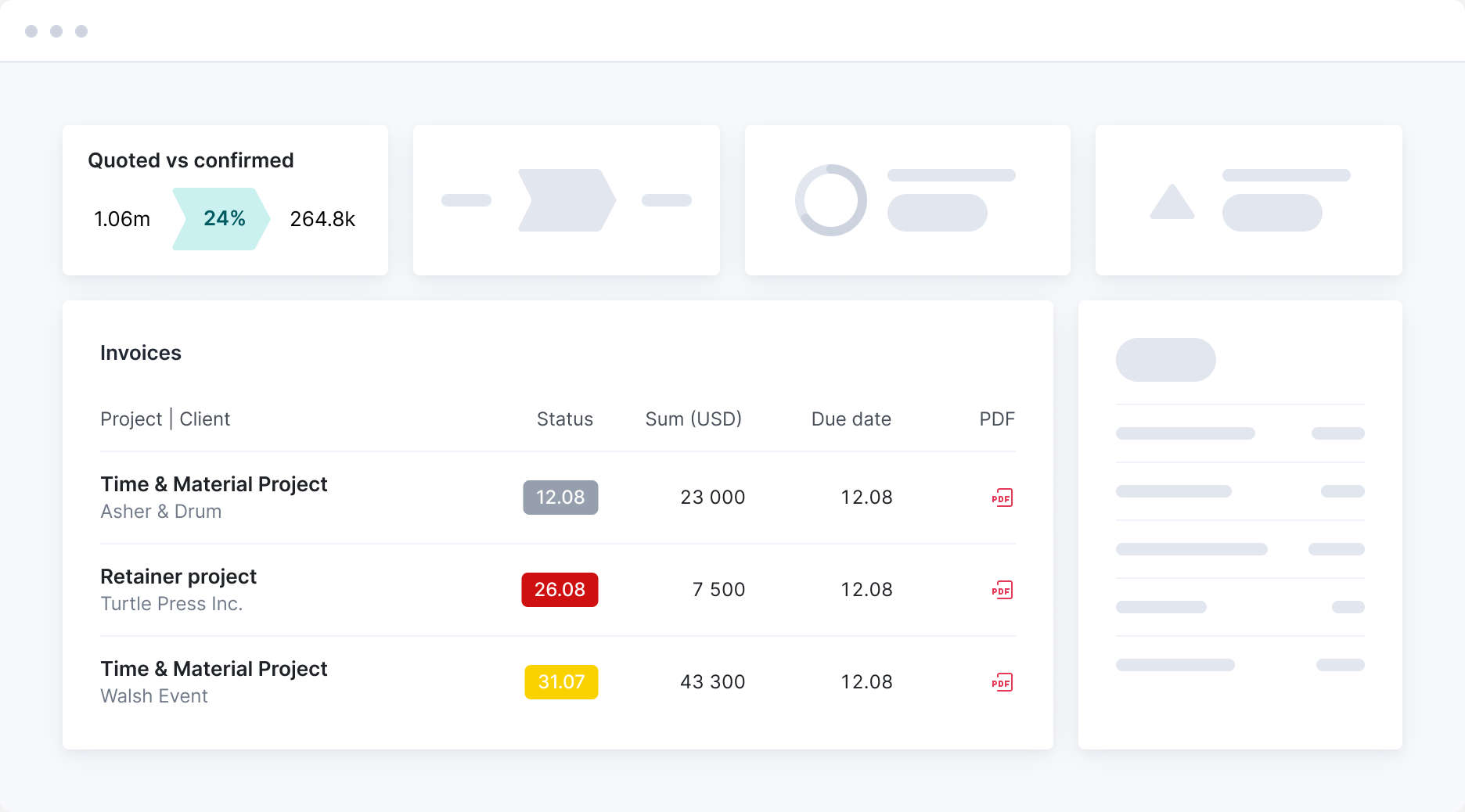
The billing side handles multiple billing structures — hourly, fixed fee, milestone-based, and retainers — within the same project. Work-in-progress tracking gives finance teams visibility into unbilled time before invoices go out. Detailed profitability reports show revenue versus cost per project, team member, and client.
The tradeoff is complexity and cost. Scoro has a steeper learning curve than the other tools on this list and a higher price point, which makes it overkill for small teams or straightforward billing workflows. For growing agencies and consultancies that need that depth, it’s the natural ceiling of this category.
Pricing
No free plan — 14-day free trial available. Core $19.90/user/month. Growth $32.90/user/month. Performance $49.90/user/month. Enterprise custom pricing.
Best for Freelancers
FreshBooks
FreshBooks started as an invoicing tool and the invoicing side shows it — branded templates, automatic payment reminders, Stripe, PayPal, and ACH payment collection directly from the invoice, and recurring billing for retainer clients. For freelancers who send a lot of invoices and want payment collection to be as frictionless as possible for clients, it’s the most polished option on this list.
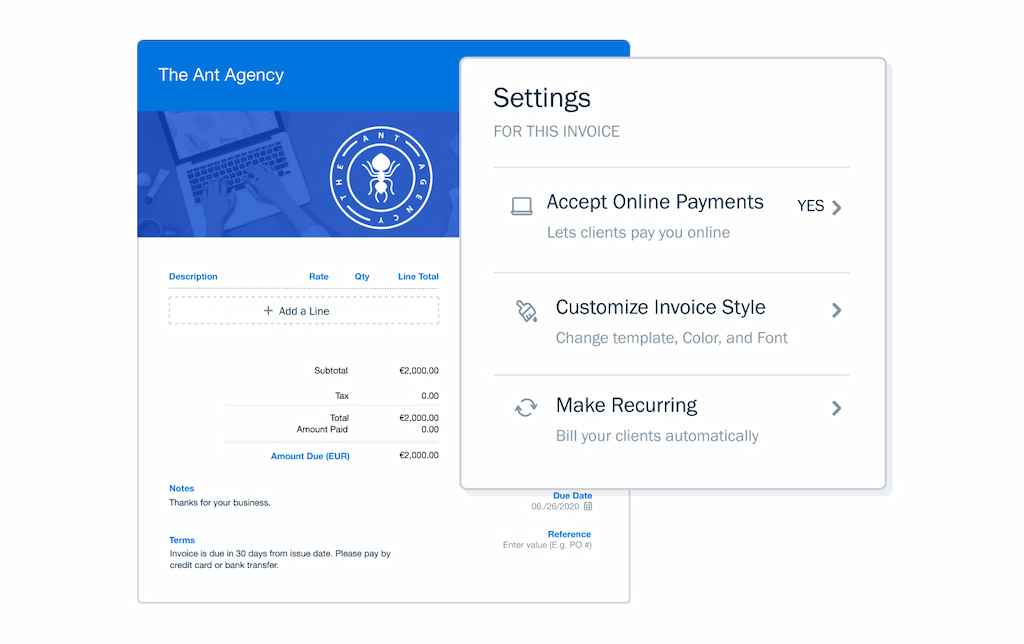
The time tracking side is functional but straightforward — you can log time against projects and clients, mark hours as billable, and pull them into invoices. There are no native integrations with PM tools like Asana or ClickUp, which matters if your work already lives in those platforms. Where FreshBooks earns its place is for freelancers whose primary pain point is billing and payment collection rather than project management complexity.
Pricing
No free plan. Lite $23/month (up to 5 billable clients). Plus $43/month (up to 50 clients). Premium $70/month (unlimited clients). Annual billing saves 10%. 30-day free trial available.
Paymo
Paymo sits between a lightweight time tracker and a full project management platform — it handles task management, time tracking, invoicing, and expense tracking in one place without the complexity or price point of something like Scoro. For freelancers and small agencies that want project management and billing consolidated without needing a separate PM tool, it covers that ground well.
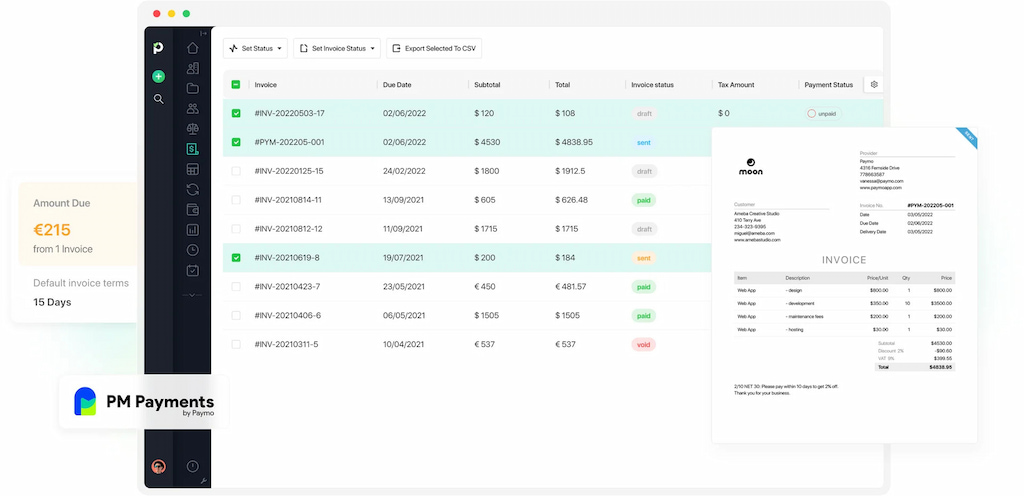
The client portal is a standout feature — clients can log in to see project progress, invoices, and communication in one place, which reduces the back-and-forth of status updates and payment chasing. Invoicing pulls directly from tracked time with customizable templates, and Stripe payment collection is built in.
Where it falls short is depth — reporting is less detailed than Everhour or Scoro, and the PM features are more basic than dedicated tools like Asana. For freelancers and small teams who don’t need that depth, it’s a genuinely good all-in-one option at a reasonable price.
Pricing
Free plan for one user. Solo $5.90/month for one user (then $9.90/month after 3 months). Plus $10.90/user/month (then $15.90/user/month after 3 months). Pro $16.90/user/month (then $23.90/user/month after 3 months).
Best for Payroll and Accounting
QuickBooks Time
QuickBooks Time’s billing story is straightforward — it doesn’t handle invoicing itself, but tracked and approved hours sync directly into QuickBooks Online where invoices are generated through QuickBooks’ own billing workflow. For businesses already running accounting through QuickBooks, that removes the manual data transfer that causes most billing errors.
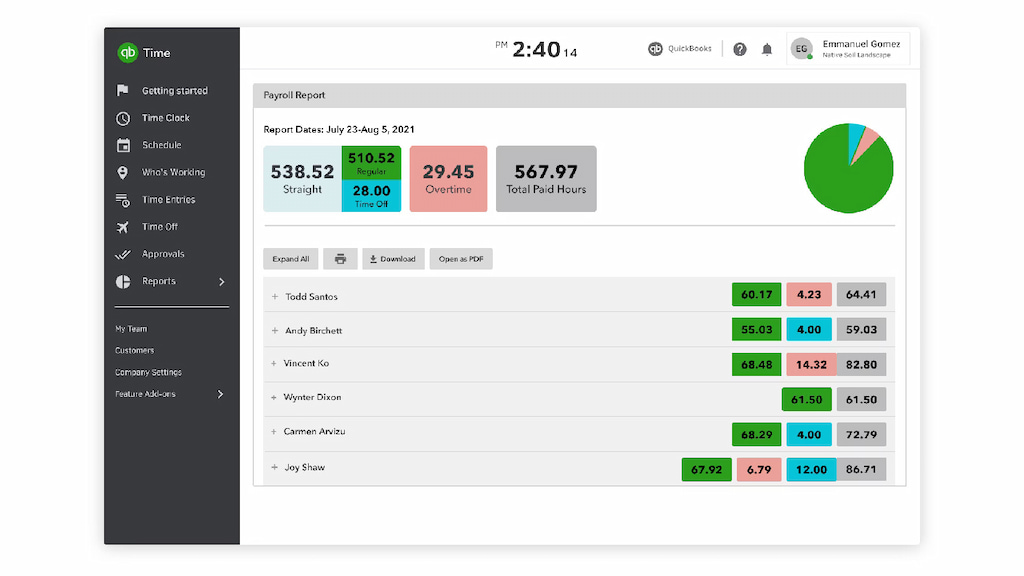
It’s worth being direct about the limitation: QuickBooks Time is only worth considering if you’re already committed to the QuickBooks ecosystem. If you are, the combination is powerful — GPS tracking, shift scheduling, job costing, payroll, and time approvals all feeding into the same accounting platform. If you’re not, the value largely disappears.
Pricing
No free plan. Premium plan $20/month base fee plus $10/user/month. Elite plan $40/month base fee plus $12/user/month. Prices verified July 2026 — verify current rates on quickbooks.intuit.com as pricing has changed recently.
FAQs
Everhour is the strongest fit for teams already working inside Asana, ClickUp, Trello, Jira, or Notion — time tracking and billing happen inside the tools you already use. For all-in-one project management and billing without external integrations, Avaza and Scoro are strong alternatives depending on team size and complexity.
Everhour has the deepest PM integrations — it works natively inside Asana, ClickUp, Trello, Jira, Notion, and Basecamp. Avaza and Paymo have built-in project management rather than integrating with external tools. FreshBooks connects via Zapier rather than natively.
Yes — Everhour, FreshBooks, Avaza, Scoro, and Paymo all generate invoices directly from tracked time. QuickBooks Time syncs hours into QuickBooks Online where invoices are generated through QuickBooks’ billing workflow.
FreshBooks is the most polished option for freelancers who prioritize invoicing and payment collection. Paymo is worth considering for freelancers who also want project management and client portals without a separate tool.
Everhour has a free plan for up to five users. Paymo has a free plan for one user. Avaza has a free plan for one user. FreshBooks, Scoro, and QuickBooks Time don’t have permanent free plans but offer free trials.
Time tracking software records hours worked against projects, tasks, and clients. Billing software generates invoices from that data and handles payment collection. The tools on this list combine both — but the depth of each side varies. Everhour and Avaza are stronger on the project tracking side; FreshBooks is stronger on the billing and payment collection side.
Which Time Tracking and Billing Software Is Right for You?
The best tool depends on how your team works, where your projects live, and how you handle billing.
| If you… | Consider |
|---|---|
| Work primarily in Asana, ClickUp, Trello, Jira, or Notion | Everhour |
| Want project management, time tracking, and billing in one standalone system | Avaza |
| Need advanced profitability, resource planning, and financial reporting | Scoro |
| Are a freelancer focused primarily on invoicing and getting paid | FreshBooks |
| Want lightweight project management with time tracking and invoicing | Paymo |
| Already run your accounting through QuickBooks | QuickBooks Time |

Maria
A dedicated content enthusiast with extensive experience in international teams and projects of all sizes. Maria thrives on creativity and attention to detail, fueled by a love for fantasy novels, music, classic black-and-white films, and always finding ways to make things better.