


Affordable Employee Time Tracking Software: Top Tools & Tips for Small Teams

Affordable employee time tracking software helps small businesses record work hours, manage payroll, track billable time, and understand where time is spent without paying enterprise prices. Some tools focus on simple timesheets, while others include budgeting, invoicing, project management, or productivity reporting. We compared the leading affordable time tracking software to help you choose the right fit for your team.
How We Evaluated These Tools
We evaluated each platform based on ease of time tracking, reporting, payroll and invoicing features, integrations, mobile experience, pricing, and overall value for small teams. We verified pricing and feature availability directly on each vendor’s website in June 2026 and considered user feedback from G2 and Capterra alongside our own testing.
A disclosure: Everhour is our product and appears first on this list. We’ve aimed to review every tool fairly, including where another platform may be a better choice depending on your workflow.
What Is Employee Time Tracking Software?
Employee time tracking software records the hours individuals spend on tasks, projects, or clients. It typically offers:
- Timers: Start and stop clocks for tasks or log time manually.
- Timesheets: Weekly or monthly views of hours logged.
- Reports: Insights into billable vs non-billable hours, project costs, and productivity.
- Project & client budgets: Set limits and track progress.
- Integrations: Connect with project management, accounting, or payroll tools.
These tools help small teams manage payroll accurately, bill clients correctly, understand how long tasks take, and plan better.
Quick Overview
- Best overall: Everhour
- Best free plan: Clockify
- Best for freelancers: Toggl Track
- Best for agencies: Everhour
- Best for invoicing: Harvest
- Best for automatic time tracking: TimeCamp
What to Look for in Affordable Time Tracking Software
Choose based on the problems you’re trying to solve—not simply the lowest monthly price.
- Easy time entry — employees should be able to log time with timers, manual entries, or weekly timesheets.
- Billable and non-billable hours — essential for agencies, consultants, and client work.
- Reporting — payroll, project, and productivity reports save hours of manual work.
- Integrations — look for native connections with tools like Asana, ClickUp, Trello, QuickBooks, or Slack.
- Mobile apps — especially important for remote and field teams.
- Scalability — a cheap tool becomes expensive if you outgrow it after six months.
Comparison Table
| Tool | Best for | Free plan | Starts at | Invoicing | Payroll exports | Project management integrations |
|---|---|---|---|---|---|---|
| Everhour | Project-based teams, agencies | ✅ Up to 5 users | $8.50/user/mo | ✅ | ✅ | Asana, ClickUp, Trello, Jira, Notion, Basecamp |
| Toggl Track | Freelancers and consultants | ✅ Up to 5 users | $10/user/mo | ❌ | ❌ | Asana, Trello, Linear, GitHub and more |
| Clockify | Budget-conscious teams | ✅ Unlimited users | $3.99/user/mo | ✅ (paid plans) | ✅ | Asana, Trello, Jira and more |
| Harvest | Client billing and invoicing | ✅ 1 user, 2 projects | $11/user/mo | ✅ | ❌ | Asana, Trello, Slack, QuickBooks |
| TimeCamp | Automatic time tracking | ✅ 1 user | $2.99/user/mo | ✅ | ✅ | Asana, Trello, ClickUp, Monday.com and more |
Top Affordable Time Tracking Tools for Small Teams
We’ve compiled a list of budget-friendly tools for time tracking for small teams and freelancers. Below, we compare their features, pros, cons, and pricing.
1. Everhour
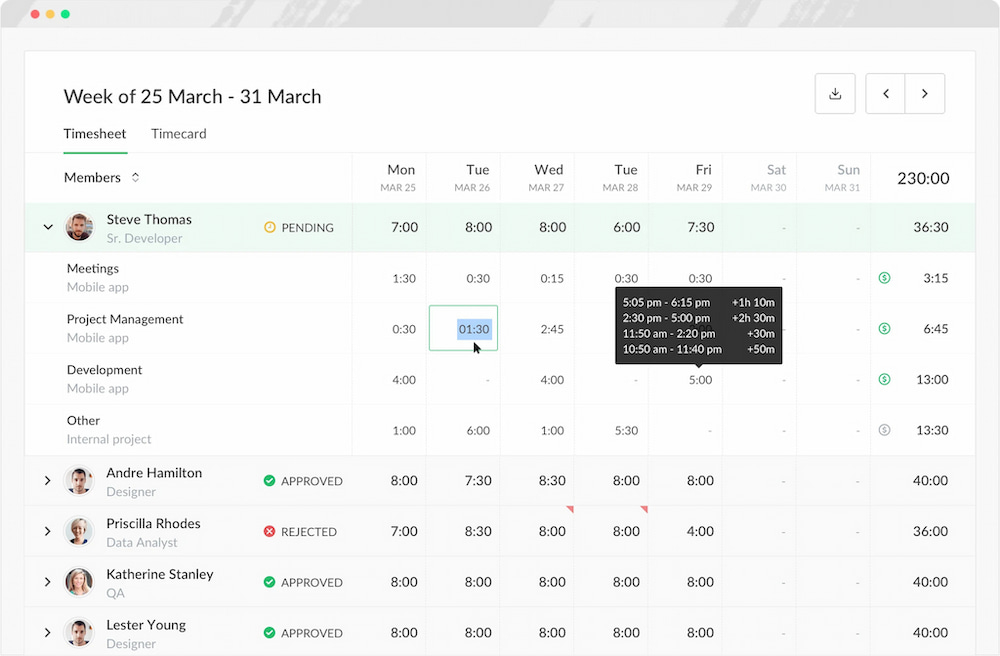
Everhour is a time tracker designed to integrate seamlessly with popular project management platforms such as Asana, Trello, ClickUp, Notion, and Basecamp. It focuses on accuracy, budgeting, and reporting.
🧠 Key features
- Timers & manual entry
- Project budgets & alerts
- Comprehensive reporting (projects, tasks, users)
- Invoicing & payroll exports
- User roles & approval workflows
- Integrations with project management and accounting apps
💰 Pricing
- Free: Limited features; ideal for personal use or a small business.
- Team: Around $8.50/user/month; budgets, invoicing, approvals.
- Enterprise: Custom pricing for advanced needs.
✅ Pros
- Deep integration with project management tools—timers appear next to tasks.
- Accurate budget tracking and alerts.
- Detailed reports for billing and internal analysis.
❌ Cons
- The free plan has limited features.
💡 Ideal for: Agencies, consultants, freelancers and small teams using tools like Asana or Trello who need precise budgets and reports.
2. Toggl Track
Toggl Track is known for its simple interface and one‑click timer. It supports manual entries, tags, and labels, and has a generous free plan.
![11+ timesheet apps for any need [updated for 2021]](https://everhour.com/blog/wp-content/uploads/2021/06/toggl-timesheet-app.png)
🧠 Key features
- One-click timers
- Billable vs non-billable tags
- Project and client organization
- Basic reporting and insights
- Integrations with dozens of tools
- Pomodoro timer and reminders (paid plans)
💰 Pricing
- Free: Up to 5 users; basic tracking and reporting.
- Starter ($9/user/month): Deeper reporting, tags, and project budgeting.
- Premium ($18/user/month): Time audits, scheduled alerts, team management.
✅ Pros
- Very easy to use.
- Generous free tier.
- Strong browser and mobile apps.
❌ Cons
- Limited budgets on the free plan; advanced reporting requires paid tiers.
- No built‑in invoice functionality.
💡 Ideal for: Freelancers, small teams needing quick time logging without complex features.
3. Clockify
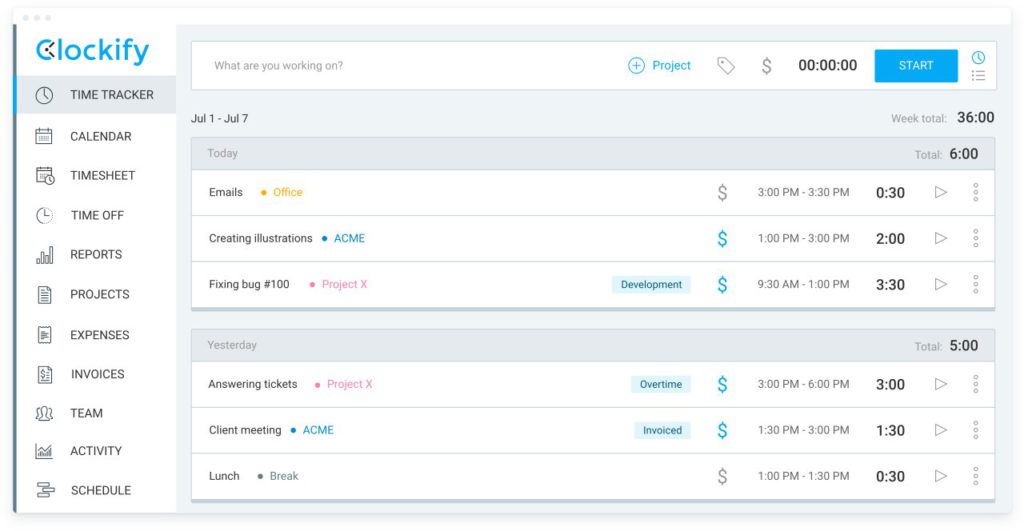
Clockify stands out for its generous free plan that includes unlimited users and projects. It offers timers, manual entries, timesheets, and simple reports.
🧠 Key features
- Unlimited users and projects on the free plan
- Time tracking via web, mobile, and desktop
- Timesheet approvals
- Export reports to CSV, Excel, and PDF
- Project budgets (paid plans)
- Invoicing (paid plans)
💰 Pricing
- Free: Unlimited tracking and basic reports.
- Basic ($3.99/user/month): Unlimited tracking, timesheet approvals, and advanced filters.
- Standard ($5.49/user/month): Adds invoicing, billable rates, and expense tracking.
- Pro: ($7.99/user/month): Adds scheduling, forecasting, alerts, and more.
- Enterprise: ($11.99/user/month): Adds SSO and audit logs.
- Productivity Suite: ($12.99/user/month): Combines all features from Enterprise, plus time tracking and project management.
✅ Pros
- Low cost with robust free option.
- Simple UI.
- Time tracking plus optional invoicing and expense management.
❌ Cons
- Limited analytics on the free tier.
- Some features (budgets, invoices) are reserved for higher tiers.
💡 Ideal for: Small teams on a tight budget or non-profits needing a free yet capable tool.
4. Harvest
Harvest is popular among freelancers and small agencies for combining time tracking with invoicing. It also integrates with scheduling (Forecast) for resource planning.
![11+ timesheet apps for any need [updated for 2021]](https://everhour.com/blog/wp-content/uploads/2021/06/harvest-timesheet-app.png)
🧠 Key features
- Timers & manual entry
- Expense tracking
- Invoicing & payment collection
- Budget alerts
- Integrations with Asana, Trello, Slack, and PayPal
- Harvest Forecast (add-on) for resource planning
💰 Pricing
- Free: One user, two projects—good for freelancers.
- Pro ($11/user/month): Unlimited projects, invoicing, and reporting.
- Premium: ($14/user/month): Custom support, SSO, activity logs, and many more.
✅ Pros
- Built-in invoicing saves time.
- Expense tracking and budgeting.
- Simple to use and well-designed.
❌ Cons
- Limited free plan.
- Requires a separate subscription for Forecast if you need scheduling.
💡 Ideal for: Small agencies and freelancers that bill clients and need both time and expense tracking.
5. TimeCamp
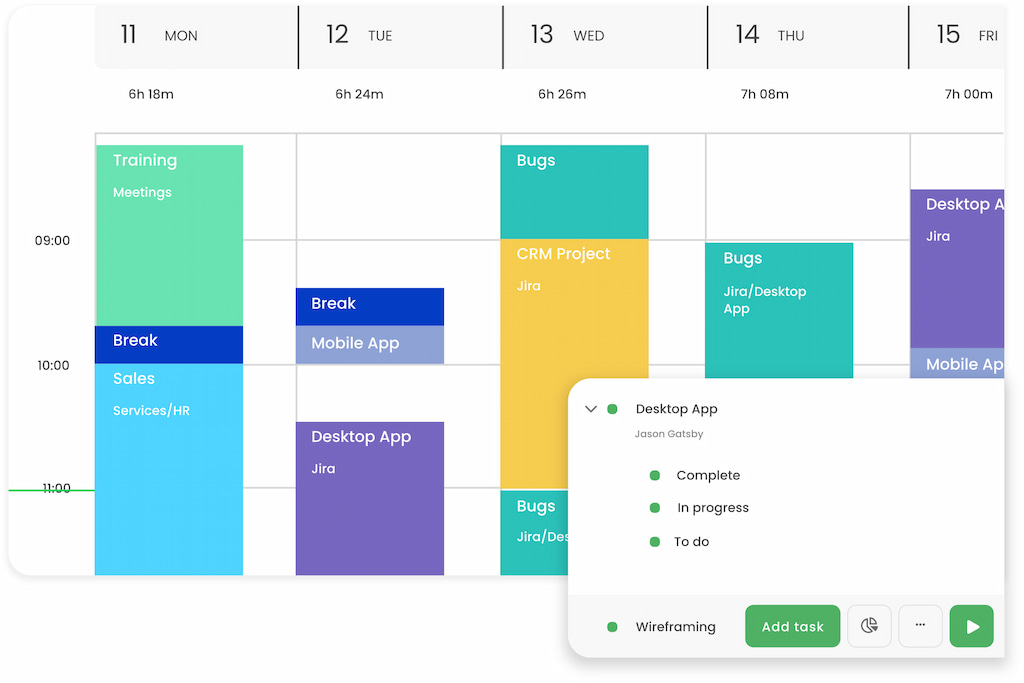
TimeCamp combines time tracking with productivity monitoring. It offers automatic time tracking based on website/app usage and supports budgets and invoices.
🧠 Key features
- Automatic time tracking (detect apps, websites)
- Manual tracking with tasks
- Project budgets
- Productivity & attendance analysis
- Invoicing
- Integrations with project management tools
💰 Pricing
- Free: One user with unlimited projects.
- Starter (Time & Billing): $2.99/mo per user billed annually, or $3.99 month-to-month
- Premium (Profit & Productivity): $4.99/mo per user billed annually, or $6.99 month-to-month
- Ultimate (Analytics & Collaboration): $7.99/mo per user billed annually, or $10.99 month-to-month
- Enterprise (Management & Security): $11.99/mo per user billed annually, or $14.99 month-to-month
✅ Pros
- Affordable pricing.
- Automatic tracking may reduce manual entry.
- Productivity insights.
❌ Cons
- Automatic tracking might be intrusive for some teams.
- The reporting interface can be complex.
💡 Ideal for: Teams needing a balance between time tracking and productivity analysis.
Who Should Choose Which Tool?
Best for freelancers
- Everhour — Best for freelancers who manage projects in Asana, ClickUp, Trello, Jira, or Notion and need budgeting, billable hours, and invoicing in one place.
- Toggl Track — Best for solo professionals looking for a fast, intuitive timer with minimal setup.
- Harvest — Best for freelancers who regularly invoice clients and want built-in online payment collection.
- Clockify — Best free option for freelancers who need unlimited time tracking without paying for a subscription.
Best for small teams
- Everhour — Best all-around choice for project-based teams that need time tracking, budgets, reporting, approvals, and invoicing.
- Clockify — Ideal for growing teams that want unlimited users on a free plan before upgrading.
- TimeCamp — Best for teams interested in automatic time tracking and productivity insights without a high monthly cost.
Best for agencies and client work
- Everhour — Best for agencies tracking billable hours, monitoring project budgets, and measuring project profitability across multiple clients.
- Harvest — Great for agencies that prioritize simple invoicing, expense tracking, and online client payments.
- Clockify — Suitable for agencies looking for an affordable entry point with flexible reporting and paid invoicing features.
Best for payroll and employee time tracking
- Everhour — Best for businesses that need approval workflows, payroll exports, and detailed employee timesheets.
- TimeCamp — Good choice for businesses that want attendance tracking and automatic time capture alongside payroll reporting.
- Clockify — Well suited to organizations that need digital timesheets and payroll-ready reports at a low cost.
FAQ: Affordable Employee Time Tracking Software
Affordable employee time tracking software helps businesses record employee work hours, manage timesheets, monitor billable and non-billable time, and prepare payroll without the cost of enterprise workforce management systems. Many tools also include reporting, invoicing, project budgeting, and integrations with accounting or project management software.
The best tool depends on your workflow. Everhour is a strong choice for project-based teams that need budgeting, invoicing, and integrations with tools like Asana, ClickUp, and Trello. Clockify is ideal if your priority is a generous free plan, while Harvest is a good fit for businesses focused on client billing and invoicing.
Often, yes. Free plans from Clockify, Everhour, Toggl Track, and TimeCamp cover basic time tracking, timesheets, and reporting. As your business grows, you may need paid features such as approvals, budgeting, invoicing, payroll exports, or advanced reporting.
Pricing varies by vendor, but most affordable tools start between $3 and $11 per user per month. Many also offer free plans or free trials, making it possible for small teams to test the software before committing to a paid subscription.
Most small businesses should prioritize:
– Easy time entry with timers and manual timesheets
– Billable and non-billable hour tracking
– Payroll or invoicing support
– Reporting and timesheet approvals
– Mobile apps for remote employees
– Integrations with project management or accounting software
Yes. Many platforms export timesheets for payroll or integrate directly with payroll and accounting software. Some tools also calculate overtime, track attendance, and simplify employee hour approvals before payroll is processed.
Freelancers often prefer Toggl Track for its simplicity, Harvest for its invoicing capabilities, or Everhour if they manage projects inside Asana, ClickUp, Trello, or Notion and need budgeting alongside time tracking.
Yes. Most tools on this list allow you to categorize time as billable or non-billable. This helps businesses invoice clients accurately, monitor internal work, and analyze project profitability.
Everhour offers deep integrations with Asana, ClickUp, Trello, Jira, Notion, and Basecamp. Harvest, Clockify, TimeCamp, and several other tools also integrate with QuickBooks or popular project management platforms, although the depth of those integrations varies.
In Summary
- Choose Everhour if you want project-based time tracking with budgeting, reporting, and native integrations.
- Choose Clockify if your priority is the most generous free plan.
- Choose Toggl Track if you want the simplest experience for freelancers.
- Choose Harvest if invoicing and client payments are central to your workflow.
- Choose TimeCamp if you prefer automatic time tracking and productivity insights.

Maria
A dedicated content enthusiast with extensive experience in international teams and projects of all sizes. Maria thrives on creativity and attention to detail, fueled by a love for fantasy novels, music, classic black-and-white films, and always finding ways to make things better.