


Activity Diagram: Symbols, Examples, and Uses
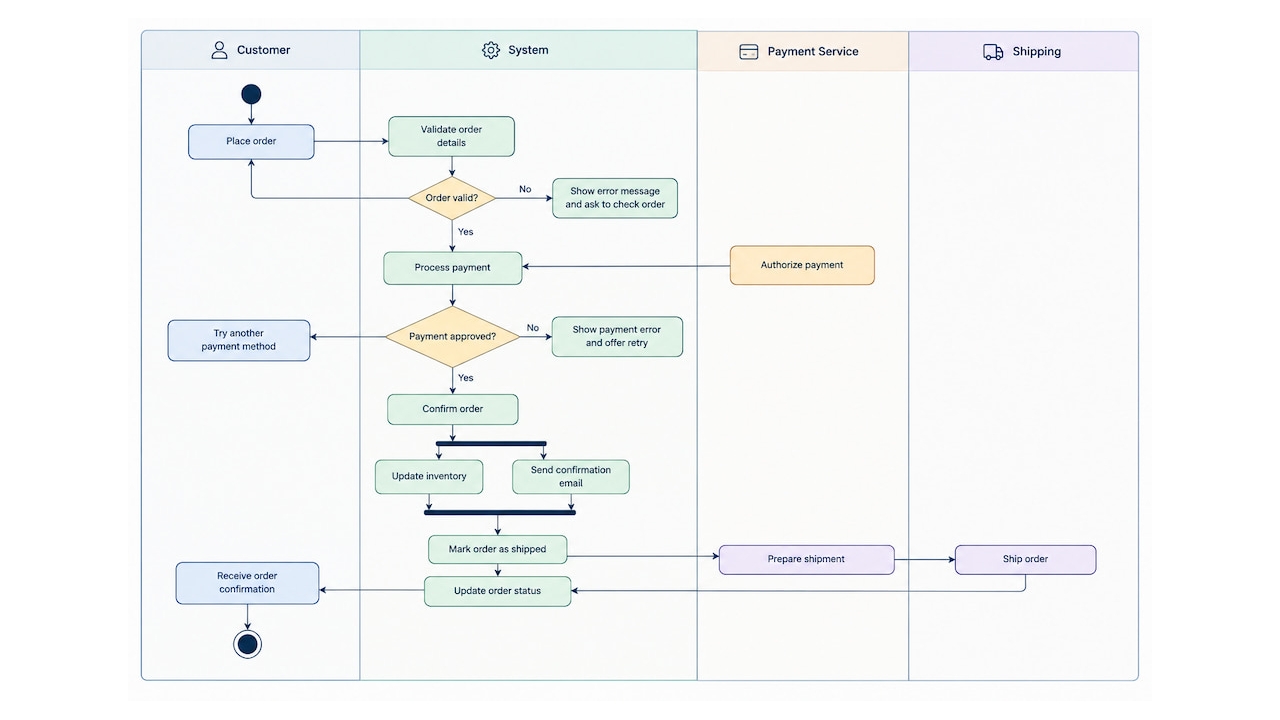
An activity diagram is a type of UML (Unified Modeling Language) diagram that visualizes the steps, decisions, and flows involved in a process. It helps teams understand how a workflow progresses from start to finish, including alternative paths, parallel activities, and the responsibilities assigned to different participants.
Activity diagrams are commonly used in software development, business process modeling, and system design. For example, a team might use one to map an online checkout process, showing how the system validates an order, processes payment, and handles a failed transaction.
TL;DR: Key Takeaways
- An activity diagram is a UML diagram that represents the flow of activities and decisions within a process.
- Key symbols include initial and final nodes, action nodes, control-flow arrows, decision nodes, fork and join nodes, and swimlanes.
- Common uses include modeling business workflows, documenting software logic, and identifying bottlenecks or missing steps.
- To create one, define the process, identify activities and decisions, connect the elements, and validate the resulting flow.
- Activity diagrams vs. flowcharts: activity diagrams use standardized UML notation and can represent concurrency and responsibility boundaries.
What Is an Activity Diagram?
An activity diagram is a behavioral diagram in UML that shows how a process moves through a sequence of actions and decisions. It represents the control flow between activities, including conditions that determine which path the process follows and actions that can occur simultaneously.
Unlike diagrams that focus on a system’s structure, an activity diagram focuses on what happens during a process and how its steps relate to one another.
For example, an activity diagram for employee onboarding might show an HR manager preparing documents, an employee completing paperwork, and IT configuring equipment. A decision node could determine whether all required documents have been submitted before onboarding continues.
Activity diagrams are useful for:
- Business process modeling: documenting workflows such as order fulfillment, invoice approval, and employee onboarding.
- Software development: mapping application logic, user interactions, and conditional behavior before implementation.
- System design: describing how different components or participants contribute to a process.
- Process improvement: identifying redundant steps, unnecessary handoffs, and potential bottlenecks.
Activity diagram vs. flowchart
Activity diagrams and flowcharts both visualize processes, but they differ in notation and modeling capabilities.
| Feature | Activity diagram | Flowchart |
|---|---|---|
| Notation | Standardized UML symbols | General-purpose flowchart symbols |
| Main purpose | Model workflows and system behavior | Represent steps in a process or algorithm |
| Parallel activities | Supports explicit fork and join nodes | Depends on the notation and conventions used |
| Responsibilities | Can use swimlanes to show ownership | Can use lanes, though conventions vary |
| Typical use cases | Software design, business workflows, system modeling | Procedures, troubleshooting, and simple process documentation |
Use an activity diagram when you need to represent a workflow with conditional paths, concurrent activities, or responsibilities across multiple participants. A flowchart is often sufficient for a straightforward process that doesn’t require UML-specific notation.
Activity Diagram Symbols and Notation
UML activity diagrams use standardized symbols to represent actions, decisions, and the flow of a process. Understanding these symbols makes it easier to read existing diagrams and create ones that communicate workflows clearly.
| Symbol | Name | Purpose |
|---|---|---|
| Filled circle | Initial node | Marks where the activity begins. |
| Rounded rectangle | Action node | Represents an individual task or step, such as validating an order. |
| Arrow | Control flow | Shows the order in which actions or other nodes execute. |
| Diamond | Decision node | Routes the flow along different paths based on a condition. |
| Diamond | Merge node | Combines alternative paths into a single flow. |
| Thick bar | Fork node | Splits one flow into multiple concurrent activities. |
| Thick bar | Join node | Synchronizes concurrent flows before the process continues. |
| Bullseye symbol | Activity final node | Marks the end of the entire activity. |
| Circle with an X | Flow final node | Ends an individual flow without necessarily stopping the entire activity. |
| Swimlane | Activity partition | Groups actions by the person, team, or system responsible for them. |
How the main symbols work together
Consider an online checkout process:
- Initial node: The customer starts checkout.
- Action node: The system validates the order details.
- Decision node: The system checks whether payment is approved.
- Control flow: An approved payment leads to order confirmation; a declined payment leads to an error message or another payment attempt.
- Fork and join nodes: After confirmation, the system might initiate inventory updates and send a confirmation email concurrently. A join node can synchronize concurrent paths when the workflow requires both to finish before proceeding.
- Final node: The activity ends once the modeled process is complete.
Not every activity diagram needs every symbol. Use only the elements required to represent the workflow accurately, and label decision branches with conditions such as [approved] and [declined].
Activity Diagram Examples
Activity diagrams become easier to understand when applied to familiar workflows. The following examples illustrate how the notation represents decisions, alternative paths, and activities handled by different participants.
1. Order processing activity diagram
An order-processing diagram maps the steps from checkout to order confirmation and fulfillment. It can help teams understand how payment status affects the workflow and where failed transactions are handled.
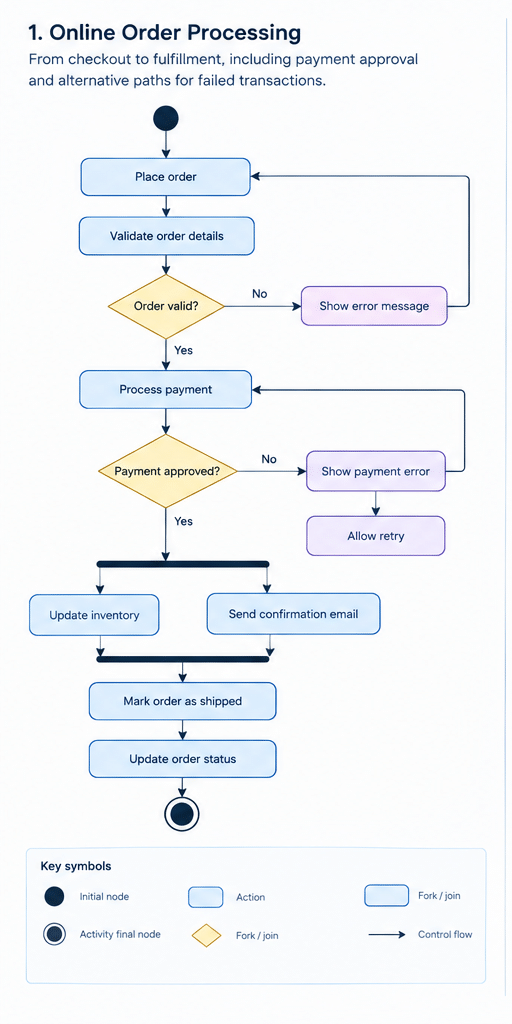
A simplified order-processing flow looks like this:
- The customer submits an order.
- The system validates the order details.
- If the order is valid, the system attempts payment.
- If payment is approved, the system confirms the order and initiates fulfillment.
- If payment is declined, the system notifies the customer and may allow another attempt.
- The process ends when the modeled checkout workflow reaches its final outcome.
What this example demonstrates: decision nodes represent payment outcomes, while alternative control-flow paths show how the system responds to different conditions. This is useful when documenting business rules and handling exceptions.
2. User login activity diagram
A login diagram illustrates how an application processes authentication requests, including successful logins and failed attempts.
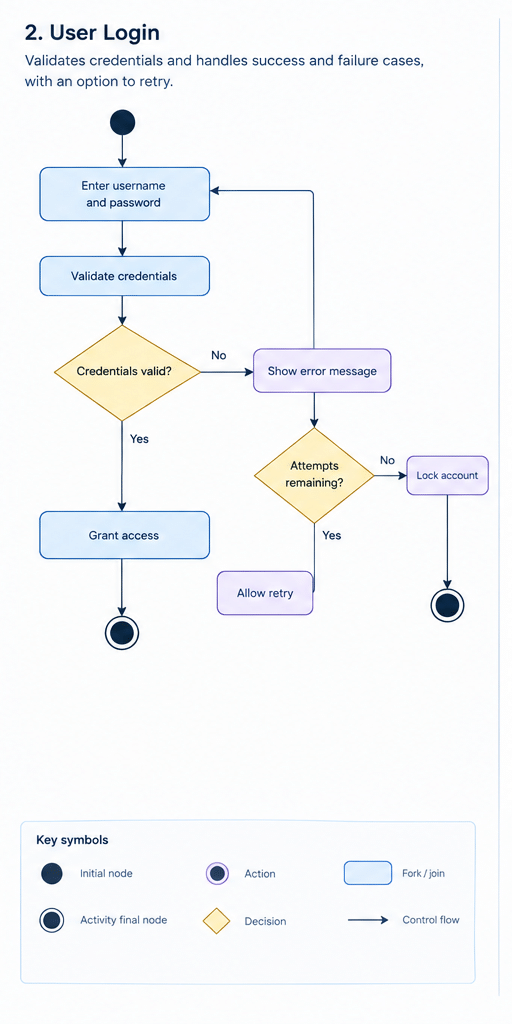
A typical login flow includes:
- The user enters a username and password.
- The application validates the credentials.
- If the credentials are valid, the application grants access.
- If the credentials are invalid, the application displays an error message.
- The user can retry, or the process can end after the permitted attempts are exhausted.
What this example demonstrates: decision nodes model conditional logic, and separate branches make success and failure paths explicit. The diagram can also reveal missing cases, such as account lockout or password recovery.
3. Employee onboarding activity diagram
An onboarding diagram shows how HR, IT, and a new employee coordinate tasks before the employee is ready to work.
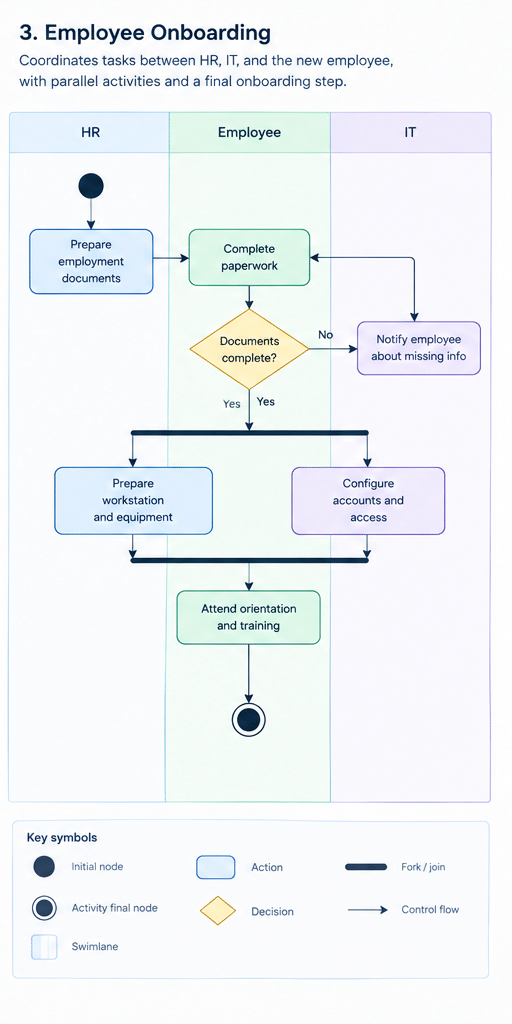
A simplified onboarding workflow might include:
- HR prepares the employment documents.
- The employee completes and submits the required paperwork.
- HR checks whether the documents are complete.
- IT configures the employee’s account and equipment.
- The employee attends orientation and receives role-specific training.
- The onboarding process ends when the required steps are complete.
Some tasks, such as preparing equipment and scheduling orientation, can happen in parallel. A fork node can represent the start of these concurrent activities, while a join node can show where they must synchronize.
What this example demonstrates: swimlanes can assign actions to HR, IT, and the employee, making ownership and handoffs visible. Fork and join nodes help model tasks that happen concurrently rather than sequentially.
These examples can be adapted to other workflows, including invoice approvals, customer support, software deployment, and leave requests. The goal is to capture the decisions, dependencies, and outcomes that matter—not to document every minor action.
How to Create an Activity Diagram
Creating an activity diagram involves breaking a process into individual actions, identifying decisions and dependencies, and connecting the elements in the order they occur. Follow these steps to build a diagram that is easy to understand and maintain.
1. Define the process and its scope
Start by deciding which workflow you want to represent and what the diagram should help you understand. Identify the trigger that starts the process and the outcome that marks its completion.
For example, if you’re mapping an invoice approval process, define whether the workflow starts when an invoice arrives or when an employee submits it. Decide whether the diagram ends when the invoice is approved or when payment is completed.
Keeping the scope specific prevents the diagram from becoming too complex.
2. Identify activities and actions
Break the workflow into individual steps. Each action should describe a specific task, such as Validate invoice, Check payment details, or Notify requester.
List the steps in their logical order before drawing the diagram. Include important inputs, outputs, and handoffs, but avoid representing every minor operation unless it affects the workflow.
3. Map decisions and alternative paths
Identify points where the process can take different directions depending on a condition. Use decision nodes to represent these branches and label outgoing paths with clear conditions.
For example, an invoice approval workflow might branch based on whether the invoice amount exceeds a predefined threshold:
[amount ≤ threshold]— proceed with standard approval.[amount > threshold]— request additional authorization.
Use merge nodes to bring alternative paths back together when they converge. Make sure each decision has clearly defined outcomes and that important exceptions aren’t overlooked.
4. Add parallel activities and swimlanes
Determine whether any tasks can happen simultaneously. Use fork and join nodes to represent concurrent activities and synchronization points.
For example, after a new employee accepts an offer, HR might prepare onboarding documents while IT configures the employee’s account and equipment.
Use swimlanes when you need to show who is responsible for each action. You might create separate lanes for HR, IT, the employee, and an external system. This makes handoffs and ownership easier to identify.
5. Connect the elements and check the flow
Connect the nodes with control-flow arrows to show how the process progresses. Check that each action has a logical predecessor and successor where appropriate, and verify that decision branches lead to the intended outcomes.
Pay particular attention to loops, retries, exception paths, and parallel activities. If the workflow includes repeated attempts, such as resubmitting an invoice after corrections, make the loop explicit rather than leaving the reader to infer it.
6. Validate and refine the diagram
Review the diagram with people who understand or perform the process. Walk through normal and exceptional scenarios to confirm that the flow accurately reflects what happens in practice.
Then simplify the diagram where possible:
- Remove redundant actions and unnecessary crossings.
- Use consistent action labels and decision conditions.
- Make responsibilities and dependencies explicit.
- Split large workflows into smaller diagrams when they become difficult to follow.
Finally, update the diagram when business rules, responsibilities, or system behavior change. A diagram is most useful when it reflects the current process rather than an outdated version of it.
Activity Diagram Best Practices
A useful activity diagram should communicate a process quickly without sacrificing important details. These practices help keep diagrams clear and accurate.
- Focus on one workflow. Keep the diagram centered on a defined process. Use separate diagrams for unrelated workflows or highly detailed subprocesses.
- Use clear, action-oriented labels. Start action names with verbs, such as Approve request or Send notification. Label decisions as questions or conditions.
- Make decision paths explicit. Label outgoing branches with conditions, and account for all meaningful outcomes.
- Use swimlanes when ownership matters. Group actions by role, department, or system to make responsibilities and handoffs visible.
- Distinguish sequential from parallel work. Use ordinary control-flow arrows for sequential steps and fork/join nodes when activities run concurrently.
- Keep notation consistent. Follow UML conventions so developers, analysts, and stakeholders can interpret the diagram consistently.
- Avoid unnecessary detail. Include steps that affect the process, its decisions, or its outcomes. Move implementation-level detail into supporting documentation if needed.
- Review diagrams regularly. Revisit them when workflows, policies, or system requirements change.
Activity Diagram vs. Other UML Diagrams
Activity diagrams focus on the flow of actions within a process. Other UML diagrams provide complementary perspectives, such as system functionality, interactions between objects, or changes in state.
| Diagram type | What it shows | When to use it |
|---|---|---|
| Activity diagram | Activities, decisions, and process flow | To model workflows and conditional logic |
| Use case diagram | Actors and the functions they interact with | To define system scope and user goals |
| Sequence diagram | Messages exchanged between participants over time | To understand interactions between objects or services |
| State machine diagram | States and transitions triggered by events | To model the lifecycle of an object or system |
| Class diagram | Classes, attributes, operations, and relationships | To represent the static structure of a software system |
For example, when designing an online checkout system, a use case diagram can show that a customer places an order, a sequence diagram can show the messages exchanged between the customer interface and payment service, and an activity diagram can show the workflow from order submission to payment confirmation.
These diagrams can be used together: each answers a different question about the same system.
Activity Diagram Tools
You can create activity diagrams with general-purpose diagramming software or tools designed specifically for UML modeling. The best option depends on the complexity of your workflows, your team’s collaboration needs, and whether diagrams need to stay synchronized with technical documentation.
When comparing tools, look for:
- UML notation support: built-in symbols for actions, decisions, fork/join nodes, and activity partitions.
- Templates and reusable components: features that help you create consistent diagrams without starting from scratch.
- Collaboration: shared editing, comments, and version history for reviewing workflows with stakeholders.
- Export and integration options: ways to embed diagrams in documentation or share them with engineering and operations teams.
- Ease of maintenance: straightforward editing when processes, requirements, or responsibilities change.
For simple workflows, a lightweight diagramming tool may be sufficient. For complex software systems, a dedicated UML modeling tool may offer better support for maintaining related diagrams and technical documentation.
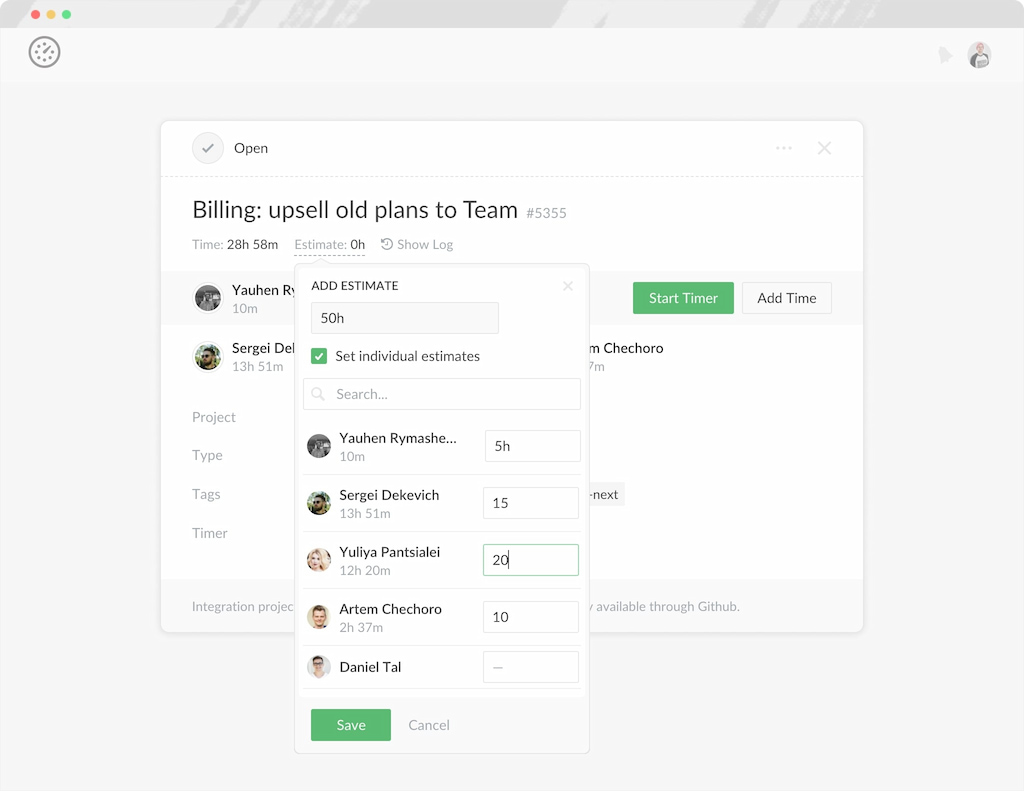
Remember that an activity diagram documents how a process should work; it doesn’t automatically measure execution time or team workload. If you also need to understand how much time work takes in practice, a time tracker such as Everhour can complement process documentation by helping teams compare actual effort with estimates.
FAQs
The main purpose of an activity diagram is to visualize the flow of a process, including its actions, decisions, alternative paths, and concurrent activities. It helps teams understand how a workflow operates, communicate requirements, and identify gaps or inefficiencies.
Both diagrams show process flow, but an activity diagram uses standardized UML notation and explicitly supports concepts such as fork and join nodes for concurrent activities. Flowcharts use general-purpose symbols and are often sufficient for simpler procedures or algorithms.
The main symbols are the initial node, action node, control-flow arrow, decision node, merge node, fork node, join node, activity final node, and flow final node. Swimlanes can also be used to group actions by responsibility.
Use an activity diagram when you need to document a workflow, explain conditional behavior, model parallel tasks, or clarify responsibilities across people and systems. Common examples include order processing, employee onboarding, invoice approval, and software workflows.
Yes. Fork nodes split a flow into concurrent paths, allowing multiple activities to proceed independently. Join nodes synchronize those paths when the workflow requires them to come together before continuing.
An activity diagram focuses on the steps and control flow of a process. A sequence diagram focuses on the order of messages exchanged between participants over time. Use an activity diagram to understand what happens in a workflow and a sequence diagram to understand how system components interact.
Include enough detail to explain the process, its decisions, and its important exceptions without making the diagram difficult to follow. The appropriate level depends on the audience and purpose: a high-level business workflow may show only major stages, while a software design diagram may include more detailed branches and conditions.

Maria
A dedicated content enthusiast with extensive experience in international teams and projects of all sizes. Maria thrives on creativity and attention to detail, fueled by a love for fantasy novels, music, classic black-and-white films, and always finding ways to make things better.