


Recruiting Tools to Improve the Hiring Process

Recruiting involves much more than publishing a job opening and reviewing applications. Hiring teams need to find potential candidates, manage applications, coordinate interviews, evaluate qualifications, and keep applicants informed throughout the process. When these activities happen across disconnected platforms and spreadsheets, it becomes difficult to maintain a consistent hiring workflow.
Recruiting tools help bring these activities together. Some focus on finding candidates, others automate application management or support structured interviews, while recruitment analytics platforms help teams understand how effectively they’re hiring.
In this guide, we’ll explore the main types of recruiting tools, explain where they fit into the hiring process, and cover what to consider when building a recruitment tech stack.
TL;DR: Key Takeaways
- Recruiting tools support different stages of hiring, including candidate sourcing, application management, candidate screening, interviewing, and background checks.
- Applicant tracking systems (ATS) are often the foundation of a recruitment tech stack, providing a central place to manage candidates and hiring workflows.
- Specialized tools such as LinkedIn Recruiter, TestGorilla, and GoodTime add capabilities for sourcing, assessment, and interview scheduling.
- The right software depends on hiring needs: team size, recruitment volume, budget, workflow complexity, and integration requirements all matter.
- AI features can speed up sourcing and screening, but human oversight remains essential for fair and informed hiring decisions.
What Are Recruiting Tools?
Recruiting tools are software applications that help organizations manage and improve their hiring processes. They support tasks such as publishing job openings, finding candidates, reviewing applications, scheduling interviews, and evaluating applicants.
Some tools cover the entire recruitment workflow, while others focus on a specific activity. For example, an ATS organizes applications and tracks candidate progress, whereas a sourcing platform helps recruiters identify potential applicants who may not have applied yet.
Recruiting tools vs. ATS vs. talent acquisition platforms
These terms overlap, but they don’t mean exactly the same thing:
- Recruiting tools is the broad category covering any software used to support hiring, including sourcing, screening, assessment, and scheduling.
- Applicant tracking systems (ATS) manage applications and candidate progress through the recruitment pipeline. They typically provide candidate databases, application workflows, and hiring team collaboration.
- Talent acquisition platforms offer broader capabilities for managing long-term talent needs, often combining recruiting, candidate relationship management, workforce planning, and analytics.
An ATS is therefore one type of recruiting tool, while a talent acquisition platform may bring several recruitment functions together in one system.
Types of Recruiting Tools and Examples
Recruiting software can be grouped by the hiring activities it supports. Some products specialize in one task, while broader platforms combine several functions.
Candidate sourcing tools
Candidate sourcing tools help recruiters find potential applicants beyond people who respond to job advertisements. They search professional networks, talent databases, and public profiles using criteria such as skills, experience, and location.
Examples include:
- LinkedIn Recruiter: Searches LinkedIn’s professional network, with advanced filters and tools for contacting potential candidates.
- SeekOut: Helps recruiters find candidates across multiple talent sources, using skills-based search and candidate profiles.
Job posting and distribution tools
These platforms help companies advertise vacancies across job boards and other recruitment channels. Some also provide tools to manage listings and track application sources.
- Indeed: A major job search platform where employers can publish vacancies, manage sponsored listings, and receive applications.
- StepStone: A job board focused primarily on professional and specialist recruitment, particularly in European markets.
- JobTarget: Distributes job advertisements across a network of job boards and recruitment channels.
Applicant tracking systems (ATS)
An ATS centralizes candidate information and helps recruiters manage applications through each stage of the hiring process. Typical features include candidate profiles, hiring pipelines, interview feedback, and workflow automation.
- Greenhouse: Supports structured hiring with customizable workflows, interview kits, and reporting.
- Lever: Combines applicant tracking with candidate relationship management, helping teams manage both active applicants and prospective talent.
- Workable: Offers applicant tracking, job posting, candidate sourcing, and recruitment collaboration features.
Candidate relationship management tools
Candidate relationship management (CRM) software helps organizations maintain relationships with potential applicants, including people who may not be ready to change jobs. Recruiters can build talent pools, organize candidate profiles, and run targeted engagement campaigns.
- Beamery: Provides talent CRM capabilities for managing candidate relationships and talent pools.
- Avature: Offers configurable talent acquisition and CRM solutions for managing candidate engagement and recruitment workflows.
Resume screening and skills assessment tools
Screening and assessment platforms help recruiters evaluate applicants against role requirements. They can automate parts of resume review or provide structured tests to assess specific skills.
- TestGorilla: Offers pre-employment assessments covering areas such as cognitive ability, personality, and job-specific skills.
- HackerRank: Provides technical assessments and coding challenges for evaluating software engineering candidates.
Interview scheduling and video interviewing tools
Interview coordination software reduces the back-and-forth involved in finding suitable times for candidates and hiring teams. Video interviewing platforms also support remote interviews and structured evaluations.
- GoodTime: Automates interview scheduling and coordination across hiring teams.
- HireVue: Provides video interviewing and assessment tools for evaluating candidates at scale.
Background check tools
Background screening platforms help employers verify information relevant to a hiring decision. Depending on the provider and jurisdiction, checks may include identity verification, employment history, education, or criminal records.
- Checkr: Provides background screening services and tools for managing checks during recruitment.
- Certn: Offers background checks and identity verification for employers.
All-in-one and enterprise recruiting platforms
Larger organizations may prefer platforms that connect recruitment with broader HR operations. These systems can combine applicant tracking, workforce planning, employee records, and other HR functions.
- Workday: Includes recruiting capabilities within its broader human capital management platform.
- Oracle Fusion Cloud HCM: Offers enterprise recruiting, candidate management, and HR functionality within Oracle’s cloud HCM suite.
Recruiting tools comparison
| Tool | Category | Main use |
|---|---|---|
| LinkedIn Recruiter | Sourcing | Finding and contacting candidates |
| SeekOut | Sourcing | Searching talent databases |
| Indeed | Job distribution | Advertising vacancies |
| StepStone | Job distribution | Reaching professional candidates |
| Greenhouse | ATS | Managing hiring pipelines |
| Lever | ATS and CRM | Tracking applicants and nurturing talent |
| Workable | Recruiting platform | Managing multiple hiring activities |
| Beamery | Candidate CRM | Building and engaging talent pools |
| TestGorilla | Assessment | Evaluating job-related skills |
| HackerRank | Technical assessment | Testing programming skills |
| GoodTime | Scheduling | Coordinating interviews |
| HireVue | Video interviewing | Conducting and assessing interviews |
| Checkr | Background checks | Screening candidates |
| Workday | Enterprise HCM | Connecting recruitment with HR operations |
These products serve different purposes, so the best choice depends on the hiring process. For example, a small company may only need Workable to manage applications and publish vacancies, while a larger recruitment team might combine Greenhouse, LinkedIn Recruiter, and specialized assessment software.
Key Features to Look for in Recruiting Software
Recruiting platforms vary in scope, but most offer a combination of features for managing candidate information, coordinating hiring workflows, and evaluating recruitment performance. When comparing products, focus on capabilities that address your team’s actual needs.
Candidate database and search
A centralized candidate database stores applicant profiles, resumes, contact details, and recruitment history. Search filters help recruiters find candidates by skills, experience, location, qualifications, or application status. This is particularly useful for teams that maintain talent pools and revisit previous applicants.
Application and workflow management
Applicant tracking features organize candidates into recruitment stages, from initial application to interview and offer. Look for customizable hiring pipelines, application forms, candidate profiles, and workflow automation. These capabilities reduce manual administration and help hiring teams keep track of each vacancy.
Communication and interview scheduling
Recruiting software should make it easy to contact candidates, send status updates, and coordinate interviews. Useful features include email templates, automated notifications, calendar integrations, self-scheduling links, and reminders. They help prevent delays and reduce the back-and-forth between recruiters, candidates, and interviewers.
Assessments and interview evaluation
Some platforms include tests, interview scorecards, and evaluation forms. These features help hiring teams apply consistent criteria across applicants and compare feedback from multiple interviewers. For specialized roles, integrations with dedicated assessment tools may provide more suitable testing options.
Reporting and analytics
Recruitment analytics help teams monitor hiring performance and identify bottlenecks. Common reports cover time-to-hire, time-to-fill, cost-per-hire, source-of-hire, and conversion rates between recruitment stages. Check whether reports can be customized and whether the platform can export or share data with other systems.
Integrations
Recruiting software should connect with the tools your organization already uses. Common integrations include job boards, calendars, email platforms, assessment providers, background-check services, and human resource information systems (HRIS). Good integrations reduce duplicate data entry and keep candidate information consistent across systems.
Workload and time tracking
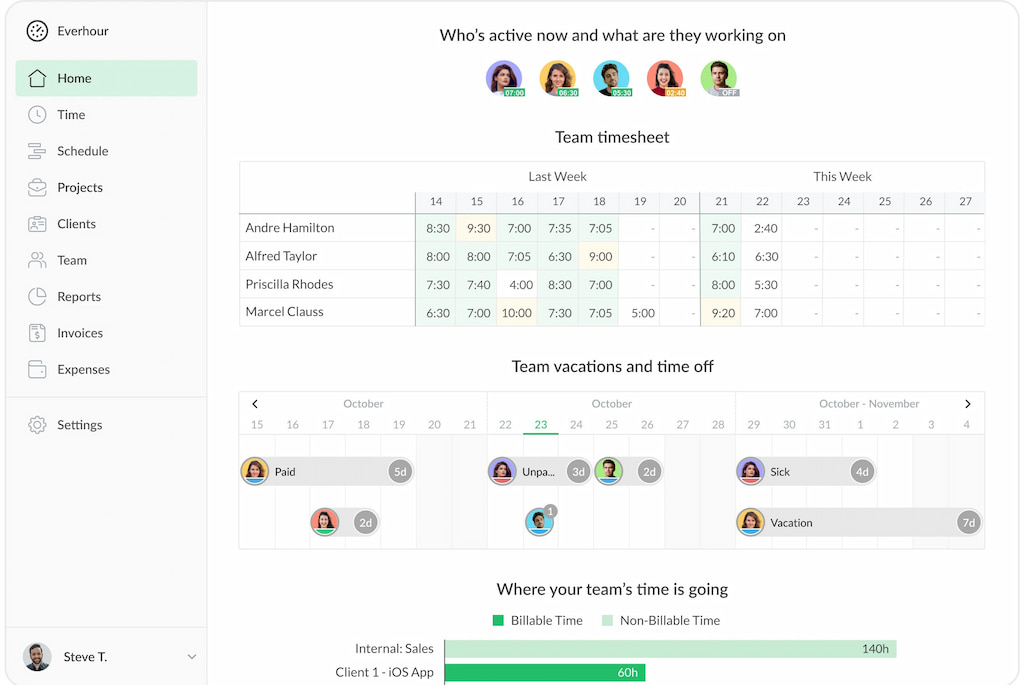
Recruitment teams also need visibility into the time and effort involved in hiring projects. Time tracking for recruitment can show how much work goes into candidate sourcing, screening, interview coordination, and recruitment campaigns.
For example, Everhour‘s time tracker helps teams track time against projects and tasks, compare actual hours with estimates, and understand workload. It complements recruiting software by showing how internal resources are spent rather than managing candidates or measuring recruitment outcomes.
How to Choose Recruiting Tools
The right recruiting software depends on your hiring volume, recruitment process, and available resources. Use these criteria to compare products before committing to a platform.
Consider hiring volume and complexity
A small business hiring a few employees a year may only need a straightforward ATS with job posting and application management. Companies recruiting across multiple departments, locations, or countries may need more advanced workflows, integrations, and reporting.
Match features to your hiring process
Start with the tasks that create the most friction. If recruiters struggle to find qualified applicants, prioritize sourcing tools. If applications are difficult to manage,a look for an ATS with customizable pipelines and automation. Avoid paying for advanced features your team won’t use.
Evaluate usability and candidate experience
Recruiters should be able to manage vacancies, review applications, and coordinate interviews without navigating unnecessarily complicated workflows. Candidates also benefit from clear application forms, timely updates, and accessible interview scheduling. Consider testing the platform with both recruiters and hiring managers before rollout.
Check integrations and customization
Make sure the software connects with your existing HR systems, calendars, job boards, and assessment providers. Check whether you can customize hiring stages, application forms, permissions, and reports to match your process.
Review pricing, scalability, and security
Compare subscription costs, per-user fees, implementation charges, and any limits on job postings or candidate records. Also review data storage, access controls, retention policies, and compliance with relevant data protection requirements. The platform should accommodate future hiring needs without introducing unnecessary cost or complexity.
How AI Is Changing Recruiting Tools
AI is increasingly built into recruiting software to automate repetitive tasks and help recruiters process candidate information. Common applications include:
- Candidate sourcing: AI-assisted search identifies potential applicants based on skills, experience, and other role requirements.
- Resume screening: Systems extract information from resumes and compare profiles with job criteria, helping recruiters organize large applicant pools.
- Candidate communication: AI can draft outreach messages, answer routine questions, and support automated updates.
- Interview support: Some platforms transcribe interviews, summarize responses, or help organize candidate evaluations.
These features can save time, but automated recommendations aren’t necessarily objective. AI systems may reproduce biases in historical hiring data or overlook candidates with nontraditional experience. Recruiters should review how tools make recommendations, monitor outcomes for unfair patterns, and retain human oversight of hiring decisions.
How to Measure Recruitment Performance
Recruiting tools provide data that helps teams assess hiring speed, efficiency, and candidate experience. The most useful metrics include:
| Metric | What it measures |
|---|---|
| Time-to-hire | Time between a candidate entering the recruitment process and accepting an offer |
| Time-to-fill | Time required to fill an open position |
| Cost-per-hire | Average recruitment cost for each new employee |
| Source-of-hire | Which recruitment channels produce successful hires |
| Application-to-interview rate | Percentage of applicants who progress to an interview |
| Offer acceptance rate | Percentage of offers accepted by candidates |
| Quality of hire | New employees’ performance, productivity, and retention |
| Candidate drop-off rate | Percentage of candidates who abandon or withdraw from the process |
Most ATS and HR analytics platforms can track hiring pipeline metrics, but measuring the internal effort behind recruitment requires a different approach. Everhour can help teams track time spent on recruitment projects and tasks, compare actual hours with estimates, and understand how much capacity hiring activities consume. It complements recruitment analytics rather than replacing metrics such as time-to-hire or cost-per-hire.
FAQs About Recruiting Tools
Common recruiting tools include applicant tracking systems (Greenhouse, Lever, and Workable), sourcing platforms (LinkedIn Recruiter and SeekOut), assessment software (TestGorilla and HackerRank), and interview scheduling tools (GoodTime). The right combination depends on the organization’s hiring needs.
Recruiters use sourcing platforms such as LinkedIn Recruiter and SeekOut to search professional networks and talent databases. Job boards such as Indeed and StepStone help attract applicants who are actively looking for work.
Recruiting software is the broader category of tools that support hiring activities. An applicant tracking system (ATS) is one type of recruiting software, focused on organizing applications, managing candidate records, and tracking applicants through hiring stages.
Yes. Features such as automated application screening, interview scheduling, candidate communication, and workflow management can reduce manual work and delays. However, results depend on how well the software fits the hiring process and how efficiently the team uses it.
Recruiting platforms use AI for tasks such as candidate sourcing, resume screening, skills matching, communication, and interview support. These features can speed up recruitment, but automated recommendations should be reviewed by recruiters to reduce the risk of biased or unsuitable decisions.
Yes. Many recruiting platforms offer solutions for small teams, including simplified applicant tracking, job posting, and candidate communication. Tools such as Workable can support several recruitment activities in one platform, while smaller businesses with limited hiring needs may only require a basic ATS.
There is no fixed number. A small organization may manage hiring with one ATS, while a larger company may combine applicant tracking, sourcing, assessment, scheduling, and background-check software. Start with the tools that address clear workflow and skills gaps and add specialized products only when necessary.

Maria
A dedicated content enthusiast with extensive experience in international teams and projects of all sizes. Maria thrives on creativity and attention to detail, fueled by a love for fantasy novels, music, classic black-and-white films, and always finding ways to make things better.