


Decision Log: What It Is, Examples, and Template

Projects involve countless decisions, from setting priorities and choosing tools to adjusting deadlines and assigning responsibilities. When these choices aren’t documented, teams can lose track of what was agreed, why a particular approach was selected, and who is responsible for following through.
A decision log provides a central record of important decisions, including their context, rationale, owners, and outcomes. It helps teams preserve institutional knowledge, avoid revisiting settled discussions, and maintain alignment as projects evolve.
In this guide, we’ll explain what a decision log is, why teams use one, what information to include, and how to create and maintain it. You’ll also find practical examples and a template to help you get started.
TL;DR: Key Takeaways
- A decision log is a record of important decisions made during a project or business process, along with the reasoning and context behind them.
- Teams use decision logs to maintain transparency, clarify accountability, preserve project knowledge, and avoid repeating discussions.
- A typical entry includes the decision, date, owner, context, options considered, rationale, and next steps.
- Not every choice needs documenting. Focus on decisions that affect project scope, priorities, resources, deadlines, or responsibilities.
- A useful decision log should be accessible, concise, regularly updated, and linked to relevant project documentation.
What Is a Decision Log?
A decision log is a centralized record of important decisions made within a project, team, or organization. It captures not only the final choice but also relevant context, the people involved, the reasoning behind it, and any resulting actions.
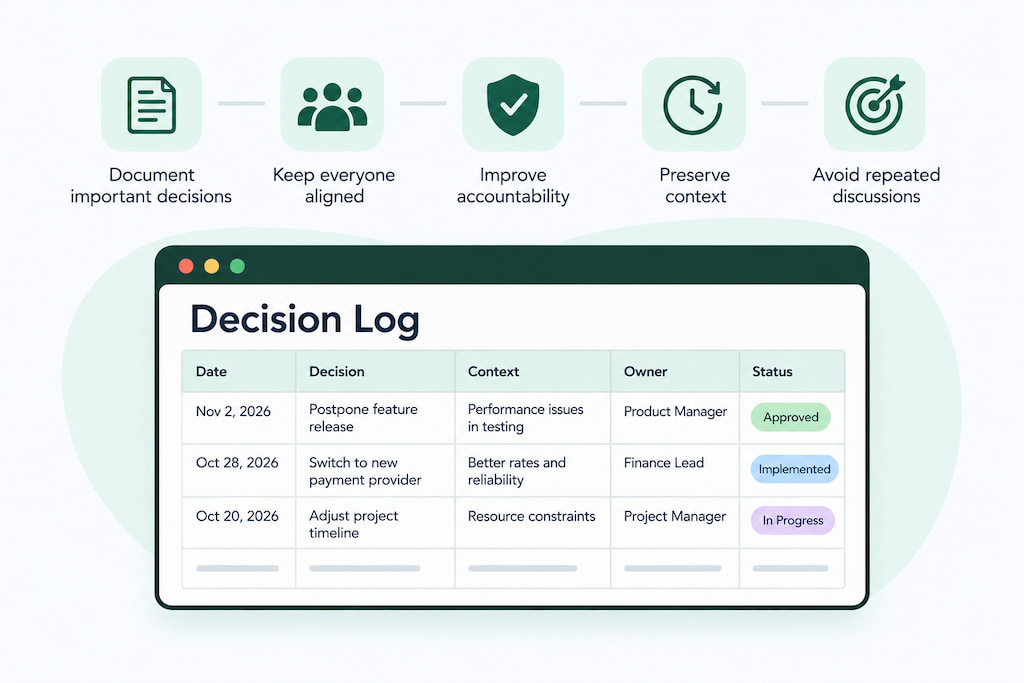
For example, a product team might decide to postpone a feature release to address critical bugs first. Its decision log could record the original release date, the issues that prompted the change, the alternatives considered, who approved the decision, and the revised timeline.
This information gives team members a reliable reference point. Someone joining the project later can understand why the release date changed without having to reconstruct the discussion from old messages or meeting notes.
Decision logs can be maintained in spreadsheets, project management tools, shared documents, or dedicated documentation platforms. The format matters less than having a consistent, accessible place where relevant decisions are recorded.
What a decision log typically captures
Although formats vary, most decision logs contain a few recurring elements:
- The decision: A clear summary of what was agreed.
- Date and owner: When the decision was made and who was responsible for it.
- Context: The problem, requirement, or situation that prompted the decision.
- Options considered: The alternatives discussed before reaching a conclusion.
- Rationale: Why the selected option was preferred.
- Impact and next steps: What changes as a result and what actions need to follow.
- Status: Whether the decision is proposed, approved, implemented, or superseded.
Together, these details make a decision log more useful than a simple list of conclusions. They preserve the reasoning behind important choices, which can be just as valuable as the decisions themselves.
Decision log vs. informal documentation
Teams often record decisions informally in meeting notes, chat messages, emails, or project comments. While these sources can provide useful context, they aren’t always easy to search or interpret later.
A decision log brings important choices into one structured record. Instead of searching through multiple conversations to find out whether a deadline change was approved, team members can check the relevant entry and see the decision, its owner, and the reasoning behind it.
The distinction is primarily one of purpose and organization:
- Informal documentation captures conversations and updates as they happen, often without a consistent structure.
- A decision log selectively records significant decisions in a standardized format, making them easier to find, review, and act on.
A decision log doesn’t need to replace meeting notes or project discussions. It complements them by providing a clear record of the outcomes that matter.
Who Should Use a Decision Log?
Decision logs are useful for any team that makes decisions affecting project direction, responsibilities, resources, or processes. However, some roles and working environments benefit particularly from maintaining one.
Project managers and project teams
Project managers can use decision logs to track changes to project scope, timelines, budgets, priorities, and resource allocation. For example, if a project deadline changes because a key dependency is delayed, the log can record who approved the adjustment, why it was necessary, and how it affects subsequent milestones.
This helps keep stakeholders informed and gives the team a reference when reviewing project progress.
Product and engineering teams
Product and engineering teams make decisions about feature priorities, technical architecture, integrations, development processes, and release schedules. Documenting these choices helps preserve technical and product knowledge, especially when team members change or projects continue over extended periods.
For example, an engineering team might record why it selected a particular database technology over other options. Future developers can then understand the original constraints and evaluate whether the decision still makes sense.
Leadership and cross-functional teams
Leadership teams often make decisions that affect multiple departments, including budget approvals, organizational priorities, staffing, and strategic initiatives. A decision log helps communicate these choices consistently and clarify which stakeholders are responsible for implementation.
Cross-functional teams can also use one to document agreements between departments, reducing the risk of conflicting expectations or unclear ownership.
Remote and distributed teams
Teams working across different locations and time zones may not always be able to discuss decisions in real time.
A decision log supports asynchronous collaboration by giving everyone access to the same information. Team members can review decisions when convenient, understand their context, and follow up on assigned actions without relying on meeting attendance or individual messages.
What Decisions Should Be Documented?
A decision log should capture choices that have a meaningful impact on a project, team, or organization. Recording every minor preference or routine task can make the log difficult to maintain and less useful as a reference.
Focus on decisions that change how work is planned, assigned, or delivered.
Project scope and priorities
Document decisions that affect project objectives, deliverables, requirements, or priorities. These might include adding or removing features, changing project milestones, or postponing lower-priority work.
For example, if a product team decides to move a feature to a later release to focus on a critical bug, the log should capture the reason for the change and its impact on the roadmap.
Technical and product decisions
Technical and product teams should record choices that influence how a product is designed, built, or maintained.
Examples include:
- Selecting a technology, framework, or third-party integration.
- Changing the product architecture.
- Prioritizing certain features over others.
- Choosing between different design or implementation approaches.
- Deciding to deprecate an existing feature.
Documenting these decisions helps preserve technical context and makes future changes easier to evaluate.
Resource allocation and deadlines
Decisions about budgets, staffing, workloads, and timelines can affect multiple people and project outcomes. Recording them helps clarify why resources were reassigned or deadlines adjusted.
For example, a project manager might document the decision to move two developers from one project to another to address a critical delivery deadline. The entry could include the reason, the expected impact on both projects, and who approved the change.
Process and workflow changes
Changes to team procedures and workflows can affect how employees collaborate and complete their work. Examples include introducing a new approval process, changing reporting requirements, adopting a project management tool, or modifying how teams handle customer requests.
Recording the rationale and implementation details helps employees understand what changed and what they need to do differently.
Team responsibilities and policies
Decisions that change ownership, reporting structures, or team expectations should also be documented.
For example, a team might agree to assign a dedicated owner to a recurring process that previously had no clear responsibility. The decision log can record the new owner, the effective date, and any responsibilities transferred to that person.
What to Include in a Decision Log
A useful decision log should provide enough information for someone to understand a decision without having to reconstruct the original conversation. The exact fields depend on the project, but most entries benefit from a consistent structure.
Essential decision log fields
Consider including the following information:
| Field | What to record |
|---|---|
| Decision ID | A unique reference number for the entry |
| Decision title | A short summary of the choice |
| Date | When the decision was made |
| Owner | The person responsible for the decision or its implementation |
| Context | The problem or circumstances that prompted it |
| Options considered | The alternatives discussed |
| Final decision | What was agreed |
| Rationale | Why this option was selected |
| Stakeholders | People or teams affected by the decision |
| Impact and next steps | Expected consequences and required actions |
| Status | Proposed, approved, implemented, or superseded |
| Review date | When the decision should be reconsidered, if applicable |
Not every decision requires every field. A straightforward operational choice may need only a short description, owner, date, and rationale. More complex or high-impact decisions benefit from additional context and documentation of the alternatives considered.
The goal is to make entries useful without turning the decision log into a lengthy report.
Decision Log Template
A decision log template gives teams a consistent structure for recording important choices. Instead of creating a new format for every project, they can use the same fields to document decisions, assign ownership, and track follow-up actions.
Simple decision log example
Here’s an example of how a project team might document a decision to postpone a feature release:
| Field | Example entry |
|---|---|
| Decision ID | DEC-014 |
| Decision title | Postpone the reporting feature release |
| Date | November 2, 2026 |
| Owner | Product manager |
| Context | Testing revealed several performance issues that could affect the user experience |
| Options considered | Release as planned, postpone the feature, or launch with limited functionality |
| Final decision | Postpone the release until performance issues are resolved |
| Rationale | A delay is preferable to releasing a feature that doesn’t meet performance requirements |
| Stakeholders | Product, engineering, QA, and customer success |
| Impact and next steps | Engineering will address the issues; QA will repeat performance testing; the product manager will update the roadmap |
| Status | Approved |
| Review date | November 16, 2026 |
This entry captures more than the final outcome. It explains why the release was postponed, which alternatives were considered, and what the team needs to do next.
How to adapt the template for different teams
The basic structure can be adjusted depending on the type of decisions a team makes.
- Project teams: Emphasize deadlines, scope changes, resource allocation, dependencies, and approval status.
- Product teams: Include user impact, feature requirements, alternatives, technical constraints, and roadmap implications.
- Engineering teams: Add architectural context, affected systems, implementation details, and technical trade-offs.
- Leadership teams: Focus on business objectives, financial implications, stakeholders, risks, and strategic outcomes.
Avoid adding fields simply because they might be useful someday. A template should make documenting decisions easier, not create unnecessary administrative work.
How to Create and Maintain a Decision Log
Creating a decision log doesn’t require a complicated system. The important part is establishing a consistent process for recording decisions and making the information accessible to the people who need it.
Start by selecting a place where relevant team members can access and update the log. Depending on the team’s needs, this could be a shared spreadsheet, a project management platform, a knowledge base, or a dedicated documentation tool. Consider how many decisions the team expects to record, who needs access, and whether entries should be searchable or linked to other project records.
For smaller teams, a spreadsheet may be sufficient. Larger projects with multiple stakeholders may benefit from a centralized documentation system with filtering, permissions, and links to related tasks.
Establish what needs to be recorded
Define which decisions belong in the log and who is responsible for documenting them. Without clear criteria, teams may either overlook important choices or spend too much time recording routine matters. Agree on what counts as a significant decision, such as changes to project scope, deadlines, budgets, technical architecture, or team responsibilities.
It’s also useful to establish a standard entry format so everyone records the same essential information.
Document decisions as they’re made
Record decisions as soon as they’re confirmed rather than relying on someone to reconstruct them later. Capture the date, decision-maker, outcome, and relevant context while the discussion is still fresh. If a decision is made during a meeting, the responsible person can add it to the log before moving on to the next topic.
For asynchronous discussions, the person who makes or approves the final decision should ensure that the outcome is documented.
Record the reasoning and alternatives
A decision log should explain why a particular option was selected, especially when other approaches were considered. Briefly document the main alternatives and the factors that influenced the final choice. These might include cost, available resources, technical limitations, deadlines, or expected user impact.
This context helps teams understand past decisions and evaluate whether they remain appropriate when circumstances change.
Assign owners and communicate outcomes
Every decision that requires follow-up should have a clearly identified owner. Record the actions needed, who is responsible for them, and any relevant deadlines. Once the decision is documented, communicate it to affected stakeholders. Don’t assume that everyone involved in the project will automatically know where to find the log or notice a new entry.
Review and update entries when necessary
A decision log should reflect the current state of the project. Review it periodically to check whether decisions have been implemented, whether follow-up actions are complete, and whether any choices need to be revisited.
If a decision changes, update its status or add a new entry that references the original. Keeping a record of superseded decisions preserves the history without confusing outdated choices with current agreements.
Frequently Asked Questions
The terms decision log and decision register are often used interchangeably. Both refer to a structured record of important decisions, including their context, rationale, owners, and outcomes. Some organizations use decision register for a more formal or comprehensive record, but there’s no universally accepted distinction.
Responsibility usually falls to the project manager, team lead, or person coordinating the decision-making process. However, the person who makes or approves a decision should ensure its outcome and rationale are recorded. Teams can also assign a designated note-taker or documentation owner to keep the log up to date.
Record a decision as soon as it’s confirmed, ideally during or immediately after the relevant discussion. This helps preserve the context and prevents confusion about what was agreed. If a decision requires approval, document it as pending and update its status once it’s finalized.
Yes, particularly when the decision has significant implications or involves several alternatives. Recording the main options considered and why they were rejected helps preserve the reasoning behind the final choice. It also prevents teams from repeatedly evaluating approaches that have already been ruled out.
Store it in a shared, accessible location where relevant stakeholders can find and update it. Options include spreadsheets, project management platforms, shared documents, and knowledge bases. The best choice depends on the team’s size, documentation needs, and existing workflows.
Update the log whenever a new decision is made or an existing one changes. Teams should also review it regularly to check implementation status, outstanding actions, and decisions that may need reconsideration. The frequency depends on the project’s pace and complexity.

Maria
A dedicated content enthusiast with extensive experience in international teams and projects of all sizes. Maria thrives on creativity and attention to detail, fueled by a love for fantasy novels, music, classic black-and-white films, and always finding ways to make things better.