


Why Is Time Tracking Bad? Common Problems and How to Fix Them

Time tracking can create problems when it becomes a form of employee surveillance, adds unnecessary administrative work, or turns the number of hours worked into a measure of performance. But these problems aren’t inherent to time tracking itself. They usually come from how a company implements and uses it.
Used responsibly, time tracking can help teams understand how long work takes, manage project budgets, improve estimates, track billable hours, and plan workloads. The key is to track work for a clear purpose without using time tracking as micromanagement.
This guide looks at the main problems associated with time tracking, why they happen, and how companies can use time tracking in a way that is useful for both managers and employees.
Is Time Tracking Actually Bad?
Time tracking isn’t inherently good or bad. Its impact depends on what you track, why you track it, and how the data is used.
For example, recording the time spent on a client project can help a team understand whether the project is staying within budget. Monitoring an employee’s applications, screenshots, or keyboard activity to determine whether they’re being productive is a very different use of tracking.
The biggest problems tend to appear when companies:
- Track activity instead of work: Monitoring apps, websites, screenshots, or keystrokes can turn time tracking into employee surveillance.
- Track without a clear purpose: Asking employees to record every minute without using the data for meaningful decisions creates unnecessary work.
- Treat hours as a measure of productivity: More hours do not necessarily mean more valuable work.
- Ignore the human side of tracking: Employees may feel pressured or mistrusted if they don’t understand why their time is being tracked or how the data will be used.
- Collect data without context: A timesheet can show how long something took, but not necessarily why it took that long or whether the result was valuable.
A better approach is to treat time as one piece of information about work, rather than as a measure of an employee’s worth or productivity. That way, time tracking matters for how your work is distributed and controlled.
When employees understand the purpose of tracking and have appropriate control over their time data, it can support better project and business decisions without becoming intrusive.
Why Time Tracking Can Be Bad
Time tracking can cause problems when it creates more friction than value or when companies use the data in ways that undermine trust. The most common issues aren’t caused by recording time itself, but by making tracking too intrusive, too complicated, or too focused on employee activity.
1. It can feel like employee surveillance
Employees may see time tracking as surveillance when it involves screenshots, keystroke logging, application monitoring, or other forms of activity tracking. This can make people feel that they’re being watched rather than trusted to do their work.
How to fix it: Define exactly what you’re tracking and why. If the goal is to understand project effort, track time against tasks and projects rather than monitoring everything an employee does on their computer. Be transparent about who can access the data and how it will be used.
2. It can create extra administrative work
Time tracking can become a chore when employees have to switch between tools, fill out detailed timesheets, or manually copy information from one system to another. The more effort tracking requires, the more likely people are to postpone it or stop doing it consistently.
How to fix it: Make tracking part of the workflow employees already use. Keep time entries simple, minimize duplicate data entry, and make it easy to correct or complete timesheets when necessary.
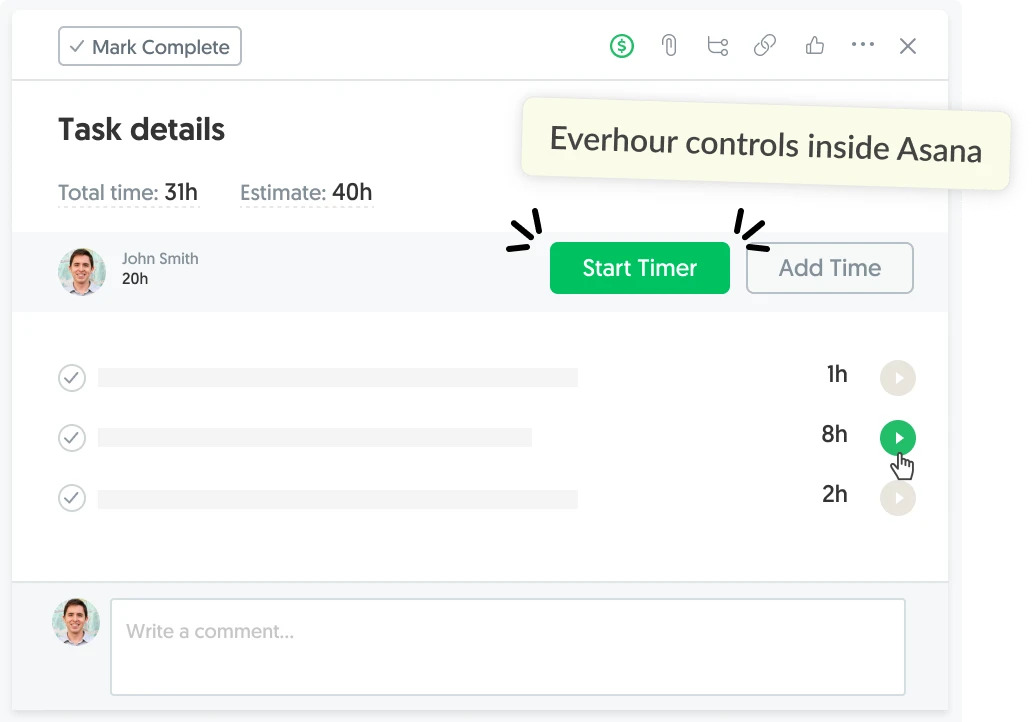
For teams that manage work in project management tools, Everhour lets employees track time directly against the tasks they’re already working on, reducing the need to maintain a separate tracking system.
3. Time tracking can be inaccurate
A time tracker can produce precise-looking numbers without necessarily producing accurate data. Employees can forget to start or stop a timer, record hours from memory, or accidentally track time against the wrong task.
How to fix it: Make time entries easy to review and correct. Regularly check timesheets for missing or unusual entries, and treat tracked time as data that may need context rather than as an unquestionable record of what happened.
4. It can make employees focus on hours instead of outcomes
Tracking time becomes counterproductive when managers treat hours as a measure of productivity. An employee who solves a difficult problem in two hours isn’t necessarily less productive than someone who spends six hours on a simpler task.
How to fix it: Use time data alongside deliverables, deadlines, quality, and project outcomes. Time can help explain the resources a project requires, but it shouldn’t be used as a standalone productivity score.
5. It can increase pressure to work longer
If employees believe that managers equate more tracked hours with better performance, they may feel pressure to work longer, skip breaks, or keep a timer running simply to make their numbers look better.
How to fix it: Make it clear that time tracking is not a competition. Set reasonable expectations around working hours and breaks, and use tracked time to understand workloads and project requirements rather than reward people for accumulating hours.
6. It can create a false sense of precision
Time tracking produces exact numbers, but exact numbers aren’t automatically meaningful. Knowing that a task took 3 hours and 42 minutes doesn’t tell you whether the estimate was realistic, whether the task was unusually difficult, or whether the work produced the expected result.
How to fix it: Add context to time data. Compare actual time with estimates, look at patterns across projects and tasks, and consider scope and outcomes when interpreting the numbers.
7. It can create privacy and trust concerns
Employees may reasonably have concerns about who can see their time records, what those records are used for, and how long the information is retained. Poorly communicated tracking policies can make employees feel that the company is collecting information about them without their knowledge or consent.
How to fix it: Establish clear rules for time tracking before introducing it. Explain what information is collected, who has access to it, why it is needed, and what decisions it will and will not be used to make.
8. It can be pointless if nobody uses the data
Tracking takes time, so collecting hours without doing anything with the information defeats the purpose. If managers rarely look at reports or the data never influences planning, estimates, budgets, or billing, employees are doing extra work for little benefit.
How to fix it: Define the purpose of tracking before asking employees to use it. Decide what questions the data should answer and use it to inform concrete decisions, such as adjusting project estimates, managing budgets, or understanding where a team’s time is going.
When Time Tracking Is Useful
The problems above don’t mean that teams should avoid time tracking altogether. When there’s a clear purpose and reasonable approach, tracked time can provide useful information that is difficult to get from intuition alone.
Time tracking can be particularly useful for:
- Tracking billable hours: Record time spent on client work for more accurate billing.
- Managing project budgets: Compare the time spent on a project with the available budget.
- Improving estimates: Use actual project data to make future estimates more realistic.
- Understanding project effort: See which tasks and projects require the most time.
- Planning team capacity: Understand how much time teams have available for new work.
- Comparing estimated and actual time: Identify tasks that consistently take more or less time than expected.
- Supporting project reporting: Give managers and clients a clearer picture of where project time went.
The value comes from using the data to make better decisions, not from tracking as much time as possible.
How to Use Time Tracking Without Making It Toxic
Ethical time tracking starts with the purpose behind it. Employees should understand why their time is being recorded and should not have to wonder whether a timesheet is being used to monitor their behavior or judge their commitment.
Track work, not employee activity
If you need to know how long a project or task takes, track time against that work. There’s usually no need to monitor every application, website, or action an employee takes while working.
Be transparent about tracking
Tell employees what is being tracked, who can see the information, and how it will be used. Transparency makes it easier to establish trust and gives employees a clear understanding of what the data means.
Don’t use hours as a productivity score
Someone’s tracked hours don’t tell the whole story. Use time data to understand project effort and workloads, while evaluating performance based on the quality and outcomes of the work.
Make tracking part of the existing workflow
People are more likely to track employee time consistently when doing so doesn’t require unnecessary steps. Connecting time tracking to the tools where work already happens can reduce friction and duplicate data entry.
Give employees control over their timesheets
Employees should be able to review their own records, correct mistakes, and understand what has been logged under their name. This also improves the quality of the data managers rely on.
Use time data for decisions, not punishment
The purpose of tracking should be to make work easier to plan and manage. If the data is mainly being used to catch employees doing something “wrong,” it is likely to create the very trust and engagement problems that make time tracking ineffective.
Avoid making these common mistakes when introducing time tracking to your team and you will see that it can be productive while still being ethical.
How Everhour Helps Teams Track Time Ethically
Everhour is designed around tracking time against work, rather than monitoring employee activity.
Teams can track time directly against tasks in the project management tools they already use, then use that data for project reporting, budgets, estimates, billing, and workload planning. This keeps the focus on the work being done rather than on monitoring what employees do on their computers.
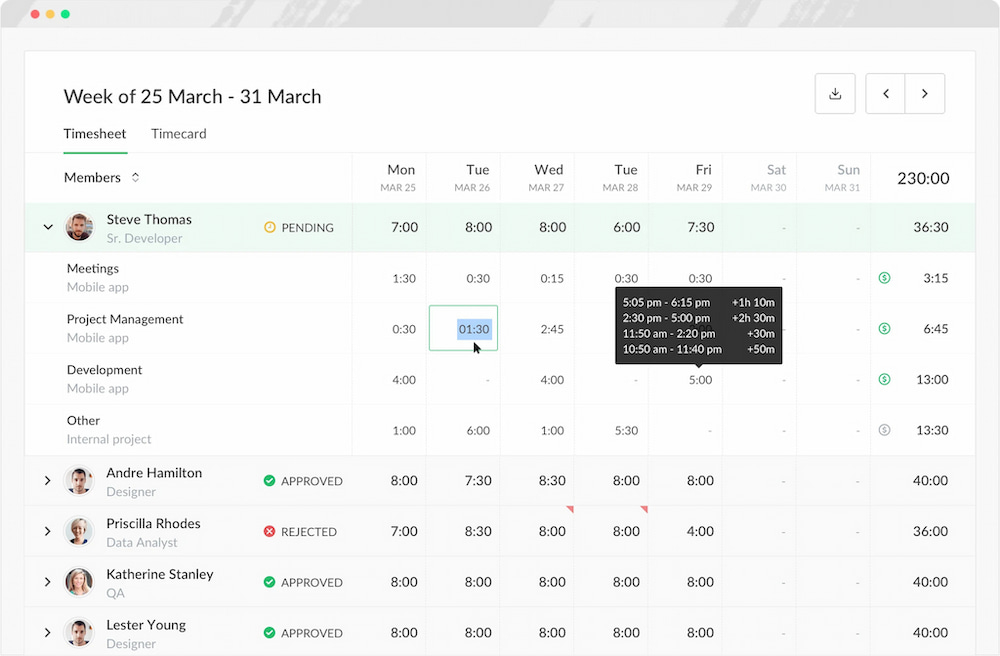
The approach also gives teams a more useful way to think about time tracking: record the time you need to understand your work, and use that information to make better decisions.
Time Tracking vs. Employee Monitoring
Employee time tracking and employee monitoring are sometimes treated as the same thing, but they serve different purposes.
| Time tracking | Employee monitoring | |
|---|---|---|
| What it records | Time spent on tasks, projects, or clients | Employee activity, such as apps, websites, screenshots, or keystrokes |
| Primary focus | Work and project effort | Employee activity and behavior |
| Common uses | Billing, budgeting, estimates, reporting, and planning | Activity monitoring and productivity measurement |
| Employee visibility | Employees can typically see and manage their own time records | Visibility varies and may be limited |
| Main concern | Accuracy and usefulness of time data | Privacy, trust, and surveillance |
The distinction matters because ethical time tracking doesn’t require employee surveillance. A team can understand how much time a project requires without monitoring everything an employee does while working.
Frequently Asked Questions
Time tracking can be problematic when it creates unnecessary administrative work, feels invasive, or is used to judge employee productivity based solely on hours worked.
It can be if employees feel constantly monitored, pressured to work longer, or unsure how their data will be used. Transparent, purpose-driven time tracking can avoid many of these problems.
It can reduce productivity when tracking is complicated or intrusive. Simple tracking integrated into an existing workflow can minimize the administrative burden while providing useful project data.
Not necessarily. Time tracking records time spent on work, while employee monitoring may track applications, websites, screenshots, keystrokes, or other activity. The two approaches have different purposes and implications.
Common disadvantages include administrative overhead, inaccurate entries, privacy concerns, pressure to work longer, and the risk of treating hours as a measure of productivity.
Companies can use time tracking ethically by being transparent about its purpose, tracking work rather than employee activity, limiting access to time data, allowing employees to correct their records, and avoiding the use of hours as a simplistic productivity metric.
Not necessarily. The level of detail should match the purpose of tracking. If a project only requires an understanding of overall effort, tracking every minute or monitoring employee activity may add unnecessary complexity.
Time tracking records how much time is spent on specific work, such as a task or project. Employee monitoring focuses on observing employee activity, such as applications used, websites visited, screenshots, or keystrokes.
Conclusion
Time tracking isn’t inherently bad. In fact, it can bring difference to your business and help get rid of some bottlenecks every team has. It becomes a problem when it creates unnecessary work, turns into employee surveillance, or is used to judge productivity based on hours alone.
A better approach is to track time for a clear purpose, keep the process simple, and use the data to understand projects rather than monitor people. When time tracking supports planning, budgeting, billing, and better estimates without undermining employee trust, it can be a useful part of a healthy work process.
Check out the best time tracking practices to make sure that time tracking is implemented in your team as ethically as possible.

Maria
A dedicated content enthusiast with extensive experience in international teams and projects of all sizes. Maria thrives on creativity and attention to detail, fueled by a love for fantasy novels, music, classic black-and-white films, and always finding ways to make things better.