


How to Avoid Common Mistakes Introducing Time Tracking in Your Team

Introducing time tracking can easily go wrong if it’s treated as a technical rollout instead of a people-first change. Teams often adopt time tracking to improve planning, balance workloads, or support accurate billing, but poor implementation can lead to frustration, low adopetion, and unreliable data. Tools like Everhour’s time tracker are designed to make time tracking more transparent and less intrusive, yet even the best software won’t work well if expectations, workflows, and communication aren’t aligned from the start. In this article, we’ll walk through the most common mistakes introducing time tracking, why companies fail at time tracking, and how to avoid them so the process actually supports your team instead of slowing them down.
❌ Treating Time Tracking As a Control Tool
One of the most common mistakes teams make is presenting time tracking as a way to monitor or police employees. When people feel watched, measured, or judged by every logged minute, time tracking quickly becomes a source of stress instead of a helpful tool.
Positioning time tracking as surveillance often leads to predictable problems:
- employees inflate or manipulate entries to “look busy”
- trust between managers and teams erodes
- adoption drops, or data becomes unreliable
- conversations shift from outcomes to micromanagement
Time tracking works best when it’s framed as a support system, not a control mechanism.
Teams are far more likely to engage with it when they understand how the data will be used, whether that’s improving estimates, preventing burnout, or making workloads more fair.
🚀 What works better:
- explain upfront what time data will and won’t be used for
- focus on trends and patterns, not individual minute-by-minute behavior
- share insights back with the team, such as improved planning or workload balance
- use time tracking to support decisions, not to justify pressure or control
🗣️ Not Explaining The “Why” To Employees
A frequent mistake when introducing time tracking is failing to communicate its purpose clearly. If employees don’t understand why they’re logging hours, what the data will be used for, or how it benefits them and the team, adoption often suffers.
This lack of clarity can cause:
- confusion and inconsistent tracking
- low engagement or incomplete data
- suspicion that time tracking is purely for monitoring
- reduced trust in management
🚀 What works better:
- clearly communicate the purpose of time tracking from day one
- explain how it helps improve workflows, spot bottlenecks, and prevent burnout
- be transparent about how the data will be used—and what it won’t be used for
- reinforce the value of time tracking by showing how insights lead to better planning and fairer workloads
🧩 Choosing The Wrong Time Tracking Tool
Picking the wrong software is one of the biggest mistakes teams make when introducing time tracking. Tools that are too complex, rigid, or poorly integrated can lead to frustration, inconsistent use, and wasted time.
Common issues include:
- steep learning curves that discourage daily use
- lack of integration with project management or payroll systems
- inflexible reporting that doesn’t match your team’s needs
- difficulty in tracking both team and individual performance
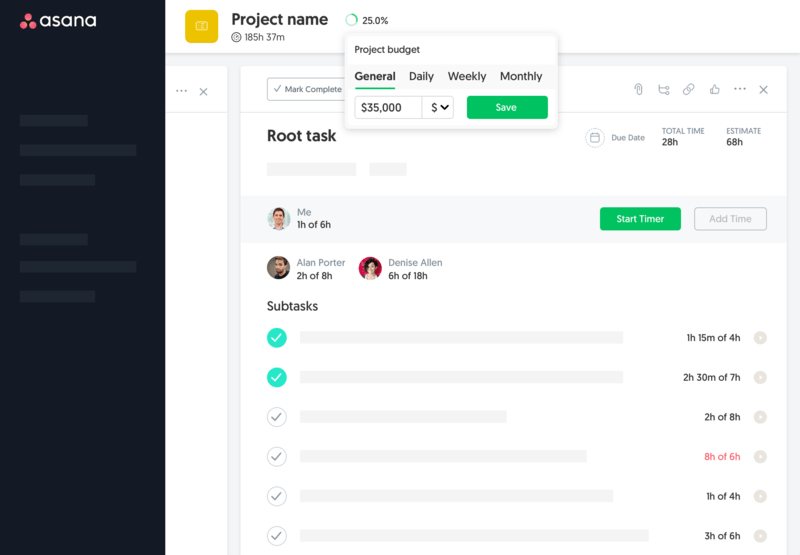
Choosing the right tool makes all the difference. Everhour, for example, integrates seamlessly with popular platforms like Jira, Asana, and Trello, offering an intuitive interface, time off calculation, and automated reporting. This ensures your team can track time accurately without added stress or disruption.
📋 Overcomplicating the Tracking Process
One of the most common mistakes introducing time tracking is making the process too complex. Adding too many categories, custom fields, or rules can overwhelm employees and reduce adoption. When users feel confused about how to log time correctly, they may skip entries, input inaccurate data, or even avoid the system entirely.
Key issues caused by overcomplication:
- Low adoption: Employees are less likely to use a tool that feels cumbersome.
- Data inaccuracies: Multiple categories or unclear rules can lead to inconsistent reporting.
- Increased admin work: Managers spend more time correcting errors or explaining processes.
🚀 Keep your time tracking setup simple. Limit the number of categories to only what’s essential, provide clear instructions, and focus on making the process intuitive. A streamlined system improves accuracy, ensures consistent data, and makes the time tracking software a helpful part of everyday work rather than a burden.
⏱️ Expecting Perfect Data From Day One
It’s common for teams to expect flawless time tracking immediately—but that’s rarely realistic. Early adoption comes with a learning curve:
- Employees are still getting used to the tool.
- Workflows and categories may need adjustments.
- Minor errors in entries are normal.
Trying to enforce perfect data too soon can reduce adoption and frustrate the team.
🚀 Better approach:
- Encourage consistent tracking, not perfection.
- Review early data to spot patterns and common mistakes.
- Provide guidance and training as needed.
🧑💼 Lack of Leadership Buy-In and Example
Time tracking initiatives often fail when managers themselves don’t use the system consistently. Leadership sets the tone—if employees see low engagement at the top, they’re less likely to take it seriously.
Common consequences:
- Low overall adoption across teams.
- Inconsistent or inaccurate data.
- Reduced trust in the tool and the purpose of tracking.
🚀 What helps:
- Managers lead by example and log their time regularly.
- Share success stories where tracking improved workflow or project delivery.
- Encourage open feedback so employees understand leadership’s commitment.
🔄 Poor Integration With Existing Workflows
Time tracking only works when it fits naturally into your team’s daily processes. Tools that don’t sync with project management, payroll, or invoicing software can create extra manual work and frustration.
🚀 Tips to avoid this:
- Choose a time tracking system that integrates with the tools your team already uses.
- Automate data transfer wherever possible to reduce errors and repetitive tasks.
- Map out workflows before rollout to ensure smooth adoption.
Learn why and how to integrate your hours tracker with a project management tool for better workflows!
📊 Ignoring the Data After Collection
Collecting time data is only valuable if you actually use it to make decisions. Without follow-up:
- Employees feel tracking is pointless.
- Insights on productivity, project estimates, or resource allocation are lost.
🚀 Best practices:
- Regularly review reports and dashboards.
- Use insights to optimize workflows, set realistic deadlines, or balance workloads.
- Share trends and results with your team to demonstrate impact.
😬 Not Addressing Privacy and Trust Concerns
Employees may resist tracking if they feel watched or micromanaged. Ignoring these concerns can lead to low adoption and mistrust.
🚀 How to handle it:
- Be transparent about what data is collected and how it’s used.
- Emphasize that tracking is for process improvement, not surveillance.
- Provide guidance on anonymized reporting or limited access where needed.
🔧 No Feedback Loop or Adjustment Phase
Time tracking should evolve over time, not be a “set it and forget it” system. Without feedback:
- Inefficient workflows go unnoticed.
- Processes may become unnecessarily complicated.
🚀 Implement a feedback loop:
- Regularly check with teams on usability and accuracy.
- Adjust categories, rules, or integrations based on real-world usage.
- Treat time tracking as a tool to support teams, not control them.
✅ Best Practices to Avoid These Mistakes
Introducing time tracking successfully means combining planning, transparency, and iteration:
- Communicate the “why” clearly to employees.
- Choose tools that integrate seamlessly with your workflows.
- Start time tracking simple—track only the most important tasks and gradually expand.
- Encourage leadership to lead by example.
- Review the data regularly and act on insights.
Following these practices helps create a time tracking culture that’s trusted, adopted, and useful, rather than a source of frustration.
🔎 Common Mistakes Introducing Time Tracking: Conclusion
Introducing time tracking successfully is more than just picking a tool, it’s about culture, communication, and integration. Avoiding common mistakes like overcomplication, poor workflow integration, or ignoring privacy concerns helps ensure adoption and meaningful insights.
Tools like Everhour, which integrate seamlessly with project management and payroll systems, make it easier to implement time tracking effectively while keeping processes simple and transparent.
By planning carefully, involving leadership, and iterating based on feedback, your team can turn time tracking into a trusted tool for productivity, resource planning, and decision-making, rather than a source of frustration. If you feel like you made the wrong choice, you can always switch your time tracking tool.

Maria
A dedicated content enthusiast with extensive experience in international teams and projects of all sizes. Maria thrives on creativity and attention to detail, fueled by a love for fantasy novels, music, classic black-and-white films, and always finding ways to make things better.