


Top 12 Project Cost Tracking Software Tools for Smarter Budget Management

Project cost tracking software helps businesses monitor the costs associated with projects, including employee time, labor costs, expenses, budgets, and billable work. The best tool depends on what costs you need to track: project-based teams may need time tracking and budget monitoring, while businesses focused primarily on employee expenses may prefer dedicated expense management software.
The best project cost tracking software includes Everhour for project-based teams, Beebole for project profitability analysis, actiTIME for time and cost tracking, Zoho Expense for business expenses, and ClickTime for resource planning and project budgeting.
How We Evaluated Project Cost Tracking Software
We evaluated these tools based on how effectively they help businesses track and manage project-related costs. Our evaluation considered:
- Project budget tracking: Whether users can set and monitor project budgets.
- Labor and time costs: Whether employee time can be connected to projects and financial costs.
- Expense tracking: Whether businesses can record and manage project-related expenses.
- Project profitability: Whether the software helps compare project costs with revenue.
- Reporting: The depth and flexibility of financial and project reports.
- Integrations: Compatibility with project management, accounting, and other business tools.
- Pricing: Overall value and availability of free plans or trials.
Disclosure: Everhour is our product and appears in this list. We aim to evaluate all tools based on their relevant features, use cases, and limitations.
Best Project Cost Tracking Software at a Glance
- Everhour — Best for project-based teams: Tracks time, project budgets, expenses, and billable work.
- Beebole — Best for project profitability: Helps businesses compare labor costs, billing rates, and project revenue.
- actiTIME — Best for time and task-based cost tracking: Combines employee time tracking with project and task management.
- Zoho Expense — Best for expense tracking: Focuses on employee expenses, receipts, travel, and approvals.
- QuickBooks — Best for accounting-focused businesses: Combines financial management with time and cost-related workflows.
- ClickTime — Best for resource planning: Helps businesses track project budgets, employee time, and resource utilization.
- Expensify — Best for receipt and expense management: Automates expense reporting and receipt processing.
- FreshBooks — Best for freelancers and small businesses: Combines expenses, time tracking, invoicing, and accounting.
- Rydoo — Best for business travel expenses: Focuses on expense management, travel costs, and approvals.
- Emburse Spend — Best for controlling employee spending: Provides spend controls and virtual cards.
- ExpensePoint — Best for expense reporting: Handles receipts, mileage, reimbursements, and expense reporting.
Project Cost Tracking Software Broken Down
| Tool | Best for | Project budgets | Labor/time costs | Expense tracking | Project profitability | Starting price |
|---|---|---|---|---|---|---|
| Everhour | Project-based teams | ✓ | ✓ | ✓ | ✓ | Free; paid from $8.50/user/month |
| Beebole | Project profitability tracking | ✓ | ✓ | — | ✓ | Free for up to 5 users; paid from $9/user/month |
| actiTIME | Time and task-based cost tracking | ✓ | ✓ | — | ✓ | Free plan; paid from $6/user/month |
| ClickTime | Resource planning and project budgets | ✓ | ✓ | ✓ | ✓ | From $12/user/month |
| Zoho Expense | Employee and project expenses | — | — | ✓ | — | Free; paid from $3/user/month |
| Abacus | Expense management and approvals | — | — | ✓ | — | Custom |
| Expensify | Receipt and expense management | — | — | ✓ | — | From €5/member/month |
| Rydoo | Travel and employee expenses | — | — | ✓ | — | From €8/user/month |
| ExpensePoint | Expense reporting | — | — | ✓ | — | Custom |
| QuickBooks | Accounting and project finances | ✓ | ✓ | ✓ | ✓ | From $21/month |
| FreshBooks | Freelancers and small businesses | ✓ | ✓ | ✓ | ✓ | From €8/month |
| Emburse Spend | Business spend management | — | — | ✓ | — | From $8/user/month |
12 Best Project Cost Tracking Tools
Project costs can include much more than direct expenses. Depending on the business, they may include employee time, labor costs, project budgets, travel expenses, materials, and other business spending.
For that reason, the tools on this list fall into several categories. Some are designed specifically for tracking project budgets and profitability, while others focus primarily on expenses, accounting, or business spending.
Best project cost tracking software for project teams
Everhour – Best for project-based teams
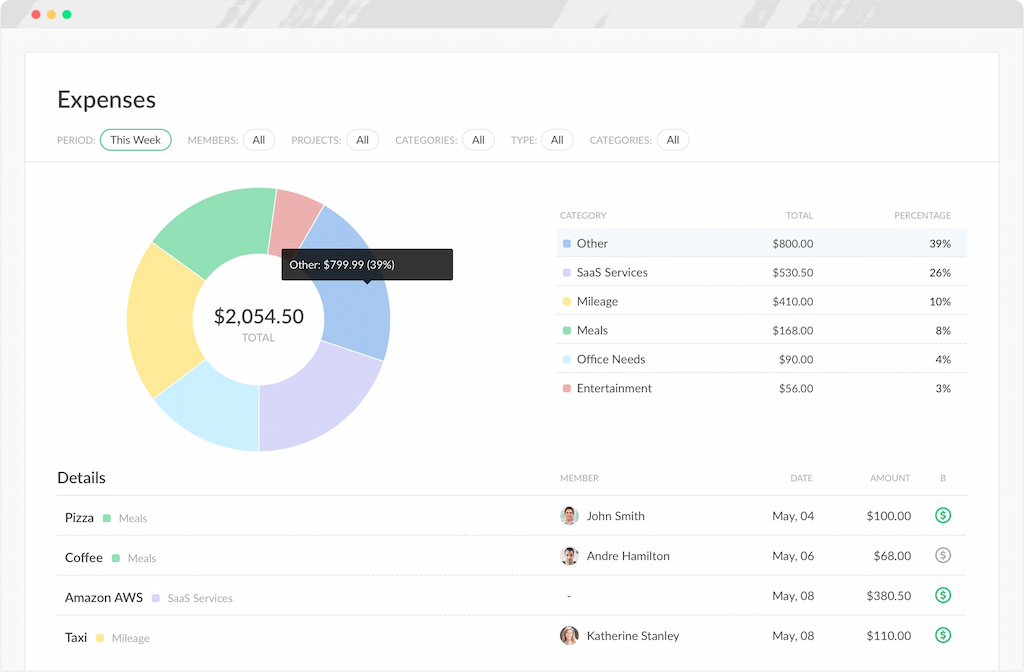
Everhour is a time tracker and project cost management software designed for teams that need to understand how time and costs affect project performance. It connects tracked time with projects, budgets, expenses, and billing, helping teams monitor project financials throughout the project lifecycle.
Why we picked it: Everhour brings together time tracking, project budgeting, expenses, and reporting in a project-focused system. Its integrations with tools such as Asana, Notion, and Jira also allow teams to track time without changing their existing workflows.
Key features
- Project time tracking: Track time against projects and tasks using timers or manual entries.
- Budget monitoring: Set project budgets and monitor progress against planned hours and costs.
- Expense tracking: Record project-related expenses and include them when reviewing project costs.
- Billing and invoicing: Track billable time and identify uninvoiced work.
- Project reporting: Create reports based on projects, clients, team members, and other criteria.
Best for: Agencies, consultancies, freelancers, and project-based teams.
Limitations: Everhour is primarily a project time tracking and budgeting platform rather than a complete accounting system.
Pricing
- Free plan: Basic features for small teams or individual use
- Team plan: $8.50 per user per month for teams needing more advanced features and integrations
Beebole — Best for project profitability tracking
Beebole is a time tracking and project reporting platform that helps businesses understand the relationship between employee time, internal costs, billing rates, and project revenue.
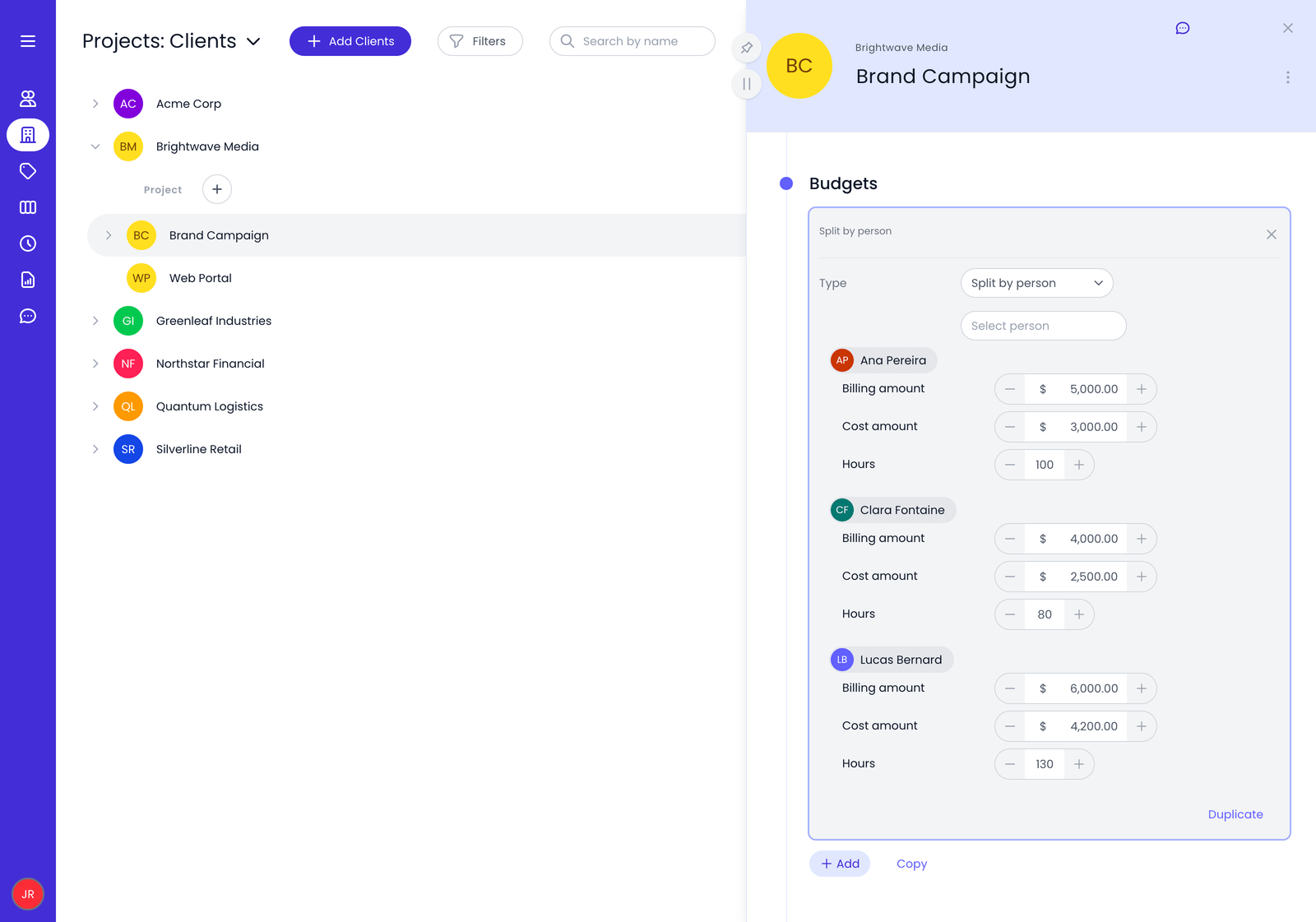
Why we picked it: Beebole is particularly useful for businesses that need detailed cost and profitability analysis. Users can assign different internal cost rates and billing rates and analyze financial performance across projects.
Key features
- Labor cost tracking: Assign internal cost and external billing rates to people, projects, tasks, or tags.
- Project profitability: Compare project costs with revenue to understand margins.
- Budget monitoring: Set and monitor budgets at the project or client level.
- Custom reporting: Analyze data by project, employee, task, date, and other criteria.
- Timesheet approvals: Use approval workflows and audit trails to improve data accuracy.
Best for: Businesses that need detailed project profitability and labor cost analysis.
Limitations: Its focus on detailed time and financial reporting may be more than smaller teams need if they only want simple expense tracking.
Pricing
- Free: $0 for up to 5 users
- Paid plans start at $9 per user/month (billed annually)
- All plans include a 30-day free trial with no credit card required.
actiTIME — Best for time and task-based cost tracking
actiTIME combines employee time tracking with task and project management, helping teams understand how working time is distributed across projects and activities.
Why we picked it: It provides a straightforward option for businesses that want to connect employee hours with projects and tasks without adopting a full accounting platform.

Key features
- Time tracking: Record employee hours against projects and tasks.
- Project and task management: Organize work, deadlines, and workflows.
- Project reporting: Analyze time and work across projects.
- Custom time entry: Support daily, weekly, and other time entry workflows.
- Integrations: Connect with other project management and business tools.
Best for: Teams that want to track employee time and project work in one system.
Limitations: It is more focused on time and task management than comprehensive expense and accounting management.
Pricing
- Free Plan
- Paid plans: Starting at $6 per user per month
ClickTime — Best for resource planning and project budgets
ClickTime is a time tracking and resource management platform that helps businesses monitor employee time, project budgets, and workforce costs.
Why we picked it: It is a strong option for organizations that need to connect project budgeting with resource planning and understand how employee time affects project costs.

Key features
- Resource management: Allocate employees and monitor workforce utilization.
- Project budgeting: Set project budgets and monitor financial performance.
- Time tracking: Record employee time against projects and tasks.
- Expense tracking: Track project-related expenses alongside employee time.
- Reporting and analytics: Review project performance through reports and dashboards.
Best for: Businesses that need project cost tracking alongside resource planning.
Limitations: May be more complex than necessary for freelancers or small teams with simple time tracking needs.
Pricing
Starts at $12 per user per month
Best expense management software for project costs
These tools primarily help businesses track employee expenses, receipts, travel costs, and reimbursements. They can contribute to project cost tracking when expenses are assigned to projects, clients, or cost categories.
Zoho Expense — Best for employee and project expenses
Zoho Expense is an expense management platform designed to help businesses record, approve, and analyze employee expenses.
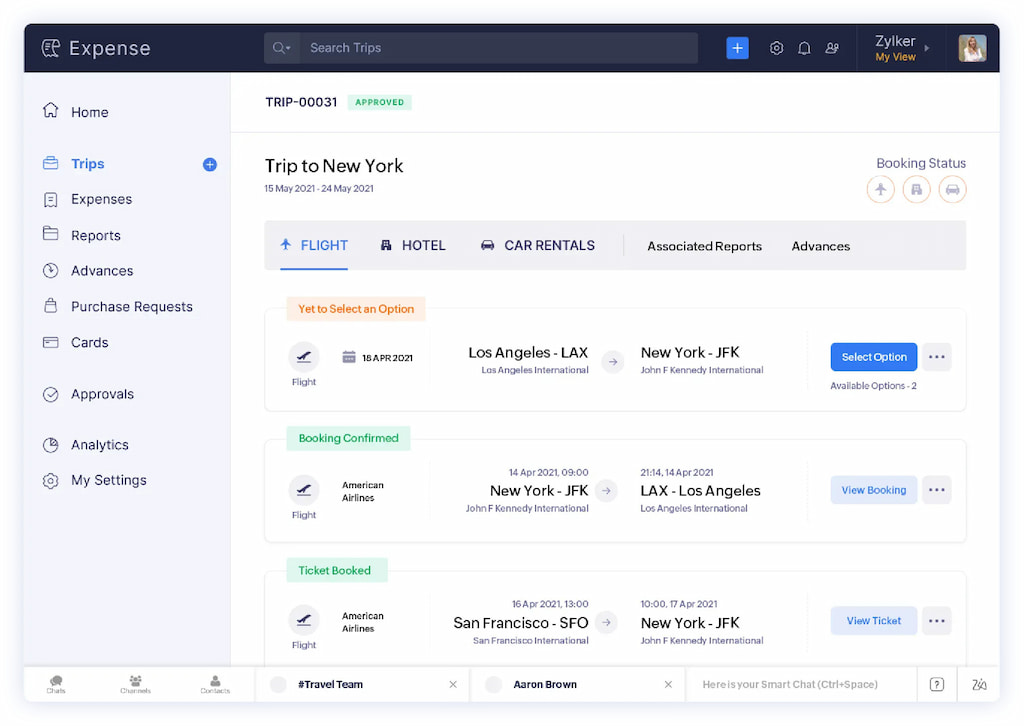
Why we picked it: It provides a broad range of tools for tracking business expenses, receipts, mileage, and travel costs, making it useful when employee spending is a major part of project costs.
Key features
- Receipt management: Scan and store receipts digitally.
- Expense tracking: Record, categorize, and manage business expenses.
- Mileage tracking: Calculate and track travel-related costs.
- Expense approvals: Create workflows for reviewing expenses.
- Mobile access: Add and manage expenses from mobile devices.
Best for: Businesses that need to manage employee, travel, and project-related expenses.
Limitations: Zoho Expense focuses primarily on expenses rather than complete project labor costs and profitability.
Pricing
- Free
- Standard: $3 per user per month
- Premium: $5 per user per month
- Enterprise: Custom
Abacus — Best for expense approvals and reimbursements
Abacus is an expense management platform focused on automating expense reporting, approvals, and reimbursements.
Why we picked it: Its approval workflows and automated expense processes can help businesses control employee spending and ensure expenses are reviewed before reimbursement.

Key features
- Receipt scanning: Digitize receipts for expense reporting.
- Automated expense workflows: Simplify expense creation and approvals.
- Mileage tracking: Record business travel costs.
- Expense policy management: Share and enforce company spending policies.
- Accounting integrations: Connect expense data with accounting systems.
Best for: Businesses that need structured expense approval and reimbursement workflows.
Limitations: Abacus is primarily an expense management tool rather than a complete project budgeting or profitability platform.
Pricing
Custom
Expensify — Best for receipt and expense management
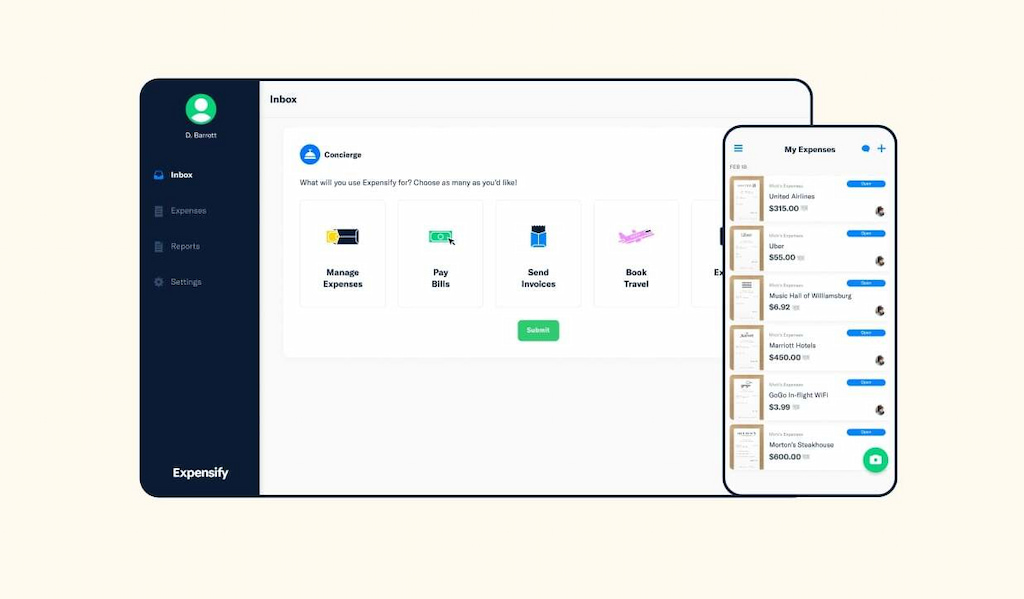
Expensify is an expense management platform known for its receipt scanning and automated expense reporting tools.
Why we picked it: Its automation features make it useful for businesses that process large numbers of employee expenses and receipts.
Key features
- SmartScan: Capture and extract information from receipts.
- Expense categorization: Organize business expenses automatically.
- Expense approvals: Review and approve submitted expenses.
- Mileage tracking: Track business travel costs.
- Real-time reporting: Monitor expenses and spending patterns.
Best for: Businesses that want to automate receipt processing and expense reporting.
Limitations: It focuses primarily on expenses rather than tracking complete project budgets, labor costs, and profitability.
Pricing
- Free
- Collect: €5 per user per month
- Control: Custom
Rydoo — Best for travel and employee expenses
Rydoo is an expense management platform focused on business travel, employee expenses, and automated approval workflows.
Why we picked it: It is particularly useful for organizations where travel and employee expenses represent a significant part of business or project costs.

Key features
- Receipt scanning: Capture and digitize receipts.
- Mileage tracking: Record travel-related costs.
- Expense approval workflows: Automate reviews and flag policy violations.
- Real-time reporting: Monitor submitted expense data.
- Mobile expense management: Submit expenses while traveling.
Best for: Businesses with significant employee travel and expense management needs.
Limitations: Rydoo is primarily designed for expense management rather than comprehensive project budgeting and labor cost tracking.
Pricing
- Essentials: €8 per user per month
- Pro: €10 per user per month
- Business: Custom
- Enterprise: Custom
ExpensePoint — Best for expense reporting
ExpensePoint is an expense reporting platform that helps businesses manage receipts, mileage, reimbursements, and employee spending data.
Why we picked it: It provides a broad collection of expense reporting features at a relatively straightforward price.

Key features
- Mileage tracking: Record business travel expenses.
- Receipt imaging: Digitize receipts for reporting.
- Credit card integration: Import business transactions.
- Employee reimbursement: Manage reimbursement workflows.
- Spending analysis: Review spending patterns and expense data.
Best for: Businesses looking for a dedicated expense reporting system.
Limitations: ExpensePoint focuses on expenses and reimbursements rather than full project cost management and profitability analysis.
Pricing
Custom
Best accounting software for tracking project costs
These tools combine financial management with invoicing, expenses, and time-related features. They are particularly useful for businesses that want project costs connected to their broader accounting workflows.
QuickBooks — Best for accounting and project finances
QuickBooks is an accounting platform that helps businesses manage income, expenses, invoices, and financial reporting. Depending on the plan and connected products used, businesses can also connect project and time-related information to their financial workflows.
Why we picked it: QuickBooks is a useful option for businesses that want project costs and expenses connected to their broader accounting system rather than managed in a separate project-focused platform.

Key features
- Expense tracking: Record and categorize business expenses.
- Invoicing: Create and manage client invoices.
- Financial reporting: Monitor business income, expenses, and profitability.
- Project-related financial management: Organize financial data related to client work and projects.
- Accounting integrations: Connect with additional business and payroll tools.
Best for: Businesses that want project-related financial data connected to accounting and invoicing.
Limitations: QuickBooks is primarily an accounting platform, so teams looking for detailed task-level project cost tracking may need additional tools.
Pricing
- Simple Start: €21 per month
- Essentials: €31 per month
- Plus: €45 per month
- Advanced: €75 per month
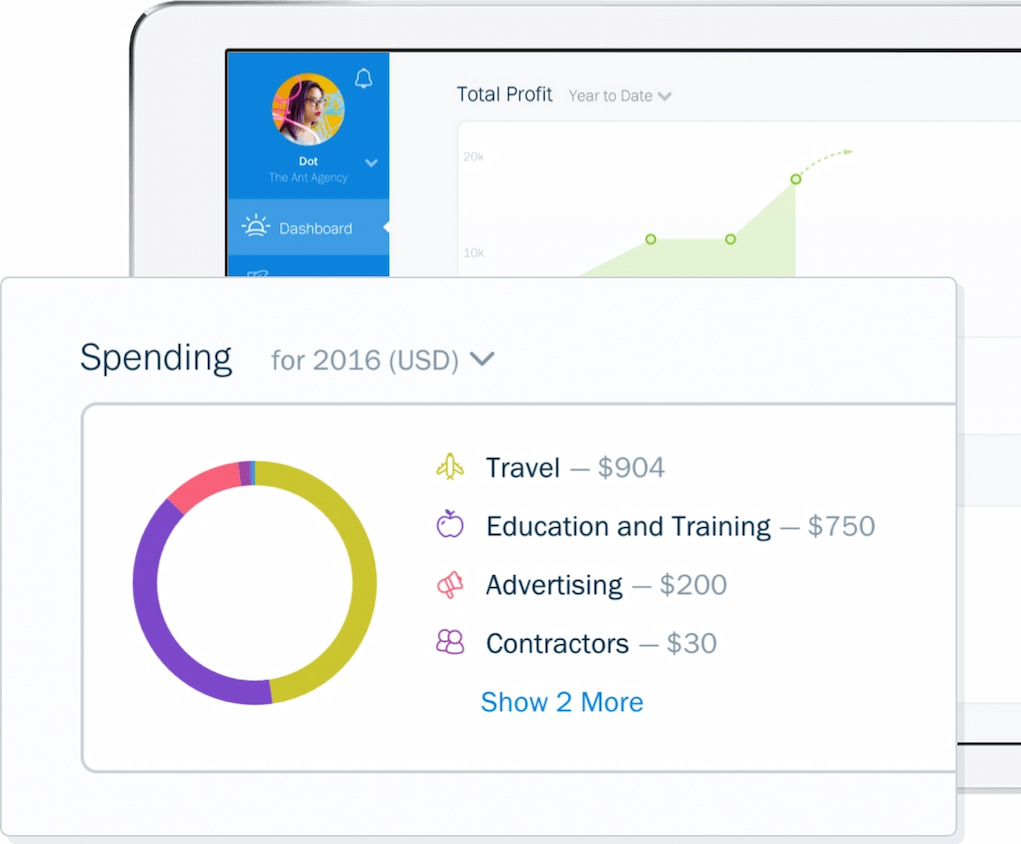
FreshBooks — Best for freelancers and small businesses
FreshBooks combines accounting, invoicing, expense tracking, and time tracking in a platform designed primarily for freelancers and smaller businesses.
Why we picked it: It provides a relatively simple way to connect tracked time and expenses with invoices and client work without requiring a complex enterprise accounting system.
Key features
- Expense tracking: Record and categorize business expenses.
- Time tracking: Track time spent on client work and projects.
- Invoicing: Turn billable work into client invoices.
- Financial reporting: Review revenue, expenses, and profitability.
- Project profitability: Monitor the financial performance of client work.
Best for: Freelancers and small service businesses that need time tracking, expenses, and invoicing in one platform.
Limitations: FreshBooks is better suited to smaller businesses and service-based work than complex organizations managing large project portfolios.
Pricing
- Lite: $2.30/month
- Plus: $4.30/month
- Premium: $7.00/month
- Select: Custom pricing
Best spend management software for controlling project costs
This tool focuses on controlling and approving business spending before it becomes an expense. It can help organizations manage project-related costs, although they are not traditional project cost tracking platforms.
Emburse Spend — Best for controlling employee spending
Emburse Spend helps businesses control employee and team spending through approval workflows, spending controls, and virtual cards.
Why we picked it: Unlike traditional expense tools that primarily record spending after it happens, Emburse Spend helps businesses establish controls before employees make purchases.

Key features
- Spending requests: Review and approve spending before purchases are made.
- Card controls: Set restrictions on employee spending.
- Virtual cards: Issue single-use and recurring cards.
- Receipt reconciliation: Match receipts with transactions automatically.
- Spend controls: Improve visibility and control over business purchases.
Best for: Businesses that want to control employee spending before costs occur.
Limitations: Emburse Spend is primarily a spend management platform rather than a complete project budgeting and labor cost tracking tool.
Pricing
Custom
Frequently Asked Questions
Project cost tracking software helps businesses monitor the costs associated with completing a project. Depending on the tool, this can include employee time, labor costs, expenses, materials, travel, budgets, and billable work.
Common project costs include labor, employee time, contractor costs, materials, travel expenses, software costs, equipment, and other business expenses directly associated with the project.
Yes. Time tracking software can help businesses calculate labor costs by connecting employee hours with internal cost rates, billing rates, or project budgets. Some tools also combine time tracking with expenses and profitability reporting.
Project cost tracking covers the broader financial cost of completing a project, including labor, budgets, expenses, and other resources. Expense tracking focuses primarily on recording and managing business purchases and employee expenses.
Project profitability is typically calculated by comparing project revenue with the total costs associated with completing the work. Software can help automate this process by tracking employee time, labor costs, expenses, billing rates, and revenue.
The best software depends on the type of costs you need to track. Everhour is suitable for project-based teams, Beebole focuses on profitability analysis, ClickTime combines resource planning with budgeting, and QuickBooks connects costs with accounting workflows.
Project Cost Tracking Software: Conclusion
The best project cost tracking software depends on which costs your business needs to manage. Project-based teams may benefit most from tools such as Everhour, Beebole, actiTIME, or ClickTime, which connect employee time and project work with budgets and financial performance.
Businesses focused primarily on employee spending and travel costs may prefer dedicated expense management platforms such as Zoho Expense, Expensify, Rydoo, or ExpensePoint. QuickBooks and FreshBooks are better suited to businesses that want project-related costs connected to invoicing and broader accounting workflows.
For teams that need to track project time, budgets, expenses, and billable work in one project-focused system, Everhour provides a particularly comprehensive option.
For a deeper look at how different leadership roles contribute to team success, don’t miss our article on project manager vs product manager vs program manager.
Discover why most teams burn budget without realizing it, and how you can fix it with data—not guesswork.

Maria
A dedicated content enthusiast with extensive experience in international teams and projects of all sizes. Maria thrives on creativity and attention to detail, fueled by a love for fantasy novels, music, classic black-and-white films, and always finding ways to make things better.