


Wrike vs Asana: Features, Pricing, Pros & Cons

Wrike and Asana are two of the most popular project management tools, but they’re built with different types of teams and workflows in mind. While both platforms help teams plan work, track progress, and collaborate, the way they approach structure, visibility, and control varies in important ways. This article compares Wrike vs Asana across core features, workflows, collaboration, reporting, and pricing. The goal is to help you understand where each tool fits best, so you can choose the one that aligns with how your team actually works.
❓ What Is Wrike?
Wrike is a work management platform designed for teams that need more structure and control than simple task lists can provide. It helps teams plan, track, and manage complex projects with multiple stakeholders, dependencies, and workflows.
At its core, Wrike makes work visible and predictable. Teams can see not just what needs to be done, but also:
- ✅ How tasks relate to each other
- 👤 Who is responsible for each task
- 📍 What stage each task is in
This makes Wrike especially useful for organizations where missed handoffs or unclear ownership can slow projects down.
Teams that benefit most from Wrike
Wrike is ideal for teams managing ongoing or large-scale work, such as:
- 📢 Marketing teams – coordinate campaigns, content production, and approval cycles
- 🚀 Product and engineering teams – structure roadmaps, sprints, and release planning
- ⚙️ Operations and professional services – manage repeatable processes while keeping deadlines and responsibilities clear
It works best for mid-sized to large teams or growing teams that need formal workflows and reporting.
How Wrike structures work
Wrike organizes projects and tasks to give teams clarity and control:
- 📁 Folders and projects – group work by goal, client, or team
- 📝 Tasks and subtasks – assigned to owners with deadlines
- 🔄 Custom workflows – track work stages like “in progress,” “review,” or “approved”
- 👀 Multiple views – lists, boards, timelines, and dashboards for planning, executing, or reporting
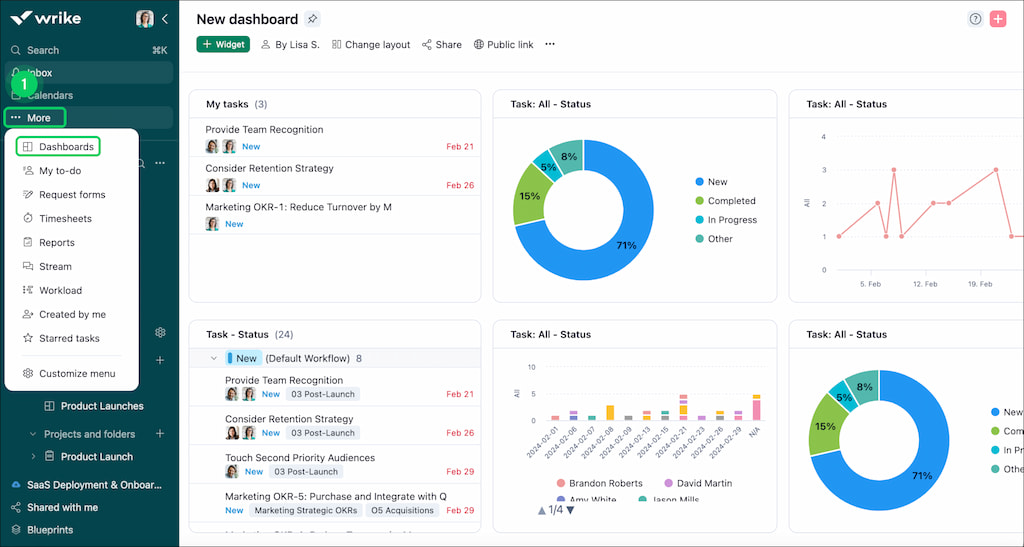
Wrike positions itself as a system for managing work at scale, prioritizing structure, accountability, and visibility. It’s a strong option for teams that need to coordinate many moving parts without losing track of progress.
❓ What Is Asana?
Asana is a flexible work and project management platform designed to help teams organize tasks, track progress, and collaborate effectively. It focuses on simplicity and adaptability, making it easy for teams to get started without rigid structures.
At its core, Asana makes work transparent and manageable, helping teams see what’s due, who’s responsible, and what’s coming next:
- ✅ Visualize tasks, deadlines, and priorities
- 👥 Assign work to individuals or teams
- 📍 Track progress across projects in one place
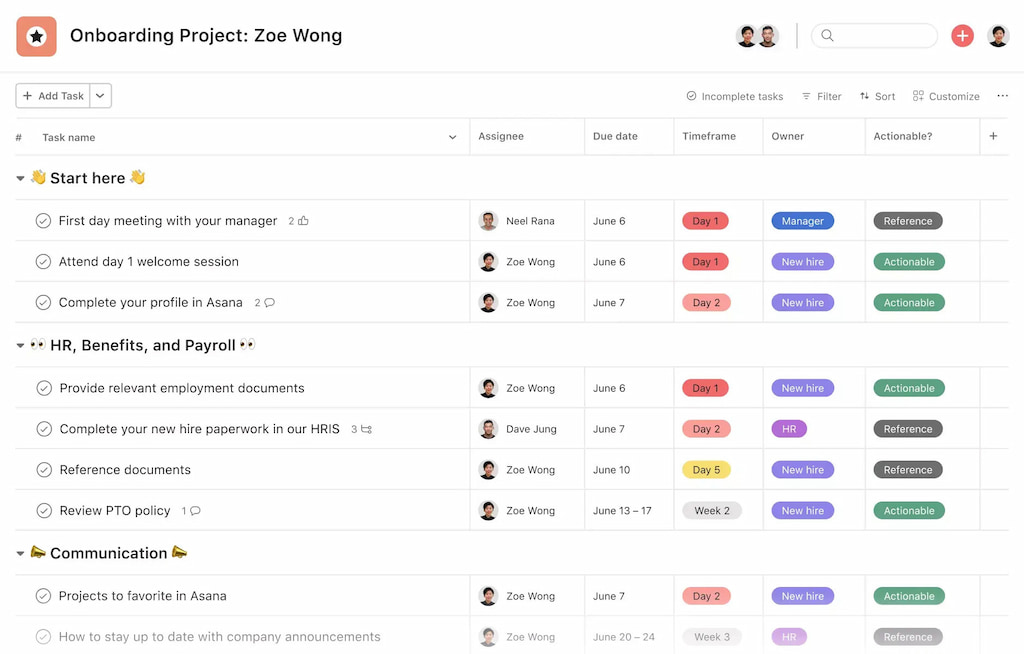
This makes Asana especially useful for teams that want flexibility without sacrificing accountability.
Teams that benefit most from Asana
Asana is ideal for teams that need to coordinate work without heavy process overhead, such as:
- 📢 Marketing teams – plan campaigns, content calendars, and social initiatives
- 🚀 Product teams – manage feature backlogs, design tasks, and releases
- ⚙️ Operations or small cross-functional teams – handle recurring tasks, approvals, and projects
It works best for small to mid-sized teams or those that value flexible workflows and visual task tracking over strict structure.
How Asana structures work
Asana organizes work in a way that emphasizes clarity and collaboration:
- 📝 Tasks and subtasks – create actionable items with due dates and owners
- 🔖 Projects – group tasks for specific goals, clients, or initiatives
- 📊 Views – list, board, timeline, or calendar views to match team preferences
- 🔔 Collaboration features – comments, @mentions, and notifications keep teams aligned
Asana positions itself as a flexible platform for teams of all types, prioritizing ease of use, adaptability, and teamwork over strict control. It’s a strong option for teams that want to manage projects efficiently without a steep learning curve.
📂 Project and Task Management
Both Wrike and Asana help teams manage projects and tasks, but they take different approaches depending on team needs.
Task creation and subtasks
- Wrike: Lets you create detailed tasks with descriptions, assignees, due dates, and attachments. You can break work into subtasks, set dependencies, and track progress across multiple projects. Ideal for complex, cross-functional work.
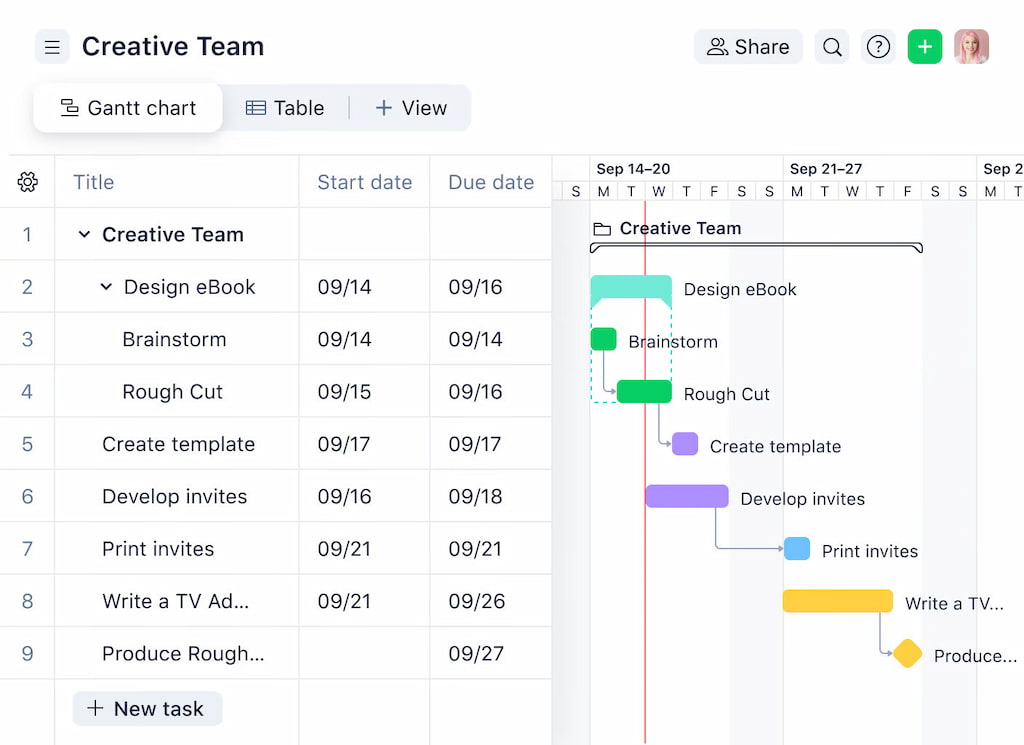
- Asana: Focuses on simplicity and flexibility. Tasks and subtasks can be created easily, and you can assign them to team members with due dates. Dependencies exist but are lighter than in Wrike, making it better for lighter or mid-sized projects.
Project views
- Wrike: Offers list, board, timeline, and Gantt views, giving multiple ways to visualize work and dependencies. Dashboards provide high-level insight into project health and team workload.
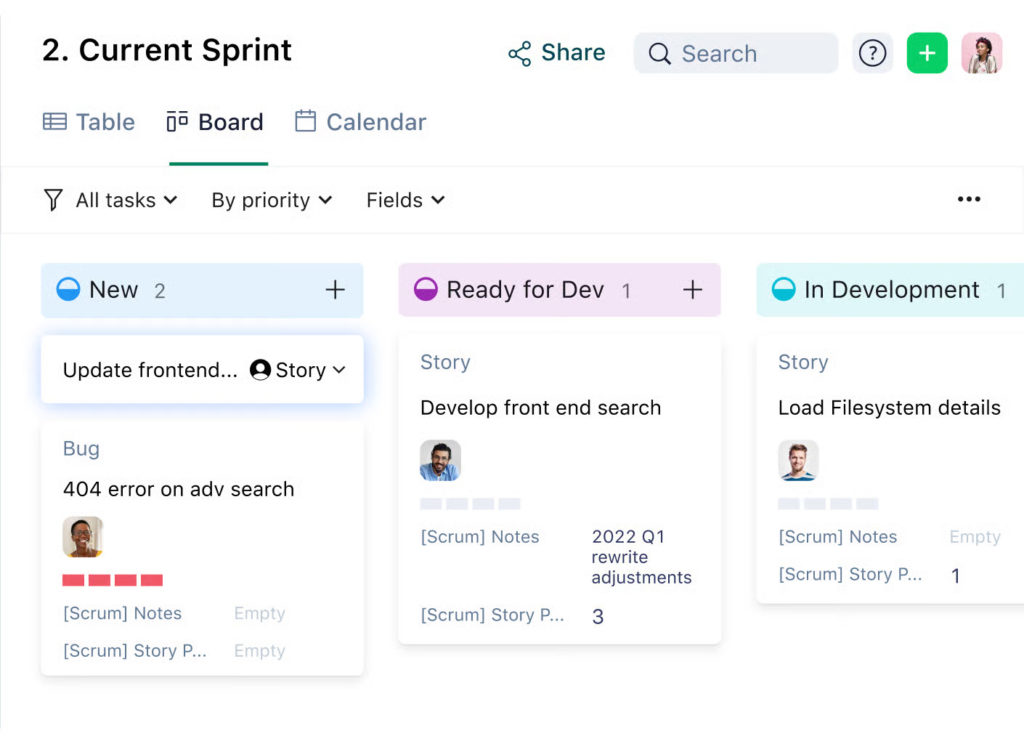
- Asana: Offers list, board, timeline, and calendar views, focusing on ease of use and collaboration. Timeline view helps with planning, while boards give a Kanban-style overview.
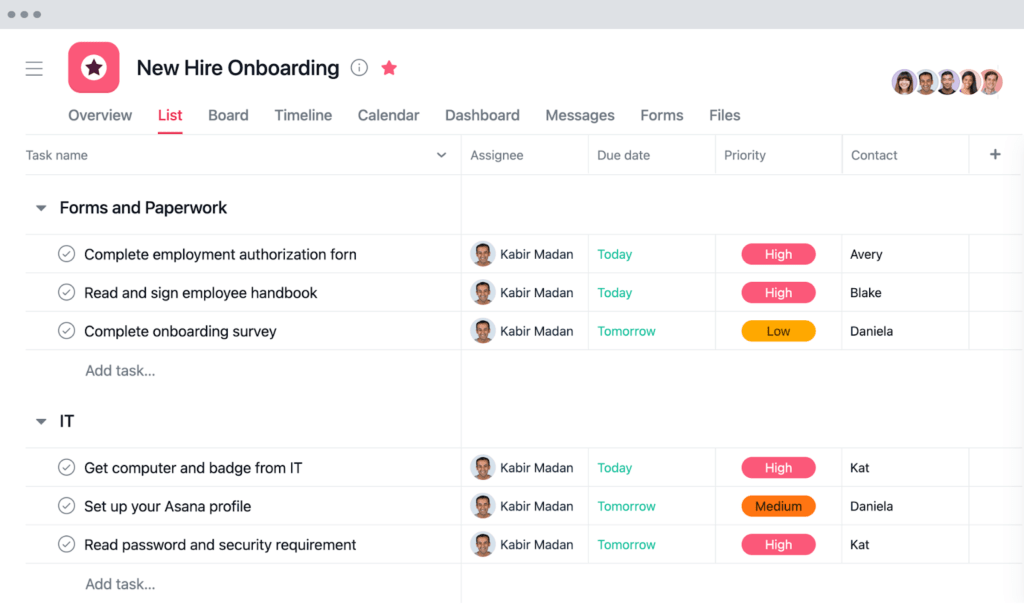
Handling complex vs lightweight projects
- Wrike: Designed for complex projects with multiple teams. Supports advanced workflows, approvals, and cross-project dependencies.
- Asana: Works best for lightweight to moderately complex projects. Its flexibility and simplicity make it easier to onboard teams quickly.
In short, Wrike excels when you need structure and control, while Asana shines when you want flexibility and speed. Both provide visibility, but the level of detail and planning capability differs.
🛠️ Workflows and Customization
Wrike workflow customization
It offers robust workflow customization, allowing teams to create custom task statuses, design project-specific workflows, and set up hierarchical processes across multiple projects. Wrike workflow customization features make it ideal for teams that need precise control over approvals, stages, and dependencies, especially in complex or large-scale projects.
Asana automation features
Asana takes a simpler approach with rules and automation to reduce repetitive tasks. Teams can automatically assign tasks, move items between sections, and trigger notifications. With automation features, plus visual boards, lists, and timeline views, workflow setup becomes fast and intuitive, focusing on flexibility without overwhelming users.
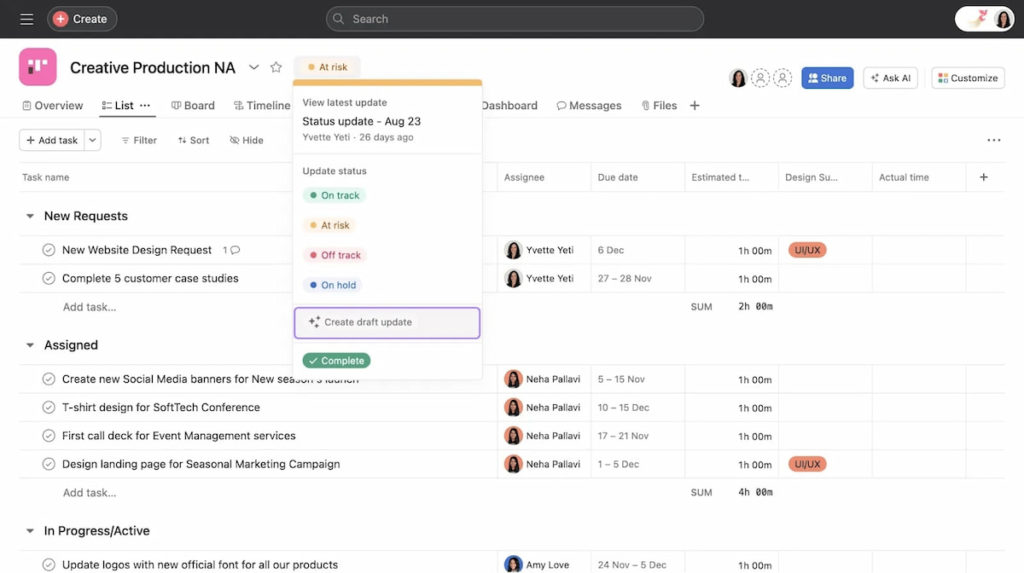
Project management workflow tools: control vs simplicity
- Wrike is best for teams that need detailed customization, complex approvals, and control over every workflow stage. Its project management workflow tools make handling complex projects easier.
- Asana is ideal for teams seeking simplicity, ease of use, and quick automation without a steep learning curve.
💬 Collaboration and Communication
Comments, mentions, and file sharing
Both Wrike and Asana let teams communicate directly on tasks. Wrike offers threaded comments, @mentions, and file attachments, keeping feedback organized within projects.
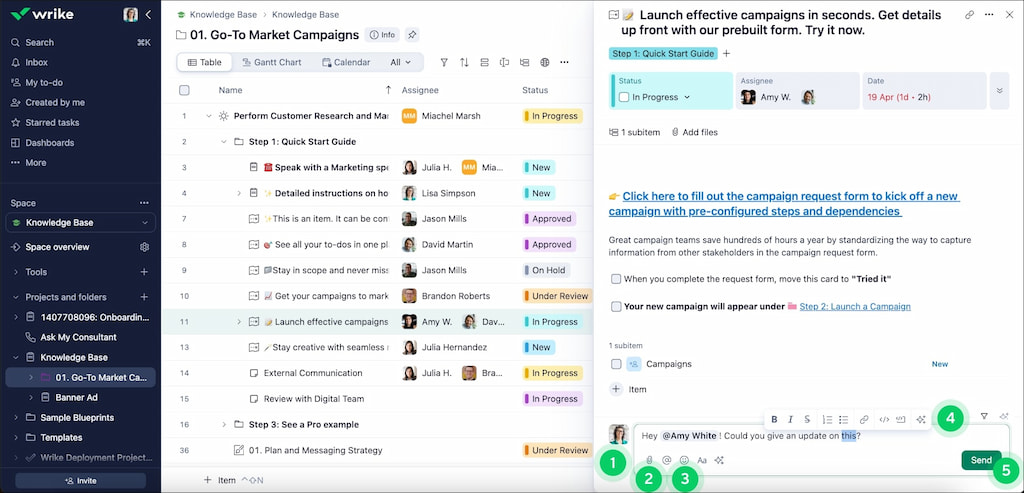
Asana supports comments, @mentions, and file uploads, and integrates smoothly with tools like Slack and Dropbox for easy collaboration.
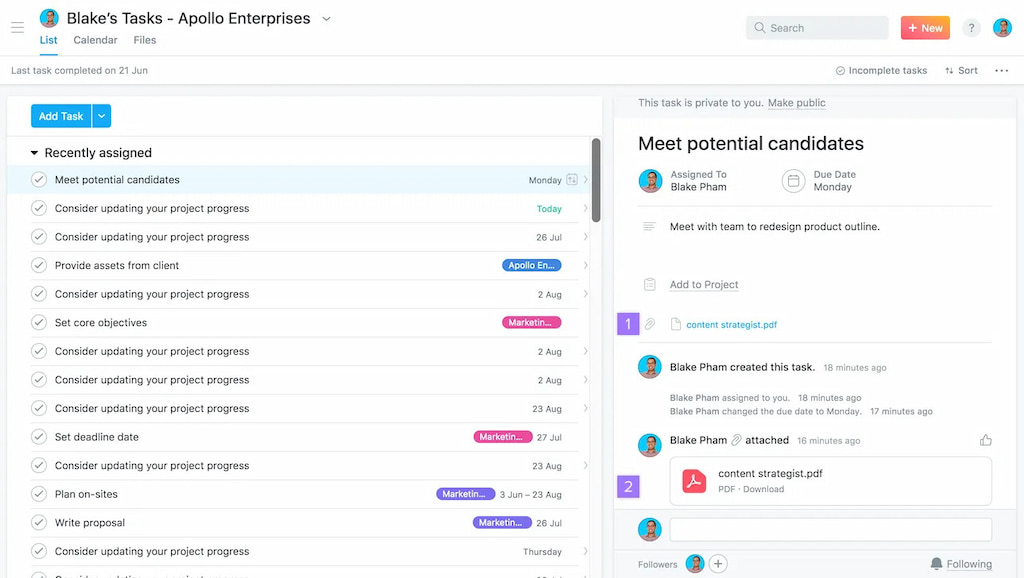
Approvals and feedback handling
Wrike includes built-in approval workflows, so managers or stakeholders can review and approve tasks or documents directly. Asana handles feedback through comments and task assignments, relying on notifications and different Asana integrations for formal approvals.
Visibility across teams and stakeholders
Wrike provides shared dashboards and customizable views, giving stakeholders clear insight into complex projects. Asana emphasizes simplicity, showing tasks, deadlines, and responsibilities in a clear, easy-to-follow way.
⚖️ Summary
- Wrike is best for teams needing structured approvals, centralized communication, and clear stakeholder visibility.
- Asana is ideal for teams that want flexible feedback, lightweight collaboration, and seamless integration with other tools.
📊 Reporting and Analytics
Having clear insights into your team’s work is essential, and both Wrike and Asana offer reporting features—but in different ways.
📈 Built-in reports and dashboards
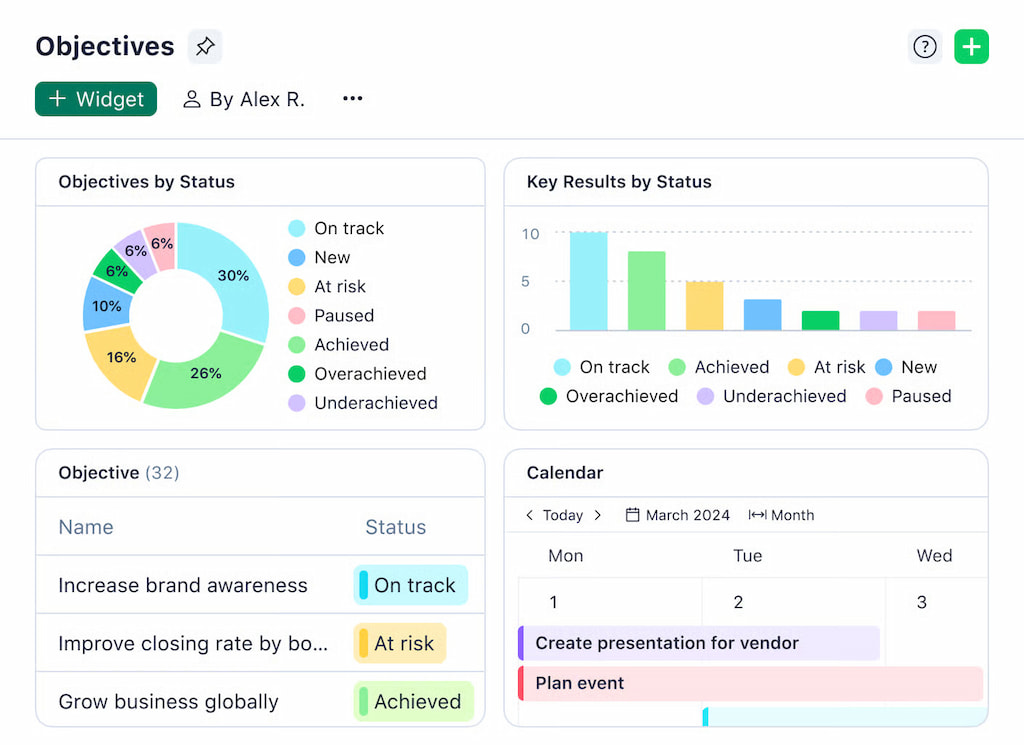
Wrike comes with a range of built-in reports and customizable dashboards. You can track project progress, monitor task completion, and see which team members are overloaded. This makes it easy to spot bottlenecks and keep stakeholders informed. Wrike’s dashboards are particularly useful for teams that need advanced project management reporting tools.
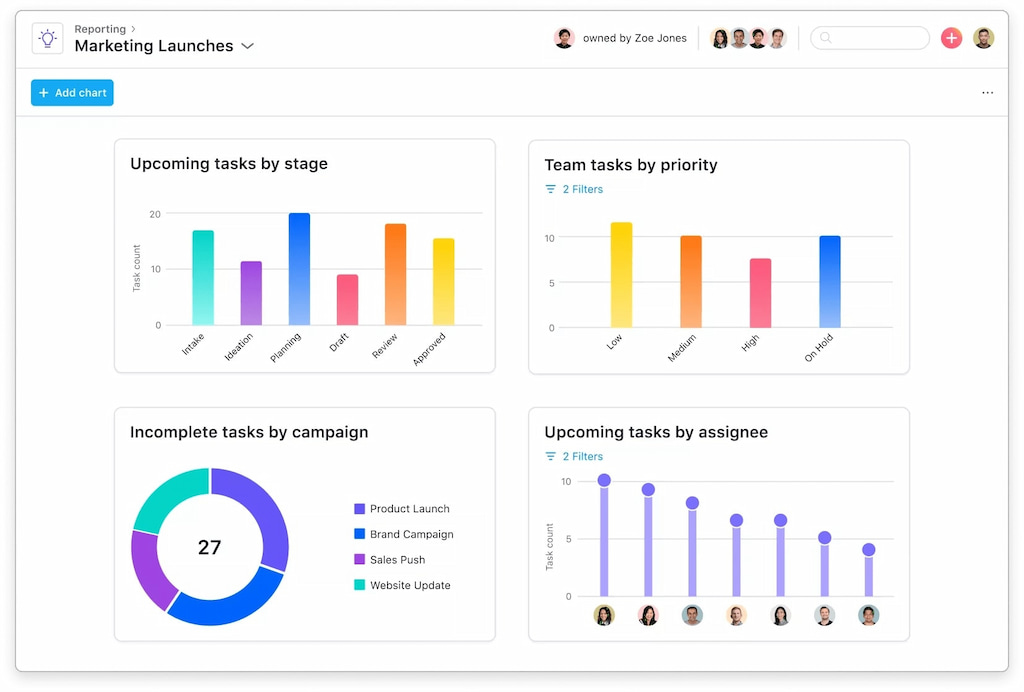
Asana offers basic reporting through its dashboards and project views. You can see task status, due dates, and workload, but it doesn’t have the same level of customization as Wrike. For teams that want a quick overview without digging into detailed data, Asana’s reporting is simple and visual.
⏱ Workload and performance tracking
Tracking who is doing what and how much work they have is easier in Wrike. Its workload charts let managers balance tasks across teams and prevent burnout. Asana also tracks workload but focuses more on overall task completion rather than detailed performance metrics.
⚠️ Limitations to keep in mind
- Wrike’s reporting is powerful, but can feel overwhelming for smaller teams or users new to project management software.
- Asana’s reporting is easy to read, but lacks advanced analytics and deep insights, which may be a limitation for growing or complex teams.
⚖️ Summary
- Wrike: Best for teams that need detailed dashboards, advanced reporting, and workload management.
- Asana: Best for teams that prefer simple, visual reports and quick insights without a steep learning curve.
🤖 Automation and Integrations
Automation can save teams a lot of time, and both Wrike and Asana offer ways to streamline repetitive tasks. At the same time, integrations help teams connect with the tools they already use.
⚡ Native automation features
Wrike includes built-in automation options that let teams automatically assign tasks, trigger notifications, and move tasks between statuses. You can even set up complex rules for multi-step workflows, which is useful for large projects or teams that need detailed process automation.
Asana also has automation through rules and triggers. You can automatically assign tasks, set due dates, or move tasks between sections. While Asana’s automation isn’t as deep as Wrike’s, it’s very easy to set up and works well for teams looking for simple, time-saving automations.
🔗 Available integrations and ecosystem
Wrike integrates with popular tools like Slack, Google Drive, Microsoft Teams, Everhour’s time tracker (check out its Wrike time tracking integration), and Salesforce. Its ecosystem supports teams that rely on multiple apps, making it easier to centralize workflows.
Asana also connects with many apps, including Slack, Dropbox, Zoom, Everhour (also check out its Asana time tracking integration), and Gmail. Its focus is on flexible integration options that let teams extend Asana without complex setup.
📈 Support for scaling processes
Wrike is better suited for teams that anticipate growth or need to scale complex processes. Its automation and integrations allow workflows to expand without losing control. Asana works well for small to medium teams, helping them automate common tasks and connect apps, but it can become limiting as processes grow more complex.
⚖️ Summary
- Wrike: Best for teams needing advanced automation, integrations, and scalable workflows.
- Asana: Best for teams looking for easy-to-set-up automation and flexible integrations without a steep learning curve.
🧩 Ease of Use and Onboarding
How easy a tool is to learn can make a big difference, especially for teams with varied technical experience. Wrike and Asana take different approaches when it comes to usability.
🎓 Learning curve for new users
Wrike offers powerful features, but with that comes a steeper learning curve. New users may need time to get familiar with custom workflows, dashboards, and automation rules. Teams that are willing to invest in training can take full advantage of Wrike’s advanced project management capabilities.
Asana, on the other hand, is designed to be intuitive. Its clean interface, visual boards, and simple task management make it easy for new users to get started quickly. For teams that want fast adoption and minimal onboarding, Asana is often the better choice.
🖥 UI clarity and navigation
Wrike’s interface can feel dense at first, but it provides deep visibility and control once you’re familiar with it. Customizable dashboards and project views allow experienced users to tailor the interface to their workflow.
Asana focuses on simplicity and clarity. The interface is straightforward, with tasks, sections, and timelines laid out in a way that’s easy to navigate. Teams appreciate the visual cues and consistent layout, which makes managing projects less overwhelming.
👥 Suitability for non-technical teams
Wrike’s depth is ideal for technical or operations-heavy teams that need advanced features and customization. Asana’s simplicity makes it accessible for non-technical teams, including marketing, creative, and small business groups, without sacrificing collaboration or oversight.
⚖️ Summary
- Wrike: Best for teams comfortable with a learning curve and looking for advanced customization and deep project control.
- Asana: Best for teams wanting intuitive navigation, fast onboarding, and simplicity across all user types.
💰 Pricing and Plans
| Plan | Asana | Wrike |
|---|---|---|
| Personal / Free | $0 – Free forever | $0 – Free forever |
| Starter / Team | $10.99 per user/month (billed annually) | $10 per user/month |
| Advanced / Business | $24.99 per user/month (billed annually) | $25 per user/month |
| Enterprise / Enterprise | Contact sales | Contact sales |
| Pinnacle | – | Custom pricing |
🏢 Use Cases by Team Type
Different teams benefit from Wrike and Asana in different ways, depending on project complexity and collaboration needs.
Marketing and creative teams usually prefer Asana. Its visual boards, timelines, and simple task management make planning campaigns and creative projects easy. Lightweight automation and integrations with Slack, Dropbox, and Google Drive help teams stay organized without overwhelming them.
Product and engineering teams often lean toward Wrike. Custom workflows, approvals, and detailed dashboards help manage complex product development cycles and dependencies. Wrike’s automation features and reporting tools make it easier to track progress across multiple teams.
Operations and professional services teams also benefit from Wrike. Advanced reporting, portfolio management, and workload tracking allow teams to manage multiple clients, deadlines, and projects efficiently. Automation helps reduce manual work and keeps projects on schedule.
In short, Asana is ideal for teams that need flexible, easy-to-use project management workflow tools, while Wrike excels for teams that need structured workflows, advanced reporting, and scalability.
⚖️ Wrike vs Asana: Pros and Cons
Both Wrike and Asana are popular project management workflow tools, but they serve different types of teams. Here’s how they compare.
Key strengths of Wrike
Wrike is designed for teams that need structure and control. Its main strengths include:
- advanced workflow customization and custom statuses
- built-in approvals and formal review processes
- powerful reporting, dashboards, and workload management
- strong automation and integrations for complex workflows
- scalability for large teams and cross‑department work
Wrike works especially well for organizations managing multiple projects, stakeholders, or dependencies.
Key strengths of Asana
Asana focuses on simplicity and ease of use. Teams often choose it for:
- clean, intuitive interface with minimal setup
- visual task management using boards, lists, and timelines
- lightweight automation that’s easy to configure
- smooth integrations with tools like Slack and Google Workspace
- fast onboarding for non-technical teams
Asana is a strong fit for small to medium teams that want to move quickly without heavy process overhead.
Common drawbacks to be aware of
No tool is perfect, and both have trade-offs.
Wrike limitations:
- steeper learning curve for new users
- interface can feel overwhelming for small teams
- higher cost at advanced tiers
Asana limitations:
- limited advanced reporting and analytics
- less control over complex workflows
- may feel restrictive for large or highly structured teams
📝 Which Tool Should You Choose
Choosing between Wrike and Asana depends on your team’s size, workflow complexity, and priorities.
When Wrike makes more sense
Wrike is ideal for teams that need detailed customization, advanced reporting, and structured workflows. Large teams, departments with complex approvals, or projects with multiple dependencies will benefit from Wrike’s dashboards, automation, and portfolio management. If your team values control and scalability over simplicity, Wrike is the stronger option.
When Asana is the better option
Asana works best for teams that prioritize ease of use, visual task management, and quick onboarding. Marketing, creative, and small-to-medium teams will appreciate its intuitive boards, timeline views, and lightweight automation. Asana keeps workflows flexible and avoids overwhelming users with too many features.
Decision criteria based on team size and complexity
- Small teams or startups: Asana is usually the better fit for simple collaboration and fast setup.
- Medium to large teams: Wrike provides the tools needed for complex workflows, approvals, and advanced reporting.
- Teams with non-technical members: Asana’s clean interface and easy navigation make adoption smoother.
- Teams managing multiple stakeholders or departments: Wrike’s dashboards, reporting, and approval workflows give better oversight.
In short, choose Wrike for control and scalability, and choose Asana for simplicity and speed.
🏁 Wrike vs Asana: Conclusion
Wrike and Asana are both strong project management workflow tools, but they serve different needs.
- Wrike is ideal for teams that need advanced workflow customization, detailed reporting, structured approvals, and scalability. It works best for medium to large teams or departments managing complex projects.
- Asana shines for teams that value simplicity, visual task management, fast onboarding, and flexible collaboration. It’s perfect for small to medium teams or creative and non-technical departments.
When choosing between Wrike vs Asana, consider team size, project complexity, and how much structure or flexibility your team needs. Ultimately, the right tool is the one that fits your workflow, keeps your team aligned, and helps projects run smoothly.

Maria
A dedicated content enthusiast with extensive experience in international teams and projects of all sizes. Maria thrives on creativity and attention to detail, fueled by a love for fantasy novels, music, classic black-and-white films, and always finding ways to make things better.