


Wrike Product Management Overview: Features, Workflows & Integrations
Product teams need a reliable way to plan work, align across roles, and track progress from idea to release. Wrike product management gives teams a structured workspace to manage roadmaps, tasks, and workflows while keeping everyone on the same page.
Wrike works well for product managers collaborating with engineering, design, and marketing teams, offering shared visibility and real-time updates. In this article, we’ll look at how Wrike supports product management, where it fits best, and how teams extend it with tools like Wrike time tracking integration as their product work grows.
❓ What Is Wrike Product Management?
Wrike product management refers to how product teams use Wrike to plan, build, and ship products while coordinating work across multiple functions. Instead of treating product work as one-off projects, Wrike helps teams manage ongoing initiatives, evolving backlogs, and long-term roadmaps in a single system.
How Wrike supports product teams specifically
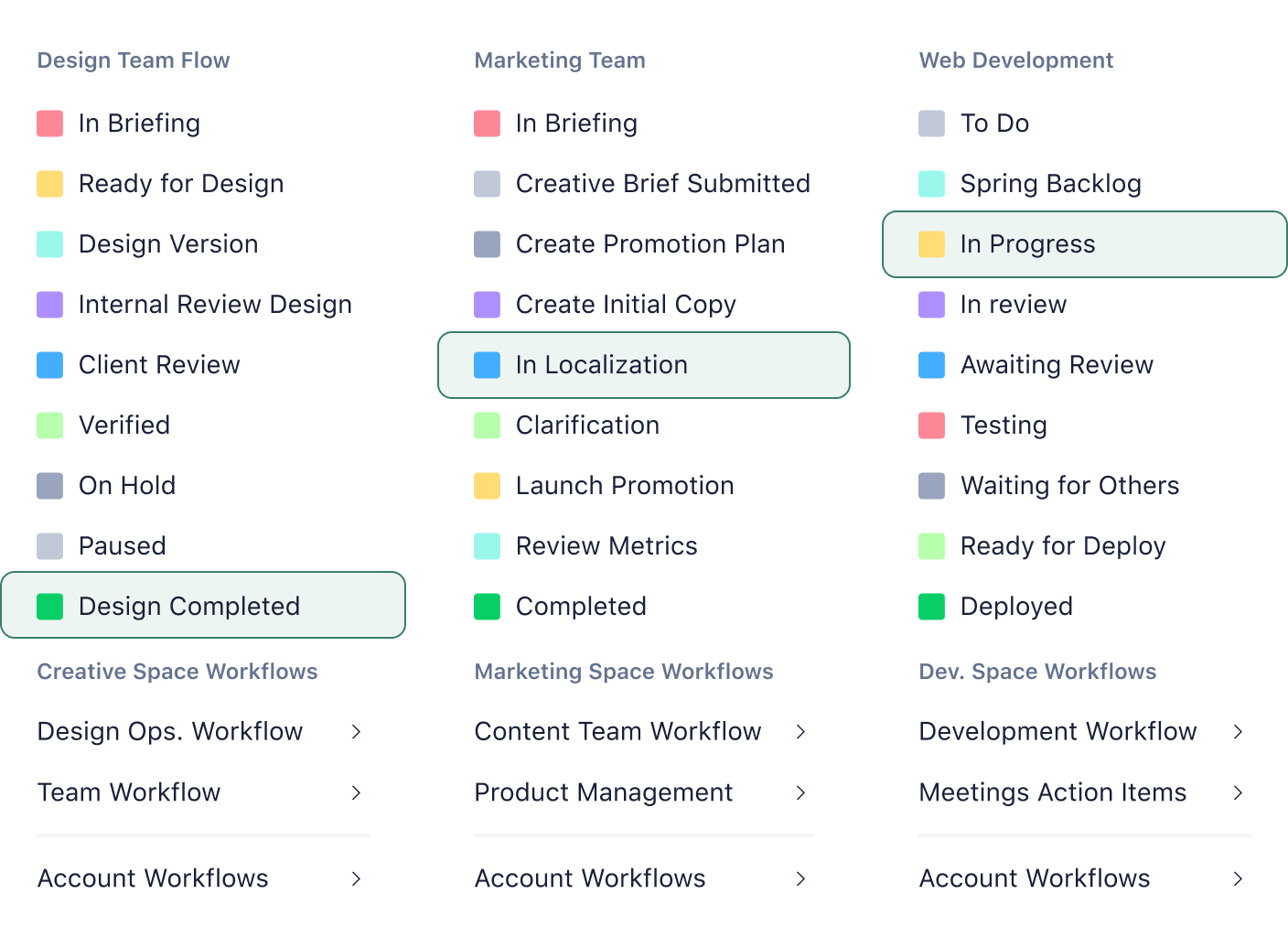
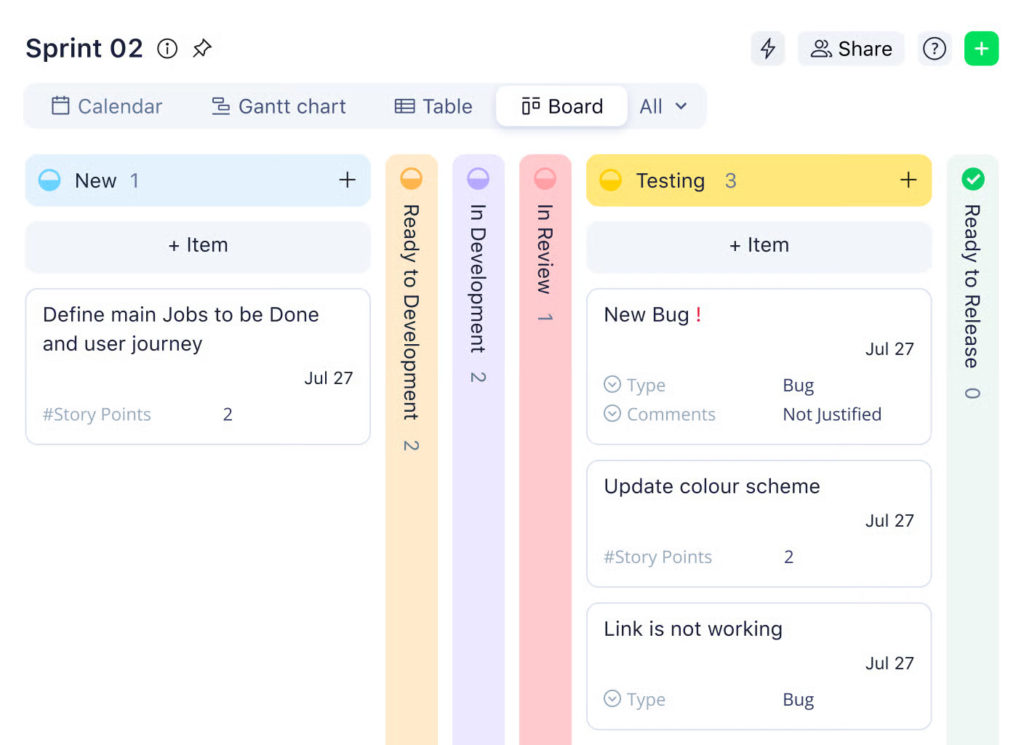
Wrike gives product managers tools and features to connect strategy with execution. Teams can organize work into product initiatives, features, and tasks, then track progress as work moves through defined stages. Custom workflows let each team reflect how product work actually happens, from discovery and design to development, review, and release.
Product managers often rely on Wrike to:
- structure product backlogs and prioritize work
- coordinate dependencies across engineering, design, and marketing
- manage releases, milestones, and launch timelines
- share progress updates with stakeholders using dashboards and reports
Because everything lives in one place, product teams spend less time syncing status and more time making decisions.
Product management vs. general project management in Wrike
General project management in Wrike focuses on delivering a defined scope by a set deadline. Product management, on the other hand, deals with continuous work, shifting priorities, and long-term ownership.
In Wrike, that difference shows up in how teams use the platform:
- product work stays open-ended, with ongoing backlogs instead of fixed project end dates
- priorities change more often, requiring flexible workflows and reordering
- visibility matters beyond delivery dates, including capacity, blockers, and cross-team impact
Wrike supports both approaches, but product teams tend to use more dynamic workflows, dashboards, and cross-tagging to manage work that never truly “ends.”
🔨 Core Product Management Features In Wrike
Wrike brings planning, execution, and collaboration together in a single workspace, which is especially valuable for product teams juggling roadmaps, backlogs, and cross-team input. Instead of spreading product work across multiple tools, teams can manage the full product lifecycle in one place.
🗺️ Roadmapping and planning
Wrike helps product managers turn product strategy into a clear, actionable roadmap. Teams can lay out initiatives and features across timelines, define milestones, and set dependencies so everyone understands what comes next and why.
Timeline and Gantt views make long-term planning more visual. They help product managers spot overlaps, delays, or risks early, before they affect delivery dates or releases.
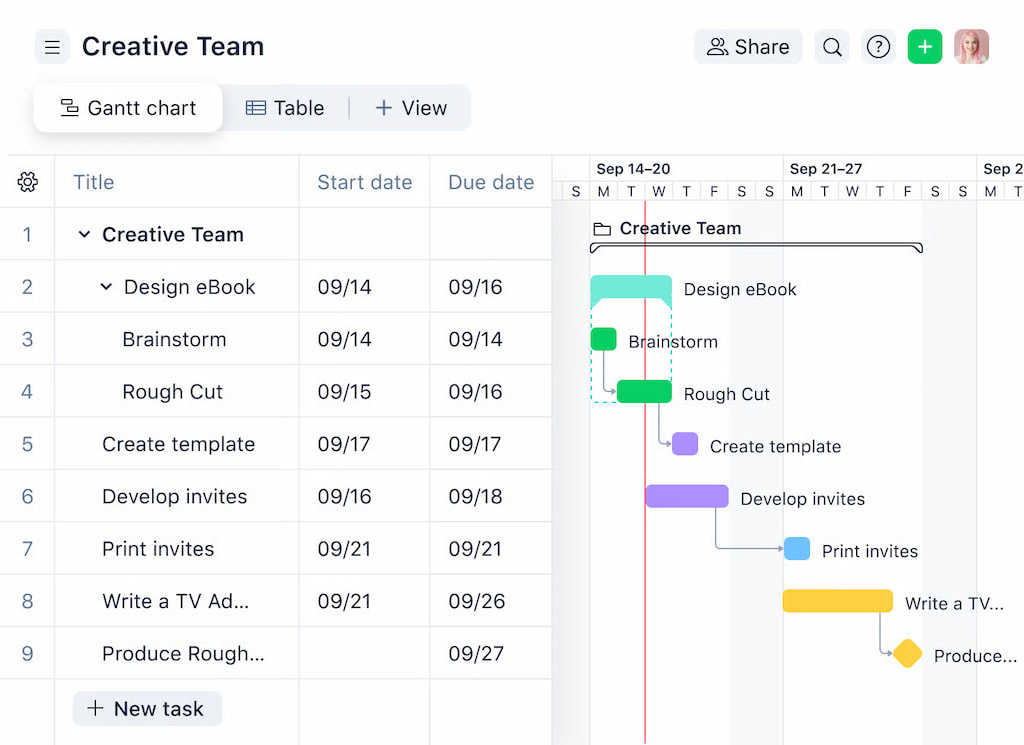
Wrike’s structure also supports growing products. Many teams use spaces for major product areas, projects for releases or initiatives, and folders to group features or themes. This keeps roadmaps flexible while still maintaining order as scope expands.
📋 Backlog and task management
Wrike allows product teams to manage epics, features, and tasks in a way that mirrors real product workflows. Larger initiatives often live as projects, with features and tasks nested underneath, so teams can break work down without losing context.
Prioritization stays visible and easy to adjust. Product managers can reorder work, assign clear ownership, and shift timelines as priorities change. Custom fields and statuses make it simple to see what’s planned, what’s actively being worked on, and what’s blocked, without needing a separate backlog tool.
🤝 Cross-functional collaboration
Product work rarely stays within one team, and Wrike is built to support that reality. Engineering, design, marketing, and stakeholders can all collaborate in the same workspace while keeping responsibilities clear.
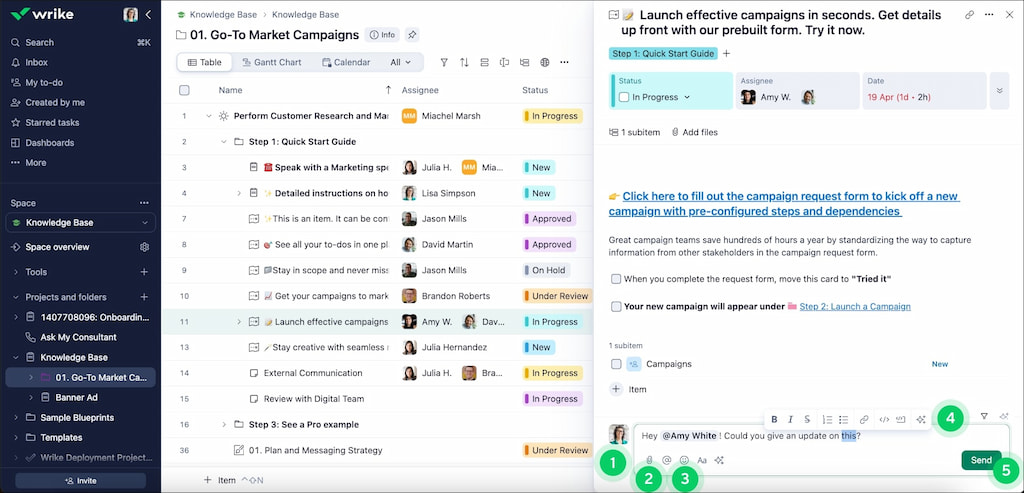
Comments, mentions, and file attachments keep discussions tied directly to the work itself. Approval tools help product managers move designs, specifications, and launch assets forward without long email threads. Real-time updates ensure everyone stays aligned as priorities or requirements shift.
🔄 Workflows and status management
Wrike’s custom workflows let product teams reflect how their process actually works, from discovery and validation to development, review, and release. Statuses can match real product stages instead of forcing work into generic task labels.
This flexibility makes reviews, handoffs, and releases easier to manage. Teams can clearly signal when work is ready for QA, awaiting feedback, or approved for launch. As a result, product managers gain stronger visibility into progress, bottlenecks, and delivery readiness across the entire product lifecycle.
👀 Visibility And Reporting For Product Teams
Strong visibility is essential for product teams, especially when multiple initiatives, releases, and stakeholders compete for attention. Wrike provides built-in tools that help product managers track progress and surface issues early, without constantly asking teams for updates.
📊 Dashboards for product progress
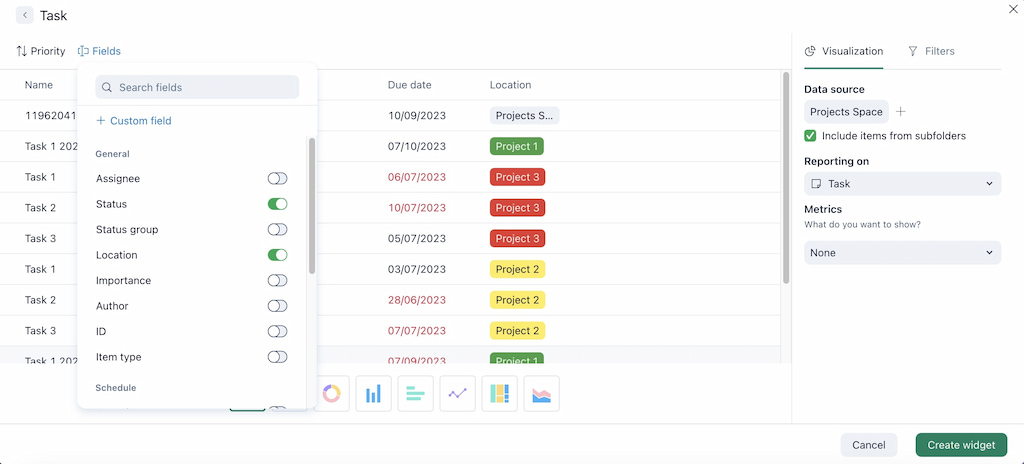
Wrike dashboards give product managers a real-time snapshot of what’s happening across their product work. Dashboards can show feature status, upcoming milestones, overdue tasks, or work grouped by product area or release.
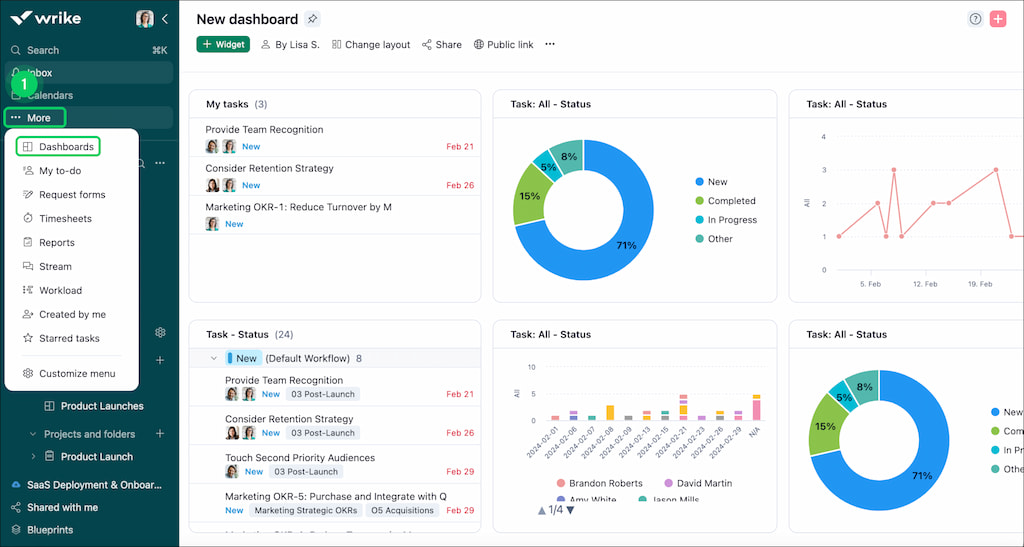
Because dashboards pull directly from live tasks and projects, they stay up to date without manual reporting. Product managers can tailor dashboards for different audiences, such as a detailed view for the product team and a higher-level summary for leadership.
🚦 Tracking delivery status and bottlenecks
Wrike makes it easier to spot delivery risks before they escalate. Status-based views, timeline charts, and workload indicators help product managers see where work slows down or piles up.
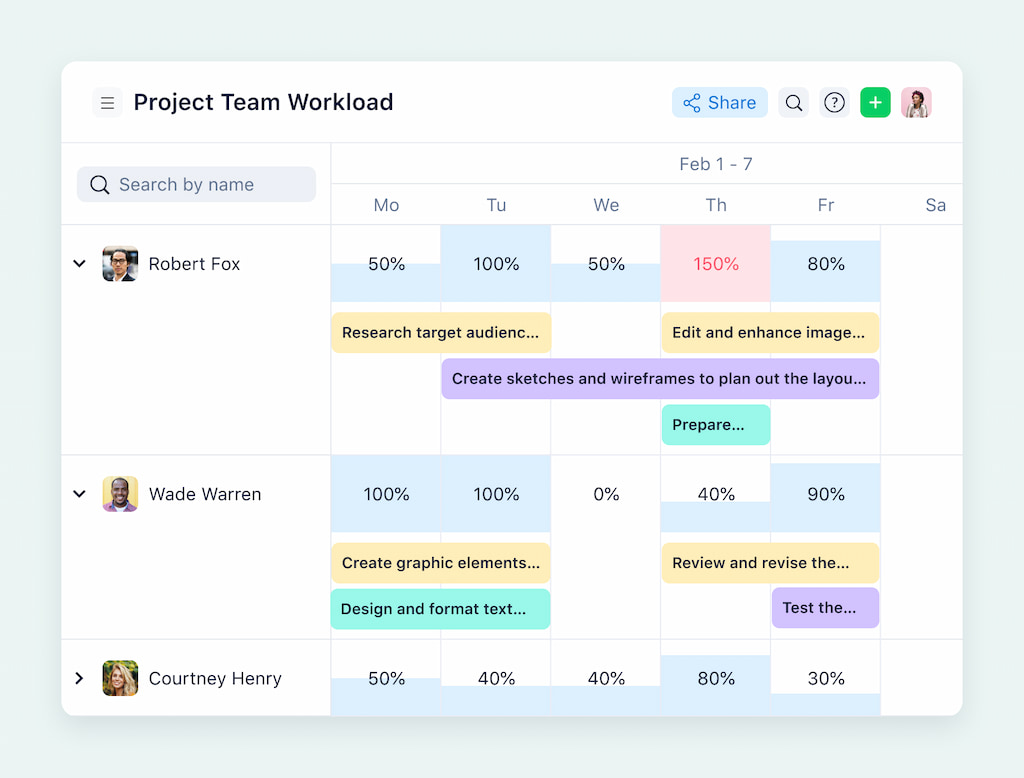
When tasks stall in the same status or dependencies start slipping, those signals become visible immediately. This allows teams to address blockers early, rebalance ownership, or adjust scope before deadlines slip or releases get delayed.
⚠️ Limitations of native reporting for time, effort, and cost
While Wrike provides solid visibility into task status and delivery progress, its native reporting has limits when it comes to time, effort, and cost tracking. Product teams that need detailed insights into how much time features consume, how effort distributes across initiatives, or how work translates into cost often hit these boundaries.
Wrike’s built-in reports focus more on progress and workload than on granular time or budget analysis. As product teams grow and product decisions become more data-driven, this is often the point where Wrike integrations become important to extend Wrike’s reporting capabilities.
✍️ How Wrike Fits Into Common Product Team Setups
Product work rarely lives in a single team. Wrike supports product management by acting as a shared system where different roles can plan, execute, and stay aligned without working in silos.
🧠 Product managers
Product managers use Wrike to connect strategy with execution. Roadmaps, release plans, and backlogs live in the same workspace, making it easier to translate high-level goals into actionable work.
Wrike helps product managers track priorities, monitor delivery progress, and communicate status to stakeholders without maintaining separate documents or spreadsheets. Custom workflows and dashboards allow them to follow features from discovery through release while keeping ownership and timelines clear.
💻 Engineering and development teams
For engineering teams, Wrike provides structured task management without forcing a rigid development process. Teams can organize work into epics, features, and tasks, assign ownership, and track dependencies across sprints or releases.
Developers benefit from clear requirements, visible priorities, and real-time updates when plans change. Wrike’s views make it easy to switch between detailed task lists and higher-level timelines, helping teams stay focused while still aligned with product goals.
🎨 Design and UX teams
Design and UX teams use Wrike to manage creative workflows, feedback cycles, and approvals. Tasks can include design briefs, assets, and comments in one place, reducing back-and-forth across tools.
Wrike’s approval features and custom statuses support design reviews, iterations, and handoffs to engineering. This keeps design work moving without losing context or slowing down product timelines.
📣 Marketing and go-to-market teams
Marketing and go-to-market teams rely on Wrike to coordinate launches, campaigns, and product messaging. Product-related tasks, such as launch plans, content creation, and stakeholder reviews, stay connected to the product timeline.
With shared visibility, marketing teams can align campaigns with release dates, track dependencies, and adjust plans as product timelines evolve. This reduces last-minute surprises and keeps launches coordinated across teams.
❌ Limitations of Using Wrike for Product Management
Wrike helps teams organize work and stay aligned, but as product work grows, teams often notice gaps in visibility, reporting, and managing multiple releases.
⏱️ Effort vs time visibility gaps
Wrike shows task status, but it doesn’t clearly show how much time teams spend on features or releases. This makes it hard to answer questions like:
- How much effort did a feature really take?
- Are teams spending too much or too little time on certain tasks?
- Are our delivery estimates accurate?
This is a common Wrike limitation for product teams.
💰 Limited cost and budget tracking
Wrike doesn’t provide detailed cost tracking. Teams can manage tasks and deadlines, but it’s hard to link work to budgets, hours, or costs.
Without this, teams struggle to:
- Track feature-level costs
- Compare planned vs actual spending
- Report on ROI for product initiatives
📊 Reporting gets harder as products scale
Wrike has dashboards and reports, but they can become complex as products and teams grow. Seeing performance across multiple releases or product lines often requires extra setup.
🚀 Managing multiple releases
Wrike handles single releases well, but juggling several at once is challenging. Dependencies, shifting priorities, and overlapping timelines can make it tough to see:
- Team capacity across releases
- Overall workload over time
- Risks before issues happen
This is often when teams look for tools or integrations to get better visibility and control.
➡️ Extending Wrike for Product Management
As product work grows, teams don’t always need to switch tools—they often just need more visibility and control. Integrations let teams fill the gaps in Wrike without changing how they manage work.
Why product teams add integrations
Product teams often add tools to Wrike when:
- They need better tracking of time, effort, and budgets
- Reporting across multiple releases becomes complex
- Coordinating feedback, QA, or releases requires extra structure
Instead of replacing Wrike, integrations enhance its core features and keep teams working in one familiar platform.
Common integration categories for product teams
Some of the most useful integrations for product management include:
- Time tracking – tools like Everhour let teams track time in Wrike per feature, release, or sprint directly inside Wrike, helping product managers compare estimates with actual effort.
- Reporting and analytics – integrations with reporting tools or BI platforms help teams analyze delivery speed, workload distribution, and recurring bottlenecks across releases.
- Release coordination – tools that support release planning and dependency tracking help product teams manage multiple versions, timelines, and priorities without losing visibility.
- Feedback and QA – integrations like Marker.io or TestLodge allow teams to collect user feedback, bug reports, and QA results and link them directly to Wrike tasks.
By adding these integrations, product teams can get the visibility, control, and collaboration they need without switching platforms.
🆚 Wrike vs Other Product Management Tools
Wrike vs Jira
Both tools support product teams, but their approaches differ:
- Wrike is flexible for cross-functional collaboration, planning releases, and managing multiple teams.
- Jira is specialized for software development with Scrum, Kanban boards, and issue tracking.
- When to choose Wrike in Wrike vs Jira: teams need structured workflows, approvals, and visibility across departments, not just software tasks.
Wrike vs Asana
- Asana is simple and easy for tracking tasks and timelines, but less robust for cross-team dependencies or resource planning.
- Wrike supports complex workflows, nested projects, and more advanced dashboards.
- When to choose Wrike: projects require more structure, approvals, and oversight across multiple teams.
Wrike vs Notion
- Notion is highly flexible, excellent for notes, lightweight project tracking, and documentation.
- Wrike is better for structured project management with task dependencies, timelines, and automated workflows.
- When to choose Wrike in Wrike vs Notion: teams need visibility, reporting, and workflow enforcement rather than just a flexible workspace.
➡️ Check out more Wrike alternatives that can also elevate your product management!
🤔 Is Wrike Right For Your Product Team?
When Wrike works well
- Complex products with multiple teams or stakeholders.
- Teams that need clear visibility into tasks, deadlines, and dependencies.
- Teams that benefit from real-time updates and centralized project tracking.
When integrations become necessary
- Tracking time and effort more accurately.
- Monitoring project budgets and costs.
- Collecting detailed reports without manual work.
- Coordinating feedback, QA, and releases across teams.
✅ Quick decision checklist
- Do you need structured workflows and approvals?
- Are multiple teams collaborating on the same projects?
- Do you need clear dashboards and progress reports?
- Would time, cost, and effort visibility improve execution?
If you answered yes to most, Wrike plus a time tracker like Everhour is likely the best choice.
🔎 Wrike Product Management: Conclusion
Wrike provides strong support for product teams, especially when managing complex projects, cross-functional collaboration, and structured workflows. It excels at project visibility, task tracking, and collaboration across multiple teams.
However, native Wrike features have gaps around time, effort, cost tracking, and advanced reporting. Adding the right integrations, such as Everhour, gives teams full visibility and control, letting them track progress, monitor budgets, and make data-driven decisions without switching platforms.
By combining Wrike with the right tools, product teams can scale their operations efficiently, keep work visible across departments, and execute product initiatives smoothly.

Maria
A dedicated content enthusiast with extensive experience in international teams and projects of all sizes. Maria thrives on creativity and attention to detail, fueled by a love for fantasy novels, music, classic black-and-white films, and always finding ways to make things better.