


Workforce Planning Software That Fixes Scheduling Chaos

Managing a team efficiently goes beyond just creating schedules—it’s about forecasting staffing needs, balancing workloads, and keeping everyone aligned. Workforce planning software makes this easier by giving managers real-time visibility, simplifying shift management, and helping teams adapt to changes quickly.
Whether your team is small or growing fast, tools like Shifts by Everhour streamline scheduling, track employee availability, and send instant notifications, ensuring smooth operations and less stress for managers and employees alike.
🚀 How We Chose the Workforce Planning Software
Selecting the right workforce planning software isn’t easy. We focused on tools that help teams save time, reduce scheduling problems, and improve overall efficiency. Key factors in our selection included:
- 📊 Feature richness – The software should offer scheduling, forecasting, reporting, and mobile access.
- ⚡ Ease of use – Intuitive interfaces that make creating and updating schedules simple for managers and employees.
- 💼 Team suitability – Works for both small teams and growing businesses.
- 🔔 Real-time updates – Instant notifications for shift changes, swaps, and availability updates.
- 💰 Pricing – Affordable options or free plans that still provide essential features.
By evaluating these aspects, we picked tools that deliver strong performance while keeping workforce management hassle-free, including Shifts by Everhour.
🔎 7 Workforce Planning Software Tools
| Tool | Short Description | Key Features | Pricing |
|---|---|---|---|
| Shifts by Everhour | Streamlines workforce planning with scheduling, availability tracking, and real-time updates. | Shift creation, forecasting, notifications, mobile access, reporting | Free plan available; paid plans start at $5/user/month |
| When I Work | Intuitive scheduling and time tracking for small to medium teams. | Shift scheduling, mobile access, notifications, team messaging | Free plan for small teams; paid plans from $2/user/month |
| Homebase | Combines scheduling, time tracking, and team communication for hourly teams. | Shift scheduling, time clocks, messaging, reporting | Free plan available; paid plans from $14/month/location |
| 7shifts | Focuses on scheduling and communication, ideal for restaurants and service teams. | Shift swapping, labor forecasting, reporting, notifications | Free trial; paid plans from $17.99/location/month |
| ZoomShift | Simple, drag-and-drop scheduling for hourly teams with notifications. | Shift scheduling, time tracking, mobile notifications, reporting | Free trial; paid plans from $2/user/month |
| Sling | Integrates scheduling, availability, and team communication for smoother planning. | Shift scheduling, messaging, time tracking, reporting | Free plan available; paid plans from $2/user/month |
| Deputy | All-in-one workforce management for scheduling, time tracking, and compliance. | Shift scheduling, forecasting, notifications, reporting, mobile access | Free trial; paid plans from $2.50/user/month |
🔧 Tool Highlights
Shifts by Everhour ⭐
Shifts by Everhour is a powerful workforce planning solution designed for teams of all sizes. It combines scheduling, forecasting, and real-time notifications in one intuitive platform.
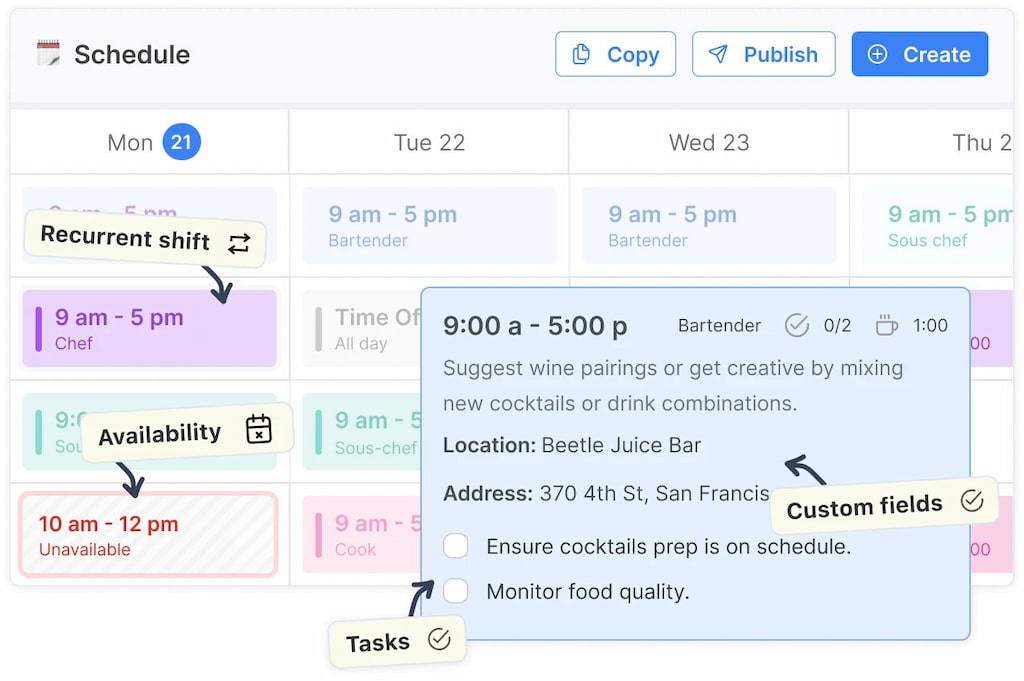
🔎 Key features:
- Drag-and-drop shift creation and assignment
- Employee availability tracking and time-off management
- Real-time notifications for swaps and schedule updates
- Forecasting and labor reporting
- Mobile and desktop access
💪 Standout features: Shifts offers an all-in-one approach, combining scheduling, forecasting, and reporting. Managers can see hours worked versus planned, avoid staffing gaps, and communicate seamlessly with teams.
When I Work
Ideal for small to medium hourly teams, When I Work simplifies scheduling and communication.
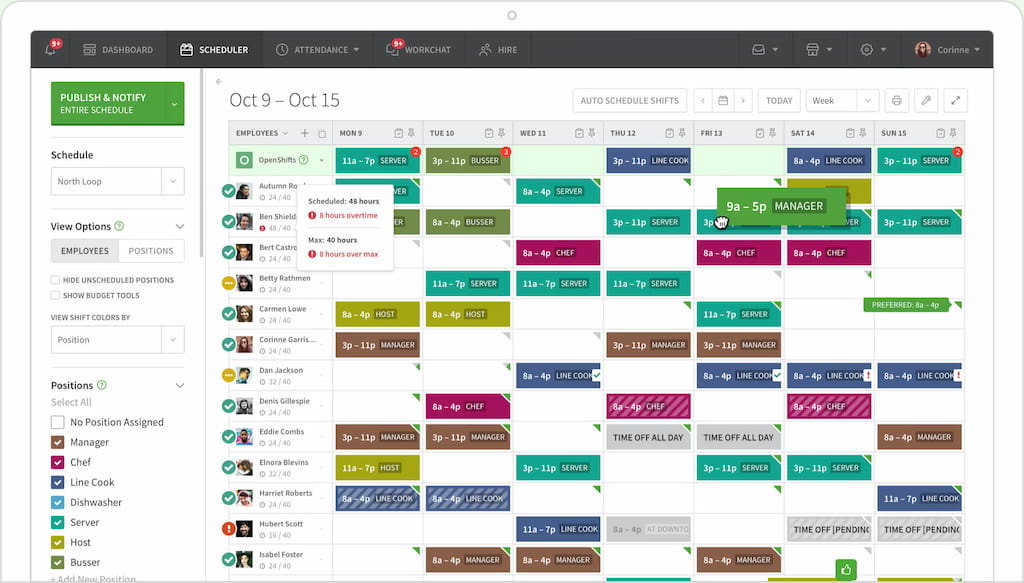
🔎 Key features:
- Shift scheduling with templates and recurring patterns
- Mobile access for employees to view shifts and request swaps
- Notifications and reminders for schedule changes
- Team messaging
- Basic labor reporting
💪 Standout features: Focuses on mobile-first scheduling and ease of use, making it simple for employees to check schedules and communicate with managers.
Homebase
Homebase combines scheduling, time tracking, and team communication, making it popular in retail and restaurant settings.
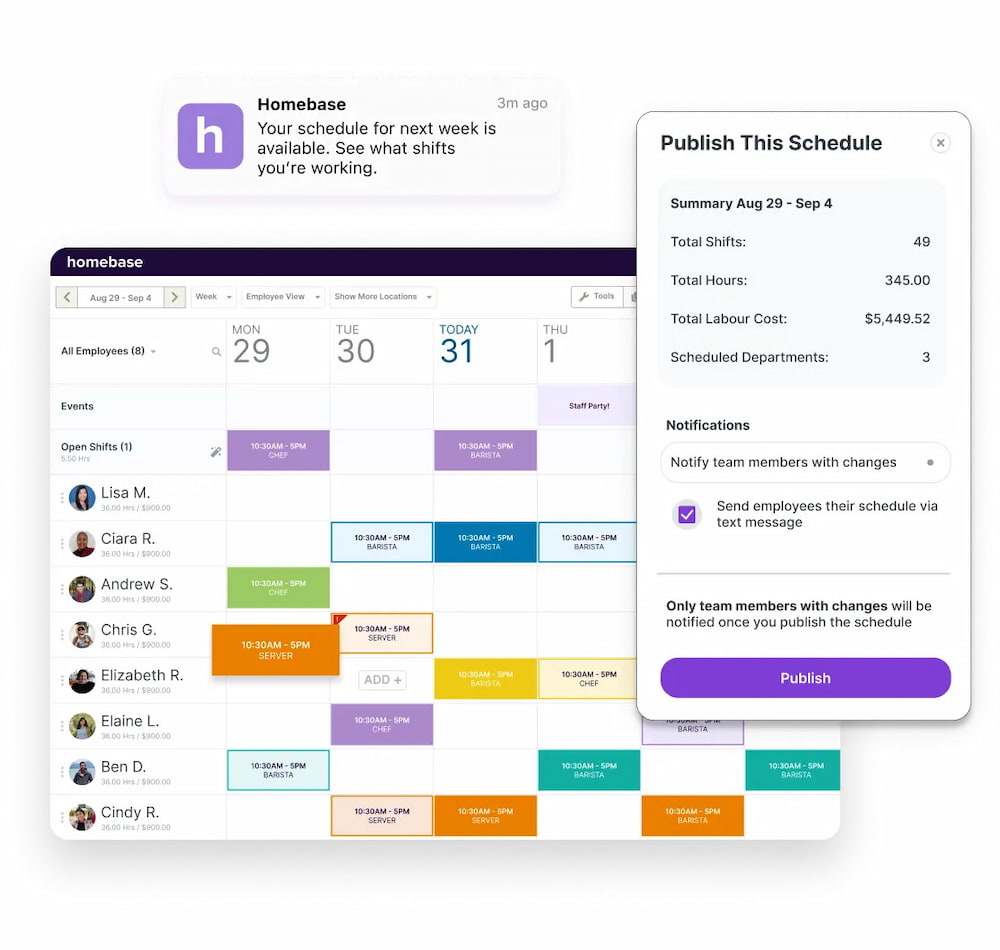
🔎 Key features:
- Shift scheduling and drag-and-drop interface
- Time clocks and attendance tracking
- Availability and time-off management
- Team messaging and notifications
- Labor cost reporting
💪 Standout features: Strong integration with payroll and POS systems, helping managers streamline operations and reduce administrative work.
7shifts
Designed for restaurants and service teams, 7shifts focuses on scheduling and labor cost optimization.
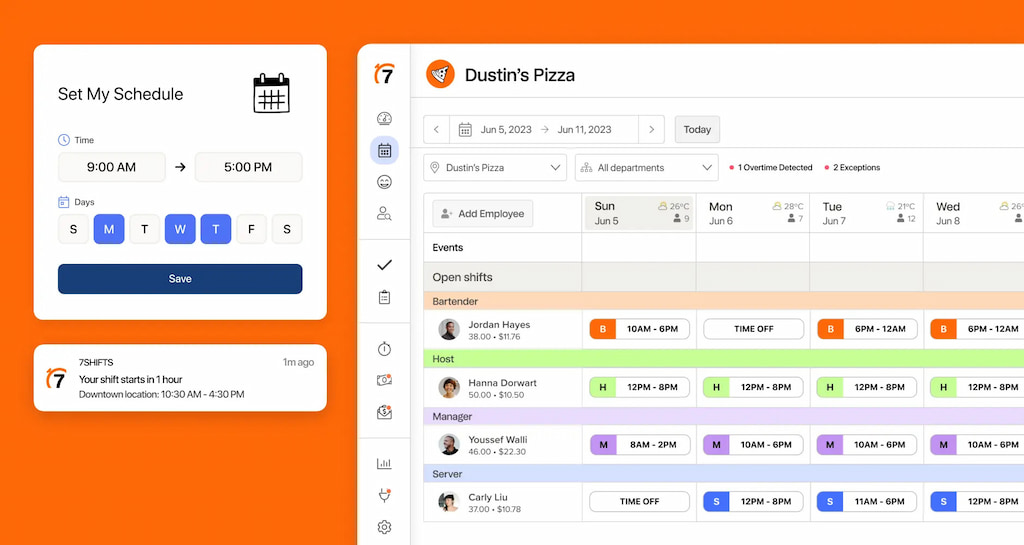
🔎 Key features:
- Shift scheduling with recurring templates
- Shift swapping and coverage management
- Labor forecasting and cost tracking
- Mobile notifications and team messaging
- Reporting dashboards
💪 Standout features: Excels in labor forecasting and cost control, helping managers reduce overstaffing while maintaining proper coverage.
ZoomShift
ZoomShift is a simple, intuitive scheduling tool for hourly teams.
![the 9 best when i work alternatives in 2023 [both paid and free]](https://everhour.com/blog/wp-content/uploads/2023/01/zoomshift.jpg)
🔎 Key features:
- Drag-and-drop shift scheduling
- Time tracking and attendance logging
- Mobile notifications
- Reporting on hours and labor costs
💪 Standout features: Best for small teams needing straightforward scheduling without complex forecasting or reporting.
Sling
Sling integrates scheduling, availability, and communication to keep teams informed.
![the 9 best when i work alternatives in 2023 [both paid and free]](https://everhour.com/blog/wp-content/uploads/2023/01/sling.jpg)
🔎 Key features:
- Shift scheduling with templates
- Messaging and announcements
- Overtime alerts and labor cost monitoring
- Mobile access
💪 Standout features: Focuses on team communication, reducing missed shifts and miscommunication alongside scheduling.
Deputy
Deputy is an all-in-one workforce management tool for scheduling, forecasting, and compliance.
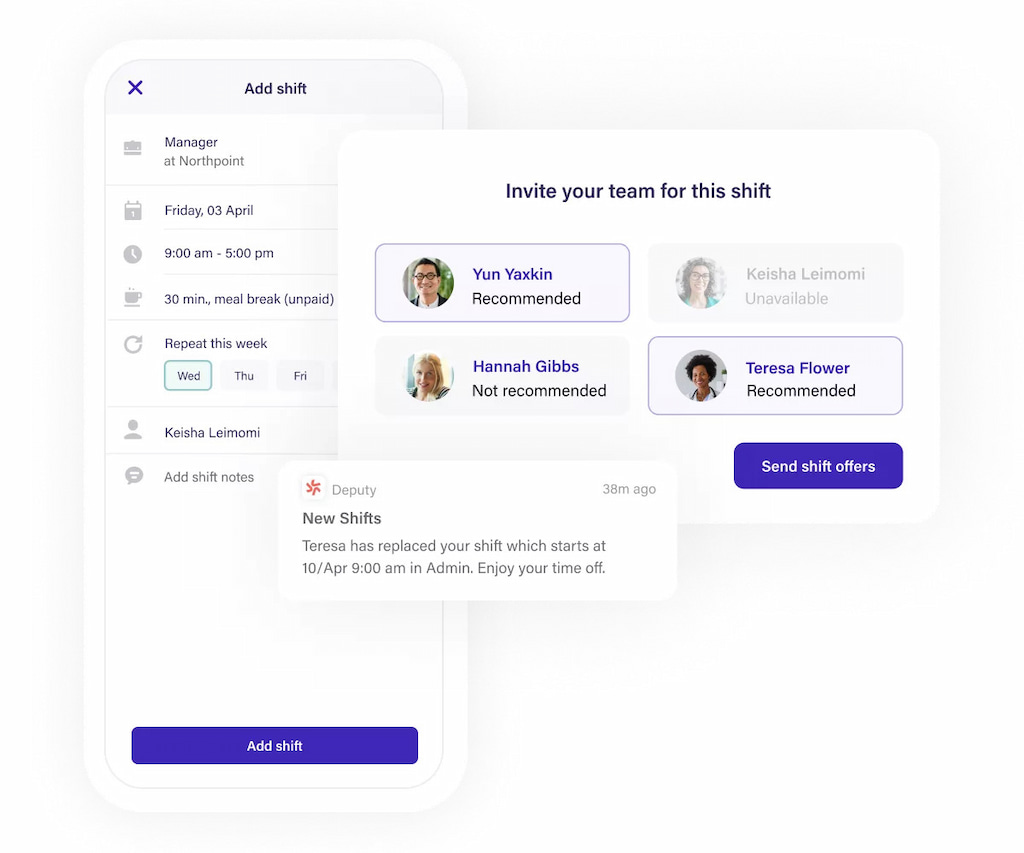
🔎 Key features:
- Shift scheduling and templates
- Labor forecasting
- Real-time notifications and alerts
- Reporting dashboards
- Mobile access
💪 Standout features: Ideal for larger teams with complex scheduling needs, offering tools to manage compliance and labor regulations efficiently.
🧠 Benefits of Workforce Planning Software
- 📈 Improved efficiency – Automates scheduling and shift management, reducing manual work and errors.
- ⏰ Time savings – Quickly create and adjust schedules, freeing managers to focus on strategic tasks.
- 💬 Better communication – Real-time notifications and messaging keep employees informed of updates or changes.
- ⚖️ Balanced workloads – Helps prevent overstaffing or understaffing by forecasting labor needs accurately.
- 📊 Insightful reporting – Track hours, overtime, and labor costs to make informed staffing decisions.
- 📱 Mobile accessibility – Employees can view schedules, request swaps, and update availability on the go.
- 🔔 Reduced missed shifts – Alerts and reminders ensure shifts are covered and attendance is tracked.
- 💡 Scalability – Adapts to small teams or large, complex organizations as workforce needs grow.
💸 Cost of Workforce Planning Software
💰 Free options – Some software offers free plans for small teams, providing basic scheduling and shift management features. Great for testing the platform or managing a limited number of employees.
📊 Subscription pricing – Most workforce planning software uses monthly or annual subscriptions, often charged per user or per location. Costs typically range from a few dollars per user to higher plans with advanced features.
⚡ Tiered plans – Many tools offer different levels of functionality. Lower tiers cover essential scheduling, while higher tiers include forecasting, reporting, and integrations.
🔄 Hidden costs – Some platforms may charge extra for add-ons, integrations, or additional support. Always check pricing details before committing.
💡 ROI consideration – Investing in workforce planning software can save time, reduce overtime costs, and prevent staffing gaps, often offsetting subscription fees quickly.
❓ FAQ
What is workforce planning software?
Workforce planning software helps managers schedule shifts, track employee availability, and forecast staffing needs. It streamlines communication, reduces scheduling errors, and ensures teams are adequately staffed at all times.
How can it improve efficiency?
By automating scheduling, notifications, and reporting, the software saves time for managers, prevents missed shifts, and helps balance workloads. Employees also benefit from clear schedules and easier shift swaps.
Is it suitable for small businesses?
Yes! Many tools offer free or low-cost plans tailored to small teams. Even small businesses can benefit from features like shift management, time tracking, and basic reporting.
Can it help reduce labor costs?
Absolutely. Workforce planning software provides insights into hours worked, overtime, and staffing needs, helping managers avoid overstaffing and reduce unnecessary labor expenses.
Does it work for remote or hybrid teams?
Yes. Most platforms offer mobile access, notifications, and cloud-based scheduling, making it easy to manage employees across multiple locations or remote setups.
What features should I prioritize?
Key features include:
- Shift scheduling and recurring templates
- Employee availability tracking
- Real-time notifications and messaging
- Reporting and forecasting tools
- Mobile accessibility
✅ Conclusion
Workforce planning software helps teams stay organized, reduce scheduling errors, and optimize labor costs. By automating shift creation, tracking availability, and providing real-time notifications, managers can save time and ensure smooth operations.
Investing in the right tool also improves team communication, prevents missed shifts, and allows for better planning and forecasting. Features like reporting and mobile access make it easier for both managers and employees to stay aligned.
Among the options available, Shifts by Everhour stands out as an all-in-one solution, combining scheduling, forecasting, and reporting in a single platform. Its ease of use and scalability make it a reliable choice for businesses of all sizes.

Maria
A dedicated content enthusiast with extensive experience in international teams and projects of all sizes. Maria thrives on creativity and attention to detail, fueled by a love for fantasy novels, music, classic black-and-white films, and always finding ways to make things better.