


Best Way to Keep Track of Employee Time: Discover Effective Strategies & 11 Best Tools

Keeping track of employee time can be as simple as using a timesheet or as comprehensive as using dedicated time tracking software. The best method depends on what you need to measure: hours worked, attendance, time spent on projects, billable hours, employee activity, or work performed in the field.
For most teams, employee time tracking software provides the most convenient option because it can record working hours, connect time entries to projects and tasks, and generate reports for payroll, billing, and workforce planning. Other options include spreadsheets, time clocks, project management software, and employee self-reporting.
This guide covers 11 apps for tracking employee time, compares their main features, and explains other ways to keep track of hours worked.
What Is the Best Way to Keep Track of Employee Time?
The best way to keep track of employee time is to use a system that matches your team’s work and reporting needs.
- Project-based teams: Use time tracking software that connects hours to projects, tasks, and clients.
- Remote teams: Consider software with optional activity monitoring, screenshots, or productivity reports.
- Field teams: Look for mobile time tracking, GPS, or geofencing features.
- Businesses that bill clients: Choose a tool that tracks billable hours and supports invoicing or billing reports.
- Simple attendance tracking: A time clock or basic timesheet may be enough.
- Personal productivity: Use automatic activity tracking to understand how time is spent across apps and websites.
Before choosing a tool, consider how employees will record their hours, what information you need to report, and whether the data will be used for payroll, billing, project management, attendance, or productivity analysis.
Key Criteria for Choosing Employee Time Tracking Software
The right employee time tracking tool should accurately record working hours without adding unnecessary administrative work. Here are the main factors to consider:
- Time tracking methods: Look for manual timesheets, timers, automatic tracking, or clock-in and clock-out functionality depending on your workflow.
- Accuracy: Accurate records help businesses understand hours worked and support payroll, billing, and project reporting.
- Project and task tracking: If employees work across multiple projects, choose a tool that connects time entries to specific tasks, projects, or clients.
- Reporting: Reports should make it easy to review hours worked, overtime, billable time, attendance, and project costs.
- Billing: Businesses that charge clients by the hour need billable time tracking and, ideally, invoicing capabilities.
- Team management: Larger teams may need timesheet approvals, permissions, scheduling, attendance, and time-off management.
- Integrations: Integrations with project management, payroll, accounting, or collaboration tools can reduce duplicate data entry.
- Employee monitoring: Some tools include screenshots, application and website tracking, or activity levels. These features should be used transparently and in accordance with applicable workplace and privacy requirements.
- Location tracking: GPS and geofencing can be useful for field teams, mobile employees, and businesses that need to verify where work is performed.
- Pricing: Compare the cost per user with the features your team actually needs.
Best Employee Time Tracking Software at a Glance
| Tool | Best for | Tracking method | Employee monitoring | Project tracking | Billable hours |
|---|---|---|---|---|---|
| Everhour | Project-based teams | Manual and timer-based | No | Yes | Yes |
| Time Doctor | Remote teams | Manual and automatic | Yes | Yes | Yes |
| Hubstaff | Remote and field teams | Manual and automatic | Yes | Yes | Yes |
| RescueTime | Personal productivity | Automatic | Yes | Limited | No |
| Timely | Automatic time tracking | Automatic and manual | Activity-based | Yes | Yes |
| ClockShark | Field teams | Mobile and clock-based | Limited | Yes | Yes |
| DeskTime | Employee activity tracking | Automatic and manual | Yes | Yes | Yes |
| TimeCamp | Reporting and flexible tracking | Automatic and manual | Yes | Yes | Yes |
| actiTIME | Project and work time management | Manual | No | Yes | Yes |
| BeeBole | Flexible timesheets | Manual and clock-based | No | Yes | Yes |
| MyHours | Client and project tracking | Manual and timer-based | No | Yes | Yes |
11 Best Apps for Keeping Track of Hours
Everhour — Best for project-based teams
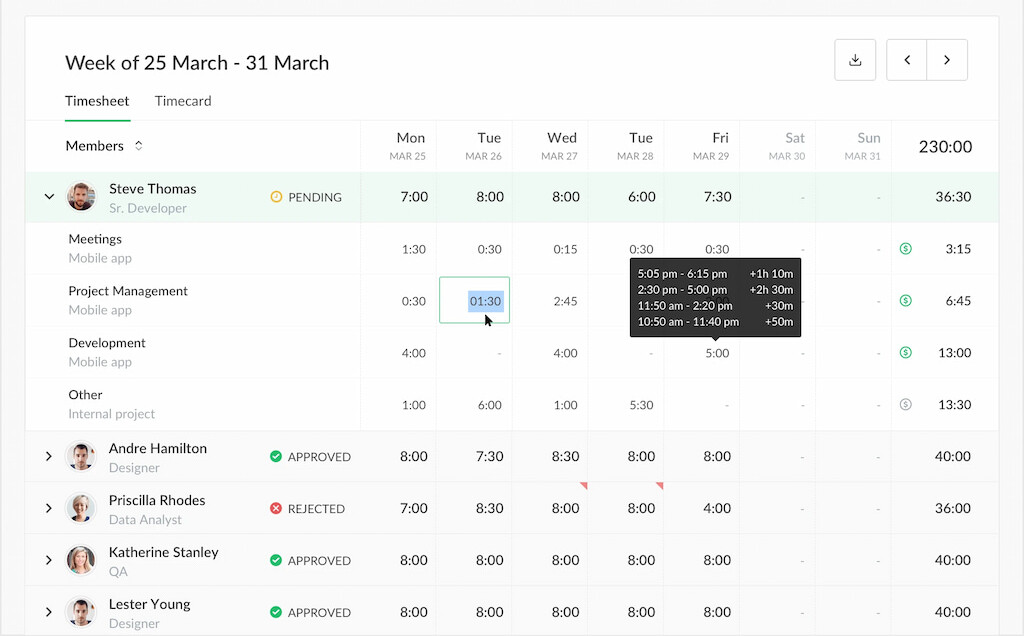
Everhour is a project-based time tracker for teams that need to connect working hours with tasks, projects, budgets, and client work. Its main advantage is that time tracking happens directly inside supported project management tools.
Why we picked it: Everhour is particularly useful for teams that already manage work in tools such as Trello, Asana, Notion, and more, and want time tracking without moving to a separate workflow.
Key features
- Time tracking: Track time with timers or manual entries against projects and tasks.
- Project management integrations: Track time directly inside supported project management tools.
- Timesheets: Review and manage employee time entries in customizable timesheets.
- Project budgets: Set budgets and compare estimated, tracked, and billable hours.
- Reporting: Create reports for projects, clients, team members, and tracked time.
- Invoicing: Turn billable time into invoices and use tracked hours for client billing.
- Resource planning: Review team capacity and allocate work based on availability.
Best for: Agencies, consultancies, software teams, and other project-based businesses.
Limitations: Everhour is primarily designed around project and task-based work rather than employee surveillance or standalone attendance management.
Pricing
- Free plan: $0 for up to 5 seats.
- Team plan: $8.50 per seat per month when billed annually.
Why Everhour excels in time tracking
Time Doctor — Best for employee productivity monitoring
Time Doctor combines employee time tracking with productivity and activity monitoring. It is designed primarily for organizations that need more visibility into how employees spend their working time.
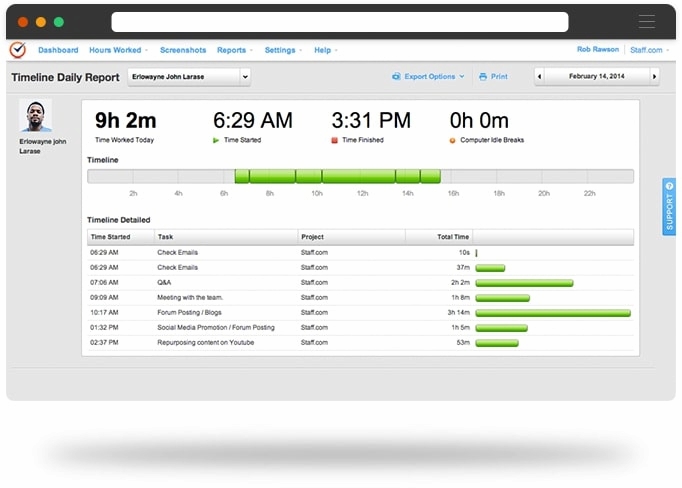
Why we picked it: Time Doctor goes beyond basic timesheets with features such as screenshots, application and website tracking, activity data, and productivity reports.
Key features
- Time tracking: Record time spent on projects and tasks.
- Activity monitoring: Track application and website usage during working hours.
- Screenshots: Capture screenshots at configurable intervals.
- Project tracking: Assign tracked time to projects and tasks.
- Productivity reports: Review activity and time data through reports.
- Payroll support: Use tracked hours as a basis for payroll calculations and payments.
Best for: Remote and distributed teams that need employee time tracking combined with activity monitoring.
Limitations: Monitoring features may be unnecessary for teams that only need project time tracking or basic timesheets.
Pricing
- Basic Plan: $7 per user per month
- Standard Plan: $10 per user per month
- Premium Plan: $20 per user per month
Learn more about Time Doctor in our Time Doctor vs Hubstaff breakdown!
Hubstaff — Best for remote and field teams
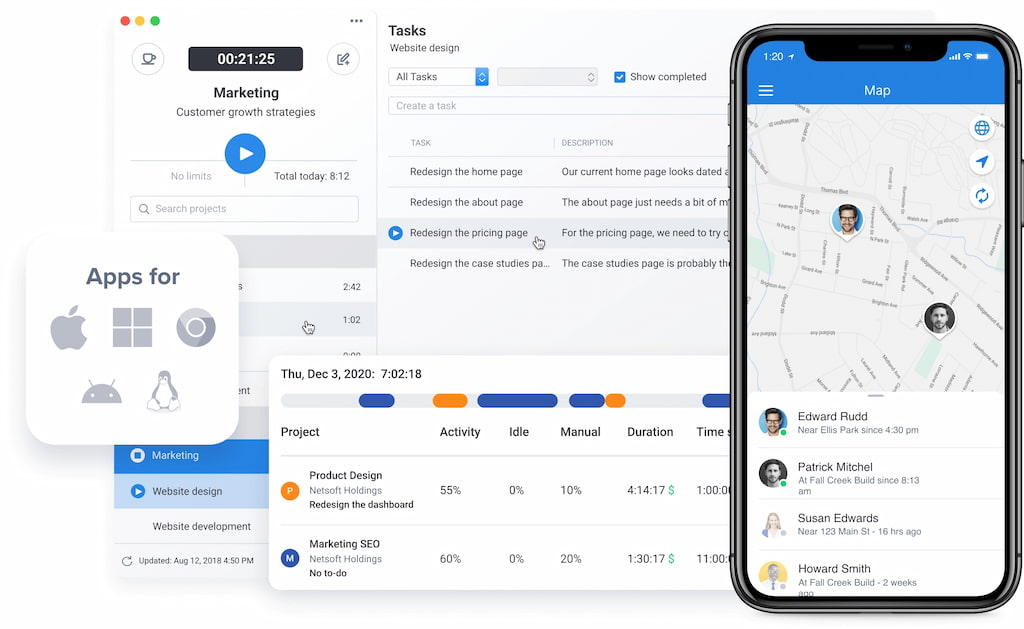
Hubstaff combines time tracking with employee monitoring, workforce management, scheduling, and location tracking. It supports both remote employees working from computers and field teams working across different locations.
Why we picked it: Hubstaff is a strong option when time tracking needs to extend beyond timesheets into workforce management and location-based tracking.
Key features
- Time tracking: Record time using timers, manual entries, and timesheets.
- Activity tracking: Monitor activity levels and computer usage.
- Screenshots: Capture optional screenshots during tracked work.
- GPS tracking: Track employee locations for field work.
- Geofencing: Create location-based rules for employees working at specific sites.
- Scheduling: Create employee schedules and manage attendance.
- Payroll and payments: Use tracked time to support payroll and payments.
Best for: Remote, distributed, and field teams that need workforce tracking features.
Limitations: Its monitoring and location features may be more extensive than necessary for teams that only need simple project time tracking.
Pricing
- Starter: $4.99 per user per month when billed annually.
- Grow: $7.50 per user per month when billed annually.
- Team: $10 per user per month when billed annually.
- Enterprise: $25 per user per month when billed annually.
RescueTime — Best for personal productivity
RescueTime is primarily a productivity and activity tracking tool rather than a traditional employee time and attendance system. It automatically records time spent on applications and websites to help users understand their work habits.
Why we picked it: RescueTime is useful when the goal is to understand where time goes rather than track billable hours or manage employee attendance.
Key features
- Automatic time tracking: Record activity in the background without requiring employees to start timers.
- Activity categorization: Categorize applications and websites based on productivity.
- Productivity reports: Review daily and weekly activity patterns.
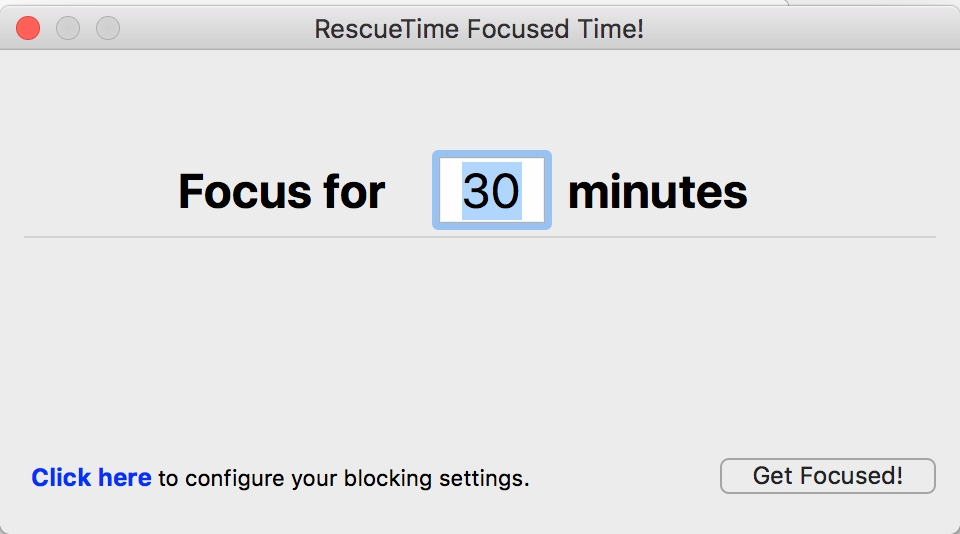
- Focus tools: Block distracting websites and applications during focused work sessions.
- Goals and alerts: Set productivity goals and receive notifications.
- Timesheets: Use available timesheet functionality when more structured time records are needed.
Best for: Individuals and teams focused on productivity, digital work habits, and reducing distractions.
Limitations: RescueTime is not primarily designed for project budgets, client billing, or traditional employee attendance management.
Pricing
- Solo: $7 per month when billed annually.
- Solo+: $12 per month.
- Team: $10 per user per month when billed annually.
- Team+: $16 per user per month when billed annually.
Timely — Best for automatic time tracking
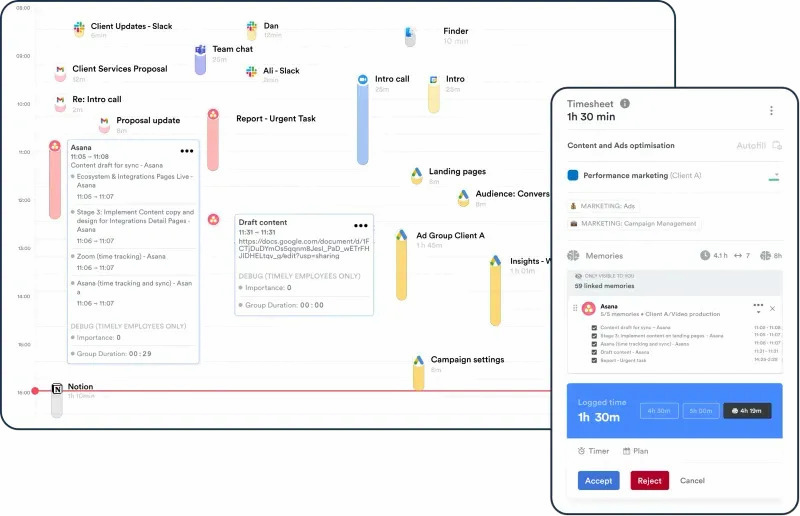
Timely automatically records work activity and turns it into time entries, reducing the need for employees to start and stop timers throughout the day.
Why we picked it: Automatic tracking is useful for people who frequently forget to start timers or switch between different tasks and projects.
Key features
- Automatic time tracking: Capture work activity in the background.
- Manual entries: Add or adjust time when automatic tracking needs additional context.
- Project tracking: Organize time around projects and work.
- Visual timelines: Review recorded activity through timeline-based views.
- Timesheets: Turn tracked activity into structured timesheets.
- Reporting: Review time allocation and project data.
- Planning: Use calendar and planning features to organize work.
Best for: Teams and professionals who want to reduce manual time entry.
Limitations: Automatic tracking may be unnecessary for employees who prefer simple timers or manual timesheets.
Pricing
- Starter: $9 per user per month.
- Premium: $16 per user per month.
- Unlimited: $22 per user per month.
ClockShark — Best for field teams
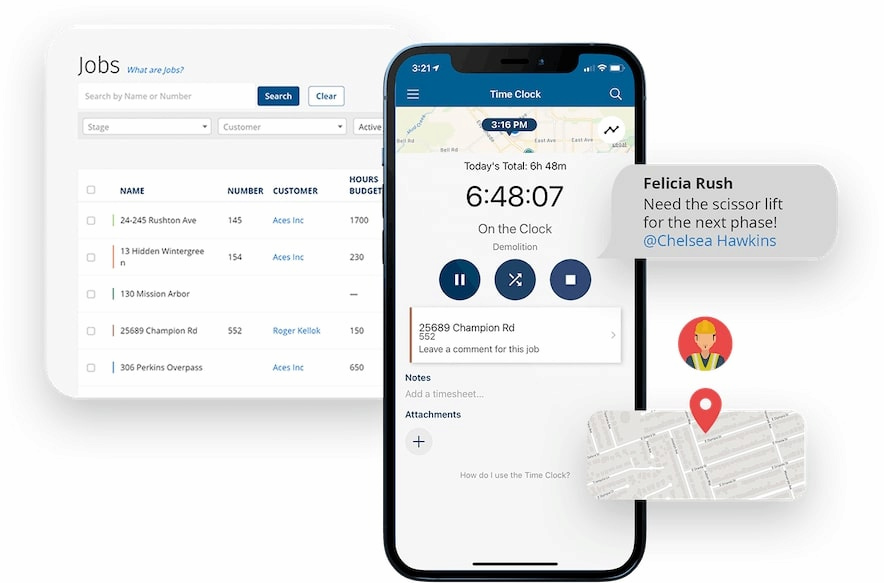
ClockShark is designed for businesses with employees who work away from a central office. Its mobile time tracking features help field teams record hours, locations, projects, and time off.
Why we picked it: ClockShark is particularly relevant for construction and other field-service businesses where employees may need to clock in and out from different locations.
Key features
- Mobile time tracking: Employees can record time from mobile devices.
- GPS tracking: Track employee locations while they are working.
- Geofencing: Use location-based controls around job sites.
- Job tracking: Connect employee hours with specific projects or jobs.
- Time off management: Manage time-off request forms and records.
- Reporting: Review employee hours and job-related time data.
Best for: Construction, field service, and other businesses with mobile employees.
Limitations: Its field-service features may be unnecessary for office-based teams that only need project time tracking.
Pricing
ClockShark plans start at approximately $42 per user per month.
DeskTime — Best for employee activity tracking
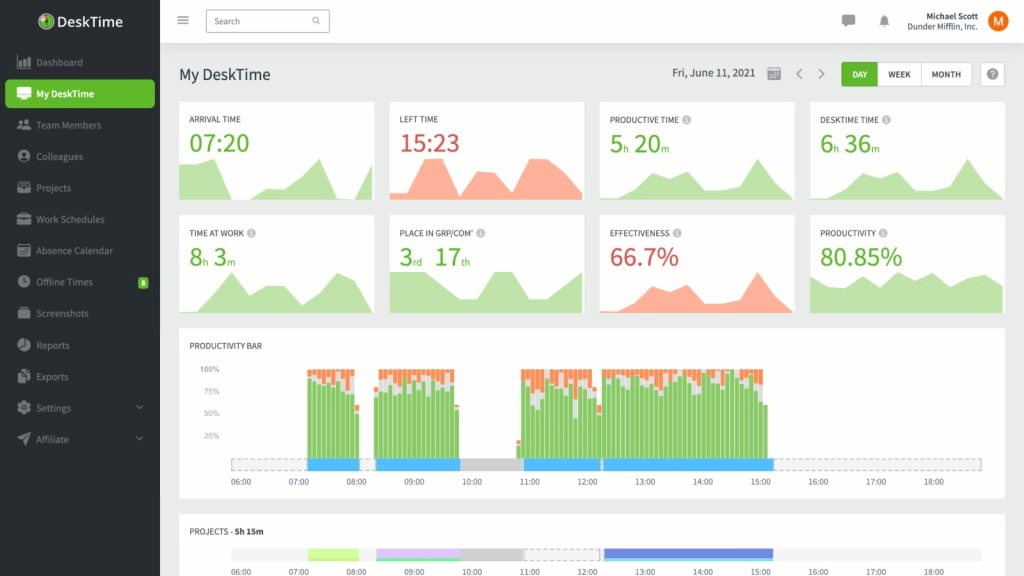
DeskTime combines automatic time tracking with employee activity monitoring. It records time spent on applications and websites and provides reports that help managers understand work patterns.
Why we picked it: DeskTime is a good fit for teams that want automatic tracking and productivity information without relying entirely on manual timesheets.
Key features
- Automatic time tracking: Record computer activity in the background.
- URL tracking: Track websites and applications used during work.
- Productivity reports: Review productive, unproductive, and neutral activities.
- Project tracking: Associate time with projects and work.
- Attendance: Monitor working hours and attendance patterns.
- Integrations: Connect time data with other business tools.
Best for: Teams that need automatic employee activity and productivity tracking.
Limitations: Activity monitoring may be more intrusive than necessary for teams that only need to record hours worked.
Pricing
- Pro: €6 per user per month.
- Premium: €9 per user per month.
- Enterprise: €18 per user per month.
TimeCamp — Best for flexible tracking and reporting
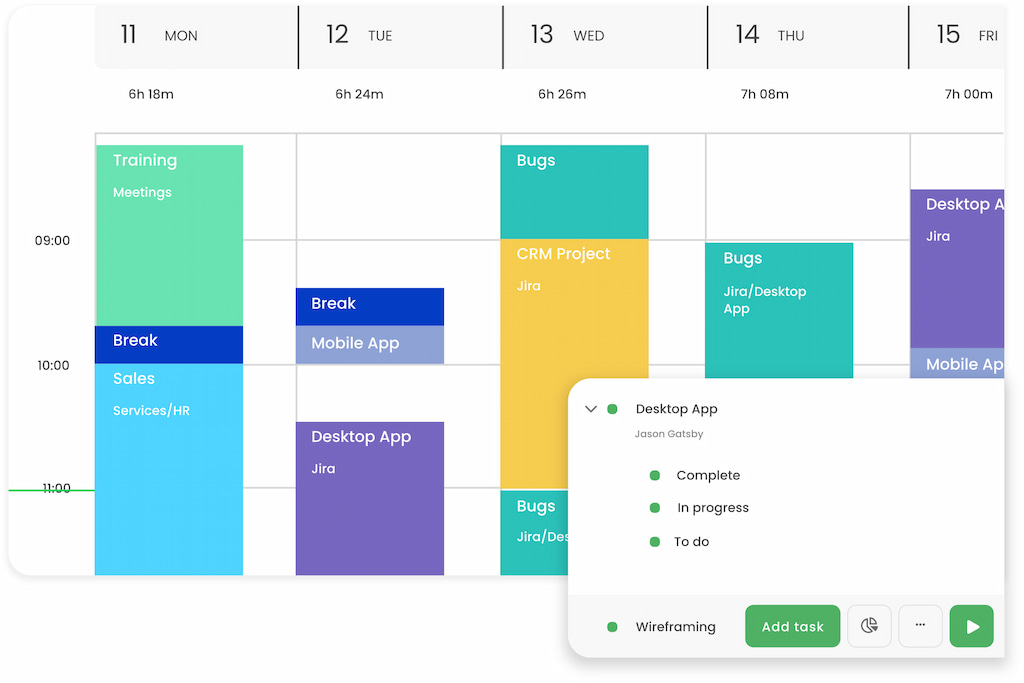
TimeCamp combines automatic and manual time tracking with timesheets, project tracking, reporting, billing, and productivity features.
Why we picked it: TimeCamp supports several tracking methods and provides detailed reports, making it useful for businesses that need more than a basic employee timesheet.
Key features
- Automatic time tracking: Record activity automatically while employees work.
- Manual tracking: Enter hours manually when needed.
- Project tracking: Assign time to projects and tasks.
- Timesheets: Review and manage employee time entries.
- Billable hours: Separate billable and non-billable time.
- Invoicing: Use tracked time to support client billing.
- Reporting: Create reports covering employee hours, projects, and productivity.
- Integrations: Connect time tracking with project management and other business tools.
Best for: Teams and agencies that need flexible time tracking and detailed reporting.
Limitations: The broader feature set may feel more complex than necessary for teams looking for a basic timer.
Pricing
- Free
- Starter: $3.99 per user per month when billed annually.
- Premium: $6.99 per user per month when billed annually.
- Ultimate: $9.99 per user per month when billed annually.
- Enterprise: Custom pricing.
actiTIME — Best for project and work time management
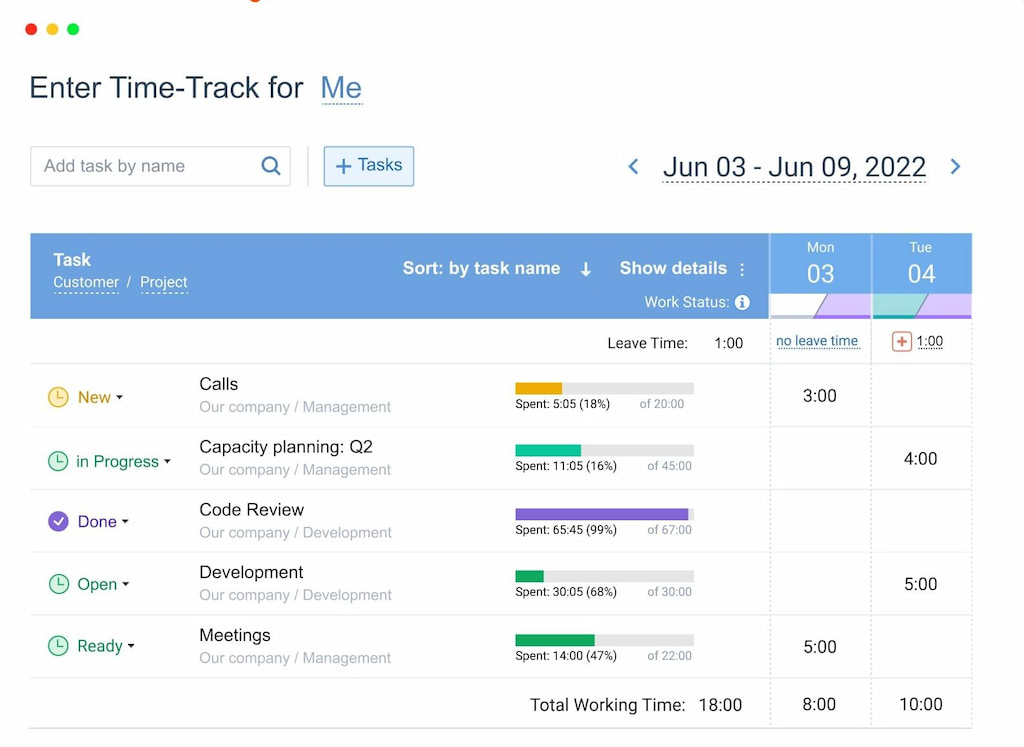
actiTIME is a time tracking and work management platform that helps teams record hours, manage projects, and track billable work.
Why we picked it: actiTIME focuses on structured time records and project management, making it useful for organizations that need detailed records of employee work.
Key features
- Time tracking: Record working hours against tasks and projects.
- Timesheets: Enter time daily, weekly, or according to your organization’s workflow.
- Project tracking: Organize work around projects and tasks.
- Billable hours: Track time that needs to be charged to clients.
- Task management: Organize tasks and deadlines.
- Reporting: Generate reports from recorded work hours.
Best for: Businesses that need structured project time tracking and work records.
Limitations: Teams looking for advanced employee monitoring or automatic activity tracking may need another solution.
Pricing
- Free plan: Available.
- Starter: $6 per user per month.
- Plus: Custom pricing.
BeeBole — Best for flexible timesheets
BeeBole is a cloud-based timesheet and time management platform designed for businesses that need to record employee hours, projects, attendance, and billable work.
Why we picked it: BeeBole offers flexible time entry and reporting options for organizations that need centralized timesheets across teams and locations.
![11+ timesheet apps for any need [updated for 2021]](https://everhour.com/blog/wp-content/uploads/2021/07/beebole-time-tracking-timesheet-1024x591.png)
Key features
- Time tracking: Record working hours through timesheets and clock-in/out functionality.
- Attendance: Track employee attendance and working time.
- Project tracking: Connect hours to projects and activities.
- Reporting: Create customizable reports from tracked time.
- Approvals: Manage and review employee timesheets.
- Integrations: Connect time data with other business systems.
- Multi-location support: Manage time records across different workplaces.
Best for: Organizations that need flexible employee timesheets and centralized reporting.
Limitations: Businesses primarily looking for automatic computer activity tracking may prefer a productivity-monitoring tool.
Pricing
BeeBole offers one main plan priced at approximately €9 per user per month.
MyHours — Best for client and project time tracking
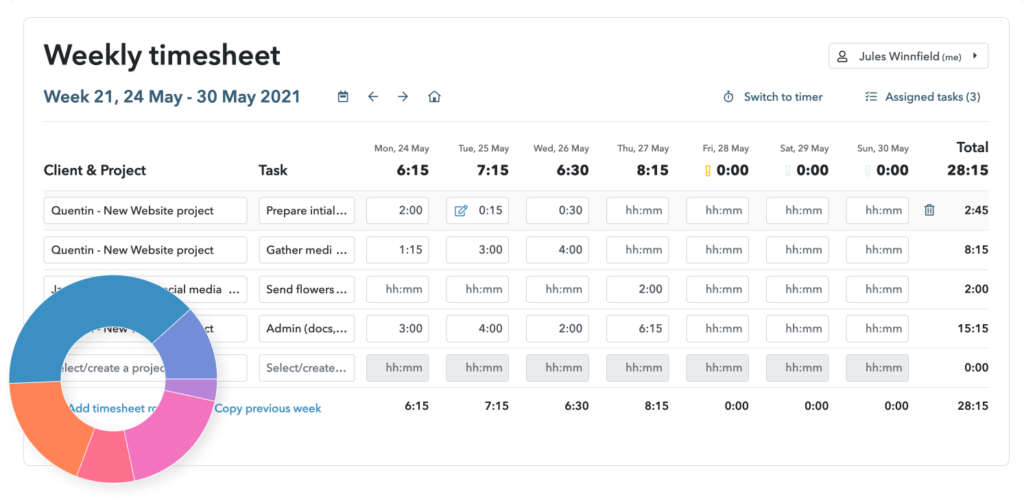
MyHours is a time tracking platform focused on projects, billable hours, reporting, expenses, and client work.
Why we picked it: Its combination of project tracking, reporting, invoicing, and client-related features makes it useful for teams and professionals who need to connect time records with client work.
Key features
- Time tracking: Record time against projects and tasks.
- Project tracking: Organize hours by project and client.
- Billable hours: Separate billable and non-billable time.
- Reporting: Analyze how time is distributed across projects.
- Invoicing: Use tracked hours to support client invoices.
- Expense tracking: Record project-related expenses.
- Client access: Provide clients with access to relevant project information.
Best for: Freelancers, agencies, consultants, and teams that track time for client projects.
Limitations: It is less suited to organizations looking for employee monitoring, screenshots, or GPS-based workforce management.
Pricing
- Free plan: Available with basic time tracking.
- Paid plan: Starts at approximately $8 per user per month.
Other Ways to Keep Track of Employee Time
Dedicated time tracking software isn’t the only way to record employee hours. Depending on the size and needs of your business, you can also use timesheets, time clocks, project management tools, or employee self-reporting.
Manual time tracking
Employees can record their working hours using paper timesheets, spreadsheets, or digital documents. This is inexpensive and easy to introduce, but manual records can take more time to maintain and are more susceptible to errors.
Best for: Small teams with simple schedules and straightforward time tracking needs.
Biometric time clocks
Biometric time clocks use fingerprints, facial recognition, or other biometric identifiers to record when employees start and finish work. They can help businesses manage attendance and reduce practices such as buddy punching.
Best for: Workplaces where employees regularly clock in and out at a physical location.
Consider: Biometric data is sensitive, so businesses should consider applicable privacy and employment requirements before using this method.
Employee activity monitoring software
Activity monitoring software can record application usage, website visits, active time, idle time, and other computer activity. Some tools also provide screenshots.
Best for: Organizations that need visibility into computer-based work, particularly for remote teams.
Consider: Employee monitoring can raise privacy and trust concerns, so companies should communicate clearly about what is being tracked and why.
Project management software
Some project management platforms include built-in or integrated time tracking. Employees can record hours directly against tasks and projects instead of using a separate timesheet.
Best for: Project-based teams that already manage their work in a project management platform.
For example, Everhour connects time tracking with project management tools so teams can track hours without leaving their existing workflow.
Time blocking
Time blocking involves assigning specific periods of the day to particular tasks or projects. Employees can record their planned and actual time manually or with a productivity tool.
Best for: Individuals and teams that want to combine time tracking with scheduling and focused work.
You can also explore our guide to time blocking apps for tools that support this approach.
Employee self-reporting
Businesses can ask employees to record their own working hours and tasks. This can work well when employees have a high degree of autonomy and the company does not need automated monitoring.
Best for: Trust-based teams with relatively simple time reporting requirements.
Limitation: Self-reported records depend on employees entering their hours consistently and accurately.
Which Employee Time Tracking Method Should You Choose?
The right option depends on what you need to track:
- Choose Everhour if your team works in project management software and needs time tracking, budgets, reporting, and billing.
- Choose Time Doctor if you need employee time tracking combined with productivity monitoring.
- Choose Hubstaff if you manage remote or field employees and need activity, GPS, scheduling, or workforce management features.
- Choose RescueTime if the main goal is understanding personal productivity and time spent on digital activities.
- Choose Timely if you want automatic time tracking with minimal manual input.
- Choose ClockShark if your employees work in the field and need mobile and location-based time tracking.
- Choose DeskTime if you need automatic activity tracking and productivity reports.
- Choose TimeCamp if you want flexible time tracking with detailed reporting and billing features.
- Choose actiTIME if you need structured project and task time tracking.
- Choose BeeBole if you need flexible employee timesheets and centralized reporting.
- Choose MyHours if you primarily track time for projects, clients, and billable work.
- Choose a spreadsheet or simple timesheet if you only need basic records of hours worked and don’t need automation.
Conclusion
The best way to keep track of employee time depends on what your business needs to measure. A simple timesheet may be enough for a small team with straightforward schedules, while larger or project-based organizations may benefit from dedicated time tracking software.
For project-based teams, Everhour connects time tracking with projects, tasks, budgets, reporting, and popular project management tools. Remote and field teams may need additional features such as activity monitoring or GPS tracking, while businesses focused on personal productivity may prefer automatic activity tracking.
Before choosing a solution, consider whether you need to track attendance, project hours, billable time, employee activity, location, overtime, or productivity. The best time tracking system is the one that gives you the information you actually need without making time tracking unnecessarily difficult for employees.

Maria
A dedicated content enthusiast with extensive experience in international teams and projects of all sizes. Maria thrives on creativity and attention to detail, fueled by a love for fantasy novels, music, classic black-and-white films, and always finding ways to make things better.